The decision to migrate your ERP system is one of the most important moves your business will make. It promises better efficiency, smarter data, and a platform built to scale. But it also carries a risk that too many businesses underestimate: what happens to your operations while migrating?
Orders don’t wait. Invoices don’t pause. Stock doesn’t stop moving just because your tech team is in the middle of a system overhaul.
And the numbers make the stakes clear. According to Gartner research, 83% of data migration projects fail or exceed their budgets and timelines, and despite technological advances, more than half go over budget. These aren’t edge cases or cautionary tales from a decade ago. They are the current reality for businesses that migrate without the right safeguards.
ERP migration is not a switch you flip overnight. It is a process that can take weeks, sometimes months, and during that entire window, your business must keep running at full capacity. The question every business leader should ask their migration partner is, “How do you protect my live operations while this is happening?”
If you don’t get a clear, confident answer, that’s a red flag.
Why Business Continuity During Migration Is Non-Negotiable
Business continuity is not just an IT concern; it is a revenue, reputation, and customer trust issue. Yet strikingly, 51% of companies globally still don’t have a formal business continuity plan. When you pair that with the complexity of an ERP migration, the exposure becomes significant. Here’s what’s at stake if a migration goes wrong:
Revenue Disruption
Even a few hours of system downtime can cascade into unfulfilled orders, delayed shipments, and lost revenue. For high-volume businesses, an unplanned outage during migration can cost tens of thousands in a single day. And if that downtime stretches longer, the risk compounds quickly; research shows that 90% of businesses that cannot resume operations within five days of a significant disruption will fail within the following year.
Data Integrity Risk
Migrating data without proper isolation means your live records are vulnerable. Poor data quality, from duplicate, outdated, or corrupted records, affects 84% of migrations and directly causes system performance issues that can take weeks to untangle. Worse, 23% of organizations experience data loss during migration, leading to the permanent loss of historical records that cannot be recovered. A corrupted product catalog or an overwritten customer database mid-migration isn’t just an inconvenience; it can bring your operations to a halt.
Loss of Customer Trust
Your customers don’t care about your back-end transition. They care about their orders arriving on time, their invoices being accurate, and their queries being answered. A migration-related disruption is nearly impossible to explain, which does not undermine confidence.
Team Productivity Loss
If your team is forced to work around system instability during migration, their productivity suffers. Workarounds, manual processes, and confusion cost time and introduce human error.
The bottom line: a migration that disrupts your business isn’t a migration; it’s a crisis.
What a Safe Migration Should Look Like
There is a right way and a wrong way to run an ERP migration when your business continuity is on the line.
The wrong way is to perform migration work directly on your live production environment. Any testing, data transformation, or integration work done live puts your operations at immediate risk.
The right way is to use a staging or mock environment, a complete replica of your production system, where all migration work happens in isolation. Your live system remains untouched. Your team keeps working. And only once everything has been tested, validated, and signed off does the new system go live.
This approach eliminates risk without slowing your business down.
Also Read: What is Odoo ERP Migration? A Complete Guide
How Master Software Solutions Ensures Business Continuity During Migration
At Master Software Solutions, we treat business continuity as non-negotiable, not as a nice-to-have but as a core principle of every migration we deliver.
Here’s exactly how we protect your business throughout the process:
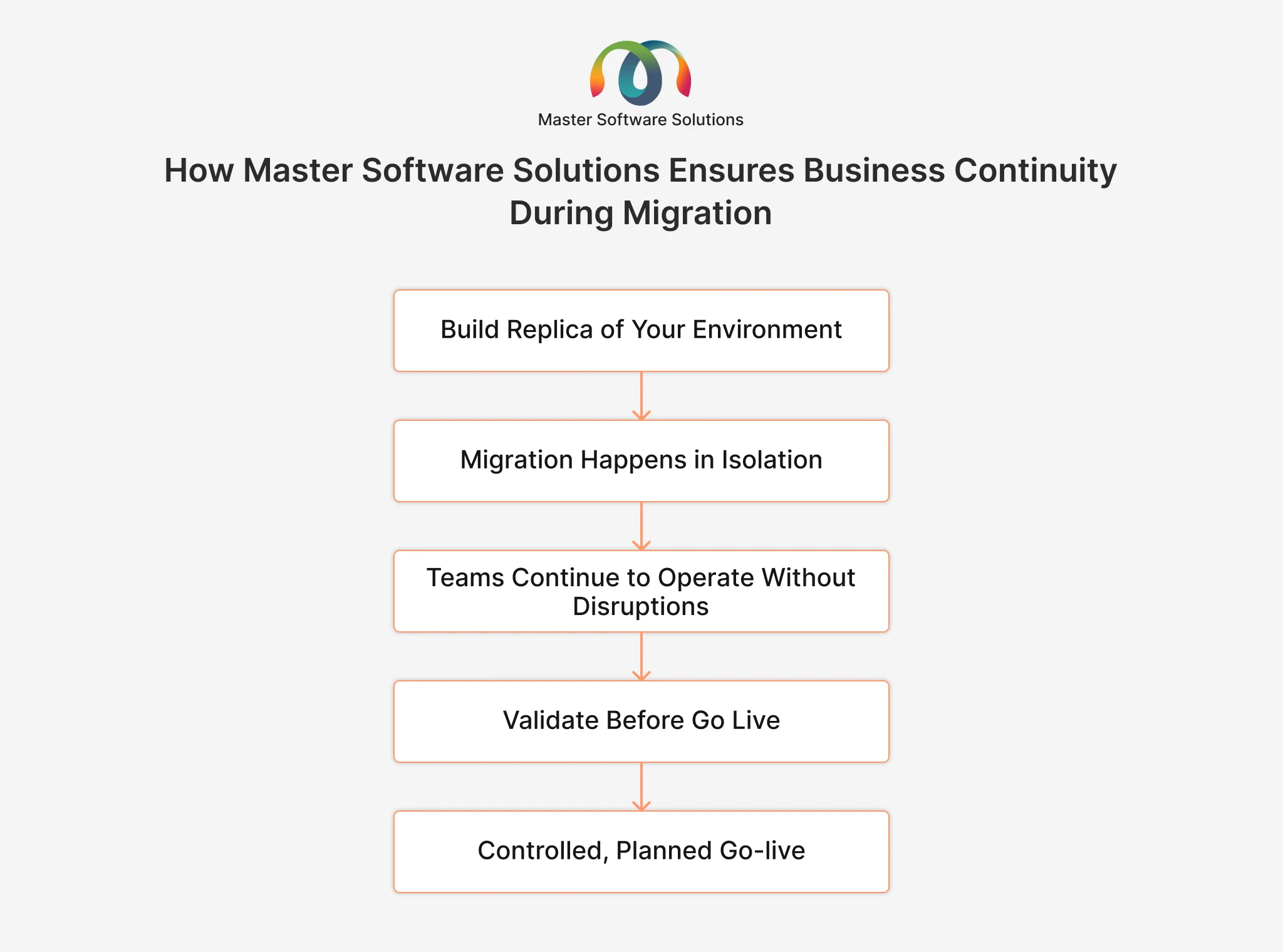
Step 1: We Build a Complete Replica of Your Environment
Before any migration work begins, we create a full staging or mock database — a complete replica of your production environment. This includes your live data, your system configurations, and all your integrations.
Nothing is guessed. Nothing is approximated. The staging environment mirrors your live system exactly, so any testing we do reflects real-world conditions.
Step 2: All Migration Work Happens in Isolation
Every step of the migration process, including data transformation, testing, integration checks, and issue resolution, happens entirely within the staging environment.
Your live system is never touched during this phase.
Your team logs in each morning and works exactly as they always have. There are no system warnings, no mysterious slowdowns, no “please don’t use the system right now” messages. For your staff and your customers, it’s business as usual.
Step 3: Your Team Continues Operating Without Disruption
Throughout the migration process, which can span weeks or months, your day-to-day operations continue without interruption. Orders are processed. Invoices go out. Stock moves. Reporting runs.
There is zero disruption to your business during the migration phase.
Step 4: We Validate Before We Go Live
Once all migration testing is complete and the validation checklist has been cleared, we seek your sign-off before proceeding. Nothing moves to your live production system until you are confident it’s ready.
This final checkpoint is your assurance that the new system has been thoroughly tested and that the cutover will be clean and controlled.
Step 5: Controlled, Planned Go-Live
The transition to your new live system is a planned event and not a surprise. We schedule it at a time that minimizes business impact, manage the cutover process end-to-end, and remain on hand to support your team in the immediate post-launch period.
Don’t leave your migration to chance. Partner with a team that has business continuity built into every step. Get Started with Master Software Solutions
What to Ask Your Migration Partner (Before You Sign Anything)
If you’re evaluating ERP migration partners, these questions will quickly separate the careful from the careless:
- Do you use a staging or mock environment for all migration work? If the answer is no, or if they seem unclear, that’s a problem.
- Will my live system be touched during the migration phase? It shouldn’t be.
- How do you validate the migration before go-live? There should be a clear, documented process.
- What happens if an issue is discovered during testing? Bugs and edge cases should be caught and resolved in staging, not after go-live.
- Who gives final approval before cutover? The answer should involve you.
A confident, transparent migration partner will answer every one of these questions without hesitation.
The Cost of Getting It Wrong
It’s worth dwelling on what happens when migration is handled carelessly.
We’ve already established that 83% of data migration projects either fail or exceed their budgets and timelines, but behind that headline figure is a very human reality. Businesses that experience migration-related disruptions often report hours or days of downtime, corrupted or lost data, frustrated customers who experience delayed service, and staff working overtime to reconstruct manual records that should never have been at risk. In some cases, the only option is to roll back entirely and start over, absorbing the full cost twice.
And the longer the disruption runs, the harder recovery becomes. Once a business loses five or more days of operational continuity, the statistical likelihood of long-term survival drops dramatically. That’s not hyperbole; it’s the reality for businesses that treat migration as a purely technical exercise rather than a business-critical event.
The cost of a failed or disruptive migration isn’t just financial; it’s the trust your customers place in you, the confidence your team has in leadership, and the momentum your business has worked hard to build.
A migration done right shouldn’t cost you any of that.
Migrate with confidence. Our team is ready to walk you through our approach. Schedule a Call Today
Conclusion
ERP migration is a significant step forward for any business, but only if it’s handled correctly. The risk to your operations during migration is real, and the consequences of getting it wrong can be severe.
The answer isn’t to avoid migration. The answer is to choose a partner who treats your business continuity with the same seriousness you do.
At Master Software Solutions, we use a proven staging environment that keeps your live system completely protected throughout every phase of migration. Your team keeps working. Your customers stay happy. And when the new system goes live, it does so cleanly, confidently, and on your terms.
About Master Software Solutions
Master Software Solutions is a specialist ERP implementation and migration partner helping businesses transition to modern systems without the downtime, data loss, or disruption that too often accompanies change.
We work with businesses across industries to plan, test, and deliver ERP migrations that protect live operations at every stage. Our staging-first methodology ensures that when your new system goes live, it does so without surprises.
We believe that technology transitions should move your business forward, not hold it back. Contact us today to find out how we can support your migration journey
Frequently Asked Questions
Q1. Will my business experience downtime during an ERP migration with Master Software Solutions?
A1. No. We use a staging or mock environment for all migration work, meaning your live system is never touched during the migration phase. Your team continues to operate throughout the entire process, with zero planned downtime.
Q2. How long does an ERP migration typically take?
A2. The timeline varies depending on the complexity of your current system, the volume of your data, and the number of integrations involved. Most migrations range from a few weeks to several months. We provide a clear project timeline at the outset and keep you updated at every stage.
Q3. What is a staging or mock environment?
A3. A staging environment is a complete replica of your live production system — including your data, configurations, and integrations — created specifically for migration testing. All migration work, testing, and validation happen in this environment. Your live system remains completely untouched until you’re ready to go live.
Q4. What happens if an issue is discovered during the migration testing phase?
A4. Issues discovered in the staging environment are resolved before any changes are made to your live system. This is precisely why the staging approach is so valuable — it allows us to identify and fix problems in a safe, isolated space without impacting your operations.
Q5. How do we know when the migration is ready to go live?
A5. Nothing moves to your live system until the validation process is completed and you have given explicit sign-off. We walk you through the results, answer any questions, and schedule the cutover at a time that suits your business.
Q6. What support is available after the new system goes live?
A6. Our team remains available to support your business in the post-launch period. We don’t hand over the keys and disappear; we’re on hand to address any questions or issues that arise as your team settles into the new system.
Q7. Is Master Software Solutions suitable for businesses of all sizes?
A7. Yes. We work with businesses at various stages of growth, from established SMEs looking to upgrade legacy systems to larger organizations managing complex, multi-site migrations. Our approach is tailored to your specific environment and requirements.
Q8. How do I get started?
A8. Simply book a free consultation with our team. We’ll take the time to understand your current system, goals, and timeline and outline exactly how we’d approach your migration safely and effectively.