Every business that runs Odoo eventually reaches the same point: the out-of-the-box modules cover 80% of what you need, but that last 20% is exactly where your competitive advantage lives. A custom approval flow, an industry-specific report, a field your sales team cannot work without.
At that point, you have two ways to customize Odoo: Odoo Studio, the drag-and-drop, no-code toolkit, or custom module development, where developers write dedicated Python and XML modules. Choosing the wrong one is expensive, not on day one, but at your next version upgrade, your next integration, or the day your “quick Studio tweak” slows down a 100-user database.
This guide compares both approaches on cost, scalability, performance, upgrade safety, and long-term ownership, so you can make the decision once and make it right.
What Is Odoo Studio?
Odoo Studio is Odoo’s built-in, no-code customization tool, available exclusively on the Odoo Enterprise edition. It lets non-developers modify the system directly from the user interface.
With Studio, you can:
- Add custom fields to any model (text, dates, selections, relations)
- Modify forms, lists, and kanban views with drag-and-drop
- Build simple automations and approval rules without code
- Design PDF report templates and email templates
- Create entirely new apps from basic building blocks
Changes take effect immediately and require no deployment. For a functional consultant or a power user, Studio is the fastest way to shape Odoo around a business process.
What Is Custom Module Development?
Custom module development means building a proper Odoo add-on: Python business logic, XML views, security rules, and data files packaged as an installable module, following the official Odoo developer framework.
It is how Odoo itself builds its own apps. Custom modules give you:
- Unlimited business logic, such as computed fields, complex validations, scheduled jobs, algorithms
- Integrations with external systems via APIs, webhooks, and middleware
- Version control (Git), code review, and automated testing
- Clean deployment across staging and production environments
- Full ownership of the code, independent of your Odoo edition
This is the approach professional Odoo development services teams use when a requirement goes beyond fields and views.
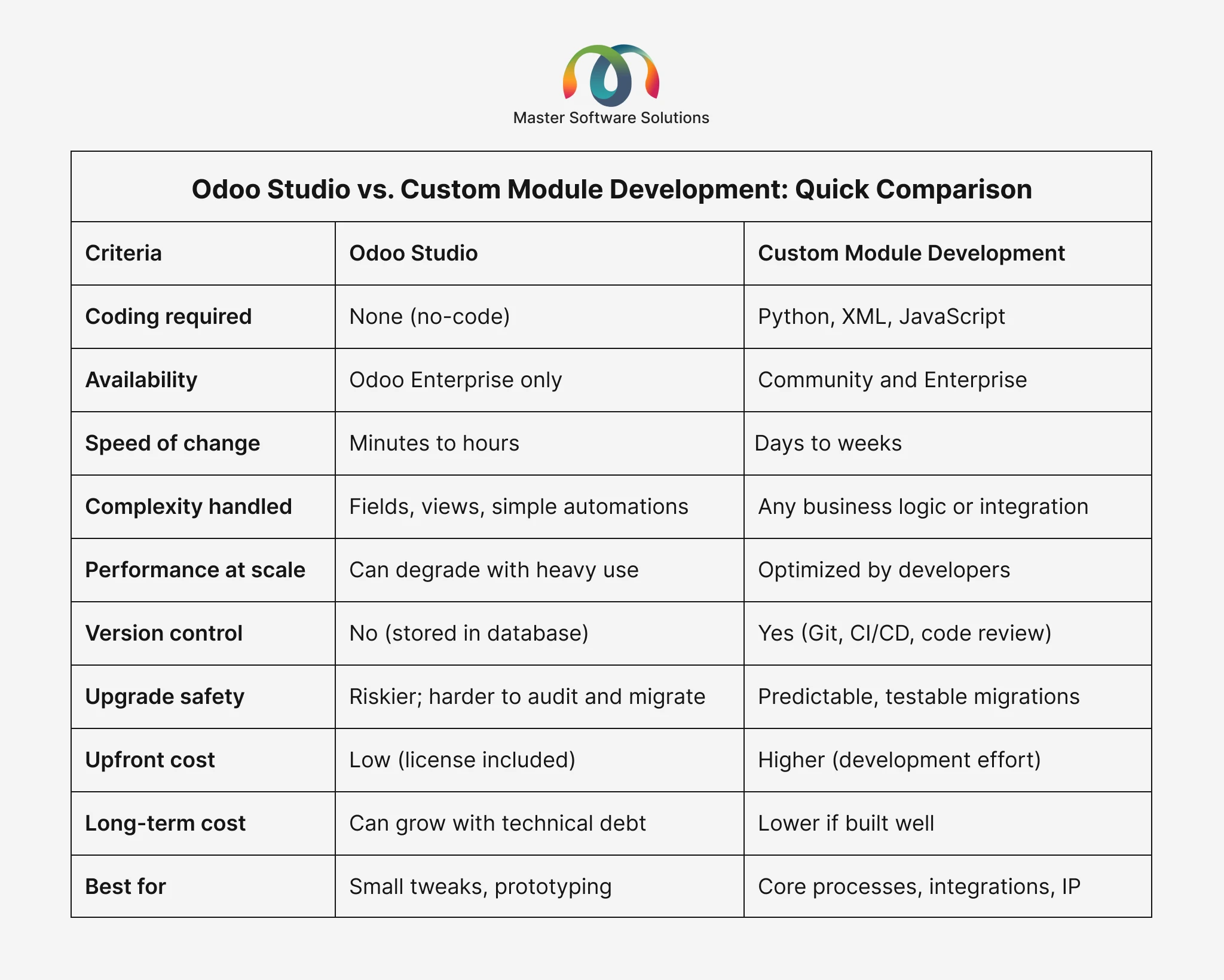
Odoo Studio vs. Custom Module Development: Quick Comparison
When Should You Use Odoo Studio?
Studio is the right tool when the change is small, low-risk, and unlikely to grow.
Typical cases:
- Adding a few extra fields to contacts, sales orders, or projects
- Rearranging a form view so it matches how your team actually works
- A simple automation, such as “when the stage changes, notify the manager.”
- Tweaking a quotation or invoice PDF layout
- Prototyping a new app idea before investing in development
Example: a distribution company wants a “Delivery Window” field on sales orders and a reminder activity when it is 48 hours away. That is a 30-minute studio job; hiring a developer for it would be overkill.
Not sure if your requirement is a “studio job” or a development project? Get a free customization assessment from our Odoo experts. Talk to our Odoo experts.
When Is Custom Module Development the Better Choice?
Choose custom development when the requirement touches core operations, data volume, or other systems:
- Complex business logic — multi-step approvals, pricing engines, commission calculations
- Integrations with payment gateways, shipping carriers, marketplaces, or legacy ERPs
- High-volume operations where performance and database design matter
- Industry-specific workflows that effectively form a product of their own
- Anything you will maintain for years and carry through multiple Odoo version upgrades
Example: a milk and grocery delivery business needs recurring subscription orders, dynamic route planning, and driver apps synced with inventory. No amount of drag-and-drop delivers that it requires custom Odoo module development with proper architecture, testing, and deployment.
Cost Comparison: What Will Each Approach Really Cost You?
Studio looks free because it ships with Odoo Enterprise, but the license itself is a recurring per-user cost, and Studio customizations often accumulate into an undocumented layer that consultants later charge to untangle.
Custom development has a visible upfront price — typically billed per module or per hour — but the code is a documented asset you own. Over a 3–5 year horizon, well-built modules are usually cheaper than an overgrown Studio setup that must be rebuilt anyway. For realistic budget figures, see our breakdown of Odoo implementation costs in the USA.
Upgrade and Maintenance: The Hidden Deciding Factor
This is where the two approaches diverge most sharply. Studio changes live inside your database, not in files. They cannot be code-reviewed, diffed, or unit-tested, and during a version upgrade they must be audited and often recreated by hand. The more Studio customizations you stack up, the more fragile each upgrade becomes.
Custom modules live in Git. They can be tested against the new Odoo version in staging, migrated with scripts, and rolled back if something breaks. If you plan to keep Odoo current with annual releases, you should upgrade; safety alone justifies custom development for anything mission-critical.
Can You Combine Both? The Hybrid Approach
Yes, and mature Odoo teams usually do. A practical rule of thumb:
- Studio for cosmetic and low-risk changes: field labels, view layouts, simple reports
- Custom modules for logic, integrations, and anything performance-sensitive
- Periodic “Studio audits” to promote customizations that have grown complex into proper modules before they become upgrade debt
A good implementation partner sets these boundaries on day one. Our Odoo ERP implementation guide covers how to structure this governance from the start.
How Master Software Solutions Can Help
Master Software Solutions is an Odoo development and implementation company that has delivered ERP solutions across delivery, retail, manufacturing, and professional services. We help you draw the Studio-vs-development line correctly, build upgrade-safe custom modules, and rescue projects buried under customization debt.
Ready to customize Odoo the right way? Book a free consultation with our Odoo implementation team and get a clear technical roadmap within days.
Conclusion: Match the Tool to the Stakes
Use Odoo Studio when the change is small, visual, and low-risk. Use custom module development when the requirement carries business logic, integrations, scale, or a multi-year lifespan. And when in doubt, remember the upgrade test: if breaking this customization during a version upgrade would hurt your operations, it belongs in a proper module.
Talk to us before you customize. Master Software Solutions will review your requirements and tell you honestly what belongs in Studio and what needs development. Get in touch today.