When businesses decide to implement Odoo ERP, one of the first and most important decisions they face is whether to use Odoo out of the box or invest in Odoo customization. It sounds like a simple choice, but the implications touch every corner of your operations: budget, timelines, scalability, and long-term maintenance.
Odoo, one of the world’s most popular open-source ERP platforms, ships with over 80 standard business applications covering accounting, inventory, CRM, manufacturing, HR, and more. For many businesses, these standard modules are more than sufficient. For others, especially those with complex, industry-specific workflows, a standard deployment leaves critical gaps.
This guide walks you through exactly what “out-of-the-box” and “customized” Odoo really mean, where each approach excels, what it costs, and how to make the right call for your business.
What Does “Odoo Out-of-the-Box” Mean?
“Odoo out-of-the-box” refers to deploying Odoo using its native, standard modules and features without modifying the underlying source code. This includes:
- Standard Odoo modules such as Sales, Purchase, Inventory, Accounting, CRM, Project, HR, and Manufacturing
- Configuration options built into the system, things like setting up approval workflows, defining product categories, enabling multi-currency, or configuring email templates
- Studio (no-code/low-code tool): Odoo Studio lets users add custom fields, modify views, and build basic automations without writing a single line of code
Out-of-the-box Odoo is ideal for businesses whose processes align closely with industry-standard workflows. It offers faster deployment, lower upfront cost, and easier access to Odoo’s official updates.
Important distinction: “Out-of-the-box” does not mean “zero configuration.” You still need a structured Odoo implementation to map your processes, configure modules, migrate data, and train your team. It simply means the core platform code is untouched.
What Is Odoo Customization?
Odoo customization involves modifying Odoo beyond its built-in configuration options. This typically means writing custom Python code, creating new Odoo modules, altering existing workflows, or building entirely new features. Customization can range from minor tweaks to complete bespoke module development.
Common forms of Odoo customization include:
- Custom module development: Building new Odoo modules from scratch to support unique business processes (see our step-by-step guide on how to build a custom Odoo module)
- Extending existing modules: Adding new fields, logic, or views to standard modules via inheritance (the Odoo-recommended approach)
- Third-party integrations: Connecting Odoo to external platforms like Shopify, Amazon, payment gateways, logistics APIs, or custom ERPs
- Custom reports and dashboards: Building industry-specific reports beyond Odoo’s standard reporting engine
- UI/UX changes: Redesigning workflows or interfaces for specific user roles
Odoo’s open-source architecture and modular design make it uniquely well-suited to customization, far more so than closed ERP platforms like SAP or Microsoft Dynamics.
Looking to build custom Odoo features? Explore our Odoo Customization Services to see how we help businesses extend Odoo without disrupting core functionality.
When Should You Use Odoo Out-of-the-Box?
Odoo standard deployment is a strong choice in the following scenarios:
You’re a small or growing business
If your team is under 50 people and your processes are relatively standard, out-of-the-box Odoo offers 80–90% of what you need at a fraction of the cost. You can always add customization later as you scale.
Speed to market matters
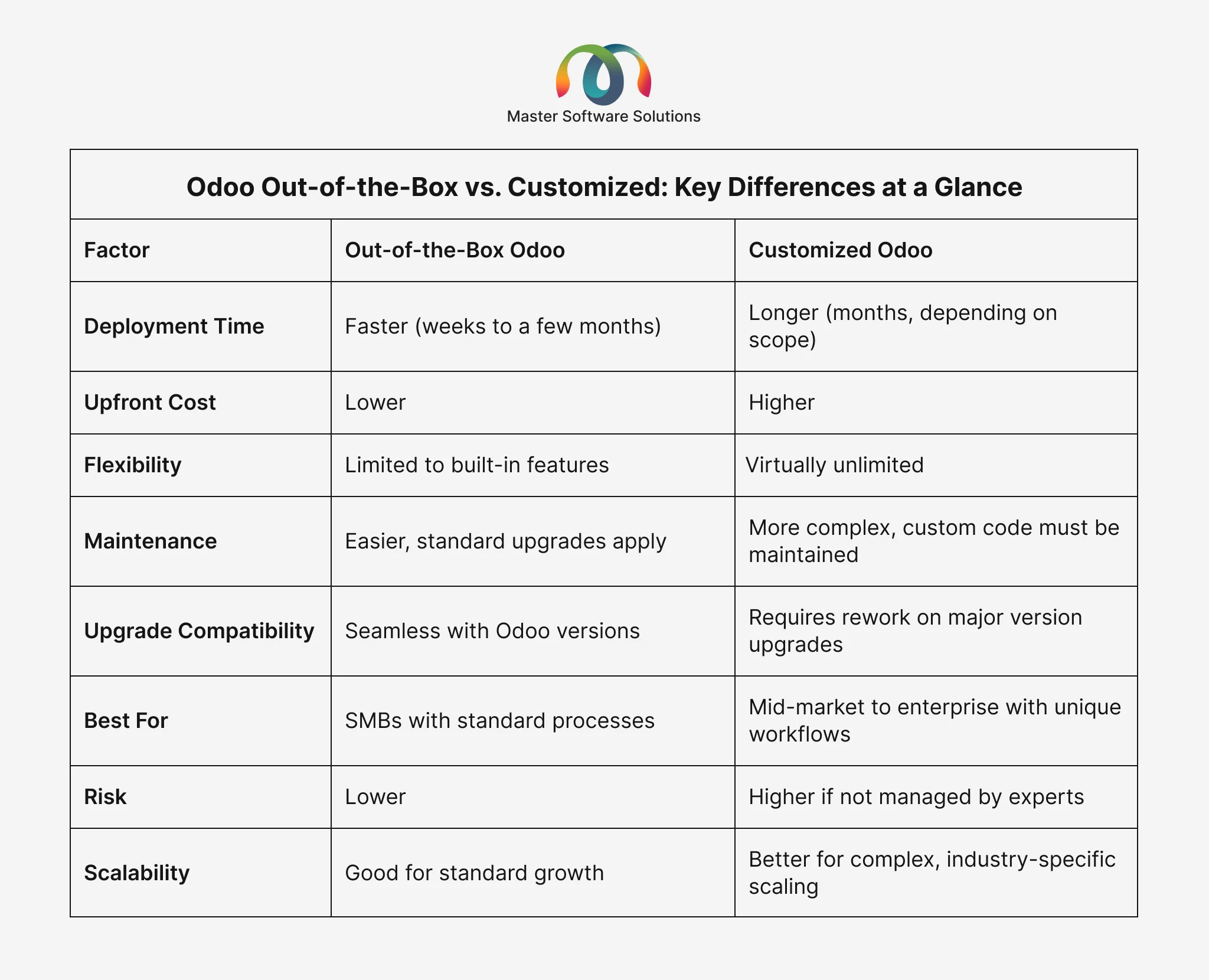
Standard Odoo deployments can go live in 4–12 weeks depending on data complexity and team size. If you need an ERP up and running fast, customization slows that down.
Your industry aligns with Odoo’s default apps
Retail, professional services, education, basic manufacturing, and e-commerce businesses often find that Odoo’s standard modules — sometimes paired with Odoo integration services to connect existing tools — cover their needs well.
Budget is a key constraint
Standard implementation costs significantly less than custom development. For early-stage businesses, this means faster ROI.
You want simpler long-term maintenance
Standard Odoo upgrades are straightforward. With no custom code to worry about, upgrading to new Odoo versions is faster and less risky.
When Does Odoo Customization Make Sense?
There are clear signals that out-of-the-box Odoo won’t be enough:
Your workflows don’t fit standard processes
Industries like food and beverage manufacturing, logistics with complex routing, subscription-based delivery, or multi-tier distribution often have workflows that standard Odoo simply wasn’t built for. Trying to force-fit these into standard modules leads to workarounds, inefficiency, and user frustration.
You need industry-specific features
Examples include route optimization for delivery companies, B2B volume-based pricing for wholesale distributors, or custom production order workflows for manufacturers. These require custom Odoo module development rather than configuration.
You have complex integrations
If your business depends on multiple third-party platforms, such as a WMS, a custom e-commerce storefront, a legacy accounting system, or an IoT device network, standard Odoo connectors may not be sufficient. Custom API integrations or middleware development becomes necessary.
Compliance and regulatory requirements
Businesses in healthcare, finance, or government contracting often face strict regulatory requirements that standard ERP templates don’t accommodate. Custom workflows and audit trails are needed to meet these standards.
You’re scaling rapidly and need competitive differentiation
When your ERP becomes a competitive advantage and not just a back-office tool, customization is worth the investment. Businesses that operate more efficiently because their ERP mirrors their exact processes gain a measurable edge.
Not sure if you need customization? Book a free Odoo consultation with our certified Odoo experts to assess your requirements.
The Role of Odoo Configuration (The Middle Ground)
Between “vanilla” and “fully custom,” there’s a powerful middle ground: configuration and Odoo Studio.
Odoo Studio is a no-code/low-code tool that allows users to:
- Add custom fields to any model
- Modify form, list, and kanban views
- Create custom menus and apps
- Build automated actions and approval flows
- Generate custom PDF reports
For many businesses, configuration + Odoo Studio covers 90% of their customization needs without writing code. This is the sweet spot: faster than custom development and more flexible than pure out-of-the-box.
According to Odoo’s official documentation, Studio is available on Enterprise plans and provides a visual interface for building on top of standard Odoo without touching core code.
The configuration-first approach is strongly recommended as a best practice: exhaust standard configuration and Studio before committing to custom development.
Cost Comparison: Out-of-the-Box vs. Custom Odoo Development
Cost is one of the most significant factors driving the standard versus custom decision. Here’s a realistic breakdown:
Out-of-the-Box Odoo Implementation Costs:
- Odoo licensing (Community is free; Enterprise is per user/app)
- Implementation partner fees for setup, configuration, data migration, and training
- Typical range: $5,000–$30,000 for SMBs depending on scope and number of users
Custom Odoo Development Costs:
- All of the above, plus:
- Custom module development: $3,000–$20,000+ per module depending on complexity
- Integration development: $2,000–$15,000+ per third-party integration
- Ongoing maintenance: typically 15–20% of development cost annually for upgrades and bug fixes
The key takeaway: customization is an investment, not just a cost. The ROI is derived from increased efficiency, the elimination of manual workarounds, and competitive differentiation, but only when the customization addresses a real, high-value business problem.
Odoo Upgrade Implications: Standard vs. Custom
One of the most overlooked dimensions of the standard vs. custom debate is long-term upgrade costs.
Odoo releases a major version roughly every year. With standard deployments:
- Upgrades are relatively smooth, as Odoo handles backward compatibility for its own modules
- Migration is primarily about data, not code
With customized deployments:
- Every custom module must be tested and potentially rewritten for each new Odoo major version
- More customization equals a higher upgrade cost and complexity
This is why working with an experienced Odoo partner matters enormously. Good custom development follows Odoo’s inheritance model and coding best practices, minimizing upgrade friction. Poor customization creates technical debt that compounds with every version upgrade.
Already on an older Odoo version? Our Odoo Migration Services help you move to the latest version cleanly, with or without custom modules.
How to Choose: A Decision Framework
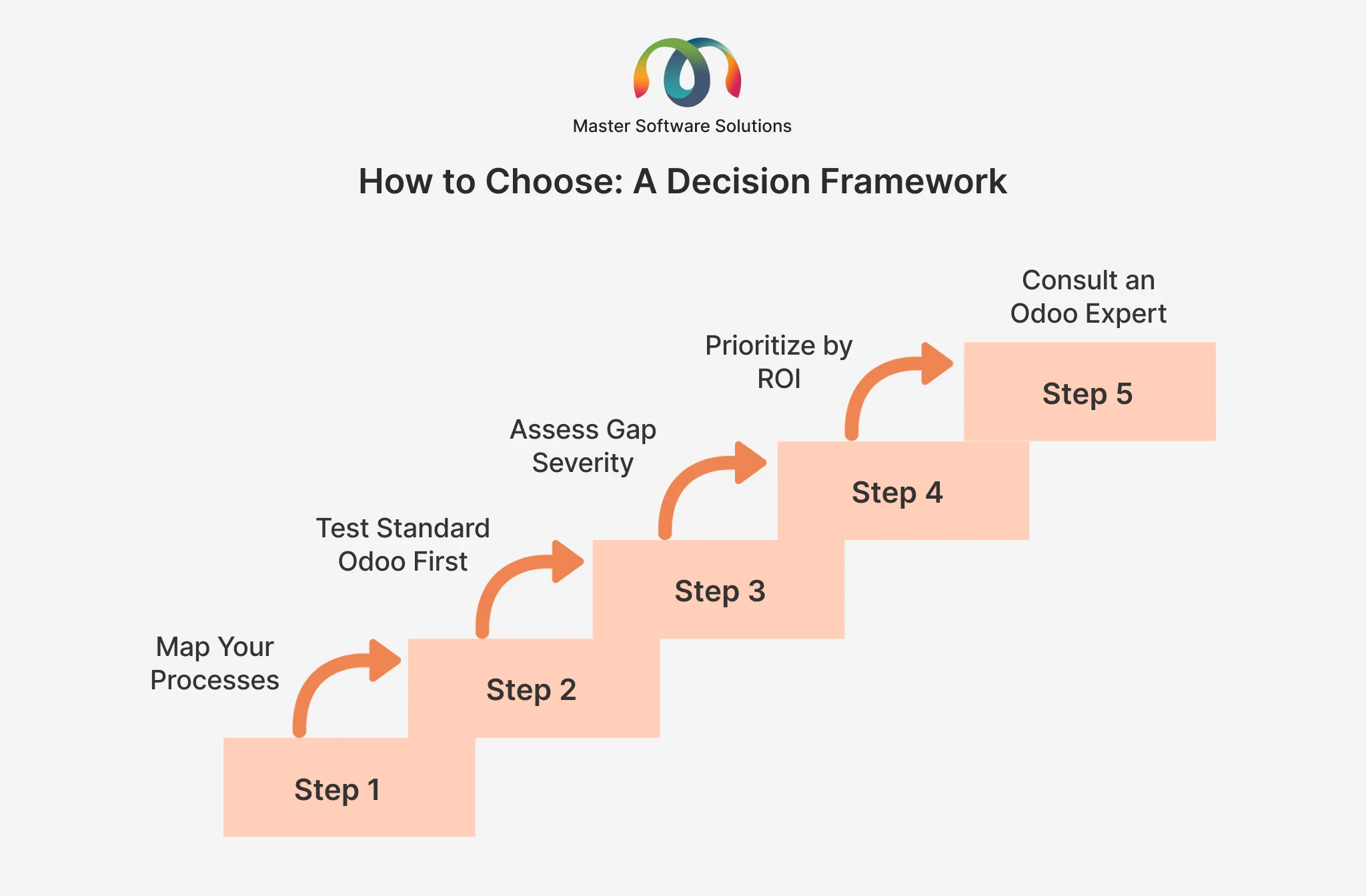
Use this framework to guide your decision:
Step 1: Map your processes
Document every business process that the ERP needs to support. Identify which are standard (common across your industry) and which are unique to your business.
Step 2: Test standard Odoo first
Set up a demo or pilot of standard Odoo. Map your processes against what’s available. Note every gap.
Step 3: Assess gap severity
For each gap, ask: Can we change our process to fit Odoo? Can Odoo Studio fill this? Only gaps that can’t be resolved without code require custom development.
Step 4: Prioritize by ROI
Not every gap is worth customizing. Focus custom development on processes where efficiency gains are highest, high-volume, high-friction workflows.
Step 5: Consult an Odoo Expert
An experienced Odoo consulting partner will often find native solutions to problems you assumed required custom code. This step alone can save tens of thousands of dollars.
According to a report by Panorama Consulting, businesses that over-customize their ERP during initial implementation are 2x more likely to experience significant cost overruns and delayed go-live dates.
Real-World Use Cases
Use Case 1: Dairy Industry
A dairy producer with strict batch traceability, shelf-life management, and cold chain compliance needed custom Odoo modules for milk collection scheduling, fat content quality checks, and lot-level expiry tracking. Standard Odoo handled procurement and accounting well, but production, quality control, and regulatory reporting required purpose-built custom development tailored to dairy operations.
Use Case 2: Steel Industry
A mid-sized steel fabrication company deployed Odoo’s standard Manufacturing, Inventory, Purchase, and Accounting modules with minimal configuration. They went live in 8 weeks and immediately gained visibility into raw material consumption, work-in-progress tracking, and supplier payment cycles, all without a single line of custom code.
Use Case 3: Water Industry
A water treatment and distribution company used standard Odoo for HR, accounting, and CRM but required custom modules for subscription-based billing cycles, meter reading integrations, and automated service route scheduling. A hybrid approach, such as standard core with targeted customization, gave them operational accuracy while keeping upgrade costs manageable.
Use Case 4: Coffee Industry
A specialty coffee roaster and B2B distributor needed custom Odoo features for blend recipe management, roast batch tracking, subscription order management, and integration with their direct-trade sourcing platform. Standard Odoo covered e-commerce and invoicing, but the unique nature of coffee production, traceability from farm to cup, and subscription logistics demanded custom module development to match their operational complexity.
Best Practices for Odoo Customization
If you’ve decided that customization is necessary, follow these principles to keep it manageable:
- Always use Odoo’s inheritance model: extend modules; never modify core files directly
- Keep customization modular: one custom module per functional area makes maintenance easier
- Document everything: custom modules need clear technical documentation for future maintenance
- Plan for upgrades from day one: design custom modules with version migration in mind
- Work with certified Odoo developers: not all developers understand Odoo’s architecture; hire Odoo developers who have proven Odoo-specific expertise
- Test thoroughly: UAT (User Acceptance Testing) is critical before go-live, especially for custom workflows
Master Software Solutions is a certified Odoo Silver Partner with 10+ years of ERP implementation experience across manufacturing, distribution, logistics, retail, and more. We help businesses implement, customize, integrate, and maintain Odoo ERP at every stage of their growth. Learn more about our Odoo Services
Conclusion
The choice between Odoo out-of-the-box and customized Odoo is not binary; it’s a spectrum. Most successful Odoo deployments blend all three: a standard foundation for core business functions, targeted customization for competitive differentiators, and thoughtful integration to connect Odoo with the wider tech ecosystem.
The key is to make the decision deliberately, with a thorough understanding of your processes, budget, growth trajectory, and the true cost of long-term maintenance.
Whether you’re starting fresh, migrating from another ERP, or looking to optimize an existing Odoo deployment, working with an experienced Odoo partner ensures you make the right call and execute it well.