Your business data is all sitting in Odoo, such as sales numbers, customer records, invoices, and inventory levels. The problem is getting answers out of it. Most of the time, that means asking IT to build a report, waiting days, or wrestling with spreadsheets yourself. So most people skip it altogether, and decisions get made without the numbers.
Master Software Solutions has built a fix. Their new Odoo plugin, OdooLens, lets anyone on your team ask a plain-English question, right inside Odoo, and get an instant, accurate answer. No reports. No IT queue. No training required.
What is OdooLens?
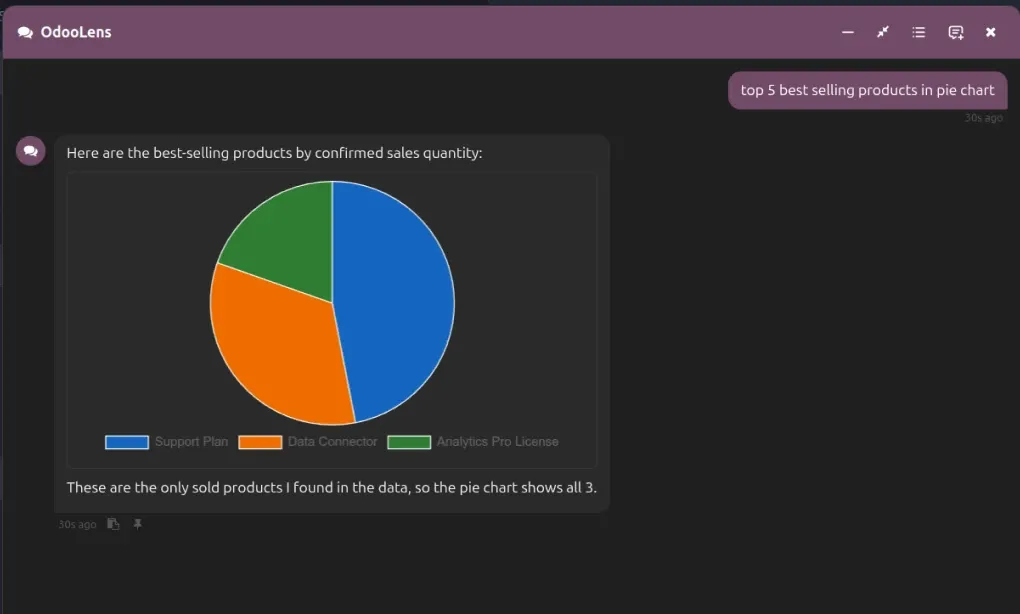
OdooLens is an AI-powered chatbot that lives inside your Odoo environment and connects directly to your live business data. You type a question; it gives you an answer, usually as a clean table or chart, in seconds.
It works across all the data you already have in Odoo: sales, customers, invoices, inventory, opportunities, and more.
Some examples of what you can ask it:
- “Who were my top 10 customers last month?”
- “Which customers haven’t ordered in 90 days?”
- “Forecast next month’s revenue.”
- “List unpaid invoices over €5,000.”
- “Show me sales by product category this quarter.”
These are questions that would normally require a custom report or a call to IT. With OdooLens, you just type and get your answer.
How It Works
The workflow includes three steps:
- Ask: Open the OdooLens chat inside Odoo and type your question in plain English (or French, or whichever language your team uses).
- Get an answer: OdooLens understands your question, looks up your live Odoo data, and replies with a clear answer, typically a table or a chart.
- Keep it: Pin the answer for quick reference, export it to Excel, or set up an automatic email summary so your team gets it on a schedule without anyone having to ask again.
That’s it. No new screen to learn. No special skills needed. If you can type a question, you can use OdooLens.
See OdooLens in Action: Book a Free Demo. Watch OdooLens answer live questions from your own Odoo data.
Is It Safe?
This is one of the most important things to understand about OdooLens: it is read-only.
It can look up information and report on it. It cannot change, delete, or break any data in your system ever. Beyond that, OdooLens is permission-aware, meaning each person only sees the data they’re already allowed to see in Odoo. A salesperson won’t see data restricted to managers. Nothing new is exposed that wasn’t already accessible.
Admins get full visibility too; they can monitor usage and costs, set spending limits, switch AI models to manage expenses, get alerted if something breaks, and track every action taken through the tool.
OdooLens vs. Traditional Odoo Reporting
Here’s how OdooLens compares to the standard way of getting answers from your Odoo data:
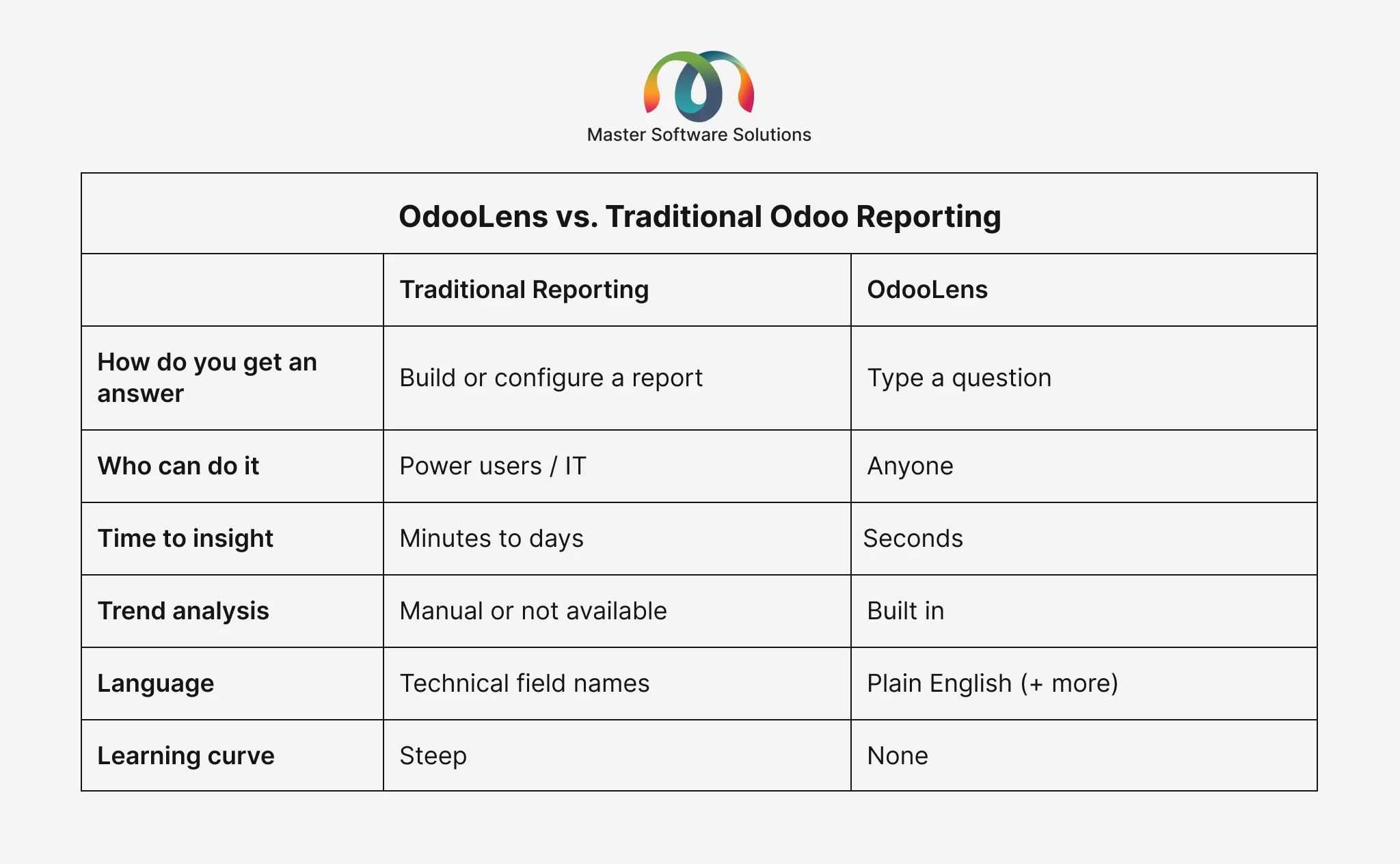
The difference is significant. Traditional Odoo reporting is powerful but requires technical knowledge and time. OdooLens gives that same power to everyone on the team, instantly.
Key Features
- Ask in plain language: No training, no report-building skills. Anyone who can type a question can use it.
- Instant answers: Insights in seconds, not “I’ll ask IT and get back to you next week.”
- Beyond basic lookups: OdooLens doesn’t just retrieve data; it analyzes it. It can spot customers who are at risk of churning, identify what’s most profitable, flag what needs restocking, and generate sales forecasts.
- Keep what’s useful: Pin answers for quick access, export to Excel in one click, or schedule automatic email digests: for example, a daily summary of new leads sent to your sales team every morning.
- Speaks your language: Answers come back in whichever language you write in.
- Safe and controlled: Read-only, permission-aware, and fully auditable. Admins control costs and monitor everything.
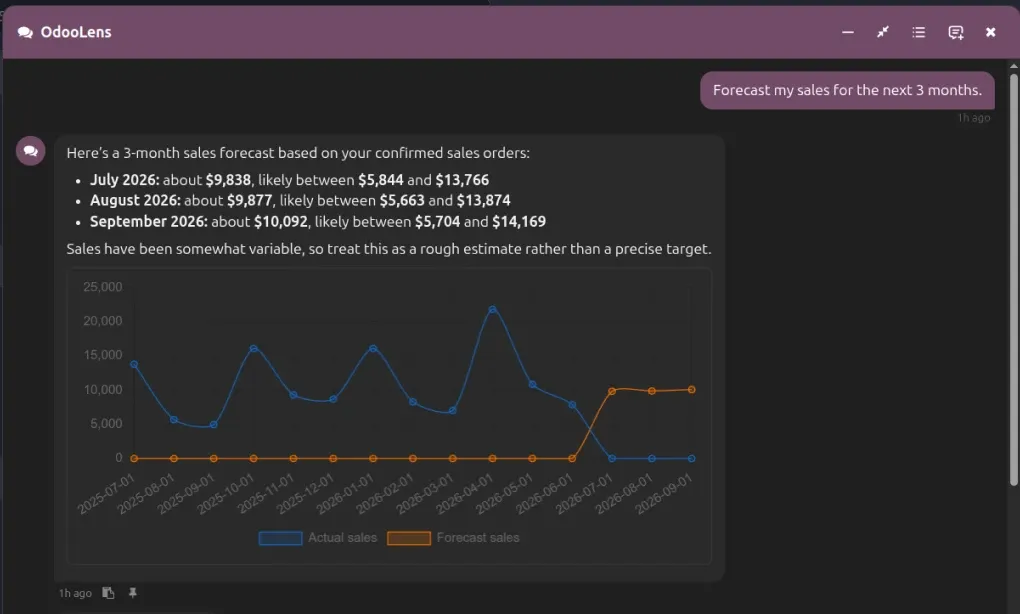
Performance Forecasting: Know What’s Coming Before It Happens
Performance Forecasting analyzes a business’s historical sales and revenue data and predicts what’s likely to happen next, using a forecasting method built on real trends, seasonal patterns, and growth rates, rather than assumptions. Instead of waiting for a quarter to close, businesses get projected figures in advance, with enough lead time to act on them.
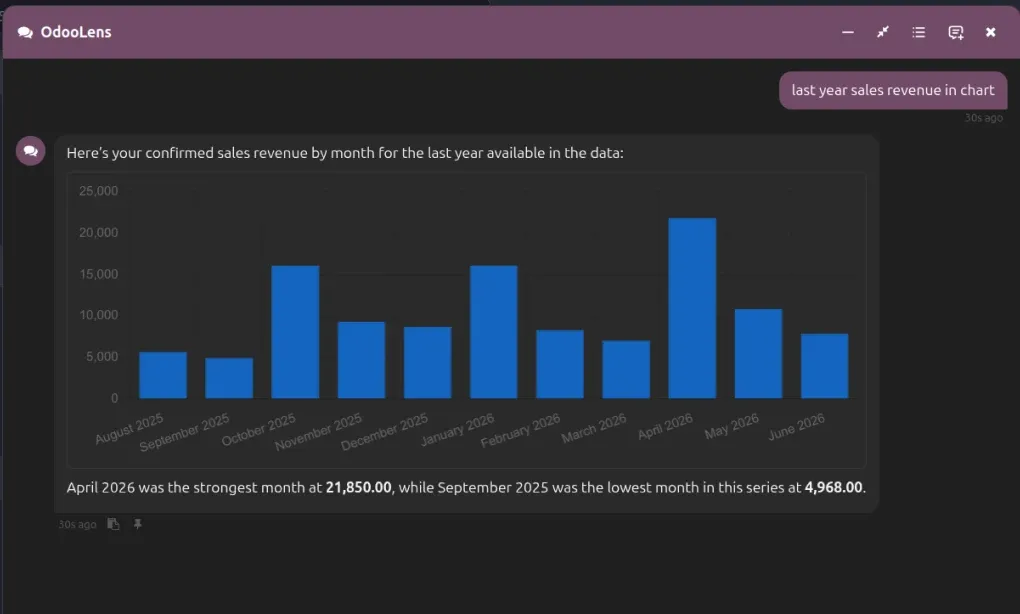
Performance Comparison: Charts and Tables For Every Metric
Performance Comparison turns sales and revenue data into charts and tables, either to compare two periods side by side or simply to visualize where the numbers stand right now. Instead of pulling raw reports and reading through rows of figures, a business gets the same data in the form of a chart or table.
Stop Waiting on IT for Business Answers. Every day your team makes decisions without the numbers, because getting those numbers takes too long. OdooLens changes that. Talk to Our Team
Who Should Use OdooLens?
OdooLens is valuable for any Odoo-based business where people regularly need data but don’t have the technical skills, or the time, to pull reports themselves. That includes:
- Sales teams that want quick visibility into pipeline, customer history, and forecasts without waiting on a manager or analyst
- Operations teams managing inventory who need instant answers on stock levels and reorder needs
- Finance teams tracking invoices and outstanding payments
- Business owners and managers who want a quick pulse on performance without building dashboards
- Any team that regularly asks “can you pull a report on…?” and waits days for an answer
If your business runs on Odoo and your team isn’t getting the insights they need because reporting is too slow or too technical, OdooLens is designed for you.
The Bottom Line
Most businesses have all the data they need to make better decisions; it’s already sitting in Odoo. The barrier has always been getting it out quickly and easily. OdooLens removes that barrier entirely.
Any member of your team can now ask a business question and get a reliable, accurate answer in seconds without touching a report, opening a spreadsheet, or waiting on IT. Ready to Get Instant Answers from Your Odoo Data? Book a Demo