Every operations team knows the drill. A supplier sends a purchase order as a PDF attachment. Someone opens the email, downloads the file, reads it line by line, and manually types everything into Odoo, including the customer name, PO number, product lines, quantities, and prices. Then double-checks for typos. Then moves on to the next one.
It’s slow, tedious, and expensive. A single miskeyed quantity or price can cost real money. And as order volumes grow, the problem only gets worse.
Master Software Solutions has built a smarter way. Their Odoo plugin, AI PO & Bill Import, reads your purchase orders and supplier bills automatically and creates the order in Odoo before your team even opens the email.
What Is AI PO & Bill Import?
AI PO & Bill Import is an Odoo plugin developed by Master Software Solutions that uses artificial intelligence to extract data from PDF documents, match them to your existing Odoo records, and create ready-to-review draft orders automatically. It handles two distinct document flows:
- Customer Purchase Orders: Sales Orders. When a customer sends you a PO, the plugin reads it and creates a draft sales order in Odoo.
- Supplier/Vendor Documents: Vendor Bills. When you receive a bill from a supplier, the plugin reads it and creates a draft vendor bill.
Instead of someone on your team reading the PDF and typing everything into Odoo by hand, the AI does it for you. It reads the document, automatically pulls out all the key details, such as customer name, PO number, products, and quantities, and creates a ready-to-review order in Odoo. Your team just checks it and clicks confirm.
The Problem With Manual PO Entry
If your team is processing purchase orders manually today, here’s what the workflow looks like:
- Open the email, download the PDF
- Read it line by line
- Manually enter the customer, products, quantities, and prices into Odoo
- Double-check for errors
- Repeat for every single order
Even a moderately busy team handling 20-30 POs a day is burning hours on pure data entry. And errors slip through. A wrong unit price and a misread quantity aren’t just inefficiencies; they’re financial risks.
AI PO & Bill Import eliminates steps 1 through 4 entirely.
How It Works
The plugin handles the full intake pipeline in three steps:
- Read: The AI parses the PDF the same way a person would, identifying the customer name, PO number, line items, quantities, and prices.
- Match: It links what it found to the right customer and products already in your Odoo database.
- Draft: A sales order or supplier bill appears in Odoo, pre-filled and ready for a quick human review. If the AI is uncertain about any field (say, only 60% confident on a price), it highlights it in orange, so your team knows exactly where to look.
Nothing is confirmed until a person approves it. The AI does the heavy lifting; your team stays in control.
Two Ways to Use AI-Powered Odoo PO and Bill Imports
You can integrate AI PO & Bill Import into your workflow in whichever way fits your team best:
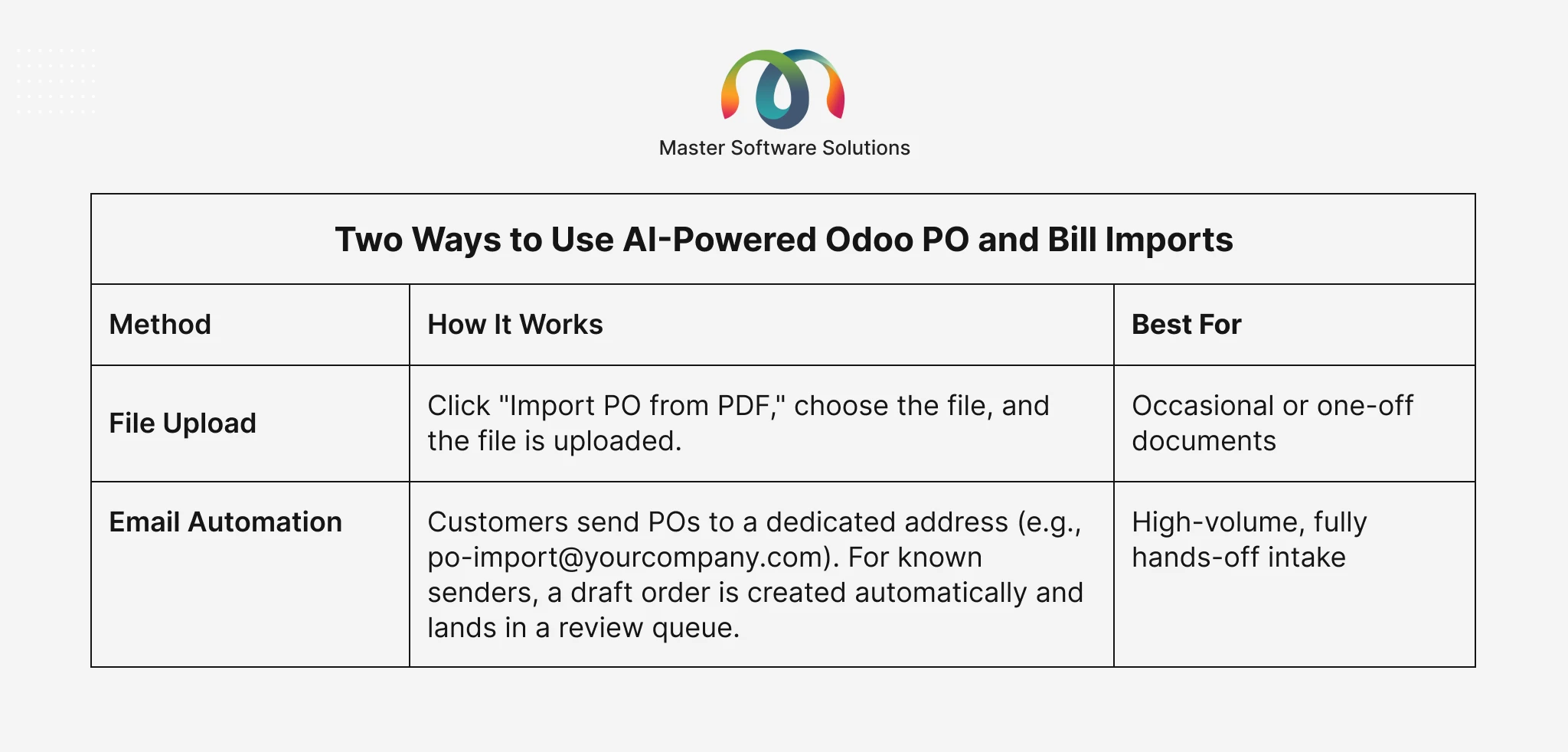
The email automation route is particularly powerful for businesses managing dozens or hundreds of supplier documents each week. Orders flow in, get processed, and sit in the queue waiting for a one-click approval, no manual touchpoints required.
Ready to Cut Your PO Processing Time? Book a Free Demo. See AI PO & Bill Import in action with your own documents. You do not need to commit.
Key Features at a Glance
- Faster processing: Minutes of typing become seconds of reviewing. Your team focuses on decisions, not data entry.
- Fewer errors: No manual re-keying means no transposition errors, misread quantities, or wrong prices slipping through.
- Human stays in control: Draft orders are flagged, not auto-confirmed. Uncertain fields are highlighted in orange for targeted review.
- Re-extract from the same PDF: If a product or customer was initially missed, just click once to re-read the same PDF. The order updates automatically without re-uploading. A simple “self-healing” fix that takes seconds.
- Duplicate detection (smart & cost-aware): If the same PDF is uploaded twice, the system recognizes it instantly and doesn’t re-process it. It also warns you if a PO or bill number has already been entered, protecting you from paying or shipping twice.
- Unknown sender control: “Restrict to Known Customers” mode gives you full control over what happens when an unrecognized email arrives: queue for review, create a CRM lead, alert an admin, or ignore. This ensures that no unwanted orders are created from unknown sources.
- Auto-confirm for clean orders: When the AI extracts a sales order with zero warnings, and the sender is a known customer, you can configure it to confirm automatically with no click needed. (Vendor Bills are never auto-posted, by design, preserving AP safety.)
- Flexible multi-attachment handling: Choose whether to process all PDF attachments in an email, just the first one, or pause for manual review when multiple files arrive.
- Real-time or batch processing: Process each incoming email the moment it arrives, or queue them to run on a schedule. High-volume sites can use batch mode to smooth out AI load.
- Auto-assign salesperson & notify: Set default salesperson and team assignments so every new sales order lands with the right owner, and they get notified automatically when their order arrives.
- Full visibility & operational monitoring: A dashboard shows processing volumes, and a built-in audit log records every action the AI took. A daily digest flags any failed or stuck documents, and a low-credit alert tells you before processing capacity runs out.
- Admin-tunable settings: Confidence thresholds, duplicate look-back windows, retry limits, and more are all configurable by your admin without touching any code.
Who Should Use This Plugin?
AI PO & Bill Import is a strong fit for any Odoo-based business that:
- Receives purchase orders or supplier bills via email as PDFs
- Spends meaningful staff time on manual data entry into Odoo
- Wants to scale order volume without scaling headcount
- Needs an audit trail for compliance or internal controls
It’s particularly valuable for wholesale distributors, manufacturers, logistics providers, and any business with a high volume of supplier or customer PO transactions.
If you’re already using Odoo for inventory management, purchase orders, or accounting, this plugin slots directly into your existing workflows.
Want to See the ROI? If your team spends even 10 minutes daily per PO on manual entry, and you process 30 POs a day, that’s 5 hours of staff time. AI PO & Bill Import can recover most of that. Talk to Our Team
The Bottom Line
Manual PO entry is one of those tasks that feels manageable until it isn’t. As order volumes grow, the time cost compounds, and so does the error rate. AI PO & Bill Import doesn’t just speed up the process; it removes the manual step entirely while keeping your team in control of every order that goes live.
It’s a straightforward upgrade for any Odoo team tired of retyping what their suppliers already sent them.
Get Started Today. Whether you process 5 POs a week or 500, AI PO & Bill Import can save your team real time and reduce costly errors. Request a Demo
Interested in more Odoo productivity tools? Explore other plugins from Master Software Solutions or learn more about extending Odoo with custom integrations.