Every growing business hits the same wall. Orders need approval, leads need follow-up, invoices need chasing, and somewhere between all of it, your team spends hours on work a system should be doing for them. The usual answer is “hire a developer,” but that answer is increasingly outdated.
Odoo, one of the world’s most widely used open-source ERPs, ships with a set of no-code tools that let non-technical users reshape how the system behaves: automated actions, Studio, approval rules, and scheduled jobs. With the right approach to Odoo customization, your operations team can automate a surprising amount of the business before a single line of Python is written.
In this guide, we’ll walk through what Odoo workflow customization actually is, which no-code tools to reach for, real automation examples by department, and the point at which professional Odoo customization services become the smarter investment.
What Is Odoo Workflow Customization?
A workflow is simply the path a record travels through your business: a lead becomes an opportunity, a quotation becomes a confirmed order, and a purchase request becomes an approved bill. Odoo workflow customization means changing that path to match how your company actually operates, rather than forcing your team to adapt to default software behavior.
Customization can happen at three levels:
- Configuration: switching built-in options on or off (approval thresholds, email templates, stage names). No code, no risk.
- No-code customization: using Odoo Studio and automation rules to add fields, redesign screens, and trigger actions automatically. Still no code, moderate power.
- Custom development: building custom modules in Python and XML for logic the no-code layer can’t express. This is where Odoo ERP customization partners come in.
The 80/20 rule applies here: roughly 80% of everyday workflow changes can be handled without code. Knowing which 80%, and recognizing the 20% that can’t, are what separate a smooth Odoo rollout from a messy one.
Why No-Code Automation Matters for Growing Businesses
Manual workflows fail quietly. A missed follow-up email rarely triggers an alarm; it just becomes a lost deal three months later.
Automating these handoffs delivers benefits that compound:
- Speed: records move to the next stage the moment conditions are met, not when someone remembers to check.
- Consistency: every customer receives the same onboarding email, and every large order receives the same approval scrutiny.
- Lower cost of change: a workflow tweak that once needed a developer sprint now takes an operations manager twenty minutes.
- Audit trails: automated steps are logged, so you always know what happened and when.
There’s also a strategic angle. Businesses that treat Odoo ERP customization services as a one-time project tend to end up with rigid systems. Businesses that build a culture of iterative, no-code adjustment keep their ERP aligned with the business as it evolves and escalate to developers when the payoff justifies it.
Not sure how much of your workflow can be automated without code? Book a free consultation with Master Software Solutions and get a practical automation roadmap for your Odoo setup.
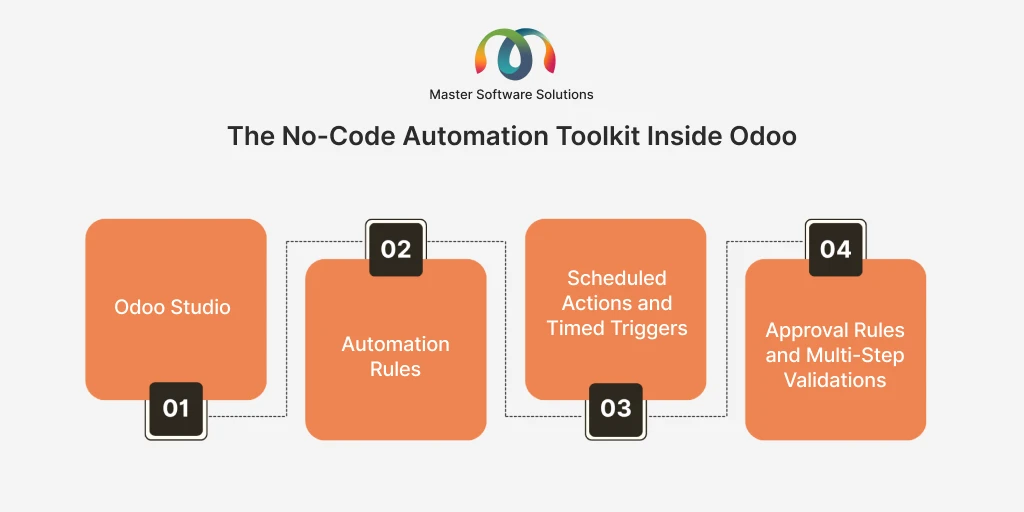
The No-Code Automation Toolkit Inside Odoo
Odoo gives you four main levers for automating workflows without writing code. Here’s what each does and when to use it.
Odoo Studio: Drag-and-Drop Customization
Odoo Studio is the platform’s official no-code editor. From any screen, you can add custom fields, rearrange forms, create new views (kanban, list, and calendar), design PDF report layouts, and even build entirely new apps, all by dragging and dropping. Behind the scenes, Studio generates the same technical definitions a developer would write; your changes survive normal use and are visible to any Odoo customization partner in the USA or elsewhere who later works on your system.
Typical Studio wins by adding an “Installation Date” field to sales orders, putting a “Priority” widget on help desk tickets, or redesigning the quotation PDF to match your brand.
Automation Rules: If-This-Then-That for Your ERP
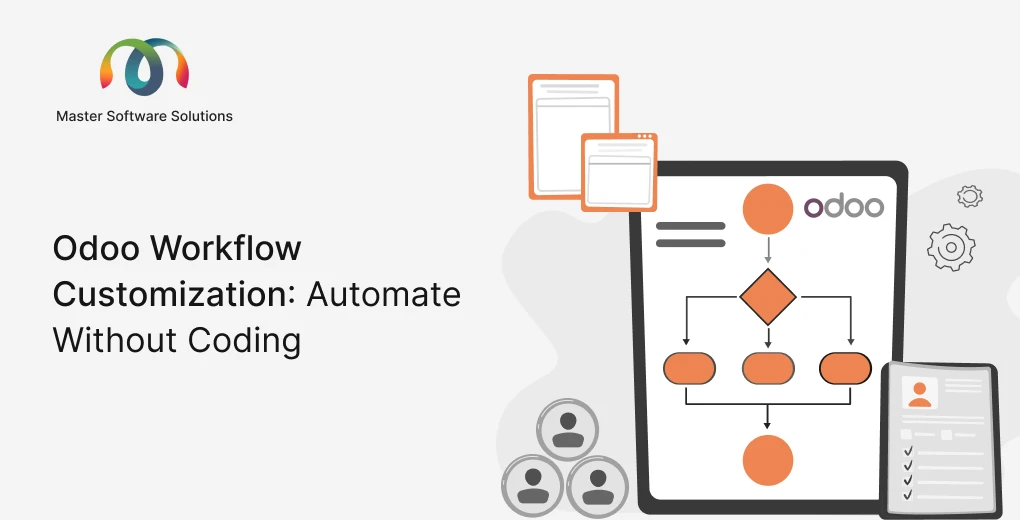
Automation rules (called automated actions in earlier versions) are the heart of no-code workflow automation. You pick a trigger, record created, stage changed, field updated, or timed condition reached and attach one or more actions: update a field, send an email, create an activity, add followers, or send a webhook to an external system.
Example: when a CRM opportunity moves to “Proposal Sent,” and no reply arrives within five days, automatically create a follow-up call activity for the salesperson and notify the sales manager. That entire flow is built with dropdowns, not code.
Scheduled Actions and Timed Triggers
Some automation isn’t event-driven; it’s time-driven. Odoo can run checks on a schedule: flag invoices overdue by 15 days, remind account managers of contracts expiring next month, or archive stale leads every quarter. Combined with time-based automation triggers, this turns your ERP from a passive database into an active assistant.
Approval Rules and Multi-Step Validations
Purchasing over a threshold? Discounting beyond 15%? Odoo’s built-in approval mechanics let you require sign-off at defined points, including multi-level, amount-based, or role-based. Configuring these correctly is one of the highest-value, lowest-effort customizations available, especially in purchase, expense, and sales workflows.
How to Build a No-Code Workflow Automation: Step by Step
Let’s make this concrete with a common scenario: automatically nurturing new website leads.
Here’s the process an admin would follow, no developer required:
- Define the outcome first. “Every new lead from the website contact form gets a welcome email within a minute and a follow-up task assigned to sales within one day.”
- Open Settings → Technical → Automation Rules (or use Studio’s Automations tab) and create a new rule on the CRM Lead model.
- Set the trigger to “On Creation,” filtered to leads where the source is your website form.
- Add actions: send the welcome email template, assign the lead to the right sales team, and schedule a “call” activity due in one business day.
- Test with a dummy lead, confirm the email fires and the activity appears, then switch it on for real traffic.
- Document the rule, a one-line note on what it does and who owns it. Future you will be grateful.
That pattern includes outcome, trigger, filter, actions, test, and document and applies to virtually every no-code automation you’ll build in Odoo.
Real-World Automation Use Cases by Department
Sales and CRM
This is where Odoo CRM customization delivers the fastest payback: auto-assigning leads by territory, escalating stale opportunities, triggering quote follow-ups, and scoring leads with custom studio fields. Teams that pair these automations with disciplined pipeline stages routinely cut lead response time from hours to minutes. If your pipeline logic is more complex, CRM consulting can help design it before you automate it.
Inventory and Purchasing
Reordering rules that fire purchase requests when stock dips below minimums, automatic vendor emails on PO confirmation, and quality-check tasks generated on receipt of goods. For distributors and manufacturers, these automations often replace entire spreadsheet-based routines.
Accounting and Finance
Automated invoice reminders on a 7/15/30-day cadence, approval chains for vendor bills above a threshold, and scheduled alerts for budget overruns. Because every automated step is logged, finance teams also gain a cleaner audit trail than manual processes ever provided.
HR and Operations
Onboarding checklists auto-generated when an employee record is created, timesheet reminders, contract renewal alerts, and equipment-return tasks triggered by an offboarding stage change.
Website and eCommerce
With Odoo website customization, form submissions can create CRM leads automatically with the right tags, abandoned carts can trigger recovery emails, and new orders can spawn fulfillment tasks. If your storefront needs bigger changes than the website builder allows, Odoo website design and development services can extend it while keeping the automation layer intact.
No-Code vs. Custom Development: Where’s the Line?
No-code tools are powerful, but they have real boundaries. Here’s a practical comparison:
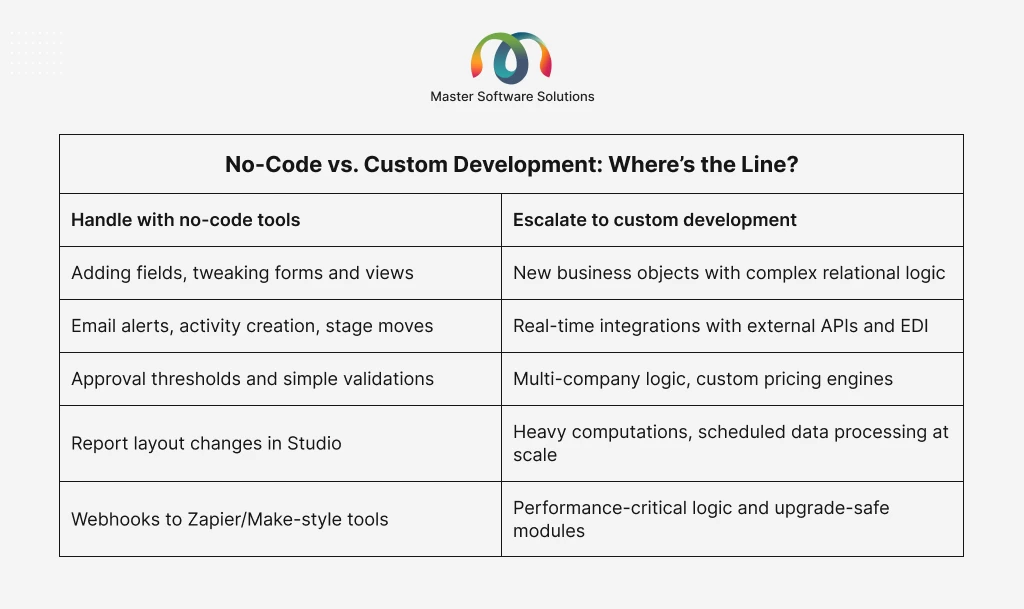
A useful rule of thumb: if the automation reads or updates data in Odoo based on clear conditions, no-code will usually do it. If it needs to compute something complex, talk to an external system in real time, or enforce logic across thousands of records per minute, you’re in custom territory, and a seasoned Odoo customization services providing company will build it as a proper module so it survives version upgrades.
This is also where the risk of over-customization lies. Layering dozens of custom Studio changes and automation rules without governance creates a system nobody understands. Periodic reviews, something Odoo consulting services typically include, keep your customization layer clean.
Best Practices for Odoo Workflow Automation
- Map before you automate. Automating a broken process just produces mistakes faster. Sketch the current flow, remove waste, then automate the clean version.
- Start with one high-friction workflow. Quote follow-ups or invoice reminders are ideal first wins that have visible impact and low complexity.
- Always test on staging. Odoo lets you duplicate your database and build and verify rules there before making changes in production.
- Name and document every rule. “Auto: Lead → Welcome Email (Marketing owns)” beats “Rule 47.”
- Watch for rule collisions. Two automations updating the same field can loop or fight. Keep an inventory of active rules.
- Plan for upgrades. Studio changes generally migrate well, but review them at every version jump, ideally with an Odoo implementation and upgrade partner.
Common Mistakes to Avoid
The failure patterns we see most often in audits: automating processes nobody has mapped, granting Studio access to everyone (leading to duplicate fields and conflicting rules), skipping staging tests, hard-wiring people’s names instead of roles into assignments, and treating automation as “set and forget.” Workflows change; your rules need quarterly review just like your budget does.
Why Work With Master Software Solutions?
Master Software Solutions is an official Odoo partner and an experienced Odoo customization partner in the USA, with delivery teams serving clients across North America, the UK, and beyond. As a full-service Odoo customization services provider, we cover the whole spectrum, including no-code Studio configuration, automation rule design, custom module development, Odoo CRM customization, Odoo website customization, integrations, migrations, and long-term support.
Our approach is deliberately pragmatic: we automate with built-in tools wherever possible and write code only where it earns its keep. That keeps your total cost of ownership down and your upgrade path clean, which is exactly what ERP customization should do.
Conclusion: Automate First, Code When It Counts
Odoo’s no-code toolkit has genuinely changed the economics of ERP customization. Approvals, follow-ups, alerts, assignments, and reports that once required developer time are now within reach of any well-trained admin. The winning strategy is layered: configure first, automate with Studio and automation rules second, and invest in expert Odoo customization development only where complexity demands it.
Ready to automate your Odoo workflows? Talk to our experts, and they’ll audit your current setup, identify quick no-code wins, and scope any custom work you actually need. No obligation, just a clear roadmap.