If you’re running a growing business, you’ve almost certainly hit the moment where your current software can’t keep up. Two names come up constantly in that conversation: Odoo and QuickBooks Enterprise.
On the surface, they both handle accounting and finance. But dig deeper, and they’re built for entirely different purposes, and choosing the wrong one can cost your business years of rework.
This guide gives you a full, no-fluff breakdown of Odoo vs. QuickBooks Enterprise, covering features, pricing, scalability, integrations, industry use cases, and which one wins for your specific business type.
Ready to explore Odoo for your business? Talk to an Odoo Expert
What Is Odoo?
Odoo is an open-source, modular Enterprise Resource Planning (ERP) platform with over 15 million users globally. It offers more than 80 integrated business applications, from accounting and inventory to CRM, manufacturing, HR, eCommerce, and project management, all running on a single platform.
Odoo comes in two editions:
- Odoo Community: Free and open-source, ideal for technically capable teams
- Odoo Enterprise: Subscription-based, with premium modules, hosting, and support
What makes Odoo different is its philosophy: instead of stitching together multiple software tools, Odoo gives every department a connected home in one system. Sales, finance, logistics, and HR; they all talk to each other natively.
Want a deeper dive?
Read: What Is Odoo ERP? A Complete Guide by Master Software Solutions.
What Is QuickBooks Enterprise?
QuickBooks Enterprise is Intuit’s highest-tier accounting product, designed for mid-sized businesses that have outgrown the standard QuickBooks plans. It supports up to 40 simultaneous users and offers an expanded chart of accounts, advanced reporting, enhanced inventory tracking, and industry-specific editions for sectors such as manufacturing, wholesale, retail, and professional services.
QuickBooks Enterprise is fundamentally an accounting-first tool. It does financials exceptionally well; invoicing, payroll, tax prep, and reporting are polished and familiar. But it is not an ERP. Operations like manufacturing workflows, full CRM, HR management, or multi-channel eCommerce require bolting on third-party apps.
Odoo vs QuickBooks Enterprise: Core Differences
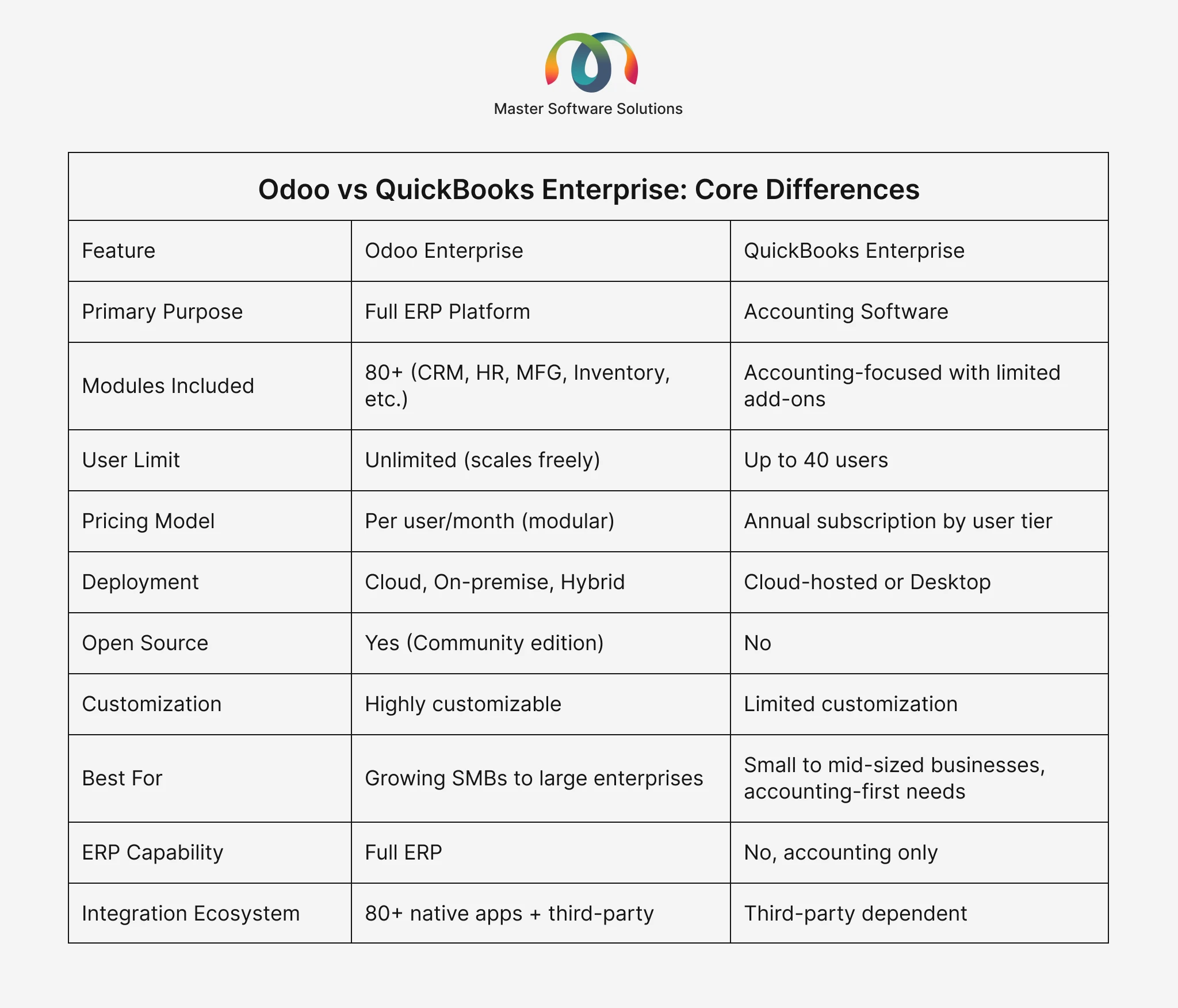
Bottom line: QuickBooks Enterprise is accounting software that can be extended. Odoo is a full business operating system with built-in accounting.
Feature-by-Feature Comparison
Accounting & Finance
Both platforms handle the accounting fundamentals: invoicing, bank reconciliation, expense tracking, financial reporting, and tax management.
QuickBooks Enterprise wins here for pure accountants. Its interface is familiar to most bookkeepers and CPAs, and its payroll, tax prep, and financial statement tools are best for SMBs.
Odoo Accounting is equally capable, supporting multi-currency, automated bank feeds, aged receivables/payables, and IFRS-compliant reporting, with the added advantage that every financial transaction flows automatically from other Odoo modules (sales orders, purchase orders, inventory). No syncing. No manual entry.
Inventory Management
QuickBooks Enterprise offers enhanced inventory with bin/serial number tracking, FIFO costing, and assembly builds. For basic warehousing, it works. For complex, multi-warehouse operations, it quickly falls short.
Odoo Inventory handles multi-warehouse management, lot and serial number traceability, automated replenishment rules, advanced putaway strategies, barcode scanning, and full supply chain visibility, all natively.
CRM & Sales
QuickBooks Enterprise has no built-in CRM. Businesses must integrate tools like Salesforce, HubSpot, or Method CRM, each adding cost and sync complexity.
Odoo CRM is a native module with pipeline management, lead scoring, email automation, quotation building, and direct connection to inventory and invoicing. A deal closes in CRM → a sales order is created → inventory is updated → an invoice is generated. All automatically.
Manufacturing
QuickBooks Enterprise offers a basic manufacturing edition with Bill of Materials (BOM) and assembly builds, adequate for small businesses but not for manufacturers with real production complexity.
Odoo Manufacturing supports full MRP (Material Requirements Planning), work center management, production scheduling, quality control, maintenance tracking, and subcontracting, all integrated with inventory and accounting.
HR & Payroll
QuickBooks Enterprise includes payroll as an add-on (extra monthly fee). HR features are minimal.
Odoo HR covers employee records, time-off management, recruitment pipelines, expense reports, payroll (in supported regions), and performance appraisals, natively connected to accounting.
Reporting & Analytics
QuickBooks Enterprise has over 200 pre-built reports and a custom report builder (Enterprise Diamond). For financial reporting, it’s strong.
Odoo Reporting spans every module, including financial dashboards, inventory KPIs, sales funnels, manufacturing efficiency metrics, and HR analytics, giving management a business-wide view in one place.
Want to unlock the full power of Odoo for your business? Explore Our Odoo Implementation Services
Pricing Comparison: Odoo vs QuickBooks Enterprise
QuickBooks Enterprise Pricing (2026)
QuickBooks Enterprise pricing is structured by plan tier and user count:
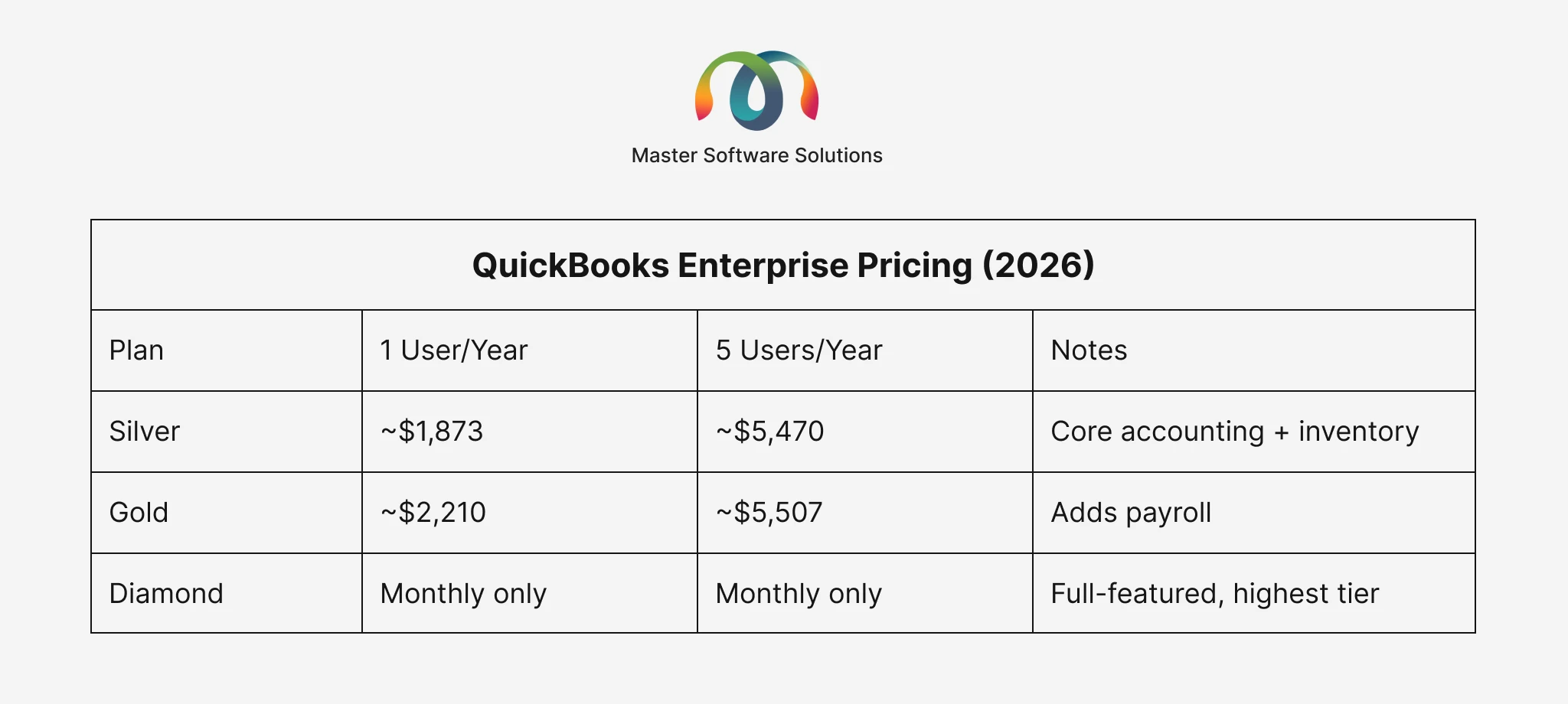
Source: QuickBooks Enterprise Pricing – Intuit
Add to this: CRM subscription (~$50-150/user/month), payroll add-ons, time tracking, eCommerce platform, and integration middleware. A 20-person company running QuickBooks + the typical software stack can easily spend $15,000-$25,000/year on software alone.
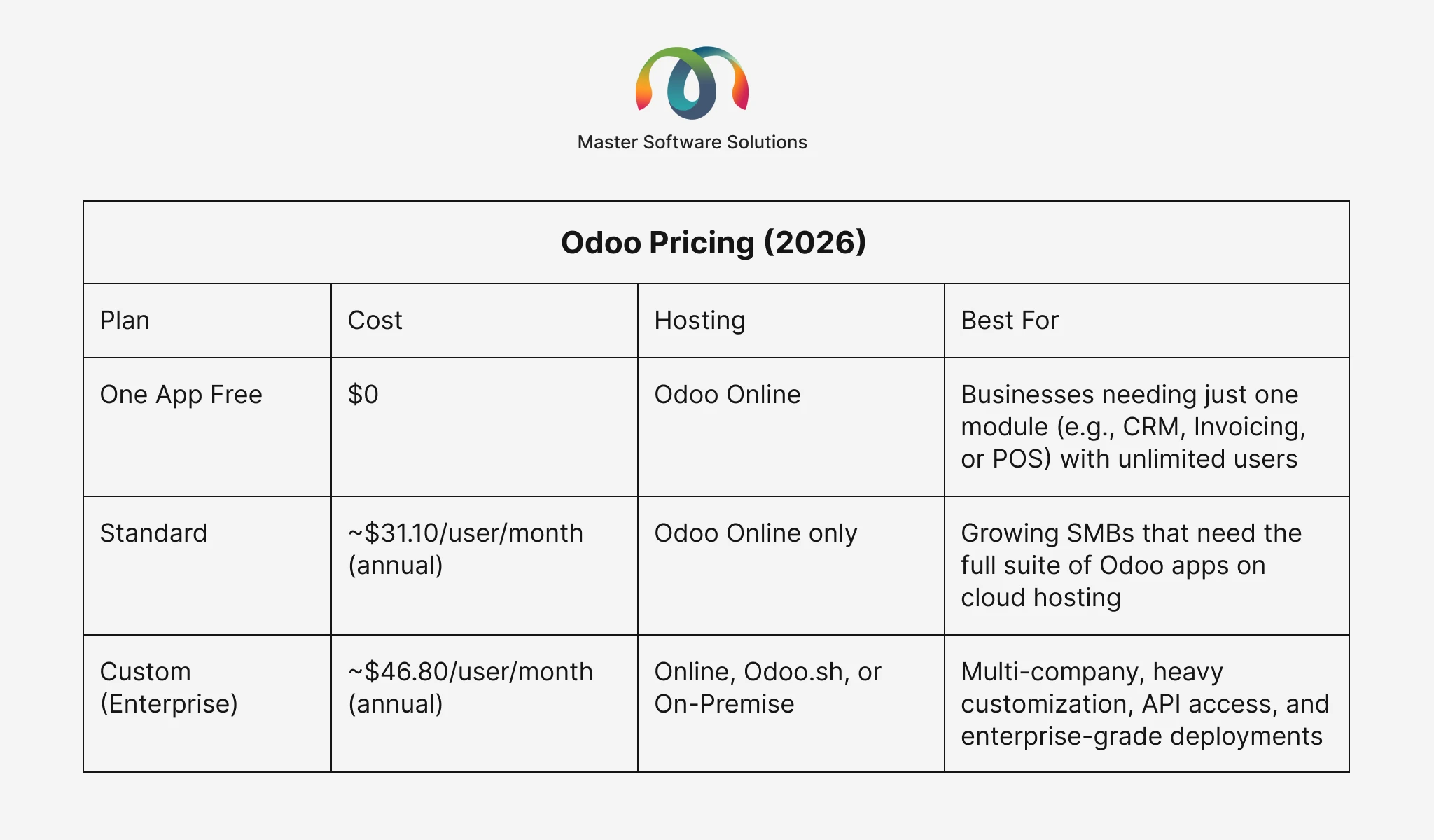
Odoo Pricing (2026)
Odoo offers three distinct pricing tiers, making it accessible to businesses of all sizes, from startups to large enterprises.
Scalability: Which Software Grows With You?
This is arguably the most important factor for growing businesses.
QuickBooks Enterprise caps at 40 users and begins to slow noticeably at 100,000+ transactions per year. When you outgrow it, and many businesses do, there is no upgrade path within the Intuit ecosystem. You face a full migration to NetSuite, SAP, or another ERP, which is expensive and disruptive.
Odoo scales from a solo entrepreneur to a 10,000-employee enterprise on the same platform. When you need a new capability, including manufacturing, eCommerce, a new warehouse, or a new country, you activate a module. No migration. No data silos. No new vendor.
Thinking long-term? See How Odoo Scales With Growing Businesses
Integrations & Add-ons
QuickBooks Enterprise integrates with 750+ third-party apps via Intuit’s marketplace, including Salesforce, Shopify, PayPal, and Bill.com. However, each integration adds cost, requires ongoing maintenance, and introduces potential sync failures.
Odoo offers 80+ native apps that communicate through a single database. Third-party integrations are also available via the Odoo Apps marketplace and custom connectors. Because core modules are built by the same team on the same framework, native integrations are seamless and real-time.
Need a custom integration? Master Software Solutions specializes in Odoo Module Development and can build bespoke connectors tailored to your tech stack.
Industry Use Cases: Who Should Use Which?
Manufacturing Businesses
If you run a manufacturing operation — even light assembly — Odoo is the clear choice. QuickBooks’ manufacturing edition handles basic BOMs and assembly, but anything involving production scheduling, work centers, quality control, or MRP is beyond its capability.
Odoo Manufacturing, connected natively to inventory and accounting, gives manufacturers real-time visibility from raw material procurement through finished goods delivery.
Related: A Complete Guide to Odoo Customization Services
Retail & eCommerce Businesses
QuickBooks Enterprise has a retail edition with basic POS and inventory support. It works for single-location retailers with simple inventory needs.
Odoo offers a native eCommerce platform, POS system, inventory management, and loyalty program that are all connected. Odoo’s unified approach greatly benefits the multi-channel retailers selling online and in-store.
Professional Services Firms
For a small accounting firm or consultancy that primarily needs invoicing, expense management, and financial reports, QuickBooks Enterprise may be sufficient and familiar.
For larger professional services firms managing projects, resources, timesheets, and client billing, Odoo Project + Timesheets + Invoicing offers a more comprehensive, connected solution.
Wholesale & Distribution
Odoo handles complex distribution scenarios: multi-warehouse operations, drop-shipping, cross-docking, landed costs, and vendor management. QuickBooks Enterprise’s wholesale edition covers the basics but lacks operational depth.
Nonprofits
QuickBooks Enterprise has a dedicated nonprofit edition with fund accounting and donor management. This is a genuine strength where QuickBooks leads.
Ease of Use & Implementation
QuickBooks Enterprise is easier to get started with; its interface is familiar to millions of users, and most bookkeepers know it well. Implementation is typically measured in days to weeks.
Odoo has a steeper learning curve given its breadth, but Odoo’s modern UI has improved dramatically. Implementation time varies from a few weeks (standard configuration) to several months (complex, multi-module rollouts). Working with an experienced Odoo Implementation Partner significantly reduces risk and time to value.
Master Software Solutions is a certified Odoo partner with 50+ certified developers across the USA, Canada, and India, delivering implementations across industries.
Data Security & Compliance
QuickBooks Enterprise (cloud-hosted) runs on Intuit’s infrastructure with SOC 1 and SOC 2 compliance, role-based access controls, and audit logs.
Odoo Enterprise (cloud) is hosted on Odoo.sh with SSL encryption, daily backups, and GDPR compliance. Businesses that need on-premise deployment for regulatory reasons can self-host Odoo Community or Enterprise, a flexibility that QuickBooks simply doesn’t offer.
Migrating from QuickBooks to Odoo: What to Expect
QuickBooks to Odoo is one of the most common ERP migration paths, with well-established tooling. Here’s what a typical migration covers:
- Chart of Accounts: mapped and imported into Odoo Accounting
- Customer & Vendor Records: contacts, payment terms, credit limits
- Open Invoices & Bills: outstanding payables and receivables
- Product Catalog & Inventory: items, pricing, stock levels
- Historical Transactions: opening balances and transaction history
The biggest risk in QuickBooks-to-Odoo migrations is that data quality is messy, and historical data in QuickBooks doesn’t clean itself on import. This is where an experienced migration partner like Master Software Solutions makes the difference between a smooth go-live and a painful one.
Which Is Better: Odoo or QuickBooks Enterprise? {#verdict}
There’s no universal answer — but there are clear guidelines:
Choose QuickBooks Enterprise if:
- You’re a small business (under 20 users) with accounting as your primary need
- Your team is familiar with QuickBooks, and switching costs are high
- You’re in a nonprofit requiring fund accounting
- You need a fast, low-complexity setup
Choose Odoo if:
- You’re a growing business that needs more than just accounting
- You’re in manufacturing, retail, wholesale, or e-commerce
- You want to consolidate multiple software subscriptions into one platform
- You’re planning to scale your team, product lines, or geographies
- Total cost of ownership matters. Odoo is significantly cheaper at scale.
The truth: Most businesses that ask “Odoo vs. QuickBooks Enterprise?” are already outgrowing QuickBooks. If that’s you, Odoo is almost certainly the right next step.
Unsure which Odoo modules you need? Get a Free Odoo Needs Assessment
If your business is ready to move beyond accounting-only software and into a platform built for growth, Odoo is the answer, and Master Software Solutions is your certified partner to get there.
With 50+ Odoo-certified experts across the USA, Canada, and India, we handle everything from initial consulting to full implementation, customization, and ongoing support.