Artificial intelligence has moved from a buzzword to a built-in capability inside modern ERP systems, and Odoo is leading that shift. With the release of Odoo 19, AI is no longer a bolt-on integration; it lives natively inside the modules your teams already use every day. Invoices read themselves, inventory predicts its own shortages, and support tickets answer before an agent even opens them.
For business leaders, the question is no longer whether to use AI in your ERP; it’s where it delivers the fastest return. In this guide, we break down the three highest-impact AI use cases in Odoo ERP: invoicing, inventory management, and customer support, along with a practical roadmap for implementing them in your business.
Why AI in Odoo ERP Matters in 2026
The numbers behind AI-driven business automation are hard to ignore. The AI-driven customer support agents market alone is projected to grow from USD 2.5 billion in 2024 to USD 53.3 billion by 2034, a compound annual growth rate of 35.8%. Meanwhile, analyses of AI-powered ERP deployments consistently report processing-time reductions of around 27% and accuracy improvements of up to 35% in core business processes.
What makes this moment different for Odoo users is that these gains no longer require expensive third-party AI platforms or custom data science teams. Odoo now ships with a dedicated AI app and embedded AI agents across its major modules, including Accounting, Inventory, Helpdesk, CRM, and more.
If you’re still evaluating whether Odoo is the right platform for your business, start with our complete guide to Odoo ERP before diving into the AI layer.
Not sure where AI fits in your Odoo setup? Book a free consultation with Master Software Solutions and get a tailored AI-readiness assessment for your business.
What Makes Odoo’s AI Different From Other ERP Platforms?
Most ERP vendors treat AI as a premium add-on with separate licensing, separate data pipelines, and separate interfaces. Odoo takes the opposite approach: AI is embedded directly into the workflows where work actually happens.
Three things set it apart.
- First, native integration means AI features that operate on your live ERP data, so there’s no syncing or middleware.
- Second, module-level agents, AI assistants, are context-aware within each app, meaning the Accounting agent understands journal entries while the Helpdesk agent understands SLAs.
- Third, with Odoo’s pricing model, which bundles AI capabilities rather than charging enterprise AI premiums, small and mid-sized businesses access automation previously reserved for large enterprises.
AI Use Case #1: Smarter Invoicing and Accounts Payable
Manual invoice processing is one of the most expensive repetitive tasks in any finance department. Odoo’s AI changes that at every step of the invoice lifecycle.
AI-Powered Invoice OCR and Data Capture
Forward a vendor email or drop a PDF into Odoo, and the AI reads the document, extracts the vendor name, line items, totals, tax lines, and due dates, and creates a ready-to-approve draft bill. There’s no template setup and no field mapping; the OCR engine learns from corrections your team makes, so accuracy improves with use.
Automated Matching and Validation
Beyond data capture, Odoo’s AI matches incoming invoices against purchase orders and receipts (three-way matching), flags mismatched quantities or prices, and suggests the correct accounts and analytic tags based on historical postings. What used to take an AP clerk several minutes per invoice now takes seconds of review.
Anomaly Detection and Payment Intelligence
AI models trained on your historical data spot the things humans miss: duplicate invoices, unusual amounts from a known vendor, or a sudden change in banking details are common fraud vectors. On the receivables side, predictive follow-ups prioritize which overdue customers to chase first based on payment behavior, improving cash flow without adding headcount.
The result: finance teams routinely cut invoice processing time by more than half while reducing data-entry errors to near zero.
Want your AP process to run itself? Our Odoo implementation experts can configure AI-powered invoicing for your finance team in weeks, not months.
AI Use Case #2: Intelligent Inventory Management
Inventory is where AI delivers the most measurable financial impact because both overstocking and stockouts cost real money.
AI Demand Forecasting
Odoo’s forecasting models analyze historical sales, seasonality, promotions, and open orders together to predict demand at the product and location level. Instead of planners exporting data to spreadsheets and guessing, the system produces forward-looking demand curves directly inside the Inventory and Manufacturing apps.
Automated Replenishment and Reorder Suggestions
The AI watches stock levels, incoming purchase orders, production plans, and vendor lead times simultaneously. Odoo can automatically create the draft purchase order and issue an early warning with a suggested reorder quantity and timing when a critical item is trending toward a stockout. Reorder rules stop being static numbers someone set two years ago and become living parameters that adapt to actual demand.
Anomaly Detection and Stock Optimization
Shrinkage, miscounts, and data-entry errors quietly distort inventory records. AI-driven anomaly detection surfaces unusual stock movements and valuation outliers so you can investigate before they cascade into bad purchasing decisions. Over time, the system also identifies slow-moving and dead stock, helping you free up working capital.
Businesses that pair AI forecasting with disciplined processes typically see lower carrying costs, fewer emergency purchases, and service levels that improve rather than degrade as SKU counts grow. For a broader look at operational gains, see our post on the top benefits of Odoo implementation for growing businesses.
AI Use Case #3: AI-Driven Customer Support
Customer expectations have outpaced what manual support teams can deliver. AI inside Odoo Helpdesk closes that gap.
AI Agents and Chatbots in Odoo Helpdesk
Odoo’s embedded AI agents handle first-line support conversations on your website’s live chat and helpdesk portal. They answer common questions from your knowledge base, check order status against live ERP data, and escalate to a human agent with full context when needed. Because the agent runs inside Odoo, it can see the customer’s orders, invoices, and history, something standalone chatbots can’t do without complex integrations.
Smart Ticket Routing and Prioritization
Incoming tickets are automatically classified by topic, sentiment, and urgency, then routed to the right team. A routine password reset is redirected to self-service, and a disgruntled enterprise customer’s risk of SLA breach is elevated to the top of the queue. First-response times can be significantly shortened just by doing this.
AI-Suggested Replies and Knowledge Management
For tickets that reach agents, AI drafts suggested replies based on past resolutions and your documentation, and it identifies knowledge base gaps by analyzing which questions recur. Agents spend their time on judgment calls, not typing the same answer for the hundredth time.
Given that companies report returns of roughly $3.50 for every $1 invested in AI customer service, support is often the fastest use case to show ROI.
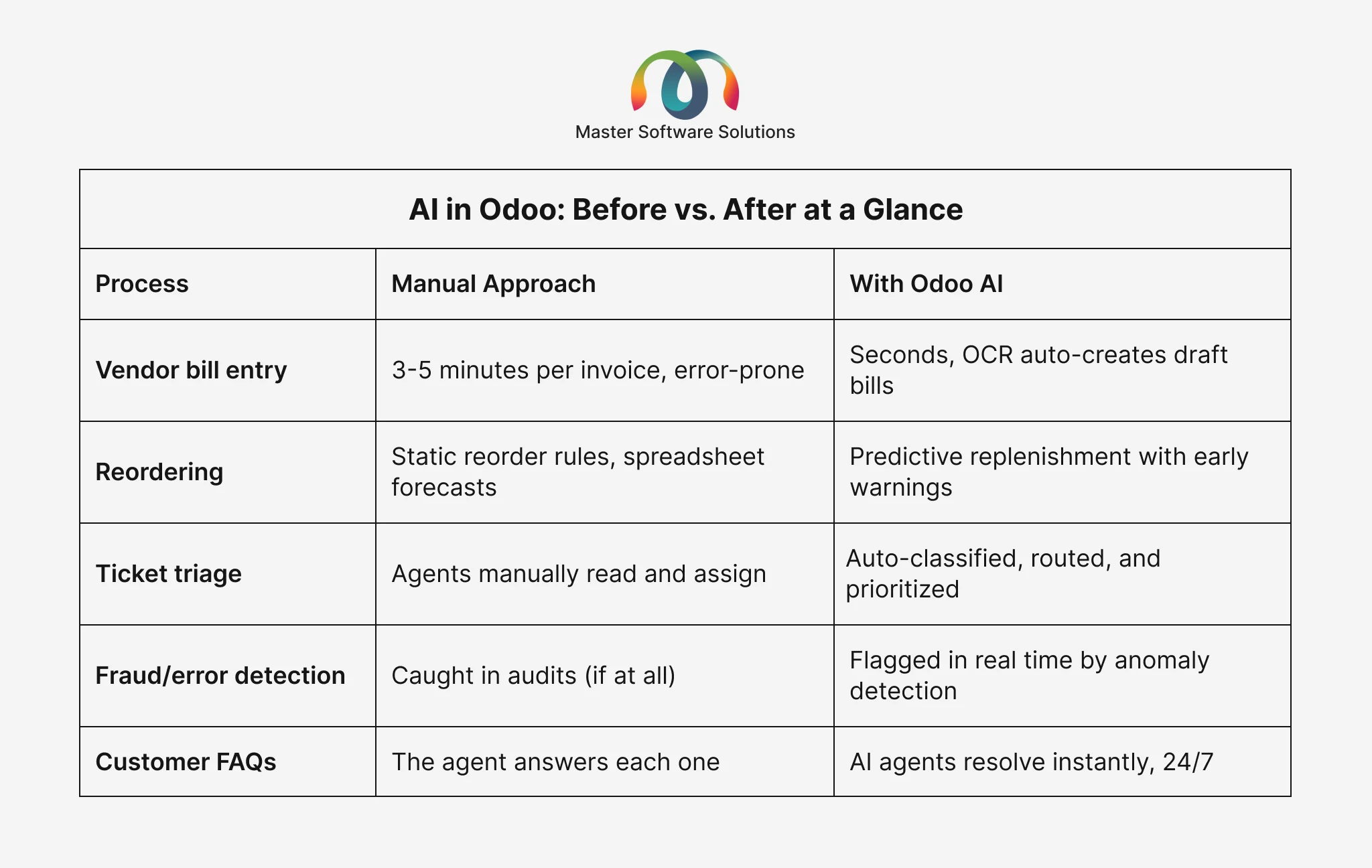
AI in Odoo: Before vs. After at a Glance
How to Implement AI in Odoo ERP: A Step-by-Step Roadmap
- Audit your current processes: Identify where your teams lose the most time to repetitive work; that’s where AI pays back fastest.
- Get your data in order: AI forecasting and matching are only as good as your master data. Clean vendor records, product data, and historical transactions first.
- Start with one high-impact module: Invoicing OCR is usually the quickest win, inventory forecasting delivers the largest financial impact, and support automation shows the fastest customer-facing results.
- Configure, test, and measure: Set baseline metrics (processing time, stockout rate, first-response time) to prove ROI.
- Customize where the defaults fall short: Every business has unique workflows. Custom AI-enabled modules, built through professional Odoo module development services, extend Odoo’s AI to your specific edge cases.
- Scale across departments: Once one team sees results, roll the same playbook out to CRM, HR, and manufacturing.
Common Challenges (and How to Avoid Them)
The most frequent failure mode isn’t the technology; it’s implementation shortcuts. The top challenges include:
- Poor data hygiene leads to poor forecasts
- Skipping user training leads to teams overriding AI suggestions out of habit
- Going live across every module at once overwhelms both staff and support structures.
A phased rollout with an experienced Odoo partner mitigates all three risks. It’s also wise to keep a human-in-the-loop review step for financial documents during the first months, tightening automation thresholds as confidence grows.
Why Choose Master Software Solutions for AI-Powered Odoo?
Master Software Solutions is an official Odoo partner with deep expertise across implementation, customization, migration, and module development. We do more than just swap out AI features; we also train your teams, clean up your data foundation, align them with your workflows, and track outcomes against predetermined KPIs. Whether you’re starting fresh with Odoo or upgrading an existing deployment to unlock AI capabilities, our consultants build a roadmap around your business priorities, not a generic checklist.
Ready to put AI to work in your ERP? Talk to our Odoo experts for a free discovery call; we’ll show you exactly which AI use cases will deliver ROI for your business.
Conclusion
AI in Odoo ERP isn’t a future promise; it’s shipping today, embedded in the modules your teams already use. Invoicing, inventory, and customer support are the three use cases where businesses see the fastest, most measurable returns: fewer errors, lower carrying costs, faster responses, and teams freed from repetitive work.
The differentiator isn’t access to the technology; every Odoo user has that. It’s implementation quality: clean data, the right configuration, and a phased rollout that your teams actually adopt.
Take the next step: Contact Master Software Solutions today for a free consultation and discover how AI-powered Odoo can transform your invoicing, inventory, and customer support operations.