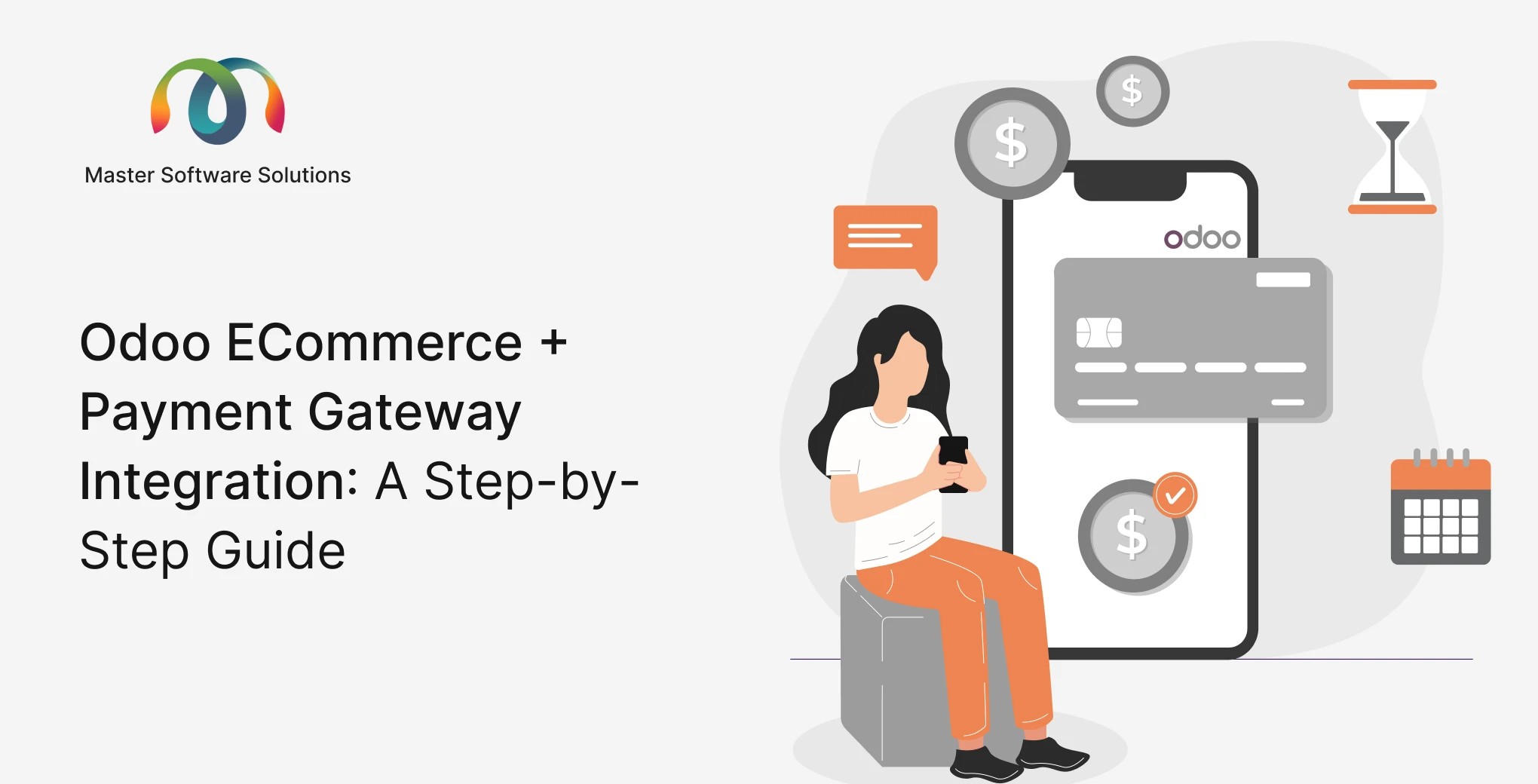
Running an online store without a reliable payment gateway is like opening a shop with no cash register. In today’s digital-first economy, seamless checkout experiences directly impact conversion rates, customer trust, and revenue. Odoo eCommerce, part of the powerful Odoo ERP ecosystem, offers native integration with the world’s most trusted payment providers, making it one of the most flexible platforms for online retail.
Whether you’re a startup launching your first digital storefront or an enterprise looking to consolidate operations under one roof, understanding how to integrate payment gateways into Odoo eCommerce is essential. This guide walks you through every step of the process, from choosing the right payment provider to going live, and explains why working with an experienced Odoo implementation partner in the USA makes all the difference.
Ready to integrate Odoo eCommerce for your business? Talk to our Odoo implementation consultants today
What Is Odoo eCommerce?
Odoo eCommerce is a fully integrated online store module built directly into the Odoo ERP platform. Unlike standalone platforms like Shopify or WooCommerce, Odoo eCommerce shares a single database with your inventory, accounting, CRM, and logistics modules. This means every order placed on your storefront is automatically reflected across your entire business — no manual data entry, no third-party sync tools, no data silos.
Key capabilities include:
- Drag-and-drop website builder
- Real-time inventory tracking
- Automated invoicing and tax calculation
- Multi-currency and multilingual support
- Built-in SEO tools
- Native payment gateway integrations
As a business solution, Odoo eCommerce is best leveraged as part of a broader Odoo ERP implementation, where every department, from warehouse to finance, operates in sync.
Why Payment Gateway Integration Matters for Your Odoo Store
A payment gateway is the technology that authorizes and processes online transactions between your customer and your bank. Integrating the right gateway with Odoo eCommerce affects:
- Checkout conversion rates: Frictionless payment experiences reduce cart abandonment
- Security and compliance: PCI-DSS compliance protects both you and your customers
- Accounting accuracy: Payments auto-reconcile in Odoo’s accounting module
- Customer trust: Recognized brands (PayPal, Stripe) increase buyer confidence
- International sales: Multi-currency support enables cross-border commerce
Choosing the wrong gateway, or implementing it incorrectly, leads to failed transactions, compliance risks, and lost revenue. This is why many businesses rely on professional Odoo ERP implementation services to get the integration right the first time.
Supported Payment Gateways in Odoo
Odoo supports a wide range of payment providers out of the box. Here are the most commonly used:
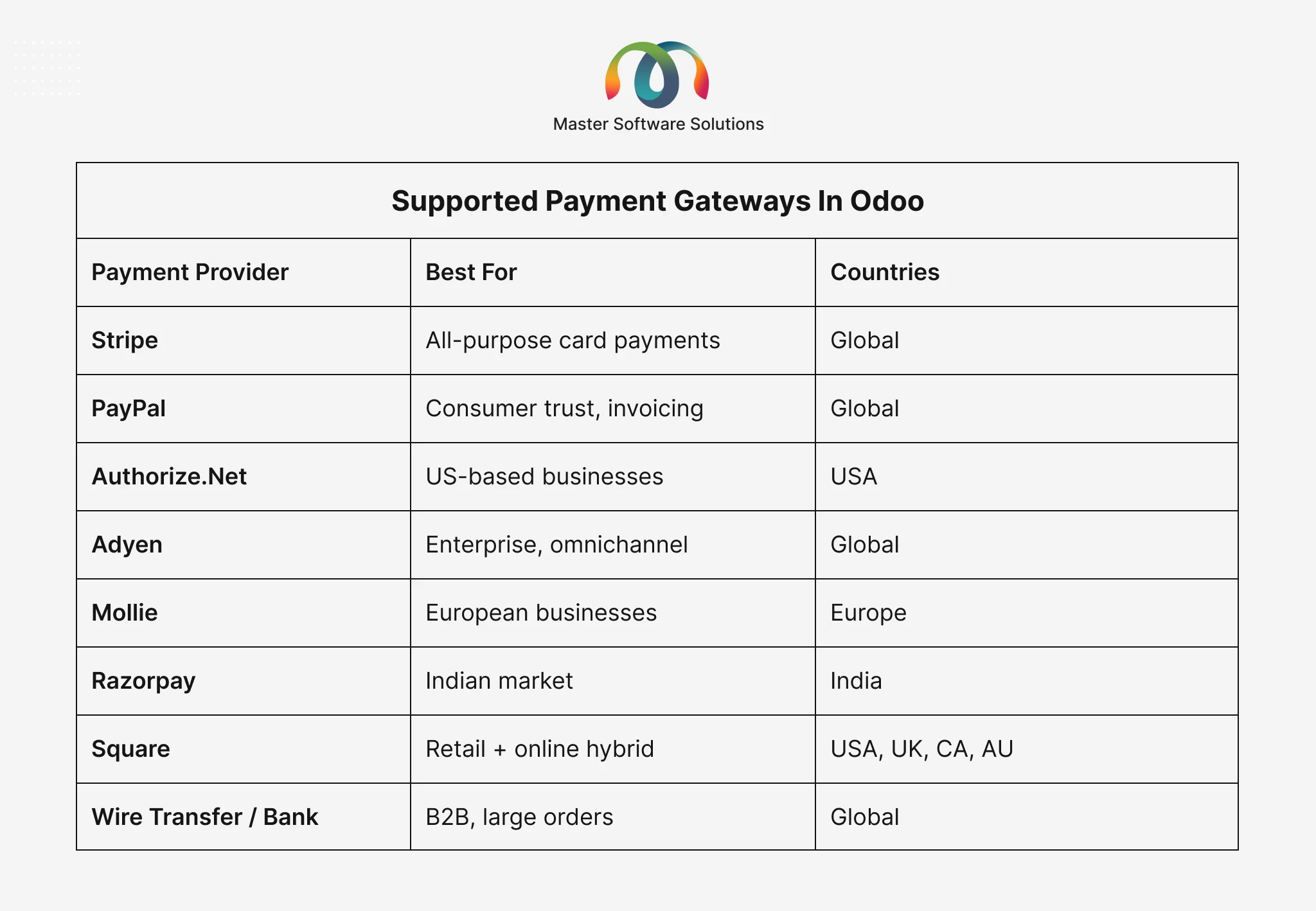
With Odoo 19 implementation, several enhancements have been made to the payment provider module, including improved tokenization support, stronger webhook handling, and a more streamlined provider configuration interface, reducing setup time significantly.
Step-by-Step Guide: Integrating a Payment Gateway with Odoo eCommerce
Step 1: Access the Odoo Payment Providers Settings
- Log in to your Odoo backend as an Administrator.
- Navigate to Website → Configuration → Payment Providers (or Accounting → Configuration → Payment Providers depending on your Odoo version).
- You’ll see a list of all available payment providers. Each can be toggled between Test, Enabled, and Disabled states.
Pro Tip: Always test in sandbox/test mode before going live. A misconfigured gateway can block all checkout transactions on your store.
Step 2: Choose and Configure Your Payment Provider
Let’s use Stripe as an example, one of the most popular choices for businesses using Odoo in the USA.
- Click on Stripe from the provider list.
- Set the State to Test Mode initially.
- Enter your Publishable Key and Secret Key (obtained from your Stripe Dashboard at stripe.com).
- Configure the following options:
- Payment Journal: Select or create an accounting journal (e.g., “Stripe Payments”)
- Supported Currencies: Choose which currencies you’ll accept
- Save Cards: Enable if you want customers to save payment methods
- Capture Method: Automatic (charge immediately) or Manual (authorize now, charge later)
- Click Save.
Step 3: Set Up Webhooks
Webhooks allow Stripe (or any provider) to notify your Odoo instance about payment events — successful charges, refunds, disputes, etc.
- In your Stripe Dashboard, go to Developers → Webhooks.
- Add a new endpoint: https://yourdomain.com/payment/stripe/webhook
- Select events to listen for: payment_intent.succeeded, payment_intent.payment_failed, charge.refunded
- Copy the Webhook Signing Secret and paste it into Odoo’s Stripe configuration under Webhook Secret.
Proper webhook configuration is critical for payment status updates to reflect correctly in Odoo’s accounting module. This is a step many DIY setups get wrong, and a core part of what our Odoo implementation services team handles for clients.
Step 4: Configure Payment Methods on Your eCommerce Store
- In Odoo backend, navigate to Website → Configuration → Settings.
- Under Shop — Checkout, enable Show Available Payment Providers.
- Go to your Website → Shop in frontend view, navigate to a product and proceed to checkout to verify the payment option appears.
- Customize the payment page layout via Website → eCommerce → Products or the website builder.
Step 5: Test Transactions in Sandbox Mode
Before going live, run through the following test scenarios:
- Successful payment with a test card (e.g., Stripe test card: 4242 4242 4242 4242)
- Declined payment test
- 3D Secure authentication flow
- Partial refund scenario
- Multi-currency checkout (if applicable).
Verify that each test transaction creates the correct:
- Sale order in Odoo Sales
- Invoice in Odoo Accounting
- Payment entry in the configured journal
Step 6: Switch to Live Mode and Go Live
Once testing is complete:
- Return to Website → Configuration → Payment Providers → Stripe.
- Change State from Test to Enabled.
- Replace test API keys with your live Publishable Key and Secret Key.
- Update the webhook endpoint in Stripe to point to your live domain.
- Place a real small-value test transaction to confirm end-to-end flow.
Step 7: Configure Accounting Reconciliation
One of Odoo’s most powerful features is automatic bank reconciliation. After go-live:
- Navigate to Accounting → Accounting → Bank & Cash.
- Match your Stripe payouts with the Odoo journal entries.
- Set up automatic reconciliation rules in Accounting → Configuration → Reconciliation Models.
This eliminates manual bookkeeping and ensures your financial data is always accurate — a major advantage of choosing Odoo over fragmented solutions.
Multi-Payment Gateway Setup: Supporting Multiple Providers
Many businesses want to offer customers choice, such as PayPal for consumer convenience, Stripe for card payments, and bank transfer for large B2B orders. Odoo natively supports this.
To enable multiple gateways:
- Configure each provider separately following the steps above.
- In Website → Configuration → Settings, ensure all desired providers are active.
- Assign different providers to different customer groups or order values using Odoo’s Pricelists and Payment Provider rules (available in Odoo 17+ and enhanced in Odoo 19).
Common Challenges and How to Avoid Them
Even with Odoo’s intuitive setup, payment integration can run into issues. Here’s what to watch for:
SSL Certificate Issues
Payment providers require HTTPS. Ensure your Odoo domain has a valid SSL certificate before configuring any live payment gateway.
Currency Mismatch Errors
If your Odoo accounting currency doesn’t match your payment provider’s settlement currency, transactions will fail. Configure multi-currency settings in Accounting → Configuration → Currencies first.
Webhook Delivery Failures
Firewalls or server misconfigurations can block webhook delivery. Work with your hosting provider or Odoo implementation consultant to allowlist payment provider IP ranges.
Duplicate Invoices
Caused by incorrect journal configuration. A certified Odoo implementation consultant will ensure each payment provider maps to a unique journal to prevent duplicate entries.
3DS2 Compliance Gaps
Strong Customer Authentication (SCA) is required in Europe under PSD2. Odoo 17+ and Odoo 19 handle this natively, but older versions may need custom development.
How Odoo 19 Improves Payment Gateway Integration
The latest Odoo 19 implementation brings significant improvements to the payment infrastructure:
- Unified Payment Provider Dashboard: All providers managed from a single, redesigned interface
- Improved Tokenization: Securely store customer payment methods with PCI-compliant tokens
- Enhanced Webhook Reliability: Built-in retry logic for failed webhook deliveries
- Faster Checkout Flow: Streamlined payment widget reduces checkout steps
- Expanded Provider Support: New native integrations with regional payment providers
- Better Refund Handling: Partial and full refunds now auto-reconcile without manual journal entries
Businesses planning an Odoo 19 implementation will benefit from lower integration complexity and reduced Odoo implementation cost compared to custom solutions built on older versions.
Odoo Implementation Cost: What to Expect for eCommerce + Payment Integration
Understanding Odoo implementation cost helps you budget realistically. For an eCommerce + payment gateway integration project, costs typically depend on:
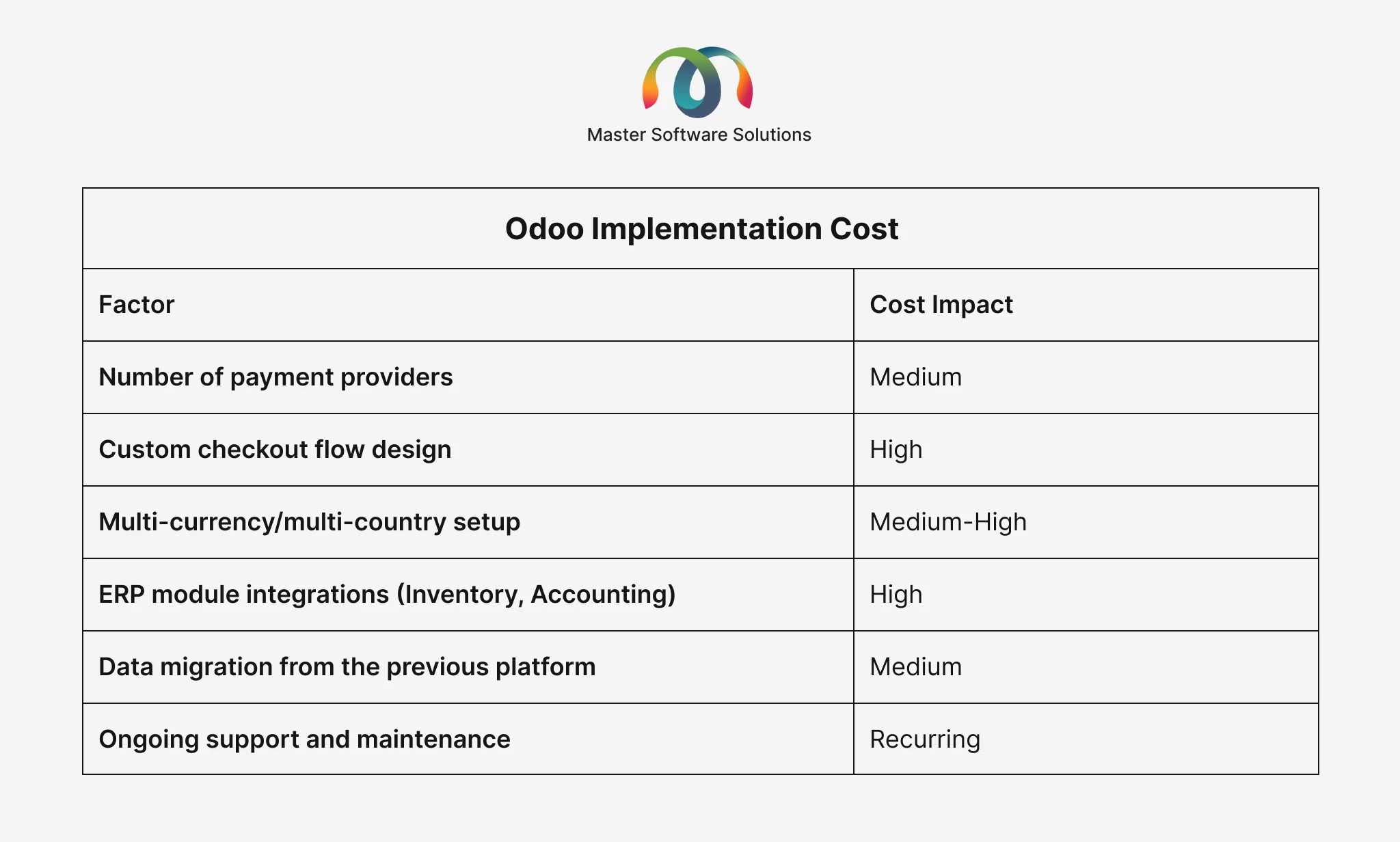
General cost ranges for Odoo ERP implementation services related to eCommerce setup in the USA:
- Basic eCommerce + 1 payment gateway: $3,000-$8,000
- Multi-gateway + accounting integration: $8,000-$20,000
- Enterprise-grade with custom workflows: $20,000+
Working with a certified Odoo implementation partner in the USA like Master Software Solutions ensures you avoid costly rework, compliance issues, and downtime.
Get a free implementation cost estimate for your project. Request a Quote from Master Software Solutions
Why Choose Master Software Solutions as Your Odoo Implementation Partner in the USA?
Master Software Solutions is a certified Odoo implementation partner in the USA with deep expertise in eCommerce, payment integrations, and full-suite ERP deployments. Our team of experienced Odoo implementation consultants has helped businesses across retail, distribution, manufacturing, and services industries go live with confidence.
What sets us apart:
- End-to-end Odoo ERP implementation services from discovery to post-launch support
- Certified Odoo consultants with hands-on experience across all Odoo versions including Odoo 17, 18, and 19
- Proven methodology for payment gateway setup, testing, and reconciliation
- Fixed-scope packages and transparent pricing to control Odoo implementation cost
- US-based support team with fast response times
- Proven track record fixing complex eCommerce integration issues — including Odoo–WooCommerce sync and SKU conflicts for wholesale manufacturers
Conclusion
Odoo eCommerce, paired with the right payment gateway, gives your business a competitive edge, from seamless customer checkout to automated financial reconciliation. The integration process is well-documented and powerful, but the details matter: SSL configuration, webhook reliability, currency mapping, and accounting journal setup all need to be right for your store to operate without disruption.
Whether you’re launching a new Odoo store or upgrading to an Odoo 19 implementation, partnering with experienced Odoo ERP implementation services professionals ensures you go live on time, on budget, and without surprises.
Master Software Solutions is ready to help. As a trusted Odoo implementation partner in the USA, we bring the expertise, process, and support your business needs to maximize the value of your Odoo investment.
Let’s build your Odoo eCommerce store the right way. Schedule a Free Consultation with Our Odoo Team