Odoo releases a major new version every year. For businesses running a standard Odoo deployment, that is straightforward to manage. For businesses with heavily customized environments, it is one of the most anxiety-inducing questions in the entire ERP lifecycle.
What happens to our customizations? Will the upgrade break them? How much will it cost to fix? How long will we be stuck on an old version?
These are not hypothetical concerns. Version upgrade failures are one of the most common causes of long-term ERP frustration. Businesses that were sold a heavily customized Odoo deployment without any upgrade strategy find themselves trapped: too dependent on old custom code to upgrade safely but too far behind on the platform to access new features, security patches, and performance improvements.
The good news is that this problem is almost entirely preventable. The key is how your Odoo implementation partner approaches customisation from day one, and whether they build an upgrade strategy into your engagement before they write a single line of code.
This blog explains how Odoo upgrades work, what upgrade-safe development actually means, and exactly how Master Software Solutions manages version migrations for our clients, including those we have already taken from Odoo version 16 all the way through to version 19.
“You will never be in a position where an upgrade surprises you. We plan for it in advance, test it in a staging environment first, and move to production only once everything is validated.” – Master Software Solutions
Why Odoo Version Upgrades Break Customisations, and Why They Don’t Have To
Not all customizations are created equal. Some are written with upgrades in mind; others are not. The difference between the two is not usually about the complexity of the feature being built; it is about the development standards and practices applied when the code is written.
When a developer writes custom Odoo code that directly modifies core platform files, overrides internal methods without following Odoo’s inheritance model, or relies on internal APIs that are subject to change between versions, the result is a customisation that is brittle, functional today, broken tomorrow.
Contrast this with customizations written using Odoo’s standard inheritance and extension patterns, which are specifically designed to remain stable across version upgrades. The same feature, built the right way, survives major version changes with far less remediation work.
The Two Types of Odoo Customization, and What Each Means for Upgrades
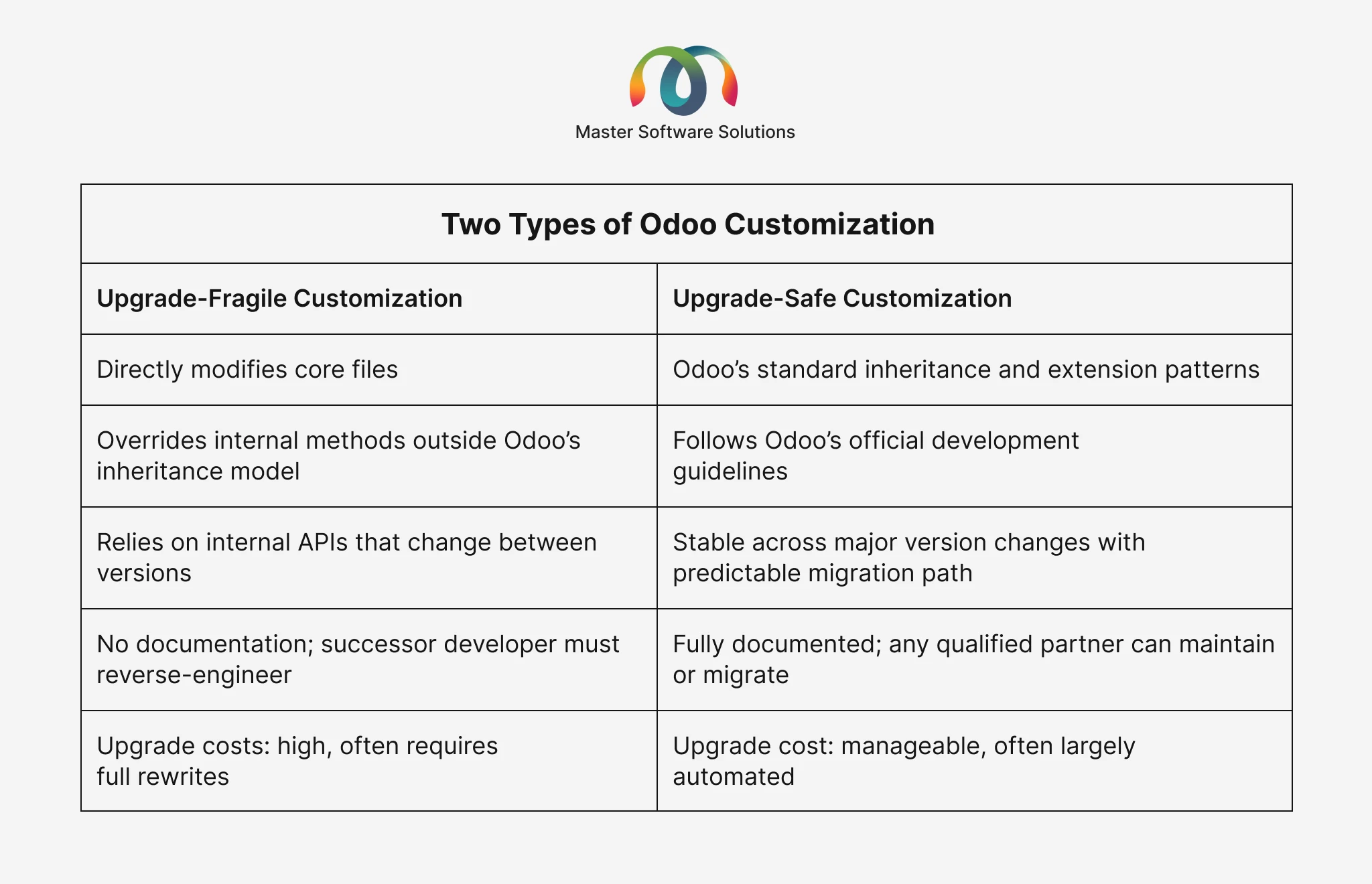
The choice between these two approaches is not made at upgrade time. It is made when the code is first written. This is why your upgrade strategy must be discussed before your implementation begins, not when you are staring down a version migration.
Red flag: If an Odoo partner cannot explain their upgrade-safe coding practices during the sales process, that is an important signal. It may mean they are not applying them. Ask specifically: how do you write custom modules to survive major Odoo version upgrades?
How Odoo’s Upgrade Process Actually Works
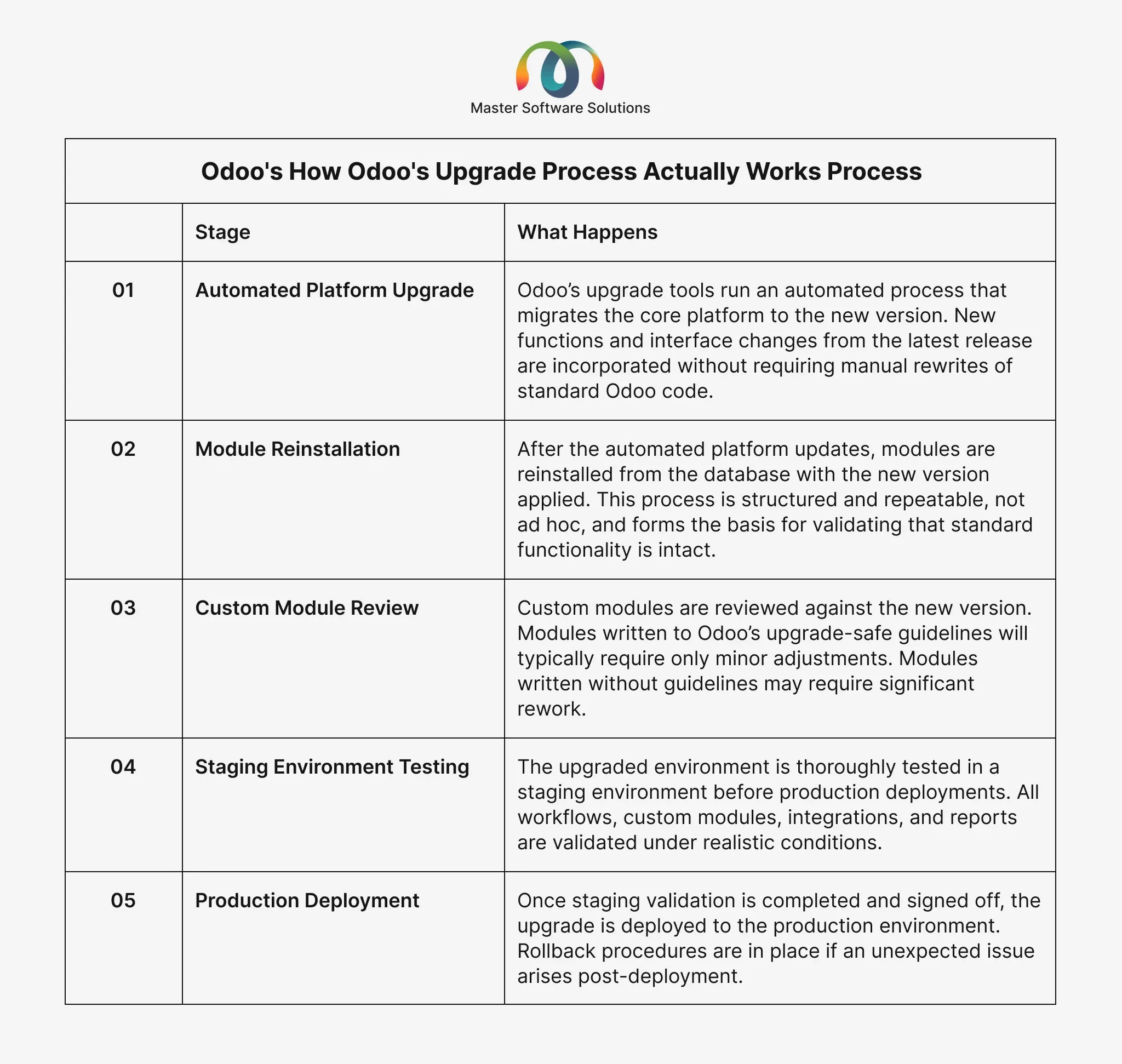
One of the most reassuring aspects of Odoo as a platform is that its upgrade process is largely automated and structured. Understanding how it works helps you have a more informed conversation with your implementation partner and ask better questions.
The key takeaway: the Odoo upgrade process is not a chaotic rewrite. It is a structured sequence of steps that, managed correctly by a prepared partner, is far less disruptive than most businesses fear.
Planning an Odoo version upgrade? Our team has successfully managed client migrations from Odoo 16 through to version 19. Speak to us about planning your upgrade before it becomes urgent. Discuss Your Upgrade Plan
How Master Software Solutions Manages Odoo Version Upgrades
We have successfully managed multiple Odoo version upgrades for existing clients, including migrations from version 16 through to version 19. Our approach is built on three commitments that we make from day one of every engagement, not when an upgrade is approaching.
Commitment One: Upgrade-Safe Coding From Day One
Every custom module we write follows Odoo’s official upgrade-safe development guidelines. This means using Odoo’s inheritance and extension patterns correctly, avoiding direct modifications to core platform files, and writing code that has a clear, predictable migration path between versions.
We do not take shortcuts in the initial build to save time, knowing those shortcuts will cost significantly more at upgrade time. Upgrade-safe development is a discipline applied consistently across every module we deliver — not selectively applied to modules we think might be upgraded soon.
Commitment Two: Thorough Customisation Documentation
Every customisation we build is fully documented. This includes what the module does, why it was built, how it interacts with Odoo core and other modules, and what migration considerations apply at the time of writing.
This documentation serves two purposes. First, it means that upgrade impact assessments can be completed quickly and accurately; we know exactly what we have built and where the upgrade-sensitive touchpoints are. Second, it means that any qualified Odoo developer, including a future partner or your internal team, can understand and maintain the codebase without starting from scratch.
Also Read: Odoo Versions Explained: Complete Guide From V14 to the Latest Version V19
Commitment Three: A Documented Upgrade Strategy From the Start
Every engagement includes a documented upgrade strategy. This covers the expected upgrade cadence for your Odoo version, how upgrades will be managed, what the testing and validation process looks like, and what the timeline and cost implications are for planned version migrations.
You will never receive a phone call saying your Odoo version is reaching end of life and you need to migrate urgently with no plan in place. We plan for upgrades as a routine, expected part of your Odoo lifecycle, not as a crisis to be managed reactively.
Our track record: We have managed Odoo version upgrades for clients across multiple industries, including migrations from version 16 through to the current version 19. Our upgrade-safe development practices mean our clients’ custom modules have required only targeted adjustments, not full rewrites, across major version transitions.
Questions to Ask Your Odoo Partner About Upgrade Management
Use this checklist when evaluating any Odoo implementation partner’s approach to version upgrades. These questions will quickly reveal whether they have a genuine upgrade strategy or are simply deferring the problem.
Q1. Do you write custom modules using Odoo’s upgrade-safe coding guidelines?
Ask for specifics, such as inheritance patterns, avoidance of core file modifications, and use of official APIs.
Q2. Is there a documented upgrade strategy included in the engagement?
A plan that exists only verbally is not a plan.
Q3. How do you document customizations for future upgrade assessments?
Documentation should be a deliverable, not an afterthought.
Q4. What is your process for testing upgrades before production deployment?
Staging environment testing is non-negotiable for any significant version migration.
Q5. Have you managed Odoo version upgrades for existing clients?
Track record is the most reliable evidence of upgrade management capability.
Q6. What does a typical upgrade cost, and what drives that cost?
Upgrade-safe code means predictable, manageable upgrade costs. Fragile code means unpredictable, escalating ones.
Q7. How will you notify us ahead of an upcoming version end-of-life?
Proactive planning is the mark of a partner who thinks beyond the initial implementation.
A partner who can answer all seven questions with specific, confident answers has an upgrade management approach worth trusting. One who deflects, generalizes, or defers the conversation is leaving you exposed.
About Master Software Solutions
Master Software Solutions is a specialist Odoo ERP implementation partner helping businesses streamline their operations through intelligent, tailored deployments of the Odoo platform.
We work with growing businesses across industries, from manufacturing and distribution to services and retail, delivering end-to-end Odoo implementations that cover everything from discovery and configuration through to training, go-live, long-term support, and version upgrade management.
We have successfully managed Odoo version migrations for clients from version 16 through to version 19. Every engagement includes upgrade-safe coding standards, thorough customisation documentation, and a documented upgrade strategy because we believe the best time to plan for an upgrade is before the implementation begins. Book a free consultion now.
Frequently Asked Questions
Q1. How often does Odoo release a new major version?
A1. Odoo releases a new major version annually, typically in the second half of the year. Each version introduces new features, interface improvements, and performance enhancements. Odoo also releases regular minor updates within a version for bug fixes and security patches. Understanding this cadence is important for planning your upgrade timeline and budget.
Q2. How long is each Odoo version supported?
A2. Odoo provides official bug fix support for the current and previous major versions. Security patches are maintained for a longer period. As a practical planning guideline, most businesses should expect to migrate to a new major version every two to three years to stay within supported, actively maintained releases. We advise every client on the support status of their current version as part of our ongoing engagement.
Q3. Will all of our customizations break when we upgrade?
A3. Not necessarily, and with proper upgrade-safe development practices, the impact is significantly reduced. Customizations written to Odoo’s official guidelines will typically require only targeted adjustments between major versions, not full rewrites. The extent of upgrade work depends directly on how the original customizations were written. This is one of the most important reasons to establish upgrade-safe coding standards at the start of your implementation, not after you have accumulated years of fragile custom code.
Q4. What is the difference between a major version upgrade and a minor update in Odoo?
A4. A minor update (for example, moving from Odoo 17.0 to 17.1) typically involves bug fixes, security patches, and small improvements. These are generally low-risk and straightforward to apply. A major version upgrade (for example, from Odoo 17 to Odoo 18) involves architectural changes, new features, and interface updates that require a more structured migration process, including staging environment testing and custom module review.
Q5. How long does an Odoo version typically take?
A5. For a standard Odoo deployment with limited customisation, a major version upgrade can be completed in a matter of days. For heavily customized environments, the timeline depends on the volume and complexity of custom modules and the extent of testing required. Because we maintain thorough documentation and write upgrade-safe code, our clients typically experience shorter, more predictable upgrade timelines than businesses migrating away from poorly documented or fragile implementations.
Q6. What happens if we skip several Odoo versions before upgrading?
A6. Odoo provides upgrade paths between versions, but skipping multiple major versions adds complexity. The further behind you fall, the more accumulated changes there are to migrate through, and the more likely it is that undocumented or fragile customizations will create significant remediation work. We strongly recommend staying within one to two major versions of the current release, and we proactively notify clients when their version is approaching end-of-active-support status.
Q7. Can we test the upgrade on a copy of our live environment before committing to it?
A7. Yes, and this is not optional for any significant version migration. Every upgrade we manage is first deployed and validated in a staging environment that mirrors your production setup. This allows us to identify and resolve any compatibility issues with custom modules, validate all critical business workflows, and get your team’s sign-off before a single change is made to your live Odoo environment.
Q8. We are currently stuck on an old Odoo version because our customizations cannot be migrated. Can you help?
A8. Yes. This is one of the most common situations we encounter when businesses approach us after a previous implementation. Our first step is a customisation audit, assessing what has been built, how it was written, and what a migration path looks like. In many cases, customizations can be rewritten to upgrade-safe standards and migrated to a current version in a structured program. We will give you an honest assessment of the scope and cost involved before any work begins.