If your sales team lives in Odoo and your accountant swears by QuickBooks, you already know the pain: invoices entered twice, payments that don’t match, and month-end reconciliation that drags on for days. The fix isn’t choosing one platform over the other; it’s a well-built Odoo QuickBooks integration that keeps both systems in sync automatically.
This guide will explain how the integration works, which data you should sync, the available methods, common pitfalls, and how to do it correctly the first time.
Why Businesses Run Odoo and QuickBooks Together
Odoo is a powerful ERP that handles sales, inventory, CRM, manufacturing, and eCommerce in one place. QuickBooks, meanwhile, remains the accounting tool of choice for millions of small and mid-sized businesses and for many accountants and bookkeepers who simply won’t work in anything else.
So in businesses and migration, many companies keep QuickBooks for accounting and compliance while running operations on Odoo. That’s a smart setup, until data starts living in two places. Without an Odoo accounting integration, teams end up:
- Manually re-entering invoices until payments are made in both systems
- Reconciling mismatched customer and product records
- Working with outdated financial reports
- Losing hours every week to copy-paste work that software should handle
A proper Odoo ERP integration with QuickBooks eliminates all of this by creating a single, automated flow of financial data.
What Is Odoo QuickBooks Integration?
Odoo QuickBooks integration is the process of connecting your Odoo ERP to QuickBooks (Online or Desktop) so that financial data, including invoices, payments, customers, vendors, products, taxes, and journal entries, syncs automatically between the two platforms, either in real time or on a schedule.
Depending on your workflow, the sync can be:
- One-way: Odoo pushes invoices and payments into QuickBooks (most common).
- Two-way: Changes in either system update the other.
- Scheduled or real-time: Batched nightly syncs or instant updates via webhooks
The integration is typically built using Odoo API integration, Odoo’s XML-RPC/JSON-RPC APIs on one side, and the QuickBooks Online API on the other. You can review the technical capabilities in the official Odoo external API documentation and the QuickBooks Online API developer docs.
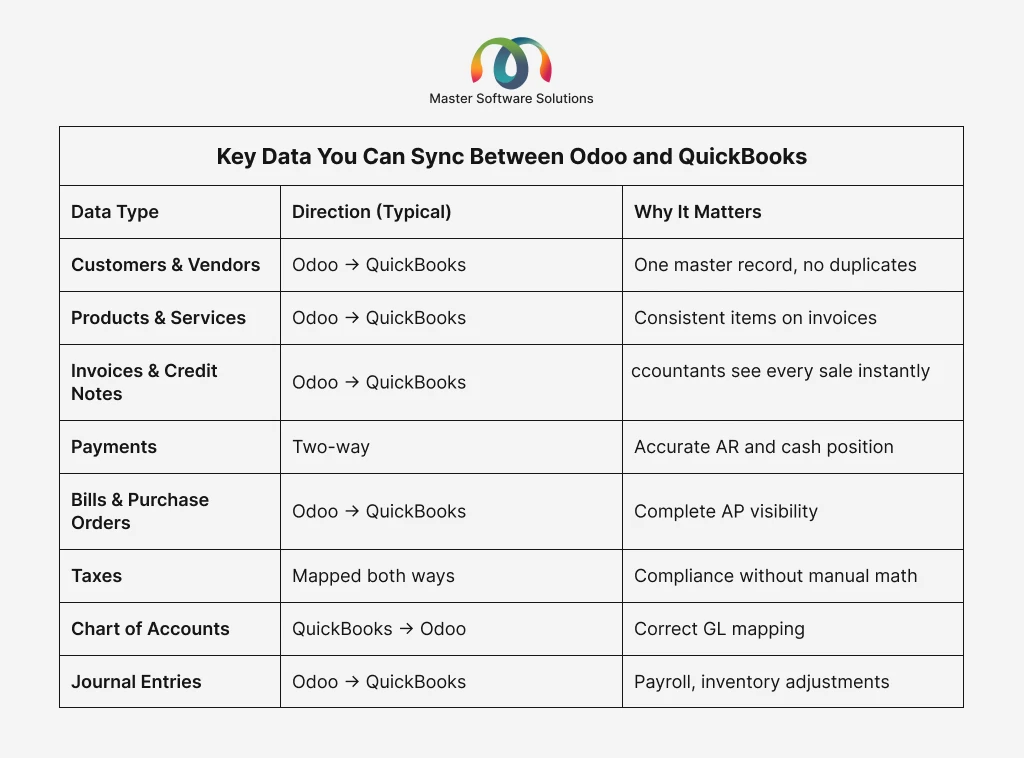
Key Data You Can Sync Between Odoo and QuickBooks
A well-scoped integration usually covers:
Top Benefits of Odoo QuickBooks Integration
Eliminate Double Data Entry
Every invoice created automatically in Odoo appears in QuickBooks. It doesn’t need retyping, no missed entries, and no transposed digits.
Real-Time Financial Visibility
Your P&L and cash flow reports in QuickBooks reflect what’s actually happening in operations today, not last week.
Faster, Cleaner Reconciliation
When payments sync both ways, bank reconciliation goes from a multi-day chore to a quick review.
Fewer Errors, Better Compliance
Automated tax mapping and consistent customer records mean fewer audit headaches and cleaner books at tax time.
Scales With Your Business
As order volume grows, an integrated system handles 10,000 invoices as easily as 100. Manual entry doesn’t.
Methods to Integrate Odoo with QuickBooks
Ready-Made Connector Apps
Third-party connectors from the Odoo App Store or QuickBooks marketplace offer quick setup for standard workflows. Good for simple, one-way syncs, but they often break down with custom fields, multi-currency, or complex tax rules.
Middleware Platforms (iPaaS)
Tools like integration platforms can bridge the two systems without code. They work, but add a monthly subscription and another vendor to manage.
Custom Odoo API Integration (Recommended for Growing Businesses)
A custom Odoo API integration created by an Odoo integration expert accurately maps your workflows, custom fields, multi-company setups, specific tax jurisdictions, and approval chains. This is where professional Odoo integration services pay for themselves: you get a sync designed around your business, not the other way around.
Not sure which approach fits your setup? Talk to our Odoo integration experts for a free assessment of your Odoo–QuickBooks workflow.
Step-by-Step: How Odoo-QuickBooks Integration Works
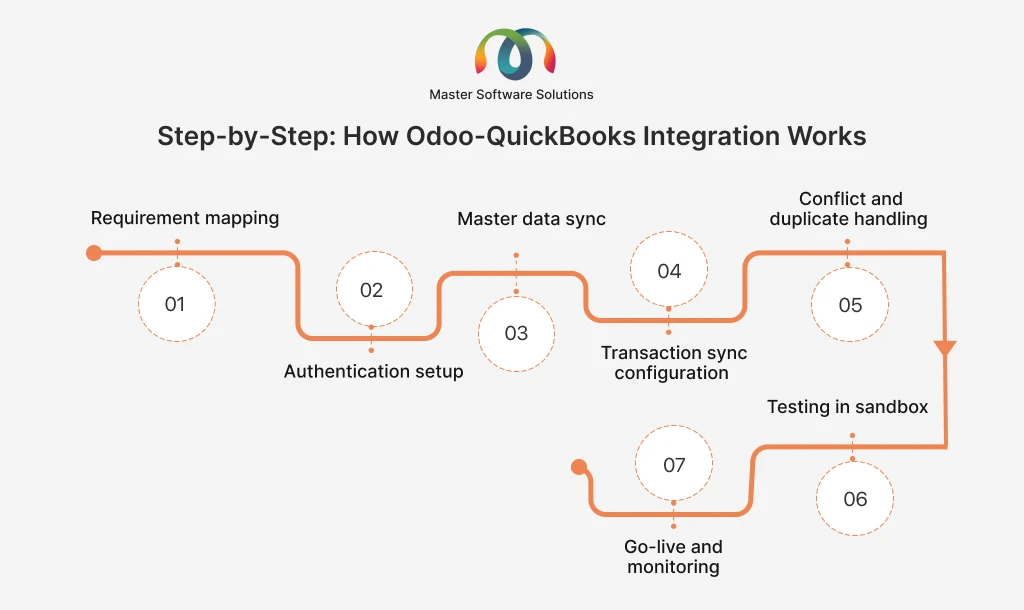
Requirement mapping
Identify which records sync, in which direction, and how fields map (e.g., Odoo analytic accounts → QuickBooks classes).
Authentication setup
Connect via OAuth 2.0 for QuickBooks Online and API keys/RPC for Odoo.
Master data sync
Align the chart of accounts, tax codes, customers, and products first.
Transaction sync configuration
Set rules for invoices, payments, bills, and journal entries.
Conflict and duplicate handling
Define the system of record for each data type.
Testing in sandbox
Validate with real-world scenarios: partial payments, refunds, and multi-currency.
Go-live and monitoring
Deploy with sync logs, error alerts, and ongoing support.
Common Challenges (and How Experts Solve Them)
- Duplicate records: Solved with unique external IDs and match-before-create logic.
- Tax mapping mismatches: Solved by building a tax mapping table validated by your accountant.
- Multi-currency rounding differences: Solved with consistent exchange-rate sources and rounding rules.
- API rate limits: Solved with queued, batched syncs and retry logic.
- Historical data migration: Solved with a one-time controlled import before enabling live sync.
These are the exact issues that derailed DIY attempts, and why most businesses hire professional Odoo integration services rather than troubleshooting sync failures during the month-end close.
Beyond QuickBooks: Building a Fully Connected Odoo Ecosystem
QuickBooks is usually just the start. Once your accounting syncs cleanly, the same integration approach extends across your stack:
- Odoo Shopify integration and Odoo WooCommerce integration: sync orders, customers, and inventory from your online store, completing the Odoo e-commerce integration loop from checkout to ledger.
- Odoo payment gateway integration: Stripe, PayPal, and other gateways feeding payments straight into Odoo and on to QuickBooks.
- Odoo POS integration: in-store sales flowing into the same unified accounting pipeline.
When every channel feeds one system of record, your books stay accurate no matter where the sale happens. Explore our full Odoo multi-platform integration services to see what a connected setup looks like.
Why Choose Master Software Solutions as Your Odoo Integration Expert
At Master Software Solutions, we’ve delivered Odoo integration projects across retail, distribution, food & beverage, eCommerce, and professional services. Our team handles the full lifecycle, from Odoo consulting and implementation to customization and ongoing support.
What you get:
- Certified Odoo developers with deep QuickBooks API experience
- Custom field mapping, multi-currency, and multi-company support
- Sandbox-tested deployments with zero disruption to live books
- Post-launch monitoring, sync logs, and dedicated support
Ready to stop entering data twice? Hire our Odoo developers and get your Odoo–QuickBooks sync running in weeks, not months.
Final Thoughts
Running Odoo for operations and QuickBooks for accounting doesn’t have to mean double work. With the right Odoo QuickBooks integration, your invoices, payments, and financial reports stay in sync automatically, giving you accurate books, faster closes, and hours back every week.
The difference between a sync that “mostly works” and one you never think about comes down to who builds it.
Get accounting off your plate. Book a free consultation with an Odoo integration expert at Master Software Solutions today.