Manual bookkeeping is one of the most expensive habits a growing business can keep. Every invoice retyped, every payment reconciled by hand, and every sales report copied between systems adds hours of work and multiplies the risk of errors. If your sales, inventory, and finance teams work in disconnected tools, your books are always a step behind your business.
Odoo accounting integration solves this by connecting your accounting module directly to the systems where transactions actually happen for your eCommerce store, POS terminals, payment gateways, CRM, and inventory. Instead of entering data twice, your ERP data flows automatically into your ledgers, so your books update themselves in real time.
In this guide, we explain how Odoo ERP integration automates accounting, which integrations deliver the biggest impact, and how to plan a smooth implementation with professional Odoo integration services.
Struggling with manual reconciliation? Talk to our Odoo integration experts for a free consultation on automating your books.
What Is Odoo Accounting Integration?
Odoo accounting integration is the process of connecting Odoo’s Accounting module with other business applications, within and outside the Odoo ecosystem, so financial data syncs automatically. That includes native links between Odoo apps (Sales, Inventory, Purchase, and POS) and third-party connections such as Odoo QuickBooks integration, Odoo Shopify integration, and Odoo payment gateway integration.
When integrated correctly:
- Every confirmed sales order automatically generates a draft invoice.
- Payments captured online post directly to the correct journal.
- Inventory movements update the cost of goods sold in real time.
- Bank feeds reconcile against open invoices with minimal manual effort.
The result is a single source of financial truth. According to Odoo’s official accounting documentation, the platform supports automated invoicing, bank synchronization, multi-currency handling, and tax reports across 70+ localizations, capabilities that only reach their full potential when your surrounding systems feed data into them.
Why Businesses Are Automating Their Books with ERP Data
The demand for connected finance systems keeps climbing. The global ERP software market continues to grow at double-digit rates as companies replace spreadsheets and siloed apps with integrated platforms, according to market research from Grand View Research. The drivers are practical:
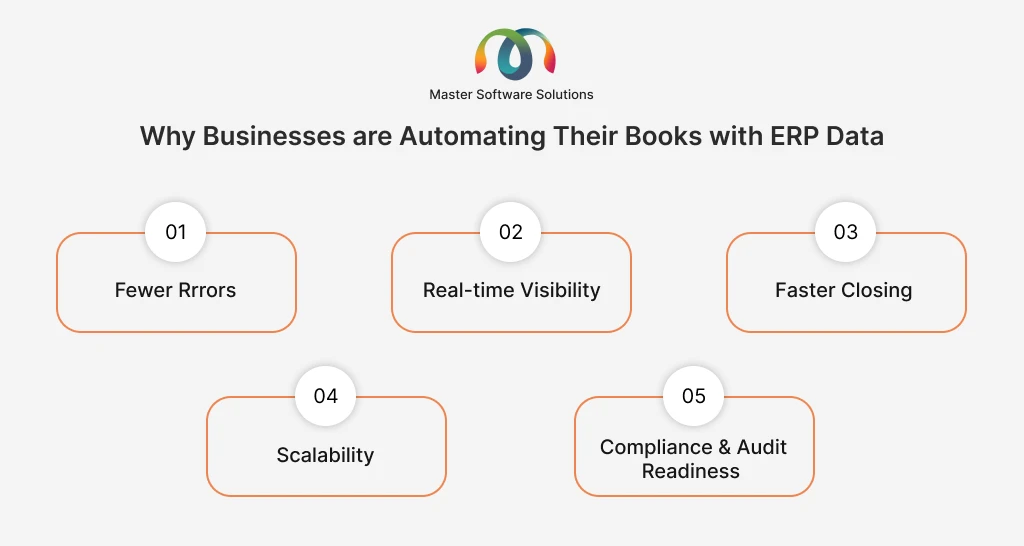
Fewer errors
Manual data entry has a known error rate. Automated syncing via Odoo API integration eliminates the need; the amount your customer paid is in your ledger.
Real-time visibility
When ERP data flows straight into accounting, your P&L, cash position, and receivables aging are current every morning, not at month-end.
Faster closing
Businesses that integrate accounting with sales and inventory routinely cut their monthly close from weeks to days because reconciliation happens continuously.
Scalability
An integrated system handles 10,000 transactions with the same effort as 100. Your finance headcount doesn’t need to grow with your order volume.
Compliance and audit readiness
Every automated entry includes a traceable source document, making auditing and tax filing easier.
Key Odoo Accounting Integrations That Automate Your Books
Odoo-QuickBooks Integration
Many businesses run Odoo for operations while their accountant stays on QuickBooks. Odoo QuickBooks integration synchronizes data between the two systems, including invoices, bills, payments, customers, and chart of accounts, to keep operations and accounting in sync. It’s also a common bridge strategy for companies migrating from QuickBooks to Odoo Accounting in phases.
Odoo-Shopify Integration
For online retailers, Odoo Shopify integration pushes every Shopify order, refund, and payout into Odoo automatically. Sales revenue, transaction fees, taxes, and inventory adjustments post to the right accounts without a single CSV export. Multi-store and multi-currency setups are fully supported.
Odoo WooCommerce Integration
WordPress-based stores get the same benefit through Odoo WooCommerce integration: orders, customers, product catalogs, and stock levels sync in both directions, and each completed order generates the corresponding accounting entries in Odoo.
Odoo Payment Gateway Integration
Odoo payment gateway integration connects Stripe, PayPal, Razorpay, Authorize.net, and other processors directly to your invoices. Customers pay online, the payment is recorded against the invoice, and gateway fees are credited to the appropriate expense account. Reconciliation that once took days happens in seconds.
Odoo POS Integration
Retailers running physical stores use Odoo POS integration to close each register session straight into accounting. Daily sales, cash counts, card settlements, and taxes flow into journals automatically, across every location.
Odoo eCommerce Integration (Native)
If you use Odoo’s own website builder and web store, Odoo eCommerce integration is native: the storefront, inventory, and accounting share one database, so there is literally nothing to sync.
Odoo API Integration for Custom Systems
Legacy ERP? Industry-specific billing tool? In-house software? Odoo API integration uses Odoo’s XML-RPC and JSON-RPC APIs (and REST via connectors) to build custom, real-time bridges between Odoo Accounting and virtually any external system.
Not sure which integration fits your stack? Explore our Odoo multi-platform integration services or request a quote, and we’ll map it for you.
How Odoo Accounting Integration Works: From ERP Data to Automated Books
A typical automated flow looks like this:
- Transaction occurs: a customer places an order on Shopify, pays via Stripe, or checks out at your POS.
- Data syncs to Odoo: the connector or API pushes the order, customer, and payment data into Odoo in real time or on a schedule.
- Accounting entries generate automatically: Odoo creates the invoice, registers the payment, books the taxes, and updates COGS from inventory valuation.
- Bank reconciliation matches automatically: Odoo’s bank feeds match statement lines to open entries using smart matching rules.
- Reports update instantly: your P&L, balance sheet, and tax reports reflect the transaction the moment it happens.
The critical engineering work sits in steps 2 and 3: field mapping, tax logic, currency conversion, and error handling. This is where an experienced Odoo integration expert makes the difference between an integration that quietly works for years and one that produces mismatched books every month.
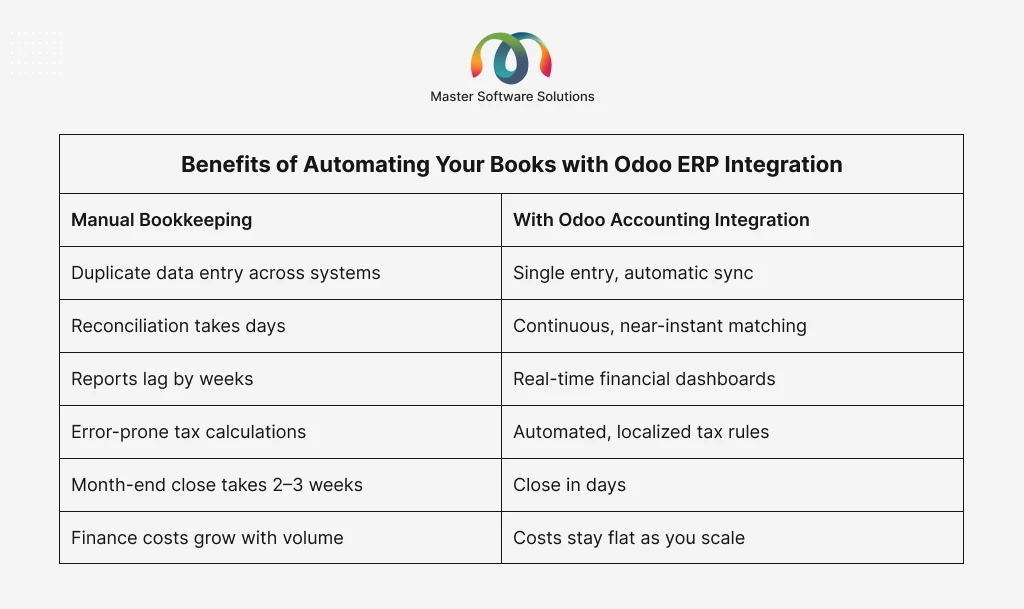
Benefits of Automating Your Books with Odoo ERP Integration
How to Implement Odoo Accounting Integration: Step-by-Step
Audit your current systems
List every tool that touches money, including storefronts, gateways, POS, payroll, and banks, and identify where data is entered manually today.
Define your chart of accounts and tax mapping
Decide how each transaction type should post before any connector is switched on.
Choose the right integration method
Native Odoo modules, marketplace connectors, or custom Odoo API integration each fits different complexity levels.
Migrate and clean historical data
Duplicate customers and inconsistent product codes will break automation. Clean first.
Configure, test in staging, and validate
Run parallel books for at least one cycle and reconcile automated output against manual records.
Go live and monitor
Set up sync-failure alerts and review exception logs weekly for the first quarter.
Optimize continuously
Add automated follow-ups, budgets, and analytic accounting once core flows are stable.
Partnering with a certified team for Odoo implementation services compresses this timeline and avoids the costly rework that follows a bad first configuration.
Common Challenges (and How an Odoo Integration Expert Solves Them)
Data mismatches between systems
Different platforms model taxes, discounts, and refunds differently. An Odoo integration expert builds mapping rules that translate them correctly rather than letting differences pile up as reconciliation gaps.
Duplicate records
Poorly configured syncs create duplicate contacts and products. Proper deduplication keys and sync-direction rules prevent this.
API limits and sync failures
High-volume stores can hit rate limits. Experienced developers implement queued, batched syncs with retry logic.
Multi-currency and multi-entity complexity
Exchange-rate handling and inter-company transactions need careful setup; this is standard territory for a seasoned Odoo ERP integration partner.
Version upgrades
Custom connectors must survive Odoo version migrations. Building on supported APIs and documented customizations keeps upgrade costs low.
Why Choose Master Software Solutions for Odoo Integration Services
Master Software Solutions is an official Odoo partner delivering end-to-end Odoo integration services, from QuickBooks, Shopify, and WooCommerce connectors to fully custom API bridges. Our team has implemented Odoo across retail, manufacturing, distribution, logistics, and food & beverage businesses, so we understand both the accounting logic and the operational reality behind your numbers.
We handle consulting, implementation, custom module development, data migration, and long-term support under one roof. If you need dedicated capacity, you can hire Odoo developers who work as an extension of your team.
Ready to automate your books? Book a free consultation with our Odoo integration experts and get a tailored integration roadmap within days.
Final Thoughts
Your accounting team shouldn’t spend its time copying numbers between systems; it should spend it analyzing them. Odoo accounting integration turns your ERP data into a self-updating financial engine: sales, payments, inventory, and taxes flow into accurate, audit-ready books automatically.
The technology is proven. The only variable is implementation quality, and that’s a solvable problem with the right partner.
Automate your books with Odoo. Get in touch with Master Software Solutions today for a free integration assessment.