What Is Odoo 19?
Odoo is an open-source, modular ERP platform used by over 12 million users worldwide. Businesses of all sizes, from solo founders to large enterprises, use it to manage sales, accounting, inventory, HR, manufacturing, marketing, and more from a single system.
Odoo 19 was officially released in September 2025, followed by incremental updates (19.1 in January 2026, 19.2 and 19.3 in May 2026), each adding further enhancements. The release is defined by three themes: AI-first workflows, 40% faster performance, and industry depth.
If you’re new to Odoo’s release history, our guide to Odoo Versions: Complete Guide From V14 to the Latest Version V19 provides a full breakdown of how the platform has evolved, useful context before diving into what’s new in version 19.
Ready to explore Odoo 19 for your business? Talk to Our Odoo Experts.
What’s New in Odoo 19 at a Glance
- 47 new features across core modules
- 40% faster UI and page load performance
- Native dark mode across all view types
- Collapsible sidebar navigation replacing the top menu bar
- AI agents that can create and update records autonomously
- Offline-first mobile app for field workers
- 100+ new industry-specific starter packages
- Two brand-new modules: Equity and ESG
- 35+ modules significantly updated in the 19.3 patch
Odoo 19 Module Overview
CRM: Smarter Lead Management
Odoo’s CRM module has long been a core part of the platform, and version 19 raises the bar further. The pipeline now features AI-driven lead scoring that analyzes your historical win/loss data to surface the opportunities most likely to convert, helping your sales team focus their energy where it counts.
Key updates in Odoo 19 CRM:
- AI-powered lead scoring and prioritisation
- Natural language search across your pipeline
- Improved activity scheduling and follow-up reminders
- Deeper integration with Email Marketing for automated nurturing sequences
- Real-time sync with Sales, Accounting, and Inventory
For businesses managing large volumes of inbound leads, the AI scoring alone can
meaningfully shift conversion rates without adding headcount.
Looking to implement Odoo CRM? Explore our Odoo CRM consulting services
Sales: From Quote to Cash
The Sales module connects your CRM pipeline directly to order fulfillment and accounting. In Odoo 19, the focus is on speed and accuracy, giving sales reps the tools to close faster and with fewer errors.
What’s new in Odoo 19 Sales:
- AI-assisted quote generation using product and customer history
- Auto-fill fields based on past orders
- Tighter price list and discount management
- Direct integration with E-Commerce for unified B2B and B2C selling
- Enhanced customer portal for order tracking and approvals
When a sales order is confirmed, it automatically triggers stock reservation in inventory, invoice creation in accounting, and a timeline update in CRM, all in real time.
Accounting & Finance: Automation at Its Core
Odoo 19 brings significant upgrades to the accounting module, with a clear focus on reducing manual work and improving accuracy across bank reconciliation, reporting, and multi-currency management.
Key Odoo 19 Accounting Module features:
- Automated bank reconciliation is upgraded to handle more complex matching scenarios, including partial payments and multi-line transactions
- PISP bill payments allow paying supplier invoices directly from within Odoo
- Manual reconciliation on any account is not just for bank accounts
- The cumulative Translation Adjustment (CTA) line is critical for multi-currency businesses and Indian exporters
- AI-assisted journal entries and expense categorisation
- Improved financial dashboards with real-time KPIs
The result is an accounting workflow that requires significantly less manual intervention while remaining fully audit-ready. You can explore the full scope of Odoo’s official accounting documentation to see every feature available in version 19.
Inventory & Warehouse Management: Intelligent Stock Control
Inventory management in Odoo 19 is now genuinely predictive. The forecasting engine uses historical consumption patterns to generate reordering recommendations, reducing both stockouts and excess inventory without manual analysis.
Odoo 19 Inventory highlights:
- AI-powered demand forecasting and reorder suggestions
- Real-time per-location inventory visibility (critical for multi-warehouse operations)
- Barcode scanning, batch tracking, and serial number management
- Improved lot/serial traceability reports
- Click & Collect integration with E-Commerce (customers choose pickup location and see live stock)
- Seamless sync with Sales, Purchase, and Manufacturing
For businesses with a high SKU count or multiple warehouses, the intelligence layer provided by Odoo 19 Inventory can be a game-changer.
Manufacturing (MRP): Redesigned for the Shop Floor
Odoo 19 overhauls the manufacturing experience from planning through to production tracking. The new Manufacturing Kanban view redesign is the headline change, but the improvements run throughout the module.
What’s new in Odoo 19 Manufacturing:
- Redesigned Kanban view includes cards that now show scheduled week, component availability, active work centre, and remaining time at a glance
- Work centre capacity dashboards redesigned for clarity
- Real-time work order tracking on shop floor tablets
- Improved Bill of Materials (BoM) management with AI-assisted component suggestions
- Better integration with Inventory for component reservation
- Quality control checkpoints embedded in work orders
- MRP II planning with finite capacity scheduling
For production managers, the redesigned Kanban board alone eliminates the need to dig into multiple views just to answer “what’s happening on the floor right now.”
Purchase: Streamlined Procurement
The Purchase module in Odoo 19 continues to mature as a full procurement management solution.
Odoo 19 Purchase Features:
- Automated RFQ generation based on inventory reorder rules
- Vendor price comparison tools
- Purchase agreement and blanket order management
- Three-way matching (PO, receipt, invoice) for internal controls
- AI-assisted vendor selection based on lead time and price history
- Direct integration with Inventory and Accounting
Human Resources: One Source of Truth
The HR module receives meaningful structural improvements in Odoo 19, most notably the merger of employee contracts with employee information pages. Previously, contract details lived in a separate section requiring additional navigation. Now, everything about an employee, such as personal details, employment terms, documents, and payroll configuration, lives in a single profile.
Odoo 19 HR module updates:
- Unified employee profile (contracts merged into employee records)
- Improved leave management and approval workflows
- Payroll upgrades with localisation support for more countries
- Expense module enhancements for faster submission and approval
- Recruitment pipeline with AI-assisted candidate screening
- Performance appraisal tools with customisable review cycles
Project Management: Clarity Across Teams
Odoo Project remains the hub for task and project management, with version 19 improving visibility and collaboration.
Key features:
- Gantt, Kanban, list, and calendar views for full planning flexibility
- Time tracking is integrated directly into tasks
- Burndown charts and project health dashboards
- Customer portal for external project visibility
- Integration with Timesheets, Invoicing, and HR
E-Commerce & Website: Built to Convert
Odoo 19 transforms the E-Commerce module into a genuine conversion tool, not just a product catalogue.
Odoo 19 E-Commerce highlights:
- Click & Collect feature enables customers to buy online and pick up in-store with real-time, location-level stock visibility
- AI-generated product descriptions and webpage content
- Improved checkout flow with fewer steps
- Upsell and cross-sell engine powered by purchase history
- B2B portal with customer-specific pricelists and credit terms
- Full integration with Inventory for real-time availability
- Mobile-optimised storefront with improved page speed
Need help building your Odoo-powered online store? Explore Odoo Website Design & Development
Marketing: Email, Social, and Automation
The Marketing suite in Odoo 19 spans Email Marketing, SMS Marketing, Social Media, and Marketing Automation.
Notable updates:
- Email Marketing module upgraded with improved template editor and AI-assisted copy suggestions
- AI commands available directly within email templates
- Better segmentation and dynamic list management
- Marketing Automation with multi-channel drip sequences
- The event module is transformed into a full event management platform, including multi-slot event support, allowing attendees to register for specific sessions rather than the entire event.
Field Service & Maintenance: Offline-First
For businesses with field teams, Odoo 19 introduces a game-changing capability: offline-first mobile mode. Field workers can now create, edit, archive, and delete records without an internet connection. Changes sync automatically when connectivity is restored.
This is a direct response to real-world feedback from field service companies operating in areas with poor connectivity within warehouses, remote sites, and construction zones.
Additional Field Service updates:
- Improved scheduling and dispatch tools
- Equipment maintenance tracking with predictive alerts
- Customer signature capture on mobile
- Time and material billing integrated with Invoicing
New Module: Equity
Odoo 19 introduces an entirely new Equity application that is purpose-built for accounting firms, professional services organizations, and companies managing complex ownership structures.
Before this module, businesses typically relied on spreadsheets or separate cap table software to manage equity. The Equity app brings this directly into Odoo and is integrated with Accounting.
Key Equity module features:
- Cap table management
- Shareholder tracking and ownership history
- Equity allocation and vesting schedule management
- Integration with Accounting for dividend and distribution workflows
New Module: ESG (Environmental, Social & Governance)
The new ESG module helps businesses comply with EU regulations for carbon emissions tracking and sustainability reporting.
ESG module capabilities:
- Carbon footprint tracking across business activities
- Automatic conversion of activities into emission factors
- Social metrics tracking
- ESG compliance reports for regulatory submission
- Integration with operational modules (Inventory, Manufacturing, Fleet) to capture emissions data at source
For businesses selling into EU markets or subject to corporate sustainability reporting requirements, this module addresses a genuine compliance need.
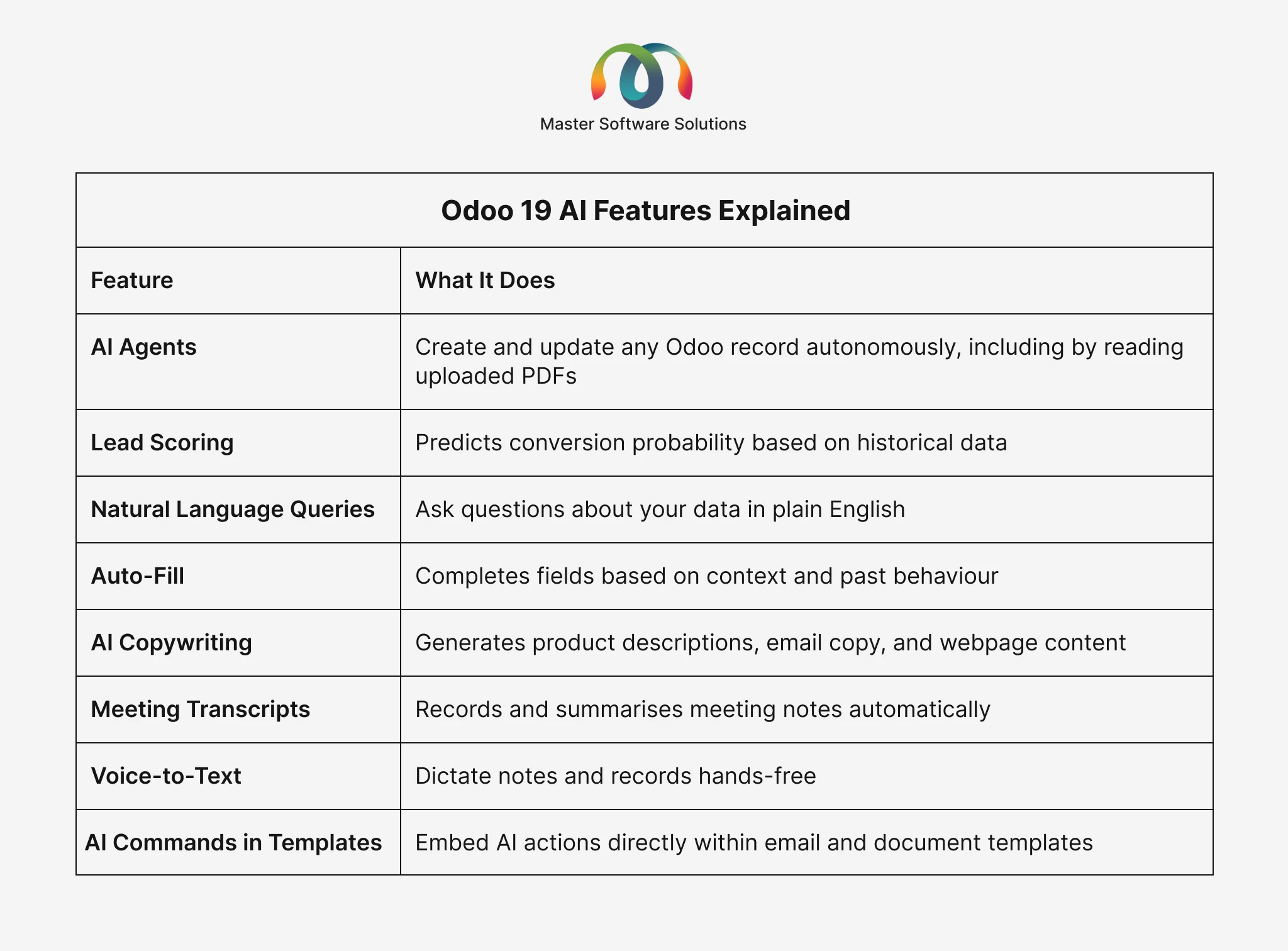
Odoo 19 AI Features Explained
AI is woven throughout Odoo 19 and not bolted on as a separate tool. Here’s where it shows up:
Odoo 19 UI & UX Upgrades
Beyond features, Odoo 19 delivers a noticeably better experience for day-to-day:
Collapsible Sidebar Navigation
The top menu bar is replaced with a collapsible sidebar, providing persistent access to all installed applications. This frees up vertical space and reduces the number of clicks to reach any part of the system.
Native Dark Mode
Full dark mode support across all view types, including form, list, kanban, calendar, pivot, and graph, each individually styled for dark backgrounds. Not an afterthought; it’s built in from the start.
40% Faster UI
Page loads and transitions are significantly faster across the board, which has a real cumulative impact on the productivity of teams using Odoo throughout the day.
Odoo 19 Industry-Specific Packages
One of the most practically useful additions in Odoo 19 is the 100+ new industry-specific starter packages. These are pre-configured bundles of modules, demo data, workflows, and settings tailored for specific business types.
Examples include:
- Bakeries and food producers
- Accounting firms
- Microbreweries
- Yoga and pilates studios
- Law firms
- Florists
- Hair salons
- Photographers
- Theatres
- Wine shops
Instead of starting from a blank Odoo instance and configuring everything from scratch, businesses in these sectors can start with a working setup that reflects their specific processes, dramatically reducing implementation time and cost.
For example, food and beverage companies are among the biggest beneficiaries. Read our deep dives on why Odoo ERP is a great fit for small food manufacturing and how Odoo Dairy ERP helps with return handling and damage tracking to see industry-specific Odoo in action.
Want to get Odoo configured for your industry? Contact our experts for an Odoo implementation consultation.
Odoo 19.1, 19.2, and 19.3: What Changed?
Odoo follows a continuous release cycle, with numbered patches adding features and fixes after the initial major version launch.
Odoo 19 (September 2025)
The initial release. Core features, a new UI, an AI integration foundation, and Equity and ESG modules.
Odoo 19.1 (January 2026)
Refinement patch addressing stability improvements, performance tuning, and module-level updates based on early adopter feedback.
Odoo 19.2
Continued improvements across modules and expanded localization support.
Odoo 19.3 (May 2026)
The largest patch release. Introduced AI agents capable of creating records from PDFs, an offline-first mobile mode, the redesigned Manufacturing Kanban view, eCommerce conversion features, and dozens of productivity improvements across 35+ modules.
If you’re evaluating Odoo 19 today, you’re evaluating 19.3, the most mature and capable version. For a broader context on how each Odoo version compares to the last, see our complete guide to Odoo versions from V14 to V19.
Should You Upgrade to Odoo 19?
If you’re on Odoo 16 or earlier, the answer is almost certainly yes. You’re missing years of performance improvements, UI refinements, and features that directly reduce operational overhead. It’s also worth noting that Odoo has introduced a 25% legacy surcharge for businesses still on V16, making staying put an increasingly costly choice.
If you’re on Odoo 17 or 18, the decision depends on how much you’d benefit from the AI features, the new modules (Equity, ESG), and the UI overhaul. For most businesses, the productivity gains justify the investment. If you’re concerned about how Odoo handles scale after an upgrade, read our analysis of how Odoo performs under high volume and concurrent users.
Key questions to ask:
- Do your field teams struggle with connectivity? Offline mobile mode alone may justify the upgrade.
- Do you run manufacturing operations? The Kanban redesign and AI-assisted planning make a real difference.
- Do you have sustainability reporting obligations? The ESG module is built for exactly this.
- Are you managing equity or ownership structures in spreadsheets? The Equity module eliminates that.
Not sure whether to upgrade? Let us assess your current setup. Book a free Odoo migration consultation.
How Master Software Solutions Can Help
Master Software Solutions is an Odoo partner with deep expertise across the full Odoo implementation lifecycle, from initial consulting and module selection through to customization, integration, migration, and ongoing support.
Our Odoo services include:
- Odoo Consulting: understand which modules fit your business before you commit
- Odoo Implementation: structured, on-time deployment with minimal disruption
- Odoo Customization: when the standard modules don’t quite fit your process
- Odoo Integration: connect Odoo to your existing tools (eCommerce, logistics, payment gateways, and more)
- Odoo Migration: safe, tested migration from older Odoo versions or other ERP systems
- Odoo Support & Maintenance: ongoing expert support after go-live
- Hire Odoo Developers: extend your internal team with certified Odoo developers
Whether you’re a growing SME implementing Odoo for the first time or an enterprise looking to migrate from Odoo 16, we have the experience to get it right. Speak to an Odoo expert at Master Software Solutions.