Your Odoo ERP already runs your sales, inventory, accounting, and HR. But how much of the work around Odoo still happens manually? Someone reads an email and creates a lead. Someone copies invoice details from a PDF into a vendor bill. Someone writes the same follow-up message twenty times a day. These small tasks quietly consume hours that your team could spend on work that actually grows the business.
This is exactly the gap that AI-powered workflow automation closes. By connecting Claude with Odoo and automation platforms like n8n or Zapier, you can build workflows that don’t just move data between systems; they read, understand, summarize, classify, and draft content the way a capable assistant would, using Anthropic’s large language model. The result is an ERP that responds to events intelligently instead of waiting for a human to click through screens.
In this guide, we’ll walk through how Claude connects to Odoo, when to choose n8n versus Zapier, step-by-step setup for both, high-impact use cases you can deploy this quarter, and the best practices that keep AI automation secure and reliable. The following playbook is applicable whether you manage a multi-entity manufacturing group or a five-person distribution company.
Why Automate Odoo Workflows with AI?
Traditional automation moves structured data from point A to point B: when a form is submitted, create a record. That’s useful, but most business information isn’t structured. It arrives as emails, chat messages, PDFs, support tickets, and free-text notes. Rule-based automation can’t read a rambling customer email and decide whether it’s a complaint, a sales inquiry, or a change request. A language model can.
Adding Claude to your Odoo automation stack unlocks a different class of workflow:
- Understanding unstructured input: extract line items from a supplier invoice, pull contact details from an email signature, or identify the intent behind a support message before it ever reaches a human.
- Generating content in context: draft personalized sales follow-ups from CRM history, write product descriptions from attribute data, or compose customer replies grounded in the actual order record.
- Making judgment calls at scale: automatically score and prioritize leads, flag anomalous expense claims, triage tickets by urgency, and route work to the right team.
- Summarizing across records: turn a week of sales activity, inventory movements, or project updates into a readable digest delivered to Slack or email every morning.
The business case is straightforward: fewer repetitive hours, faster response times, fewer data-entry errors, and decisions made on information that would otherwise sit unread. For companies already invested in Odoo ERP, this is the fastest way to compound the value of that investment without replacing anything.
What Is Claude, and Why Pair It with Odoo ERP?
Claude is a family of large language models developed by Anthropic, accessible through an API that automation platforms can call mid-workflow. Compared to generic scripting, Claude brings three things that matter in an ERP context:
strong reading comprehension for long, messy documents; reliable structured output (it can return clean JSON that maps directly to Odoo fields); and careful instruction-following, which matters when the output is going to write into your books or message your customers.
Odoo, meanwhile, is unusually automation-friendly for an ERP. It exposes virtually every model, including leads, sales orders, invoices, inventory moves, employees, and projects, through its external API (XML-RPC and JSON-RPC), supports inbound and outbound webhooks, and has a modular architecture that makes it easy to act on events. Although Odoo offers Claude-based modules in its app store and ships its own AI features in more recent versions, integrating Claude into workflows via a specific automation layer still offers the greatest flexibility.
That automation layer is where n8n and Zapier come in. They sit between Odoo and Claude, listening for events (a new lead, an incoming email, or an updated delivery order), sending the relevant context to Claude, and writing the result back into Odoo, all without your team touching a line of your ERP’s core code.
Claude + n8n vs. Claude + Zapier: Which Should You Choose?
Both platforms can connect Claude to Odoo, but they serve different teams and budgets. Here’s how they compare:
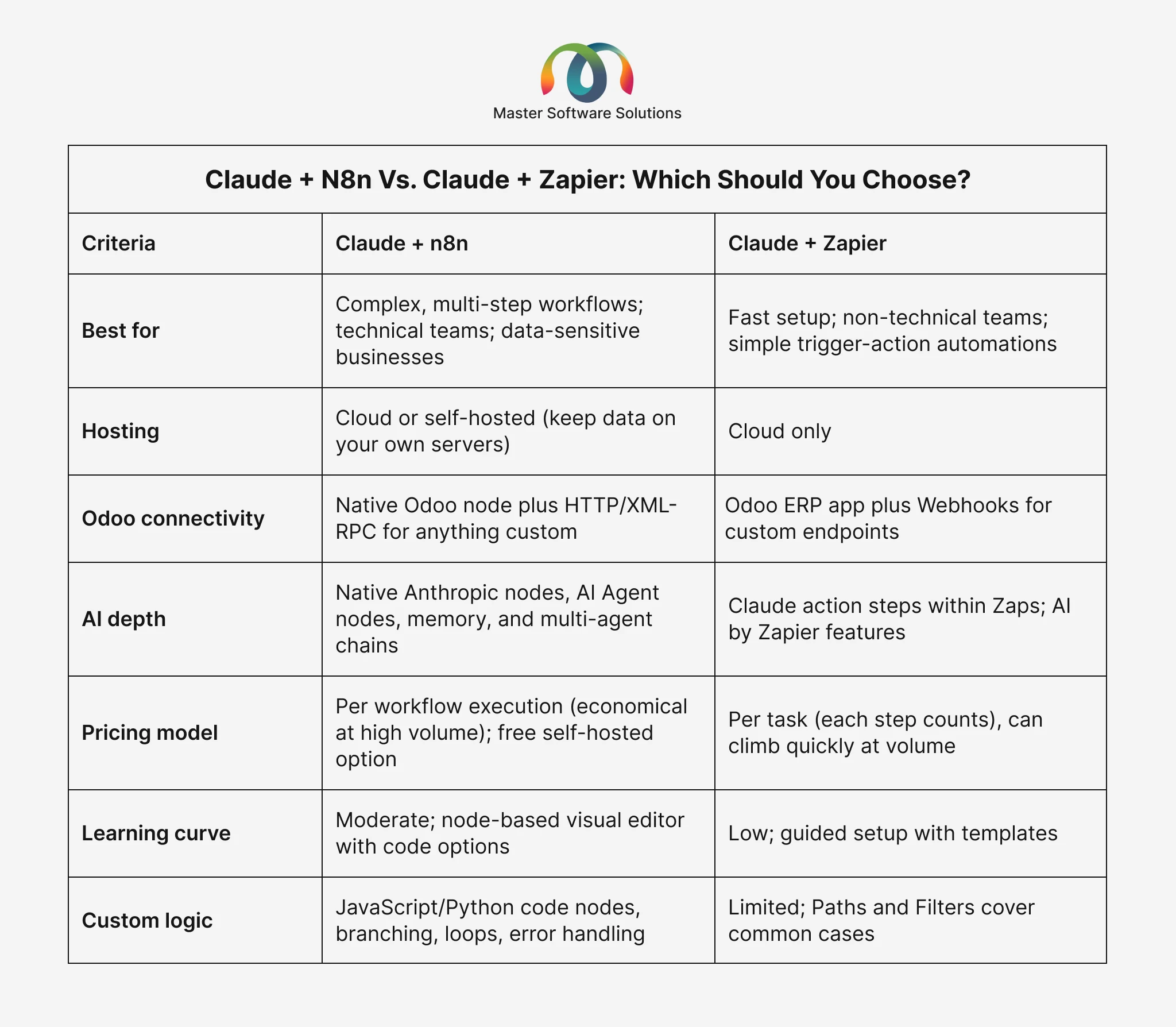
Choose n8n if you want self-hosting for data privacy, you expect high volumes (n8n charges per workflow run, not per step), or your workflows involve branching logic, loops, retries, and multiple AI calls. n8n’s official Claude and Odoo integration includes a native Odoo node and a full Anthropic node, plus AI agent capabilities for multi-step reasoning.
Choose Zapier if speed of setup matters more than depth, your team is non-technical, and your workflows are mostly linear (trigger → AI step → action). Zapier’s Odoo ERP + Anthropic (Claude) integration lets you connect the two in minutes alongside 7,000+ other apps, which is valuable if your stack includes many SaaS tools.
Many businesses actually use both: Zapier for quick, low-volume conveniences, and n8n for the mission-critical, high-volume pipelines. There’s no wrong answer, only a wrong fit for a given workflow.
Not sure which stack fits your Odoo setup? Our team at Master Software Solutions has implemented both. Book a free automation assessment, and we’ll map your highest-ROI workflows in one call.
How Claude Connects to Odoo: The Technical Foundations
You don’t need to be a developer to follow this section, but understanding the plumbing helps you scope projects realistically. There are four main connection patterns:
Odoo’s External API (XML-RPC / JSON-RPC)
Every Odoo model can be searched, read, created, and updated through the external API. Automation platforms use this to pull records into a workflow and push results back. This is the workhorse of most integrations; it works with Odoo Online, Odoo.sh, and self-hosted deployments.
Webhooks and Automation Rules
Odoo’s automation rules can fire an outbound webhook the moment something happens, like a stage change on a CRM lead, a confirmed sales order, or a stock level crossing a threshold. That webhook becomes the trigger for your n8n or Zapier workflow, making automations event-driven and near-real-time rather than running on polling schedules.
The Claude API
Within the workflow, an Anthropic/Claude node (n8n) or Claude action step (Zapier) sends your prompt plus the Odoo data to the Claude API and returns the response. Prompts can request structured JSON output so the next step can map fields directly.
MCP and AI Agents
The newest pattern uses the Model Context Protocol (MCP), an open standard that lets Claude discover and call tools directly. n8n workflows can be exposed as MCP tools, and community MCP servers exist for Odoo itself, meaning Claude can query your ERP conversationally (“Which customers have overdue invoices above €5,000?”) and take actions with human approval. This is the direction the industry is moving, and it’s worth designing today’s workflows with it in mind.
Step-by-Step: Automating an Odoo Workflow with Claude and n8n
Let’s build a concrete example: AI-powered lead qualification. When a new lead lands in Odoo CRM, Claude analyzes it, scores it, drafts a personalized first-touch email, and updates the record, all in seconds.
Set up your connections
In n8n, add credentials for Odoo (URL, database, username, and API key) and Anthropic (API key from the Anthropic Console). Both take about two minutes.
Create the trigger
Add an Odoo trigger node watching for new records on the `crm. lead “model,” or configure an Odoo automation rule to send a webhook to n8n the instant a lead is created; webhooks are faster and lighter than polling.
Enrich the context
Use the Odoo node to fetch related data: the contact’s company, past orders, country, and source channel. The more relevant context Claude sees, the better its judgment.
Add the Claude node
Prompt it with the lead data and clear instructions: Score the lead from 0 to 100 against your ideal customer profile, classify the industry, flag urgency, and draft a two-paragraph intro email in your brand voice. Request the output as JSON.
Parse and act
Map Claude’s JSON back into Odoo fields with an update node: set the score, assign the salesperson based on territory rules, and post the draft email as a note or a scheduled activity for review.
Add guardrails
Insert an IF node so low-confidence outputs route to a human review queue instead of auto-updating, and add error handling so failed API calls retry or alert your team in Slack.
Total build time for an experienced team: an afternoon. Time saved: every single lead, forever. The same skeleton, including Trigger, Enrich, Claude, Writeback, and Guardrail, adapts to invoices, tickets, purchase orders, and virtually any other Odoo document.
Step-by-Step: Automating Odoo with Claude and Zapier
Now the same philosophy on Zapier, with a different example: automated customer email triage into Odoo Helpdesk.
Choose your trigger
Start the Zap with your support inbox (Gmail, Outlook, or a shared mailbox) and trigger it on every new inbound email.
Add the Claude step
Use the Anthropic (Claude) action “Send Message.” Ask Claude to classify the email (complaint, question, order change, & spam), rate its urgency, extract the order number if present, and write a one-line summary.
Branch with Paths
Route by classification: complaints and urgent issues create high-priority Helpdesk tickets in Odoo, order changes go to the sales team channel, and spam is archived.
Create the Odoo record
Use the Odoo ERP action (or a Webhooks step calling Odoo’s API) to create the ticket with Claude’s summary as the description and the extracted order number linked to the ticket.
Close the loop
To ensure clients receive a response in minutes rather than hours, include a final step that generates an acknowledgment reply or posts a Slack notification.
Zapier’s per-task pricing means each step consumes quota, so keep Zaps lean, but for workflows in the dozens-per-day range, the convenience is hard to beat.
7 High-Impact Odoo + Claude Automation Use Cases
CRM lead scoring and enrichment
Automatically qualify every inbound lead against your ideal customer profile and draft the first outreach.
Invoice and document data extraction
Reduce accounts payable entry time by pulling structured line items from supplier emails and PDFs into draft vendor bills.
Helpdesk ticket triage
Classify, prioritize, summarize, and route support requests before an agent ever opens them.
Sales follow-up sequences
Generate personalized follow-ups based on quote status, order history, and time since last contact.
Inventory intelligence
Summarize stock movements, flag unusual demand patterns, and draft reorder recommendations for purchasing.
Automated reporting digests
A morning briefing in Slack or email summarizing yesterday’s sales, new leads, overdue invoices, and open tickets, written in plain language.
Multi-channel e-commerce sync
When orders flow in from your website or marketplaces, Claude can normalize messy product data, detect duplicates, and standardize customer records before they hit Odoo.
Start with one workflow that hurts the most.
Usually, lead handling or document entry proves the ROI in weeks, then expands. Automation programs succeed incrementally, not in big-bang launches.
Want these workflows built for you? Master Software Solutions designs and deploys production-grade Odoo integrations and custom AI agents.
Best Practices for Secure, Reliable AI Automation in Odoo
Keep humans in the loop for irreversible actions
Let Claude draft, score, and suggest, but require human approval before sending customer-facing messages or posting accounting entries, at least until trust is established.
Use dedicated API credentials with least privilege
Create a new Odoo user with only the models required for automation and change the API keys regularly.
Request structured output and validate it
Always ask Claude for JSON with a defined schema, then validate before writing to Odoo. Never pipe raw model text into database fields.
Mind data privacy
If you handle sensitive customer or financial data, consider self-hosting n8n to keep data on your own infrastructure, and review Anthropic’s data-handling terms for API requests.
Build error handling from day one
Retries, dead-letter queues, and alerting turn a demo into a dependable system. A workflow that silently fails is worse than no workflow.
Log everything
Keep an audit trail of what the AI read, what it decided, and what it changed. This is invaluable for debugging, compliance, and improving prompts.
Version your prompts
Treat prompts like code: store them in version control, test changes on sample data, and roll back when quality dips.
Common Pitfalls to Avoid
Automating a broken process. If your lead stages are inconsistent or your product data is messy, AI will amplify the chaos. Clean the process first; this is where an experienced Odoo consulting partner pays for itself.
Over-prompting a single giant step. One enormous prompt that classifies, extracts, scores, and drafts in a single call is fragile. Chain smaller, focused AI steps, each easier to test and debug.
Ignoring costs at scale. Model calls and per-task pricing both add up. Estimate monthly volumes before launch, use smaller/faster Claude models for simple classification tasks, and reserve the most capable models for judgment-heavy steps.
No fallback path. APIs have outages. Every automated workflow needs a defined manual fallback so the business keeps moving when a service hiccups.
Why Work with an Odoo Automation Partner
The tools are accessible, but production-grade automation is a systems discipline: mapping processes, securing credentials, designing prompts that behave under edge cases, handling Odoo version differences, and maintaining workflows as your business evolves. That’s the difference between a weekend prototype and infrastructure your team relies on daily.
As an official Odoo partner, Master Software Solutions brings both sides of this equation: deep Odoo expertise across implementation and customization and a dedicated AI engineering practice building agents and automations on Claude and modern orchestration platforms. Whether you need a single workflow automated or an end-to-end AI roadmap for your ERP, you can hire our Odoo developers on flexible engagement models.
Conclusion
Odoo gave you a single source of truth. Claude plus n8n or Zapier gives that source of truth hands and judgment, reading the documents, qualifying the leads, triaging the tickets, and writing the summaries your team used to handle manually. The technology is mature, the connection patterns are proven, and the first workflow can be live within weeks.
The businesses winning with AI in 2026 aren’t the ones with the biggest budgets; they’re the ones that started with one painful process and automated it well.
Ready to automate your Odoo workflows? Contact Master Software Solutions for a free consultation, or explore our Odoo consulting services to see how we take businesses from manual to automated, securely and measurably.