For small businesses, Zoho Books is a good place to start. However, as your business expands, you start to run into problems, such as restricted inventory workflows, user caps, disconnected apps, and reports that fall short of what your finance team truly requires. That’s usually the moment businesses start searching for Odoo migration options.
Odoo Accounting isn’t just a bookkeeping tool. Your invoices, inventory, CRM, payroll, and manufacturing all reside in a single database because of a single module within a complete ERP. Upgrading your entire financial operating system is more important when moving from Zoho Books to Odoo than simply switching software.
In this guide, we’ll walk you through why businesses make the switch, what data moves (and how), a proven Odoo data migration process, common pitfalls, and how to choose the right Odoo migration company for the job.
Not sure if Odoo is the right fit for your business? Talk to our Odoo consultants for a free migration assessment.
Why Businesses Move from Zoho Books to Odoo Accounting
Most companies don’t leave Zoho Books because it’s bad; they leave because they’ve outgrown it. The most common triggers we see as an Odoo migration service provider in the USA market and beyond:
Scalability Limits
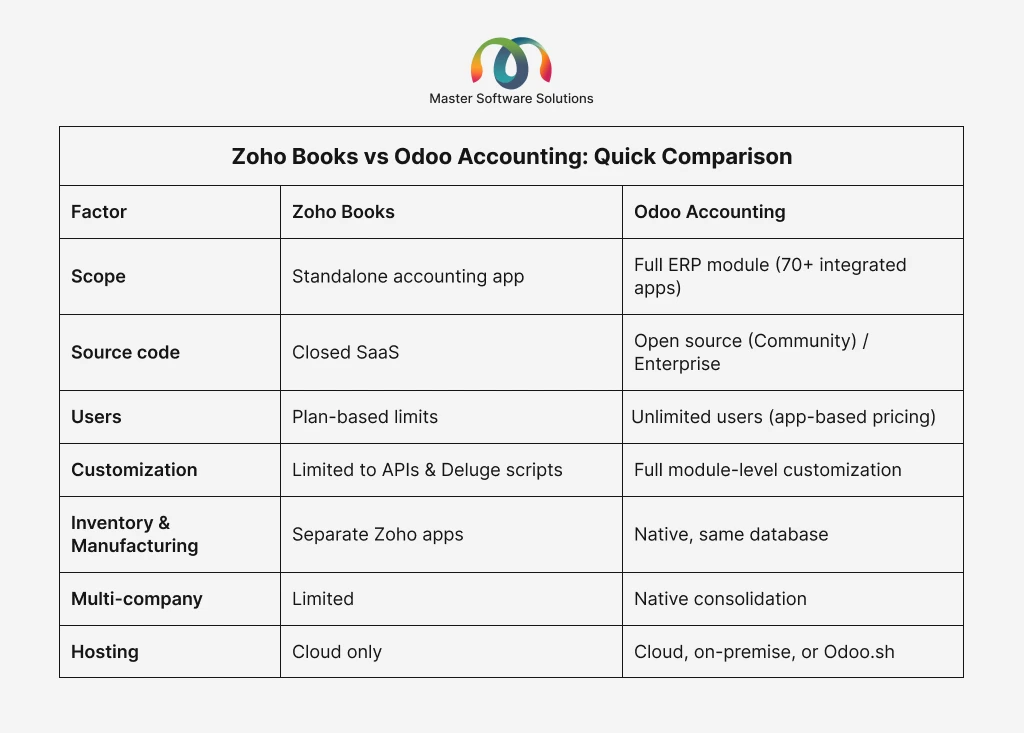
Zoho Books restricts users, transactions, and workflows by plan tier. Odoo supports unlimited users via Odoo Enterprise per-app pricing or the Community Edition.
Fragmented Apps
Zoho’s ecosystem integrates your data into Books, Inventory, CRM, and People. Odoo unifies everything in a single database, with no sync issues and duplicate records.
Deeper Accounting Features
Odoo Accounting supports multi-company consolidation, multi-currency revaluation, automated bank reconciliation, analytic accounting, and localized fiscal packages for 80+ countries.
Customization Freedom
As an open-source platform, Odoo lets you tailor workflows, reports, and modules, something a closed SaaS product can’t match.
True ERP Capability
An Odoo ERP migration brings inventory, manufacturing, eCommerce, and HR under the same roof as your books.
Zoho Books vs Odoo Accounting: Quick Comparison
What Data Can Be Migrated from Zoho Books to Odoo?
A professional Odoo data migration services engagement typically covers:
- Master data: Chart of accounts, customers, vendors, products, price lists, taxes, and payment terms
- Open transactions: Unpaid invoices, bills, credit notes, and outstanding payments
- Historical transactions: Past invoices, bills, journal entries, and payments (based on how much history you want to keep)
- Bank data: Bank accounts, reconciliation history, and statements
- Opening balances: Trial balance, AR/AP aging, and stock valuation as of your cutover date
- Attachments: Invoice PDFs, receipts, and supporting documents
Step-by-Step: The Zoho Books to Odoo Migration Process
Step 1: Migration Audit and Planning
Every successful Odoo migration starts with an audit: data volume, customizations, integrations, chart of accounts structure, and fiscal localization needs. This is where you decide your cutover date (usually a month-end or fiscal year-end) and how much transaction history to migrate.
Step 2: Data Export from Zoho Books
Zoho Books allows full data export in CSV/XLS format from its Data Backup feature. Your migration partner extracts master data, open items, and historical transactions, then maps every Zoho field to its Odoo equivalent.
Step 3: Data Cleansing and Mapping
This is where most DIY migrations fail. Duplicate contacts, inconsistent tax codes, and mismatched account structures must be cleaned before import. A structured mapping document ties every Zoho Books field to the correct Odoo model.
Step 4: Odoo Database Migration and Import
Using Odoo’s import framework, APIs, or custom ETL scripts, data is loaded into a staging database. A proper Odoo database migration validates record counts, balances, and relational integrity (invoices linked to the right customers, payments to the right invoices) before anything touches production.
Step 5: Configuration and Localization
Your migration partner configures fiscal positions, tax rules, payment acquirers, bank feeds, and reporting structures. If you’re deploying the latest version, this is also where an Odoo 18 migration or Odoo 19 migration setup ensures you’re on a supported, future-proof release. (See Odoo’s official accounting documentation for what the platform supports out of the box.)
Step 6: Reconciliation and Validation
The trial balance in Odoo must match Zoho Books to the penny as of the cutover date. AR/AP aging, tax reports, and bank balances are cross-verified line by line.
Step 7: User Training and Go-Live
Parallel runs, user acceptance testing, and role-based training close out the project. Post-go-live support catches edge cases in the first few closing cycles.
Want a migration plan tailored to your data? Explore our Odoo migration services, and we handle everything from export to go-live.
How Long Does a Zoho Books to Odoo Migration Take?
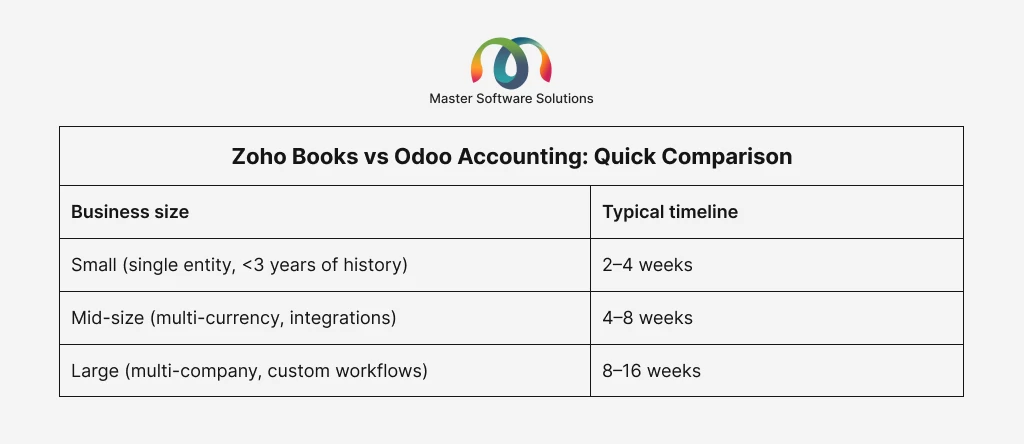
Timelines depend on data volume, cleanliness, integrations, and the amount of historical data you migrate. Migrating only opening balances and open items is the quickest; full history takes longer but maintains audit trails.
Common Migration Challenges (and How to Avoid Them)
- Chart of accounts mismatch: Zoho’s flat account structure doesn’t map 1:1 to Odoo’s. Solution: restructure during mapping, not after go-live.
- Tax configuration differences: Sales tax, VAT, and GST behave differently in Odoo’s fiscal positions. Validate tax reports against Zoho before cutover.
- Partially paid invoices: These require careful handling so payment links survive migration.
- Multi-currency balances: Historical exchange rates must be preserved to keep gains/losses accurate.
- Integration downtime: Payment gateways, eCommerce, and bank feeds need to be reconnected and tested in Odoo.
An experienced Odoo migration company anticipates all of these, which is why professional Odoo migration services consistently outperform DIY imports.
Zoho Books to Odoo Migration Cost
Cost drivers include data volume, historical depth, number of integrations, customization needs, and training scope. As a ballpark, straightforward migrations start at a few thousand dollars, while complex multi-entity Odoo ERP migration projects run higher. A fixed-scope audit up front prevents budget surprises; beware of quotes given without seeing your data.
Why Choose Master Software Solutions as Your Odoo Migration Partner
Master Software Solutions is an official Odoo Silver Partner and a trusted Odoo migration service provider in the USA, Canada, and international markets. In addition to version upgrades like Odoo 18 and Odoo 19 migrations, our team has completed end-to-end migrations from Zoho Books, QuickBooks, Xero, and legacy ERPs to Odoo.
What you get with us: a zero-data-loss methodology with staging validation, penny-perfect reconciliation sign-off, fiscal localization expertise, certified Odoo developers for custom modules, and post-migration support and maintenance so you’re never left alone after go-live. Over 12 million people use Odoo to run their businesses globally, according to the company’s official website. Making the right move the first time is what separates a seamless transition from months of cleanup.
Ready to make the switch? Request a free quote today.
Conclusion
Migrating from Zoho Books to Odoo Accounting is one of the highest-ROI moves a growing business can make, but only when the migration is planned, mapped, validated, and reconciled. With the right Odoo migration services partner, you keep every invoice, every balance, and every audit trail intact while unlocking a full ERP platform that grows with you.