Odoo is one of the most flexible ERP platforms on the market, and that flexibility is exactly why so many businesses get it wrong. Done well, Odoo customization turns a generic system into a solution that mirrors how your business actually runs. Done poorly, it creates a fragile, expensive system that breaks with every upgrade and frustrates the very teams it was meant to help.
At Master Software Solutions, we have rescued dozens of over-customized, under-planned Odoo implementations. The same mistakes appear again and again, regardless of company size or industry. This guide walks through the ten most common Odoo ERP customization mistakes, why they happen, and what to do instead, so your investment pays off from day one.
Why Odoo Customization Projects Fail
Industry research consistently shows that a large share of ERP projects run over budget or fail to deliver expected benefits, and excessive or poorly planned customization is one of the leading causes. Odoo’s open-source architecture makes changes easy to start but hard to unwind. Every custom field, workflow, and module you add is something you must maintain, test, and migrate for the life of the system.
The good news: nearly every failure traces back to a handful of avoidable mistakes. Whether you customize in-house or work with professional Odoo customization services, knowing these pitfalls in advance is the cheapest insurance you can buy. If you’re new to the topic, start with our complete guide to Odoo customization.
Mistake #1: Customizing Before Mapping Your Business Processes
The most expensive mistake happens before a single line of code is written. Teams jump straight into building custom screens and workflows without documenting how their business actually operates, who does what, where approvals sit, and which steps add no value. The result is a system that faithfully automates a broken process.
What to do instead: run a structured discovery phase first. Map every core process, identify gaps between standard Odoo and your real requirements, and rank each gap as ‘adapt the process’ or ‘customize the software.’ A seasoned Odoo customization services providing company will insist on this phase before quoting development work, and that insistence is a sign you are dealing with professionals.
Mistake #2: Over-Customizing Instead of Using Standard Features
Odoo ships with more than 80 official apps and thousands of community modules. Yet many businesses pay to rebuild functionality that already exists because nobody checked first. Every unnecessary customization adds cost three times: once to build, once to maintain, and once again at every version upgrade.
A good rule of thumb: if standard Odoo covers 80 percent of a requirement, adapt your process for the remaining 20 percent unless that 20 percent is a genuine competitive differentiator. Before commissioning custom work, review the official Odoo documentation and the module ecosystem maintained by the Odoo Community Association (OCA); a vetted, community-audited module may already solve your problem.
Mistake #3: Modifying Odoo’s Core Code Directly
Editing Odoo’s core source files might feel like the fastest path to a change, but it makes every future upgrade a manual, error-prone merge and usually voids support agreements. Businesses that hack the core often find themselves stuck on an aging version for years because upgrading has become too risky.
What to do instead: all changes should live in custom modules that inherit and extend core models and views. Odoo’s inheritance framework exists precisely so customizations remain isolated, upgrade-safe, and testable. If a developer proposes editing core files, treat it as a red flag.
Mistake #4: Choosing Odoo Studio for Complex Requirements
Odoo Studio is excellent for quick tweaks, adding a field, adjusting a view, and building a simple approval flow. But teams frequently stretch Studio far beyond its design intent, building complex logic that becomes impossible to version-control, test, or migrate cleanly. The opposite mistake also happens: paying for custom module development when a ten-minute studio change would do.
Knowing where the line sits saves real money. We break down the trade-offs in detail in our guide to Odoo Studio vs. custom module development, but the short version is: Studio for configuration, custom modules for logic.
Not sure whether your requirement needs a studio or custom development? Get a free 30-minute assessment from our certified Odoo experts. Request a quote today.
Mistake #5: Ignoring Upgrade and Migration Compatibility
Odoo releases a major version every year. Customizations built without upgrade discipline, hard-coded IDs, undocumented database changes, monkey-patched methods, turn each annual release into a costly rewrite. Many companies discover this only when they are three versions behind and facing a six-figure migration bill.
Build with migration in mind from day one: follow Odoo’s ORM conventions, document every customization, and keep business logic separate from UI changes. If you have already inherited a tangled system, professional Odoo migration services can untangle legacy customizations and bring you safely onto a current version.
Mistake #6: Treating Data Migration as an Afterthought
Customization projects obsess over screens and workflows while leaving data migration to the final week. Then reality hits: duplicate customers, inconsistent product codes, orphaned records, and historical transactions that do not reconcile. Dirty data in a beautifully customized system is still a failed project.
Plan data cleansing, field mapping, and validation runs early, and rehearse the migration at least twice on a staging database before go-live. Your custom fields and models should be designed around the data you actually have, not the data you wish you had.
Mistake #7: Neglecting Performance and Scalability
A customization that works flawlessly with 100 test records can crawl with 100,000 real ones. Common culprits include unindexed custom fields used in searches, computed fields recalculating across huge record sets, and automated actions triggering on every write. Performance problems that surface after go-live are far more expensive to fix than those caught in design.
Insist on load testing with production-scale data as part of any Odoo customization services engagement, and review stored versus non-stored computed fields, batch processing for scheduled jobs, and query performance before sign-off.
Mistake #8: Skipping Staging Environments and Testing
Deploying customizations straight to production is playing roulette with your live operations. One faulty automated action can corrupt thousands of records in minutes. Every serious Odoo setup needs at least three environments: development, staging (a mirror of production), and production itself, with changes promoted through each stage and tested by real users, not just developers.
Automated tests matter too. Custom modules should ship with unit tests so that future upgrades can be validated quickly instead of through weeks of manual clicking.
Mistake #9: Underestimating Training and Change Management
Even a perfectly built system fails if people will not use it. Customizations change screens, workflows, and responsibilities, and employees who were never consulted or trained will quietly fall back to spreadsheets. User adoption, not technical elegance, determines ERP ROI.
Involve end users during design, appoint champions in each department, and budget genuine time for role-based training. Post-go-live, structured Odoo support and maintenance keeps small user frustrations from snowballing into system abandonment.
Mistake #10: Choosing the Wrong Customization Partner
The cheapest bid is rarely the cheapest outcome. Freelancers and inexperienced agencies frequently deliver customizations that work on demo day and collapse at scale, with no documentation and no upgrade path. Replacing bad custom code typically costs more than building it correctly the first time.
Look for a partner with verifiable Odoo case studies, certified developers, a documented development methodology, and post-launch support. If you are based in North America, working with an experienced Odoo customization partner in the USA time zone also means real-time collaboration instead of overnight email loops. You can hire dedicated Odoo developers from our team on flexible engagement models.
Special Cases: CRM and Website Customization Pitfalls
Odoo CRM Customization Mistakes
With Odoo CRM customization, the classic mistake is over-engineering the pipeline: a dozen custom stages, mandatory fields on every screen, and complex scoring rules that sales reps bypass entirely. Keep pipelines lean, automate data capture instead of demanding manual entry, and customize reports before customizing forms. A CRM your team actually uses beats a sophisticated one they avoid.
Odoo Website Customization Mistakes
In Odoo website customization projects, the common failures are heavy custom themes that tank page speed and SEO, editing theme code instead of extending it, and building custom snippets that break with website builder updates. Prioritize performance budgets, mobile responsiveness, and upgrade-safe theme inheritance. Our Odoo website design and development team builds storefronts that stay fast and survive version upgrades.
Odoo Customization Best Practices: A Quick Checklist
If the mistakes above describe what not to do, here is the positive version, the habits that separate successful Odoo ERP customization service engagements from expensive rescues. Print this list and hold every stakeholder, internal or external, accountable to it.
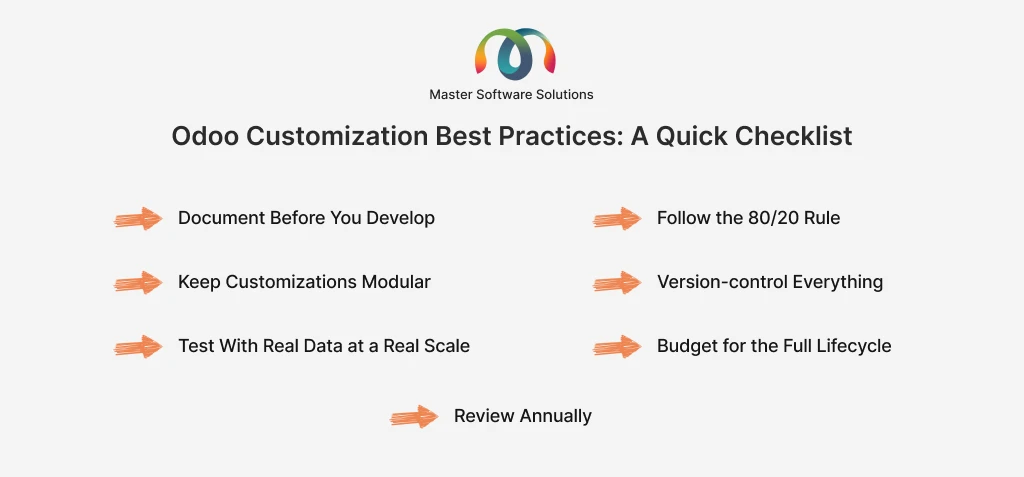
Document before you develop.
Every customization request should include a written business case, the process it supports, and the standard-Odoo alternative that was considered and rejected.
Follow the 80/20 rule.
Adapt your process to standard Odoo wherever the difference is not a competitive differentiator; reserve custom development for what truly sets you apart.
Keep customizations modular.
One custom module per functional area, each independently installable, testable, and removable.
Version-control everything.
All custom code lives in Git with code review, meaningful commit history, and tagged releases matched to deployments.
Test with real data at a real scale.
Staging environments should mirror production data volumes, not toy datasets.
Budget for the full lifecycle.
A realistic customization budget covers build, training, support, and at least the next two version migrations.
Review annually.
Audit your customizations once a year; retire anything Odoo’s newest version now handles natively.
Teams that follow this checklist consistently report smoother upgrades, higher user adoption, and total cost of ownership dramatically lower than teams that customize reactively. The discipline costs a little speed upfront and repays it many times over across the life of the system.
How to Choose the Right Odoo Customization Services Providing Company
Use this checklist when evaluating vendors:
- Proven track record: ask for live references and industry-relevant case studies, not just portfolio screenshots.
- Certified expertise: official Odoo partnership status and certified developers on staff.
- Discovery-first methodology: they analyze your processes before quoting development hours.
- Upgrade-safe development standards: custom modules only, version control, code review, and automated testing.
- Transparent documentation: you own the code and receive technical documentation for every customization.
- Post-launch commitment: defined SLAs for support, maintenance, and future version migrations.
As an official Odoo partner serving clients across the USA, UK, and beyond, Master Software Solutions delivers Odoo ERP customization services that meet every item on that checklist, from initial Odoo implementation through long-term optimization.
Planning an Odoo customization project? Talk to a certified Odoo consultant before you write a single requirement document. Contact Master Software Solutions for a free consultation.
Conclusion: Customize with Discipline, Not Enthusiasm
Odoo’s greatest strength, its near-unlimited flexibility, becomes a liability without discipline. Map your processes first, exhaust standard features before building custom ones, keep every change in upgrade-safe modules, test on staging, invest in your users, and choose a partner who will tell you ‘no’ when a customization is not worth building.
Avoid these ten mistakes, and Odoo customization becomes what it should be: a durable competitive advantage rather than a recurring cost center.
Ready to customize Odoo the right way? Master Software Solutions has delivered 100+ successful Odoo projects across manufacturing, retail, logistics, and services. Explore our Odoo customization services or request a free quote today.