Choosing the right ERP for your mid-sized business is one of the most consequential decisions you’ll make. Get it right, and you have a system that scales with you, delivering measurable ROI. Get it wrong, and you’re locked into a costly platform that doesn’t fit how your business actually works.
Odoo and NetSuite are two of the most popular ERP platforms for growing businesses, and they couldn’t be more different in philosophy, pricing, and flexibility. This guide compares them head-to-head across every dimension that matters to mid-sized companies: cost, features, customization, ease of use, integrations, and support.
By the end, you’ll know exactly which platform deserves your investment and which questions to ask before you sign a contract.
Odoo vs NetSuite: Quick Overview
Before diving deep, here’s a snapshot of each platform:
What Is Odoo?
Odoo is an open-source, modular ERP platform built for businesses of all sizes. Originally launched in 2005, Odoo now covers over 80 integrated business applications, from accounting and inventory to CRM, manufacturing, HR, e-commerce, and more. Its open-source core makes it highly customizable, and its modular nature means you only pay for what you use.
Odoo is available in two editions:
Odoo Community: Free, open-source, with core modules
Odoo Enterprise: Paid, with advanced features, cloud hosting, and official support
What Is NetSuite?
NetSuite is a cloud-based ERP owned by Oracle. Launched in 1998, it was one of the first cloud ERP systems and has grown into an enterprise-grade platform used by over 40,000 organizations. NetSuite’s strength lies in financial management, multi-subsidiary operations, and built-in business intelligence. It’s particularly popular with businesses backed by private equity or preparing for an IPO, where audit trails and financial compliance are critical.
NetSuite is a proprietary, SaaS-only solution, meaning you cannot self-host or access the source code.
Pricing Comparison: What Will It Actually Cost?
Pricing is often where the Odoo vs. NetSuite decision gets made for mid-sized businesses. The difference is stark. You can view the latest plans on Odoo’s official pricing page.
Odoo Pricing (2026)
Odoo Enterprise pricing is per user, per month, and you only pay for the apps you use:
- One App plan: $24.90/user/month (single app)
- Standard plan: $34.90/user/month (all apps, cloud-hosted)
- Custom plan: $46.90/user/month (all apps + custom/multi-company/external API)
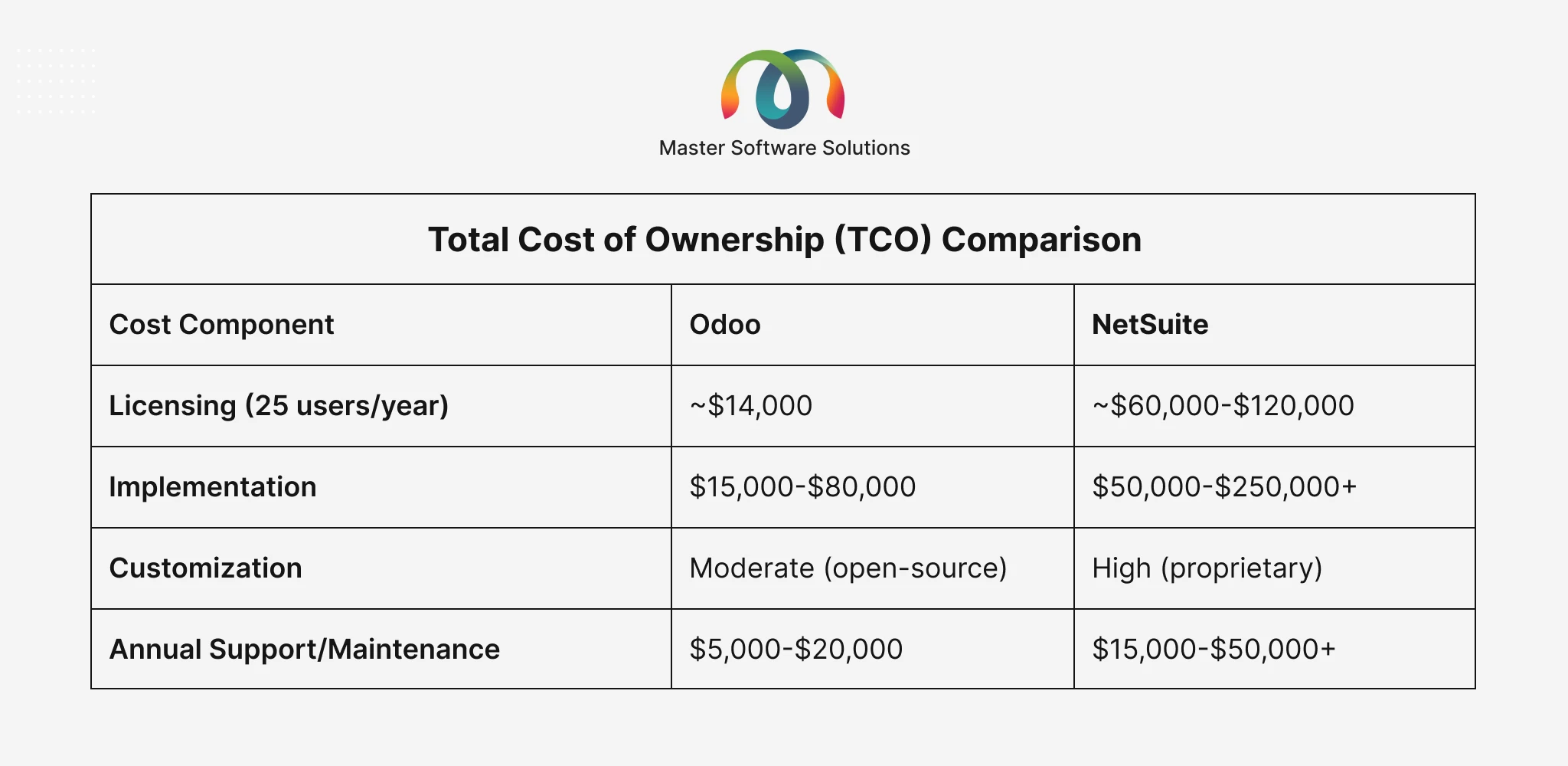
For a mid-sized business with 25 users on the custom plan, that’s approximately $14,000/year in licensing before implementation costs.
Odoo Community is completely free (open-source), though you’ll need to self-host and hire a developer for customizations. Want a full cost breakdown? Read our detailed guide: Odoo Pricing
Breakdown: Cost Guide for Successful ERP Implementation
NetSuite Pricing (2026)
NetSuite does not publish pricing publicly; costs are negotiated per contract. However, based on widely reported estimates:
-
Base license: $999–$1,999/month
- Per-user fee: $99–$129/user/month
- Module add-ons: Additional cost per module (e.g., Advanced Manufacturing, WMS, Revenue Recognition)
For a mid-sized business with 25 users, NetSuite’s total licensing typically runs $60,000-$120,000+ per year, often 5-8x more expensive than Odoo.
Total Cost of Ownership (TCO) Comparison
Core Features Comparison
Both platforms cover the core ERP functions, but with notable differences in depth, approach, and out-of-the-box capability.
Financial Management
Odoo: Robust multi-currency accounting, automated invoicing, bank reconciliation, tax management, and financial reporting. Handles multi-company and multi-currency setups on the Custom plan. Some advanced financial features (e.g., revenue recognition, consolidation reporting) require add-ons or customization.
NetSuite: Financial management is best-in-class. Built-in revenue recognition (ASC 606/IFRS 15), consolidation across multiple subsidiaries, advanced budgeting, and audit-ready financial controls. NetSuite was designed for financial compliance from day one.
Inventory and Supply Chain
Odoo: Excellent inventory management with lot/serial number tracking, multi-warehouse, reordering rules, landed costs, and barcode scanning. Tightly integrated with manufacturing and procurement modules.
NetSuite: Strong inventory capabilities with demand planning, supply chain management, and WMS (Warehouse Management System) as an add-on. Better for complex, multi-location distribution operations.
Manufacturing (MRP)
Odoo: One of Odoo’s standout modules. Full MRP support, Bills of Materials (BoM), work orders, quality control, shop floor management, and maintenance. Excellent for SMEs and mid-sized manufacturers.
NetSuite: Manufacturing capabilities are more limited in the standard package. Advanced Manufacturing is a paid add-on. Many manufacturers find Odoo more practical and cost-effective for production management.
CRM and Sales
Odoo: Native CRM with pipeline management, email integration, and sales quotation-to-invoice workflow. Fully integrated with inventory and accounting for seamless order-to-cash processes.
NetSuite: CRM is functional but widely considered inferior to dedicated CRM tools. Many NetSuite customers use Salesforce alongside NetSuite for sales.
E-Commerce
Odoo: Built-in e-commerce module fully integrated with inventory, accounting, and CRM. Build and manage your online store directly within Odoo.
NetSuite: SuiteCommerce exists but is expensive and complex. Most NetSuite customers integrate with Shopify or Magento rather than using native e-commerce.
Human Resources
Odoo: Covers recruitment, onboarding, attendance, leaves, payroll (with localization), appraisals, and expenses.
NetSuite: HR module (SuitePeople) available but considered basic. Most enterprise customers supplement with Workday or ADP.
Reporting and Business Intelligence
Odoo: Good standard reporting within each module. Custom reports require developer involvement or third-party BI tools (Power BI and Tableau).
NetSuite: Superior reporting and analytics with SuiteAnalytics. Real-time dashboards, saved searches, and pre-built financial reports are the key strengths of NetSuite.
Winner: NetSuite for advanced reporting.
Customization and Flexibility
This is where Odoo and NetSuite diverge most dramatically, and it matters enormously for mid-sized businesses with unique processes.
Odoo Customization
Odoo’s open-source architecture gives you unlimited customization potential:
- Build entirely new modules in Python
- Modify any existing module’s logic, views, or workflows
- No vendor lock-in on customizations
- Your development team or an Odoo partner can own and maintain your customizations
- Custom code is portable across hosting environments
This means you can tailor Odoo to fit your business processes, not the other way around. Read our full guide on Odoo customization: A Complete Guide to Odoo Customization
NetSuite Customization
NetSuite uses a proprietary scripting language called SuiteScript (JavaScript-based) for customizations. While powerful, customizations are
- Confined to Oracle’s ecosystem
- Subject to version-upgrade compatibility issues
- Typically expensive to develop and maintain
- Dependent on certified NetSuite developers (a smaller talent pool)
NetSuite’s SuiteFlow (workflow tool) and SuiteBuilder (custom fields/forms) allow configuration without code, making simpler modifications easier.
Verdict on Customization
For mid-sized businesses with industry-specific or unique business processes, Odoo’s open-source model offers far greater flexibility at a lower cost. NetSuite customization is viable but expensive and constrained.
Need a customized Odoo implementation tailored to your exact business processes? Master Software Solutions’ certified Odoo developers build exactly what your business needs on time, on spec. Explore Odoo Customization Services
Ease of Use and User Experience
Odoo User Interface
Odoo’s interface has evolved dramatically over recent versions. The current UI (Odoo 17) is clean, modern, and intuitive, particularly for users familiar with business software. Navigation is logical, and the modular structure means users only see what’s relevant to their role.
The learning curve is manageable for most business users, though power users working with manufacturing or accounting modules may need structured training.
NetSuite User Interface
NetSuite’s interface is functional but dated by modern standards. It has a reputation for being complex and non-intuitive, especially for new users. Menu structures can be deep, and customizing dashboards requires some technical familiarity. User adoption is commonly cited as a challenge in NetSuite implementations.
NetSuite is investing in UI modernization, but it still lags behind Odoo in day-to-day user experience.
Mobile Access
Both platforms offer mobile apps, but Odoo’s mobile experience is generally considered more user-friendly and feature-complete for field teams.
Scalability for Growing Mid-Sized Businesses
A critical question for any mid-sized business: Can this ERP grow with us?
Odoo Scalability
Odoo scales effectively from 10 users to thousands. Its modular architecture means you can start with core modules (Accounting, Inventory, and Sales) and activate new modules as your business grows without re-implementation. Odoo natively supports multi-company, multi-currency, and multi-warehouse setups on the Enterprise plan.
Large enterprises (500–5,000+ users) run Odoo successfully, though very large-scale deployments may benefit from a dedicated Odoo partner for optimized infrastructure.
NetSuite Scalability
NetSuite is purpose-built for scalability, particularly for businesses with complex multi-subsidiary financial structures, international operations, and high transaction volumes. It’s the platform of choice for PE-backed businesses preparing for rapid growth, M&A activity, or IPO readiness.
If your growth trajectory involves acquiring subsidiaries across multiple countries and you need consolidated financial reporting from day one, NetSuite’s scalability architecture has advantages.
Integrations and Third-Party Ecosystem
Odoo Integrations
Odoo’s open-source nature and REST API make integration with virtually any third-party system possible. The Odoo App Store (apps.odoo.com) has over 45,000 community and commercial modules, covering integrations with:
- E-commerce: Shopify, WooCommerce, Amazon, Magento
- Payment gateways: Stripe, PayPal, Authorize.net, Square
- Shipping: FedEx, UPS, DHL, ShipStation
- Accounting: QuickBooks (migration), Xero
- Marketing: Mailchimp, HubSpot
- Communication: Slack, Twilio, WhatsApp
Custom API integrations can be built by any Odoo developer, giving you complete flexibility.
NetSuite Integrations
NetSuite has a mature integration ecosystem via SuiteIntegrator and the SuiteCloud platform. NetSuite integrates well with Salesforce, Workday, and enterprise tools. However, integrations are typically more expensive to build and maintain, and you’re often dependent on certified NetSuite integration partners.
Need to integrate Odoo with your existing tools? Master Software Solutions specializes in Odoo multi-platform integrations, from e-commerce to logistics APIs to custom ERP connectors. Explore Odoo Integration Services
Implementation: Time, Complexity, and Cost
Odoo Implementation
A typical Odoo implementation for a mid-sized business (5–10 modules, 20–50 users) takes 3–6 months. Implementation costs through a certified Odoo partner typically range from $20,000 to $80,000, depending on the scope of customization.
Odoo’s modular approach also supports phased implementations, going live with core modules first, then activating additional modules as teams are ready. This reduces risk and shortens time-to-value.
Planning an Odoo implementation? See what’s involved, end-to-end: Odoo Implementation Services
NetSuite Implementation
NetSuite implementations are notoriously complex and expensive. A mid-sized business implementation typically takes 6-12 months and costs $75,000 to $250,000+ in consulting and implementation fees.
NetSuite’s proprietary nature means implementation must be done by certified NetSuite partners, which limits your choice of implementation team and drives up costs.
Implementation Risk
Both platforms carry implementation risk, but the consequences of a failed NetSuite implementation in terms of time and money lost are significantly higher given the investment involved.
Support and Maintenance
Odoo Support
- Odoo Enterprise includes official support from Odoo S.A.
- Certified Odoo partners (like Master Software Solutions) provide hands-on functional and technical support.
- A large global community of developers and users for open-source troubleshooting
- Version upgrades are included in the Enterprise subscription
NetSuite Support
- NetSuite support plans (Basic, Premium, and Advanced Customer Support) vary in responsiveness and cost
- Premium and Advanced support tiers add a high annual cost
- Many customers report that standard support is slow and relies heavily on community forums
- Customization maintenance across version upgrades can be costly
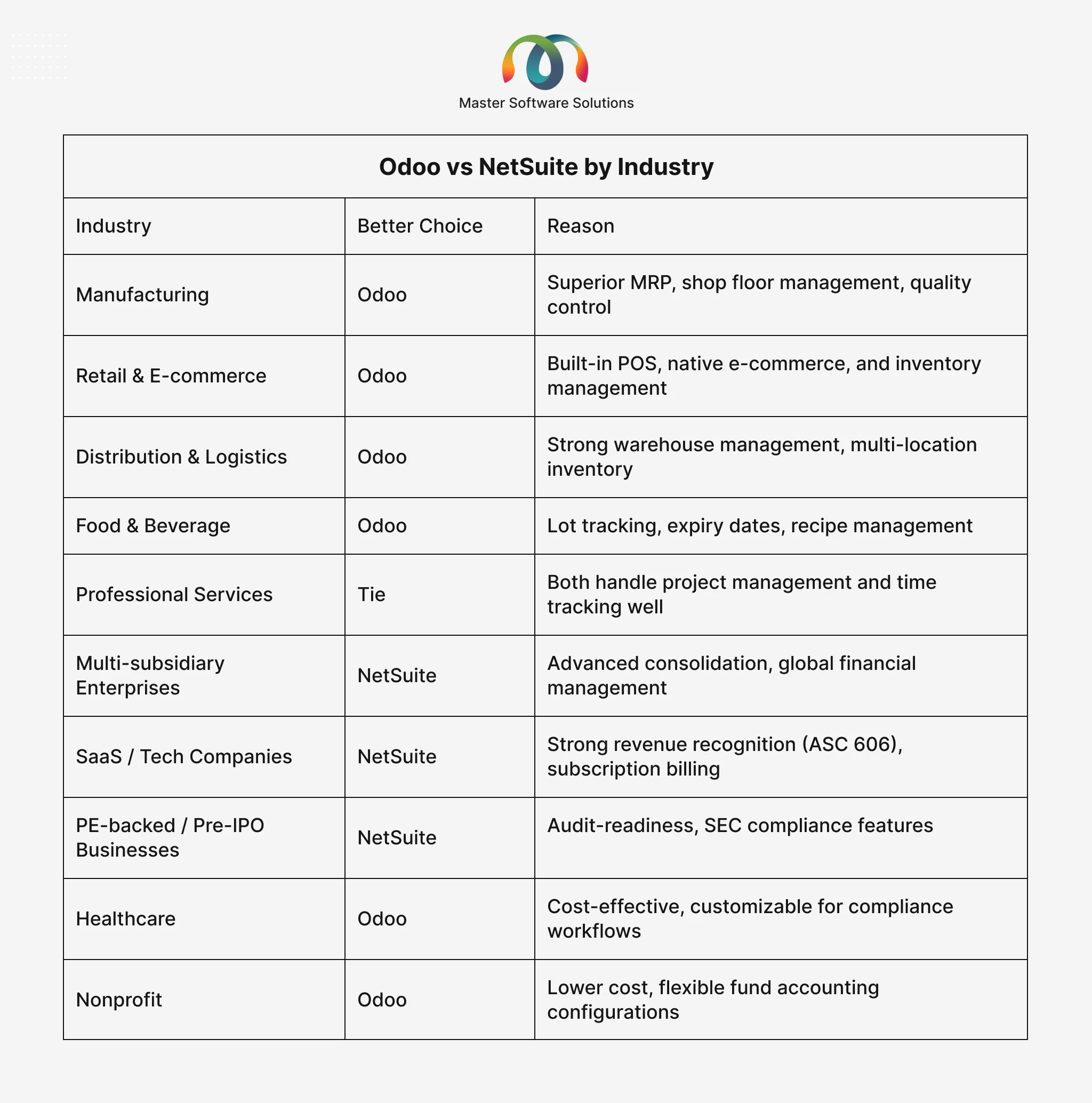
Odoo vs NetSuite by Industry
Odoo vs NetSuite: Pros and Cons
Odoo Pros
- Significantly lower licensing and implementation costs
- Open-source — unlimited customization potential
- Modular — pay for only what you use
- Modern, intuitive user interface
- Strong manufacturing, inventory, and e-commerce modules
- Large global community and growing partner ecosystem
- Flexible deployment: cloud, on-premise, or hybrid
Odoo Cons
- Advanced financial consolidation requires more configuration effort
- Reporting requires add-ons for sophisticated BI needs
- Large-scale deployments need experienced Odoo partner support
- Community edition lacks official support
NetSuite Pros
- Best-in-class financial management and compliance
- Built for multi-subsidy, international operations
- Strong reporting and analytics (SuiteAnalytics)
- Mature enterprise-grade platform with 25+ years of development
- Preferred by PE firms and pre-IPO companies
NetSuite Cons
- Significantly higher cost (licensing + implementation + support)
- Dated user interface with a steep learning curve
- Customization is expensive and constrained to Oracle’s ecosystem
- Weak manufacturing, e-commerce, and CRM modules
- Long implementation timelines
- Vendor lock-in with no access to source code
Which ERP Should Your Mid-Sized Business Choose?
After comparing both platforms across every dimension, here’s the honest verdict:
Choose Odoo if:
- You’re a mid-sized business with 50–500 employees looking for an affordable, flexible ERP
- Your operations span manufacturing, retail, distribution, food & beverage, or e-commerce
- You need significant customization to match your unique business processes
- Total cost of ownership matters; you want enterprise-grade features without enterprise pricing
- You want a fast, phased implementation that delivers ROI quickly
- You value an open-source platform with no vendor lock-in
Choose NetSuite if:
- You’re a PE-backed business or preparing for M&A activity or IPO
- You have multiple international subsidiaries requiring complex financial consolidation
- Revenue recognition compliance (ASC 606) is a top priority
- Your business is SaaS or subscription-based with complex billing models
- Budget is not a constraint, and financial reporting sophistication is paramount
For the vast majority of mid-sized businesses, particularly in manufacturing, distribution, retail, logistics, and professional services, Odoo delivers better value, faster implementation, lower TCO, and greater flexibility than NetSuite.
Not sure which ERP is right for you? Master Software Solutions offers a free ERP consultation to assess your business needs, compare platforms, and recommend the right solution for your budget and growth plans. Schedule Your Free ERP Consultation
How Master Software Solutions Can Help
At Master Software Solutions, we are a certified Odoo Partner with deep expertise in ERP strategy, implementation, and optimization for mid-sized businesses.
We’ve helped businesses across manufacturing, retail, logistics, food & beverage, distribution, and professional services implement Odoo successfully, delivering systems that fit how their business actually operates, not how an ERP vendor wants it to.
Whether you’re evaluating Odoo for the first time, migrating from NetSuite, or looking to optimize an existing Odoo deployment, our certified team is ready to help.
Real Results: How We’ve Helped Businesses Like Yours
Our work speaks for itself. Here are two examples of how we’ve helped mid-sized businesses solve the exact challenges you’re facing:
Cannon Tools
Cannon Europe, Cannon Tools, and Neilsen Tools were running three fragmented systems across the UK and Europe. MSS delivered a full Odoo multi-company implementation with automated intercompany transactions, Shopify integration, and a custom commercial invoice module for UK/EU customs. The result: 98%+ order fulfillment, 99% inventory accuracy, and 75% less manual data entry.
This Canada-based specialty coffee brand had been running on a 20-year-old platform with zero task tracking and unmanaged helpdesk queries across multiple sales channels. MSS replaced the legacy system with a fully configured Odoo deployment, delivering 85% fewer missed tasks, 3x faster helpdesk resolution, and 60% less manual admin time.
Our Custom Odoo Plugins and Module Development
Beyond standard Odoo implementation, Master Software Solutions builds custom Odoo modules and plugins that extend the platform to match your exact business requirements. Our development team has built bespoke solutions across every major Odoo module area:
Branded invoice templates, customs documentation, and regulatory-compliant formats
We also offer Odoo mobile app development, Odoo website and theme development, and Odoo store development for businesses that want to extend their ERP into customer-facing digital channels.
Need a custom Odoo module built for your business? Explore Odoo Development Services
Our Odoo Services
- Odoo Consulting Services: ERP strategy, requirements analysis, and platform selection
- Odoo Implementation Services: End-to-end deployment with minimal disruption
- Odoo Customization Services: Custom modules and workflow automation
- Odoo Integration Services: Connect Odoo to your existing tools and platforms
- Odoo Migration Services: Migrate from NetSuite, SAP, QuickBooks, or legacy ERPs
- Odoo Support & Maintenance: Ongoing system support as your business grows
Thinking of switching from NetSuite to Odoo? We’ve done it before, and we know exactly how to migrate your data, replicate your workflows, and get your team’s lives back without disruption. Talk to our migration experts.