QuickBooks has long been the go-to accounting software for small businesses. It’s familiar and is widely used, covering the basics well. But as businesses grow, their needs change, and what worked in the early days doesn’t always scale.
Maybe your team has outgrown the user limits. Pricing may have crept up to a point where it no longer feels justified. Maybe you need tighter integration between your accounting and your inventory, operations, or e-commerce, and QuickBooks just isn’t connecting the dots the way you need it to.
Whatever the reason, it’s always a smart idea to check out the alternatives to QuickBooks for any business that wants to ensure its accounting software is working for them, not against them.
In this article, we walk through the top 7 QuickBooks alternatives for small and growing businesses, what each one offers, who it’s best suited for, and where Odoo stands out for businesses looking for something more than just accounting.
What to Look for in a QuickBooks Alternative
Before diving into the options, it’s worth getting clear on what actually matters when switching accounting software.
Core accounting features: Double-entry bookkeeping, accounts payable and receivable, bank reconciliation, and solid financial reporting are non-negotiable. Any platform you consider needs to nail these fundamentals.
Invoicing flexibility: Look for unlimited invoices, recurring billing, online payment acceptance, and automated payment reminders.
Bank connectivity: Automatic bank feeds and intelligent transaction matching save significant time on reconciliation.
Multi-currency support: If your business operates internationally, this needs to be included and not gated behind a premium tier.
Workflow automation: The best platforms reduce manual data entry via automation. Things like automatic invoice reminders, purchase order generation, and recurring journal entries should just happen.
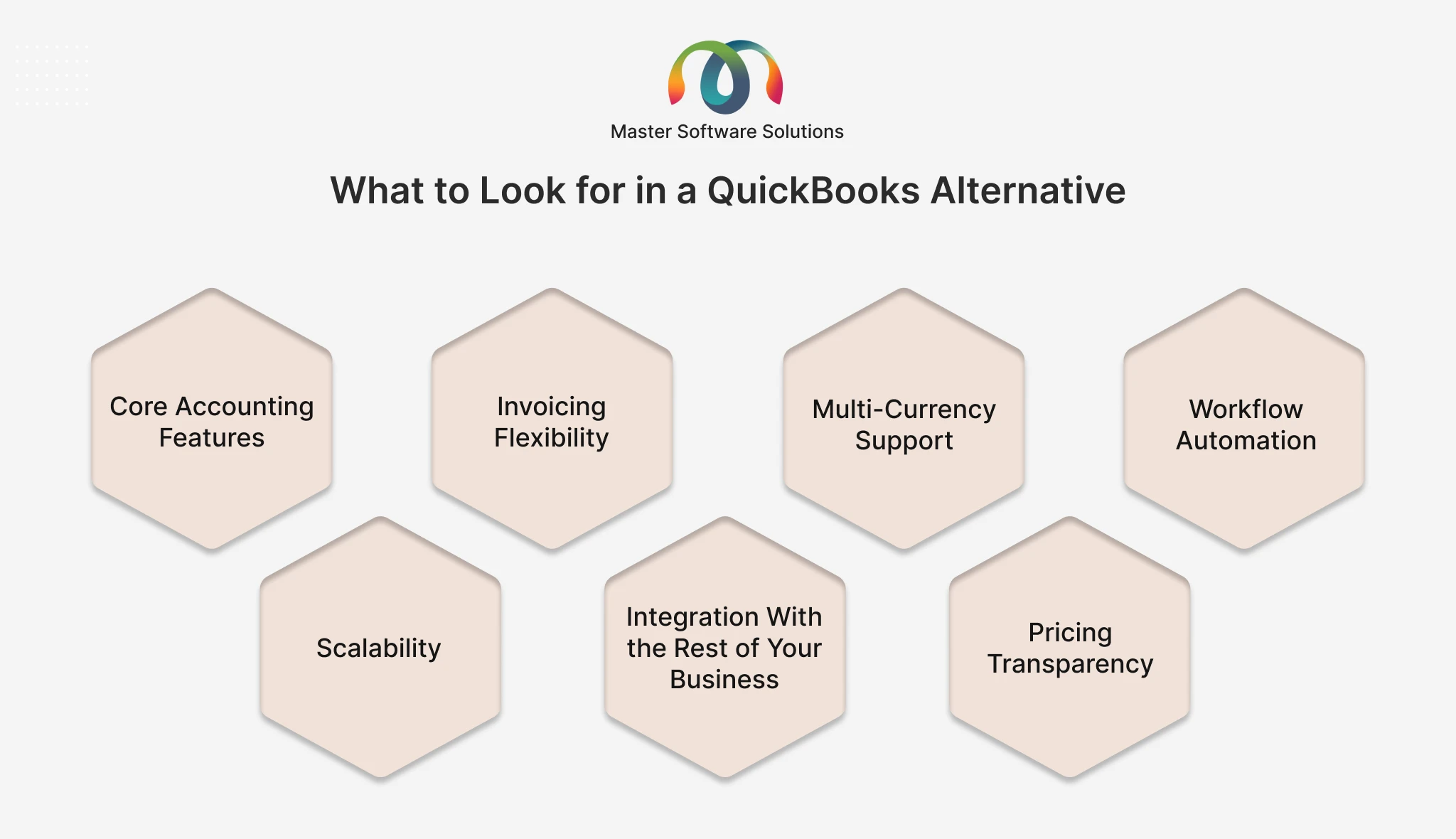
Scalability: Choose software that can grow with your business. The last thing you want is to go through another migration in two years because you’ve outgrown your replacement.Integration with the rest of your business: Accounting doesn’t happen in isolation. Your software needs to connect with your inventory, payroll, e-commerce, and CRM tools, ideally without paying for a third-party sync tool.
Pricing transparency: Watch out for platforms that lock essential features behind upsells.
Understand the full cost at your expected user count and feature set. With that in mind, here are the top seven alternatives to QuickBooks worth considering.
Not sure which accounting platform is the right fit? Talk to our experts for a free assessment, and we’ll help you find and implement the right solution for your business.
The Top 7 QuickBooks Alternatives for Small and Growing Businesses
Xero
Xero is one of the most respected QuickBooks alternatives on the market and a firm favorite among accountants and bookkeepers. If clean financial reporting and strong bank reconciliation are priorities for your business, Xero consistently delivers.
What Xero does well:
- Intuitive, modern interface that multiple users can navigate without accounting expertise
- Real-time cash flow tracking and financial reporting dashboards
- Excellent bank reconciliation with smart transaction matching
- Strong multi-currency support across all plan tiers
- A wide ecosystem of third-party integrations, including payroll, payments, inventory, and CRM
- Accountant-friendly with robust journal entry and audit trail capabilities
Pricing: Xero is a paid subscription platform; there’s no free tier. Pricing is tiered based on features and transaction volume, and it’s competitive with QuickBooks at comparable feature levels.
Who it’s best for: Growing businesses that need professional-grade accounting with strong reporting, multi-user collaboration, and good accountant compatibility. Particularly strong for service businesses and those with international operations.
Limitations: Xero doesn’t offer the breadth of an ERP; it’s accounting software, not a full business platform. You’ll need separate tools for inventory management beyond the basics, and payroll varies significantly by region.
Odoo Accounting
Odoo is the only truly open-source accounting platform on this list, and it’s a fundamentally different kind of tool than everything else here. Where the other platforms are accounting-first, Odoo is a complete, modular business platform that includes a powerful accounting module alongside CRM, inventory, manufacturing, purchasing, e-commerce, HR, and more.
For growing businesses that have realized they’re paying for too many disconnected tools, Odoo is the answer.
What Odoo Accounting does well:
- Full double-entry accounting with a complete chart of accounts, journal entries, and financial statements
- Automated invoicing includes recurring billing, payment reminders, and online payment integration
- Bank synchronization with AI-assisted transaction matching for fast reconciliation
- Multi-currency and multi-company support are built in at no extra cost and not gated behind a premium plan
- Tax management configured for your local jurisdiction, such as VAT, GST, and sales tax, with automated calculation
- Real-time financial dashboards with P&L, balance sheet, and cash flow are always up-to-date
- Purchase order and vendor bill management are connected directly to inventory and accounting
- Seamless integration with the rest of your business: when you raise a sale, it flows automatically into inventory, then invoicing, then accounting. No manual entry, no sync tools
- The open-source codebase is fully customizable with the help of the global developer community.
Odoo Community vs. Odoo Enterprise
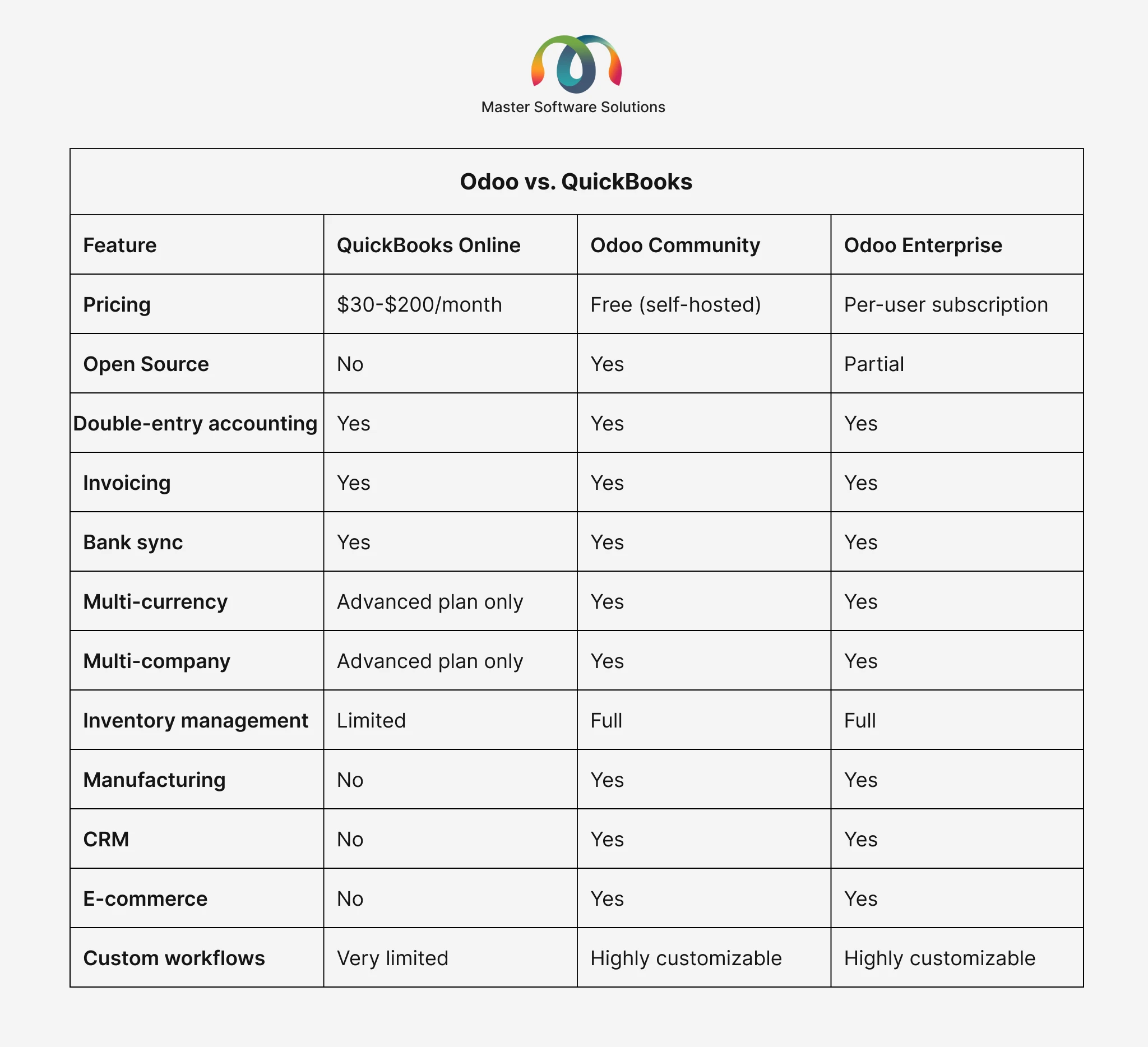
The Odoo community edition is completely free and open source. You can self-host it, customize it, and use it without paying licensing fees, making it the most cost-effective option for businesses willing to invest in implementation rather than recurring subscriptions.
The Odoo Enterprise edition adds advanced features and Odoo’s own hosting and support, available at a per-user subscription. Even at the Enterprise tier, the total cost of ownership is typically more favorable than QuickBooks Advanced or comparable Xero plans once you factor in the tools Odoo replaces.
Odoo vs. QuickBooks
Who it’s best for: Growing SMEs, manufacturers, distributors, food and beverage businesses, retailers, and e-commerce brands that need accounting as part of an integrated business platform and not a standalone tool sitting separate from everything else they do.
Limitations: Odoo’s breadth is a genuine advantage, but it does mean implementation takes more thought than signing up for a SaaS tool. Businesses get the most from Odoo when they work with an experienced implementation partner who configures it properly from the start.
Master Software Solutions is a certified Odoo Silver Partner. We implement, customize, and support Odoo for businesses across industries, including accounting, ERP, inventory, and e-commerce. Book your free Odoo consultation to see what switching looks like for your business.
FreshBooks
FreshBooks was built with a very specific customer in mind: service-based businesses and professionals who bill by time or project. If invoicing and client billing are the center of your financial workflow, FreshBooks makes them genuinely easy.
What FreshBooks does well:
- Outstanding invoicing is customizable, professional, and easy to send
- Built-in time tracking that ties directly to invoices
- Project management features for tracking billable work
- A client portal where customers can view, pay, and communicate
- Online payment acceptance through Stripe, PayPal, and other processors
- Automated payment reminders to reduce late payments
- User-friendly interface designed for non-accountants
Pricing: FreshBooks is subscription-based with tiered plans. There’s no free version, though pricing is accessible for freelancers and small teams.
Who it’s best for: Freelancers, consultants, agencies, and service businesses where invoicing and time tracking are the primary financial activities.
Limitations: FreshBooks is not built for product-based businesses. Inventory management, purchase orders, and manufacturing workflows are outside its scope. It’s also not a full double-entry accounting system in the traditional sense; businesses with complex accounting needs may find it limiting.
Zoho Books
Zoho Books is one of the most powerful QuickBooks alternatives available, and it stands out for something rare in this category: a genuinely useful free plan for eligible small businesses. For companies already using Zoho’s ecosystem, including Zoho CRM, Zoho Inventory, and Zoho Projects, it’s an especially natural fit.
What Zoho Books does well:
- Full double-entry accounting with a complete general ledger
- Automated bank feeds and reconciliation
- Invoicing, estimates, purchase orders, and vendor bill management
- Workflow automation ensures automatic payment reminders, recurring invoices, and approval workflows
- Multi-currency support
- Strong reporting and custom dashboards
- Project tracking and time billing
- Seamless integration across the Zoho product suite
- Free plan available for businesses under a revenue threshold
Pricing: Zoho Books has a free tier for qualifying small businesses, plus paid plans that scale affordably as you grow. It’s typically more cost-effective than QuickBooks at equivalent feature levels.
Who it’s best for: Small to mid-sized businesses that want robust accounting with automation, and especially those already using or open to using Zoho’s broader suite of business tools.
Limitations: Zoho Books is a strong accounting platform, but it isn’t a full ERP. Businesses with complex manufacturing, logistics, or multi-entity operations will eventually need more than it offers.
Sage Accounting
Sage is a long-established name in business accounting software, and Sage Accounting continues that tradition with reliability, structure, and compliance. It appeals particularly to businesses that have moved beyond the startup phase and need more rigorous financial controls.
What Sage Accounting does well:
- Solid double-entry bookkeeping with strong audit trail functionality
- Inventory tracking beyond what QuickBooks offers at comparable tiers
- Bank reconciliation and automated bank feeds
- Multi-user access with role-based permissions
- Strong payroll integration
- Advanced reporting tailored to established business needs
- Good accountant collaboration tools
Pricing: Sage Accounting is a paid subscription with tiered plans. Pricing is competitive and transparent.
Who it’s best for: Established small to mid-sized businesses, particularly those in retail, distribution, or with inventory-heavy operations, that want a structured accounting platform with strong internal controls and payroll connectivity.
Limitations: Sage’s interface feels less modern than competitors like Xero or Zoho Books. It’s a strong accounting tool, but, like the others, it isn’t a full business platform if you need ERP-level capability.
Wave
Wave is the standout option for businesses that need solid accounting functionality without any software cost. Its core accounting features are completely free, making it one of the most accessible QuickBooks alternatives for solo operators and very small teams.
What Wave does well:
- Free invoicing, expense tracking, and bank reconciliation, genuinely no cost
- Unlimited invoices and connections to unlimited bank accounts
- Online payment processing (paid feature, but competitively priced)
- Receipt scanning via mobile app
- Basic financial reports, including P&L, balance sheet, and cash flow
- Clean, simple interface that’s easy to use without accounting knowledge
Pricing: Wave’s core accounting is free. Payroll and payment processing are paid add-ons.
Who it’s best for: Freelancers, solopreneurs, and micro-businesses with straightforward finances who want a no-cost cloud accounting tool.
Limitations: Wave is not open source; its code is proprietary. It doesn’t scale well beyond simple bookkeeping and has limited inventory, project tracking, or advanced reporting. Payroll is only available in the US and Canada.
NetSuite
NetSuite by Oracle sits at the top end of this list; it’s not a QuickBooks replacement for a five-person team, but for businesses that have truly scaled beyond what any mid-market tool can handle, it’s one of the most comprehensive platforms available.
What NetSuite does well:
- Complete financial management with advanced consolidation for multi-entity businesses
- Revenue recognition, subscription billing, and complex financial instruments
- Multi-currency, multi-subsidiary, and multi-language support at scale
- Advanced analytics and real-time financial reporting across the entire business
- Full ERP capability — inventory, manufacturing, supply chain, CRM, HR
- Strong compliance and audit trail features for regulated industries
- A mature ecosystem of integrations and ISV partners
Pricing: NetSuite is a significant investment; it’s priced for mid-market and enterprise businesses and requires both licensing and implementation investment. It is not designed for microbusinesses or those seeking a free or low-cost solution.
Who it’s best for: Fast-scaling businesses managing multiple entities, complex revenue models, or international operations that have outgrown mid-market tools and need an enterprise-grade platform.
Limitations: NetSuite’s cost and complexity put it out of reach for most small businesses. For growing companies that need ERP capability but aren’t at enterprise scale yet, Odoo is typically the more appropriate and cost-effective path.
Why More Growing Businesses Are Choosing Odoo
Among all the options on this list, Odoo occupies a unique position; it’s the only one that genuinely replaces not just QuickBooks but the collection of tools most growing businesses end up running alongside their accounting software.
Here’s why businesses in the growth phase consistently land on Odoo:
Everything connects. When a sales order is placed in Odoo, it automatically updates inventory, triggers picking and packing, generates an invoice, and records the revenue, all without anyone manually pushing data between systems. QuickBooks can’t do this on its own, and getting other platforms to do it requires integrations that cost money and break unexpectedly.
No feature paywalls. Multi-currency, multi-company, and advanced reporting. These are built into Odoo, not locked behind a higher pricing tier the way they are in QuickBooks and Xero.
It grows with you. Most businesses that start on QuickBooks end up switching platforms at least once as they scale. Odoo is designed to take a business from early growth to multi-entity enterprise operations on the same platform, with the same data.
It can be customized. Because Odoo is open source, it’s extensible. Master Software Solutions builds custom Odoo modules for clients in manufacturing, food and beverage, logistics, retail, and professional services, giving them capabilities that no off-the-shelf accounting software can match.
The total cost is lower. When you add up what businesses typically spend on QuickBooks, plus inventory software, plus CRM, plus e-commerce integration, plus analytics tools, Odoo’s total cost of ownership is almost always lower.
How Master Software Solutions Helps You Switch to Odoo
Making the move from QuickBooks to a new accounting platform benefits enormously from expert guidance. Master Software Solutions specializes in exactly this, helping businesses evaluate, implement, and get the most from Odoo. Here’s what a typical Odoo implementation with MSS looks like:
Free business audit
Master Software Solutions starts by understanding your current setup, your workflows, and where your existing tools are letting you down. This gives you a clear, honest picture of what needs to change and why.
Configuration and customization
Master Software Solutions configures Odoo’s chart of accounts, tax rules, invoice templates, payment workflows, and financial reports to match your business requirements. Where the standard Odoo configuration doesn’t cover your specific needs, they build the custom module that does.
Data migration from QuickBooks
Your customer and vendor records, chart of accounts, opening balances, and historical transaction data are migrated cleanly and accurately into Odoo. You don’t lose your history. We help businesses migrate data from QuickBooks to Odoo seamlessly with no downtime.
Integration with your other tools
Master Software Solutions integrates Odoo with other tools, including your bank feeds, payment processors, e-commerce platform, payroll system, and any other tools that need accounting integration.
Training and go-live support
Your finance team is trained before go-live, and MSS is available throughout the transition to handle questions and resolve any issues quickly.
Ongoing support and improvement
After go-live, Master Software Solutions continues to support your Odoo environment, updates, new modules, performance improvements, and whatever comes next as your business evolves.
Ready to make the switch? Get in touch with our experts for a free consultation and find out exactly what moving from QuickBooks to Odoo would look like for your business.
How to Migrate From QuickBooks Safely
Whichever platform you choose, the migration process follows a similar structure. Here’s how to do it without disrupting your operations:
Before you migrate
Reconcile all bank accounts in QuickBooks, clear any outstanding open invoices and bills, and export a complete backup of your data, including customers, vendors, chart of accounts, transaction history, and reports. Choose a migration date during a low-activity period, ideally at the end of a financial period.
During migration
Most modern platforms offer import tools for QuickBooks data. Work with your implementation partner to validate that data has transferred correctly before switching over. Test with a small dataset first, then do the full migration once you’re confident.
After migration
Run both systems in parallel for a short period, just long enough to confirm your new platform is producing reports that match your QuickBooks history. Then close out QuickBooks and move fully to the new system.
For businesses migrating to Odoo, Master Software Solutions handles the full migration process, including data cleaning, validation, and reconciliation, as part of the implementation.
Conclusion
QuickBooks is a solid product, but it’s not the right fit for every business at every stage of growth. As your operations get more complex, your accounting software needs to keep up.
Whether you’re drawn to Xero’s reporting, Zoho Books’ automation, Wave’s zero cost, or Odoo’s open-source flexibility and ERP capability, there’s a better fit out there than sticking with software that’s starting to hold you back.
For businesses that want more than just accounting, that want their financials connected to their inventory, their sales, their purchasing, and their operations, Odoo is the platform worth serious consideration. And Master Software Solutions is the partner that makes it work.
With 800+ clients served across 40+ countries since 2012, MSS has helped businesses across manufacturing, food and beverage, retail, logistics, and professional services move from fragmented tools to a single, integrated Odoo platform that runs the whole business.
Don’t settle for software that almost works. Book your free consultation and find out what the right accounting platform can do for your business.