ravi garg, master software solutions, odoo partner, top banner, usa, uk, canada, india, odoo implementation partner company, image

2012

Founded

90+

Professionals in our Team

800+

Clients Served

40+

Countries on Global Map

Common Field Service Challenges We Solve

Managing a field workforce without the right tools is complex. These pain points directly impact time, revenue, and customer trust. Here's how Odoo Field Service fixes them.

01

Manual Scheduling Headaches

Assigning jobs via calls, texts, or spreadsheets leads to double bookings, missed appointments, and inaccurate information shared with the technician. Odoo Field Service manages complete manual data automatically for smooth field operations.

02

Disconnected Systems and Data Silos

Disconnected tools for scheduling, inventory, and finance create chaos among the team and lead to miscommunication and reconciliation errors. Odoo Field Service performs all the field operations in a unified platform to maintain data integrity.

03

Inaccurate Time and Cost Tracking

Mismanaged timing and tracking of assets makes billing a mystery, leading to undercharging and lost revenue. Odoo Field Service has built-in tracking and time management functionality to manage leads successfully.

04

No Real-Time Field Visibility

No real-time updates on where the work is stuck, completed, or in progress creates difficulty for team managers to make proactive decisions. Odoo Field Service offers real-time visibility of every process and team member to make decisions accordingly.

05

Slow and Inaccurate Invoicing

Maintaining paper worksheets manually consumes time and leads to billing delays, weakening client relationships. Odoo Field Service provides real-time invoicing for smooth billing processes and maintains client relationships.

06

Frustrated Customers

Customers do not get accurate details about tracking, delivery, and job completion, which loses confidence. Odoo Field Service provides accurate data from tracking to delivery for customer satisfaction.

Key Features of the Odoo Field Service Module

The Odoo Field Service module is packed with purpose-built features that streamline field operations and manage the full cycle of every job.

Smart Scheduling and Gantt View

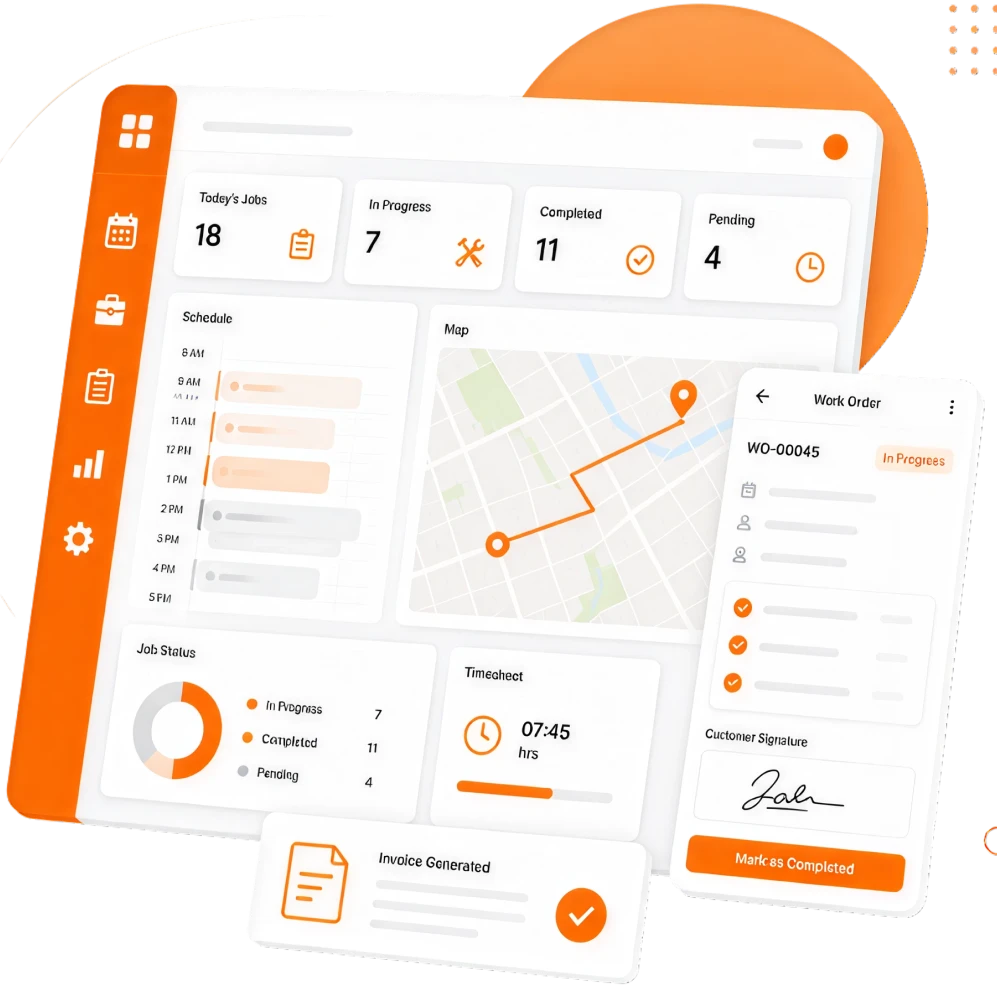
Drag and drop tasks on a visual Gantt chart to schedule dates, assign reliable technicians to various fields, set dependencies, and avoid conflicts — all in one screen.

Map View and Route Planning

View all appointments on a live map with the Odoo Field Service module, enabling technicians to plan efficient routes and managers to oversee field coverage by location.

Powerful Mobile App Functionality

Technicians manage their entire day from the application: check complete job details, fill worksheets, log time, add components used, and collect signatures offline or online.

Customizable Worksheets

Design report templates with the exact fields required by the job. Create multiple templates for different service types and share detailed reports with clients instantly.

Integrated Time Tracking

The Odoo Field Service module offers a built-in timer that enables technicians to start directly from the task. Time logs are captured automatically and flow into timesheets and invoices.

Products and Inventory Tracking

Track products via serial number or task, get updates on stock levels, and capture all used items on the invoice in real time with the Odoo Field Service module.

Instant Invoicing

Odoo Field Service generates draft invoices directly from a completed task. Timesheets and used products are pre-filled automatically, eliminating manual billing work.

Digital Signature Collection

Job completion reports are signed by the team directly on the technician's mobile device, providing instant, legally valid confirmation on-site for further processing.

Recurring Task Automation

Odoo Field Service automatically creates tasks for maintenance schedules or regular service calls at the right intervals, with no manual reminders needed.

Sales Order and Helpdesk Integration

After a sales order is confirmed or a helpdesk ticket is raised, field tasks are created automatically, connecting your sales and support teams seamlessly.

Customer Portal

A dedicated self-service portal for customers where they can view task status, access job reports, check quotations, and download invoices at any time.

Real-Time Reporting and Analytics

The module analyses team performance, project profitability, and customer satisfaction with built-in pivot tables, graphs, and worksheet-based reports, all exportable.

Benefits of Odoo Field Service

The Odoo Field Service module delivers key benefits to businesses across various industries. Here they are, one by one.

Faster job completion

Job details, customer history, and required components are confirmed in advance.

Zero revenue leakage

Every hour and every part is captured automatically, and an invoice is generated.

Lower administrative costs

Eliminate manual data entry across scheduling, billing, and reporting.

Higher customer satisfaction

Timely updates, professional digital reports, and faster invoices build loyalty.

Better business visibility

Real-time dashboards and team productivity reports ensure smarter, faster decisions.

Seamless Odoo ecosystem

Connects natively with Sales, Inventory, Accounting, and Helpdesk to fix data gaps.

Scalability

Add users, teams, locations, or modules without switching platforms or rebuilding your workflows.

Real-time team collaboration

Eliminates communication gaps by offering real-time visibility for both the technician and the field team.

Our Odoo Field Service Development and Implementation

Master Software Solutions follows a structured, phase-by-phase development and implementation process to match field operation workflows at every stage of adoption.

Discovery and Requirements

  • Understand current processes and pain points
  • Understand the job and analyse the requirements

Project Planning and Setup

  • Key responsibilities, timelines, and milestones
  • Set up the Odoo instance and project strategies

System Configuration

  • Module setup
  • Set integrations according to your operations

Custom Development

  • Analyze client business requirements
  • Build custom modules, workflows, and automations

Data Migration

  • Migrate existing data, service history, and product catalog
  • No data loss and minimal disruption

Testing & Quality Check

  • Integration testing, unit testing, and bug fixing
  • Error-free system for live use

User Training

  • Field-based training sessions
  • Proper understanding of the technicalities and tools

Go-Live and Ongoing Support

  • Go-live, launch, and beyond support
  • Timely system optimisation

Odoo Field Service Compatibility

Odoo Field Service works hand-in-hand with the Odoo suite for data synchronization. Master Software Solutions configures and validates all integrations to provide complete clarity.

Central Module

Odoo Field Service

The field service engine connected across your Odoo stack.

Odoo Sales

Auto-create field tasks when a reliable product or service sale is confirmed.

Odoo Helpdesk

Convert support tickets into field service tasks with a single click.

Odoo Inventory

Track components used on jobs and sync stock levels in real time.

Accounting and Invoicing

Push complete job data directly to invoices with zero manual entry.

Odoo Project

Manage field tasks as part of larger project requirements with full milestone tracking.

Timesheets and Payroll

Time logged in Field Service syncs automatically to timesheets and payroll.

Let's Build Your Odoo Field Service Solution Together

Stop losing revenue to disconnected tools. Our certified Odoo consultants will configure, customize, and implement a field service system that fits your business needs.

Industries Where Odoo Field Service Fits Best

The Odoo POS module is flexible enough to serve businesses across a diverse range of industries. Master Software Solutions showcases the industries that fit best within.

Frequently Asked Questions

A1. Odoo Field Service is a specialized module built for small to large businesses to manage scheduling, task tracking, time logging, parts inventory, and invoicing for field teams — technicians and engineers sent to customer sites for installation, maintenance, repair, or on-site support.
A2. Yes, definitely. Odoo has an in-built mobile app available on both iOS and Android. Technicians can view their task list, fill out worksheets, log time, add components, collect signatures, and create quotes — all from their phone or tablet, even in offline mode.
A3. Our Odoo Field Service integrates natively with Odoo Accounting and Invoicing. If you're using another accounting tool, our team can build custom integrations via APIs. In most cases, switching to Odoo Accounting and Invoicing alongside Field Service is more efficient and cost-effective.
A4. Implementation timelines depend on your business size, customization needs, and data migration complexity. A standard Field Service setup typically takes 4–8 weeks. Master Software Solutions provides a detailed project plan after the discovery session.
A5. Yes. Odoo Field Service comes with customized worksheet templates featuring reliable fields including checkboxes, text fields, measurements, photos, and more. You can create unique templates for different service types and generate branded reports automatically.
A6. As a leading Odoo partner, we handle data migration as part of our implementation process. We'll map your existing customer records, service history, product catalogs, and other data to Odoo's structure and securely import it. Before going live, data integrity is validated to ensure that nothing is lost or corrupted.
A7. Our Odoo Field Service scales from small operators to large enterprises. The base app holds a free subscription for one application, with unlimited users — making it accessible for small teams. As your business grows, you can add modules like Inventory, Sales, or Accounting without switching platforms.
A8. Yes. Master Software Solutions offers ongoing support packages including system monitoring, troubleshooting, user assistance, and feature enhancements. As a dedicated Odoo partner, our team will provide you with complete support after go-live.
Contact Us - Click to open form
Restore Widget