Running an eCommerce business in 2026 means juggling a dozen tools at once, a payment gateway here, a CRM there, a shipping platform somewhere else, and an accounting system holding it all together. When these systems don’t talk to each other, data falls through the cracks, orders slip, and your team wastes hours on manual data entry.
That’s exactly what Odoo eCommerce integration solves.
Odoo is one of the fastest-growing open-source ERP platforms in the world, offering a native eCommerce module that connects directly with your inventory, sales, finance, and customer management, all from a single platform. But most businesses already have an existing tech stack. The real challenge is getting Odoo to work seamlessly alongside (or in place of) those tools without disrupting operations.
In this guide, we walk you through exactly how to integrate Odoo eCommerce with your existing tech stack, step by step, covering APIs, third-party connectors, payment gateways, CRMs, shipping tools, and more.
Why Integrate Odoo eCommerce with Your Existing Tech Stack?
Before diving into the how, let’s address the why.
A disconnected tech stack creates silos. Your sales team works out of a CRM that doesn’t reflect real-time inventory. Your warehouse ships orders that haven’t been accounted for. Your finance team reconciles data manually at month-end. Sound familiar?
Integrating Odoo eCommerce bridges these gaps by creating a unified data flow across your entire business. The key benefits include the following:
- Eliminated double data entry: orders placed online flow automatically into inventory, fulfillment, and accounting
- Real-time inventory visibility: stock levels update across all channels the moment a sale is made
- Faster order fulfillment: automated workflows replace manual handoffs between departments
- Accurate financial reporting: every transaction is captured in your books without human intervention
- Better customer experience: your team always has the full picture of a customer’s purchase history and status
According to research, Odoo has become the fastest-growing ERP choice among mid-market eCommerce businesses, and for good reason. Its modular architecture makes integration with virtually any tool achievable without building from scratch.
Understanding Odoo’s Integration Architecture
Before you start connecting tools, it helps to understand how Odoo exposes its data for integration. Odoo offers three primary API interfaces:
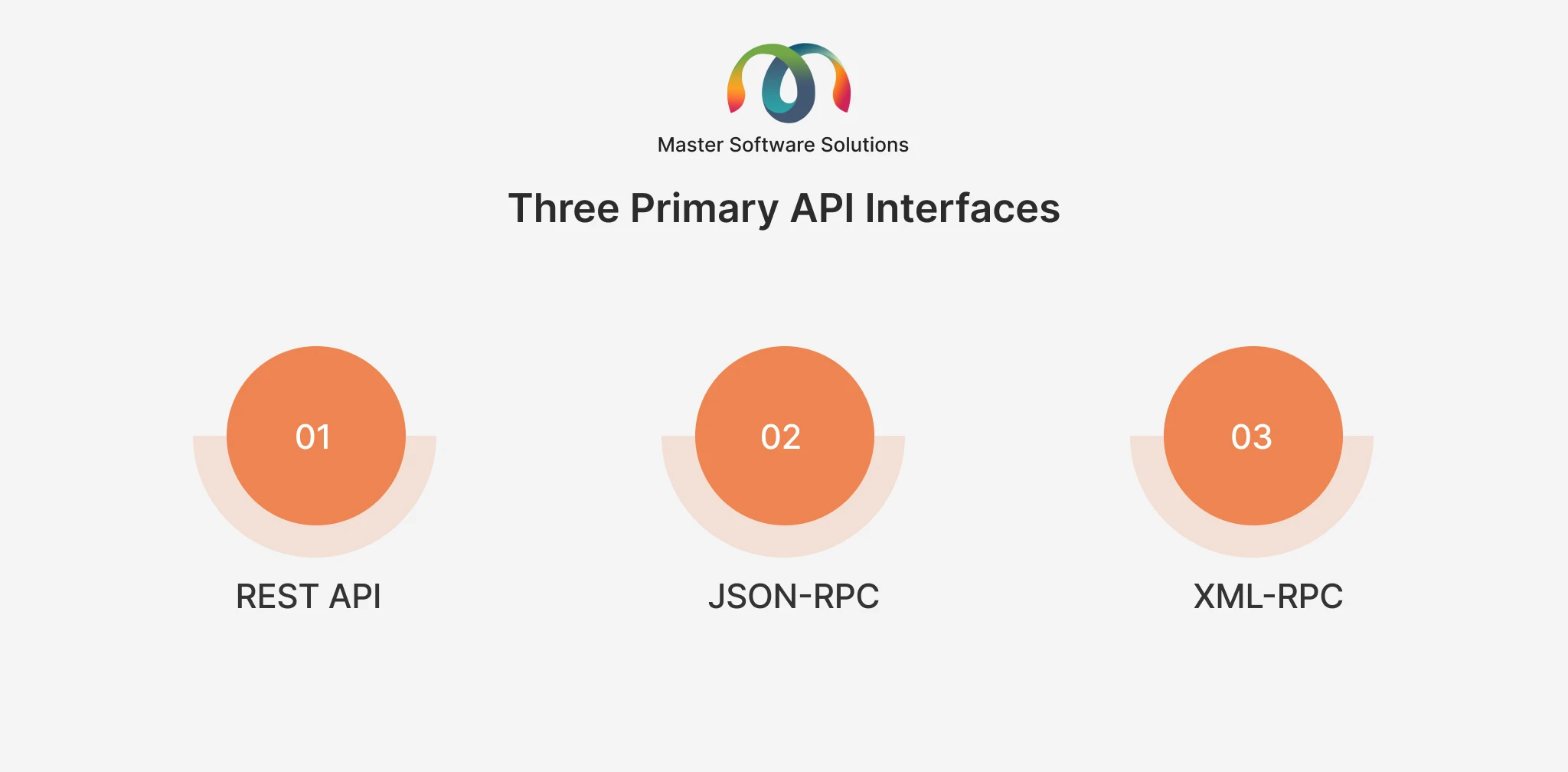
REST API
The most modern and developer-friendly interface. Odoo 17+ natively supports REST APIs, making it easy to build integrations with web-based tools, mobile apps, and third-party SaaS platforms using standard HTTP calls.
JSON-RPC
A lightweight, web-based protocol ideal for real-time data sync. Commonly used for frontend applications and webhook-driven workflows where speed matters.
XML-RPC
Odoo’s original remote procedure call interface. While older, it’s still widely supported and used in legacy integrations and enterprise connectors.
Authentication is handled via API keys (generated under Settings → Users → Your User → API Keys in Odoo 17+), and all calls should be made over HTTPS for security.
For businesses that prefer no-code or low-code connectivity, middleware platforms, including Zapier, Make (formerly Integromat), and dedicated Odoo connectors, provide drag-and-drop integration without writing a single line of code.
Step-by-Step: How to Integrate Odoo eCommerce with Your Existing Tech Stack
Step 1: Audit Your Existing Tech Stack
Make a list of all the tools your company currently uses and the data they contain before proceeding with any configuration. Create a simple inventory of:
- Sales & eCommerce: Shopify, WooCommerce, Magento, Amazon Seller Central
- CRM: Salesforce, HubSpot, Zoho CRM, Microsoft Dynamics 365
- Payment Gateways: Stripe, PayPal, Authorize.net, Adyen
- Shipping & Logistics: FedEx, UPS, DHL, ShipStation, EasyPost
- Accounting: QuickBooks, Xero, Sage, NetSuite
- Marketing: Mailchimp, Klaviyo, ActiveCampaign
- Customer Support: Zendesk, Freshdesk, Intercom
For each tool, identify what data it holds, how often it updates, and which other tools it currently connects with. This audit becomes your integration roadmap.
Need help mapping your tech stack to an Odoo integration plan? Book a free Odoo Consulting session with Master Software Solutions; our experts assess your setup and build a tailored integration strategy.
Step 2: Choose the Right Integration Method
Not all integrations are built the same. Your choice of method depends on data volume, real-time requirements, and your team’s technical capacity.
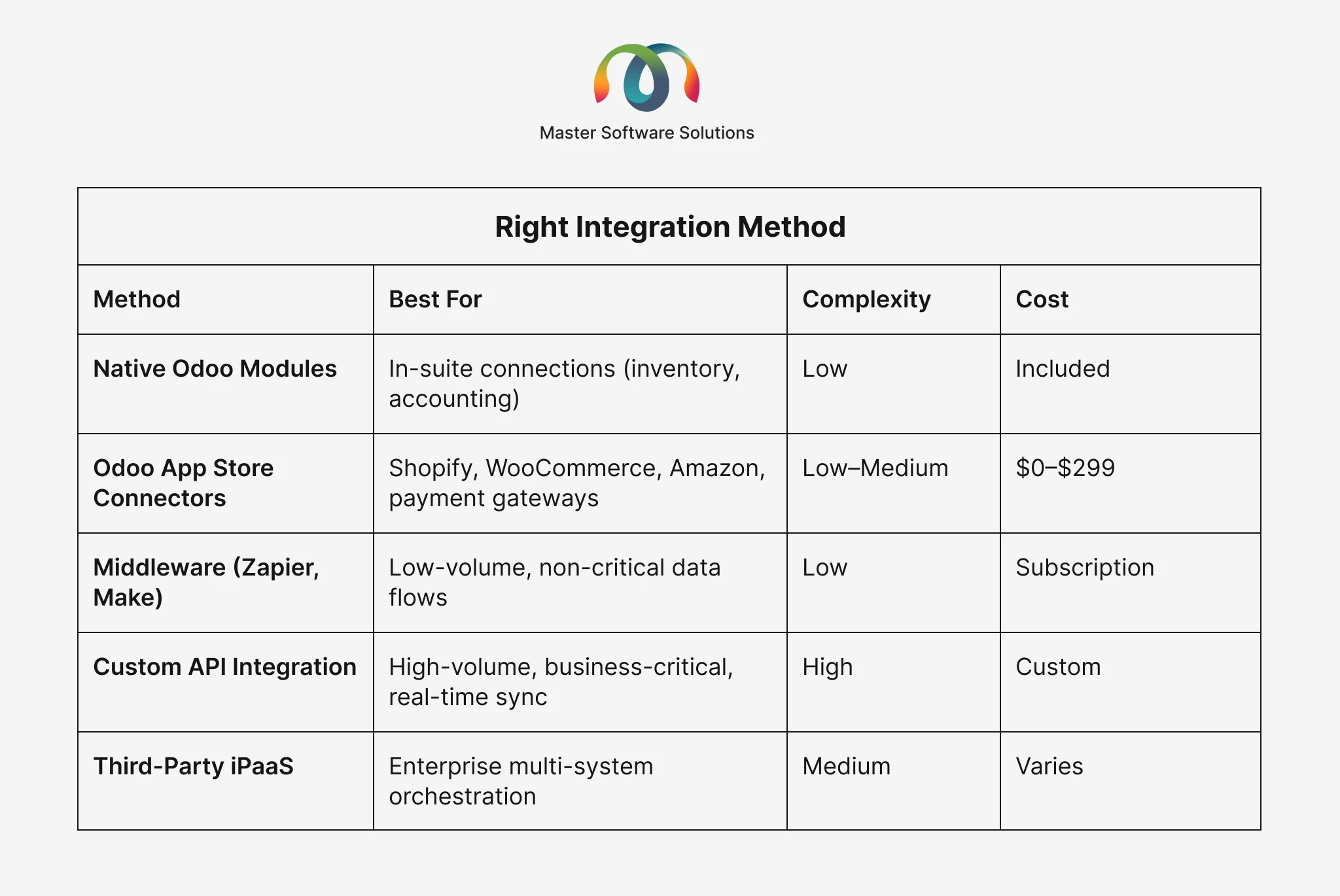
Rule of thumb: For fewer than 100 transactions/month, a middleware or App Store connector is usually sufficient. For 500+ transactions or financial-critical data, a custom API or enterprise connector is the safer bet.
For a deep dive into Odoo’s API capabilities, see the official Odoo API Integration Guide, covering XML-RPC, JSON-RPC, and REST approaches with code examples.
Step 3: Integrate Your Payment Gateway
Odoo has native support for the most widely used payment gateways, including Stripe, PayPal, Adyen, Authorize.net, Google Pay, and PayU. These are available as built-in payment providers in Odoo’s eCommerce settings.
To activate a payment gateway in Odoo:
- Go to Website → Configuration → Payment Providers
- Select your provider and click Activate
- Enter your API keys (from your payment gateway dashboard)
- Configure transaction currencies, minimum amounts, and countries
- Run a test transaction before going live
For gateways not natively supported, REST API integration allows you to build a custom payment flow that passes transaction data directly between your gateway and Odoo’s accounting module, ensuring every payment is recorded automatically.
Security note: All payment API connections should use HTTPS with encrypted API keys. Never expose credentials in client-side code.
Step 4: Sync Your CRM
If your sales team lives in Salesforce, HubSpot, or another CRM, you’ll want Odoo eCommerce orders and customer data to flow into that system automatically, and vice versa.
Common CRM integration patterns:
- New customer registered in Odoo: Contact created in CRM
- Order placed in Odoo eCommerce: Deal/opportunity updated in CRM
- CRM lead converted; Customer record synced back to Odoo
Odoo has a built-in CRM module that can serve as your primary system. However, if you’re committed to an external CRM, use Odoo’s REST API or a connector app to establish bidirectional sync. Webhooks are the most efficient mechanism here; Odoo can instantly trigger a webhook on order creation, pushing the data to your CRM.
Our Odoo Integration Services team regularly implements Salesforce-Odoo and HubSpot-Odoo integrations for mid-market and enterprise clients.
Step 5: Connect Shipping & Logistics
Odoo’s inventory and delivery modules support direct integration with major carriers, including FedEx, UPS, DHL, Sendcloud, and EasyPost. These integrations enable:
- Automated label generation at the time of shipment
- Real-time shipping rate calculation at checkout
- Tracking number syncs back to the customer order
- Delivery status updates in Odoo’s inventory
For businesses using third-party fulfillment centers or 3PLs, a custom API integration ensures your warehouse management system (WMS) stays in sync with Odoo’s inventory in real time, preventing overselling and fulfillment errors.
Step 6: Integrate Accounting & Finance Tools
Odoo’s native accounting module is powerful, but if you’re using QuickBooks, Xero, or Sage as your primary accounting system, you’ll need a sync layer.
Key data flows to establish the following:
- Sales invoices generated in Odoo: pushed to your accounting software
- Payments received: reconciled automatically
- Refunds and credits: mirrored across systems
- Tax calculations: consistent across Odoo and the accounting platform
Most accounting integrations run on a scheduled sync (every 15 minutes to hourly) rather than true real-time, which is perfectly adequate for financial reporting purposes.
Step 7: Set Up Data Synchronization Strategy
Once your integrations are configured, you need to define your sync strategy:
- Real-time sync (Webhooks): Triggered immediately when an event occurs in Odoo (e.g., order placed, stock updated). Best for inventory, order status, and customer-facing data.
- Scheduled sync (polling): Odoo periodically fetches or pushes updates at defined intervals. Best for reporting data, analytics feeds, and financial summaries.
- Bidirectional sync: Data flows both ways. Requires conflict resolution logic to decide which system is the “source of truth” for each data type to avoid overwrites.
- A critical best practice: always test integrations in a staging environment with realistic transaction volumes before going live. Sample data frequently overlooks edge cases that occur at scale.
Integrating Odoo eCommerce with Popular Platforms
Odoo + Shopify Integration
Shopify is the most common existing platform that businesses migrate from or use alongside Odoo. The Odoo-Shopify connector ecosystem has matured significantly, with over 68% of mid-market Shopify merchants now using an ERP for back-office operations.
Key sync points include products and variants, inventory levels, orders and fulfillment status, customers, and refunds/returns. For high-volume Shopify stores (500+ orders/day), a custom API integration with webhook-driven order sync is recommended over App Store connectors.
Odoo + WooCommerce Integration
WooCommerce integrates with Odoo via REST API, with several App Store connectors available. The primary challenge is handling WooCommerce’s flexible product schema (variable products, bundled products, subscriptions) and mapping it correctly to Odoo’s product model. We solved exactly this for a Toronto-based wholesale manufacturer whose duplicate internal references in Odoo were breaking product sync entirely — see how we fixed Aquatech’s Odoo-WooCommerce sync issues.
Odoo + Magento Integration
Magento (Adobe Commerce) integrations with Odoo are typically enterprise-grade, involving large product catalogs, complex pricing rules (B2B tiered pricing), and multi-warehouse inventory. A custom API integration is usually the right approach here.
Odoo + Amazon & Marketplaces
For sellers on Amazon, eBay, or other marketplaces, Odoo integrations map marketplace orders directly into Odoo’s sales and inventory modules, enabling unified fulfillment across all channels from a single dashboard.
Common Odoo eCommerce Integration Challenges (and How to Solve Them)
Data mapping mismatches
Different platforms use different data structures (e.g., product variants, tax codes, customer IDs).
Solution: build a mapping layer in your integration that translates data between formats before writing to either system.
Duplicate records
When two systems create records independently, duplicates emerge.
Solution: designate one system as the master source of truth for each data type and enforce unidirectional creation for that field.
API rate limits
High-volume sync jobs can hit API rate limits, causing failures.
Solution: Implement queue-based processing with exponential backoff and retry logic.
Real-time sync failures are going undetected
A failed webhook or dropped API call can silently desync your systems.
Solution: build monitoring and alerting into your integration layer so failures trigger immediate notifications.
Handling returns and refunds
Return workflows are complex and often missed in initial integration planning.
Solution: Explicitly map your return and refund flow during the audit phase (Step 1) and test it thoroughly before launch.
If you’re running into integration roadblocks, our Odoo Support and Maintenance team provides ongoing monitoring and troubleshooting for live integrations.
Best Practices for a Seamless Odoo eCommerce Integration
Start with a data audit, not a tool selection.
Know your data before you know your connector. The right integration method includes understanding your data volumes, velocity, and criticality.
Use staging environments religiously.
Never test integrations on production. Maintain a dedicated staging Odoo instance that mirrors your production setup.
Document every integration point.
Write down what syncs, in which direction, how often, and what the failure behavior is. This documentation becomes invaluable for onboarding, debugging, and scaling.
Build error handling from day one.
Assume every API call will eventually fail. Log failures, send alerts, and have a manual recovery process documented before you need it.
Scale Plan
An integration that works for 100 orders/day may break at 1,000. Design with headroom built in.
Maintain a single source of truth per data type. Inventory lives in Odoo.
Leads live in CRM.
Payments live in your accounting system. Mixed ownership of data types causes conflicts.
Conclusion
Integrating Odoo eCommerce with your existing tech stack is one of the highest-leverage moves a growing eCommerce business can make. It eliminates the operational drag of disconnected systems, gives your team a single source of truth, and lets your business scale without adding headcount to manage manual data flows.
The path to a successful integration starts with a thorough audit, a clear understanding of your data flows, and the right technical approach for your volume and complexity. Whether you’re connecting a payment gateway in an afternoon or orchestrating a full enterprise integration across CRM, ERP, shipping, and accounting, the investment pays for itself quickly in time saved and errors prevented.
Looking to build a production-ready Odoo integration? Our certified developers specialize in custom Odoo integrations built to scale. Hire Odoo developers from Master Software Solutions and get your integration live faster.