Running an eCommerce business on Shopify is powerful. But the moment your order volumes grow, you hit a wall. Manually syncing orders, updating stock levels, reconciling payments, and tracking shipments across disconnected tools is not just tedious; it is a business liability.
That is where integrating Shopify with Odoo ERP changes everything. Shopify brings a world-class customer-facing storefront. Odoo brings enterprise-grade operations: inventory management, accounting, fulfillment, purchasing, and CRM, all in one unified backend.
This guide covers everything you need to know about Shopify-Odoo integration: why it matters, what it does, how to set it up, common pitfalls to avoid, and how Master Software Solutions can help you get it right from day one.
What Is Shopify and Odoo Integration?
Shopify and Odoo integration is the process of connecting your Shopify online store with Odoo’s ERP (Enterprise Resource Planning) system so that data flows automatically between both platforms in real time or near real time.
Rather than operating as two separate silos, an integrated setup means:
- Orders placed on Shopify appear instantly in Odoo as sales orders
- Inventory levels updated in Odoo sync back to Shopify automatically
- Customer records are unified across both platforms
- Payments and refunds recorded in Shopify flow into Odoo’s accounting module
- Fulfillment and shipping updates from Odoo are reflected in Shopify for customers
Think of it as creating a single, intelligent commerce engine: Shopify handles the customer-facing experience, and Odoo manages everything behind the scenes.
Shopify vs. Odoo: Understanding the Strengths of Each Platform
Before diving into the integration, it is important to understand what each platform does best.
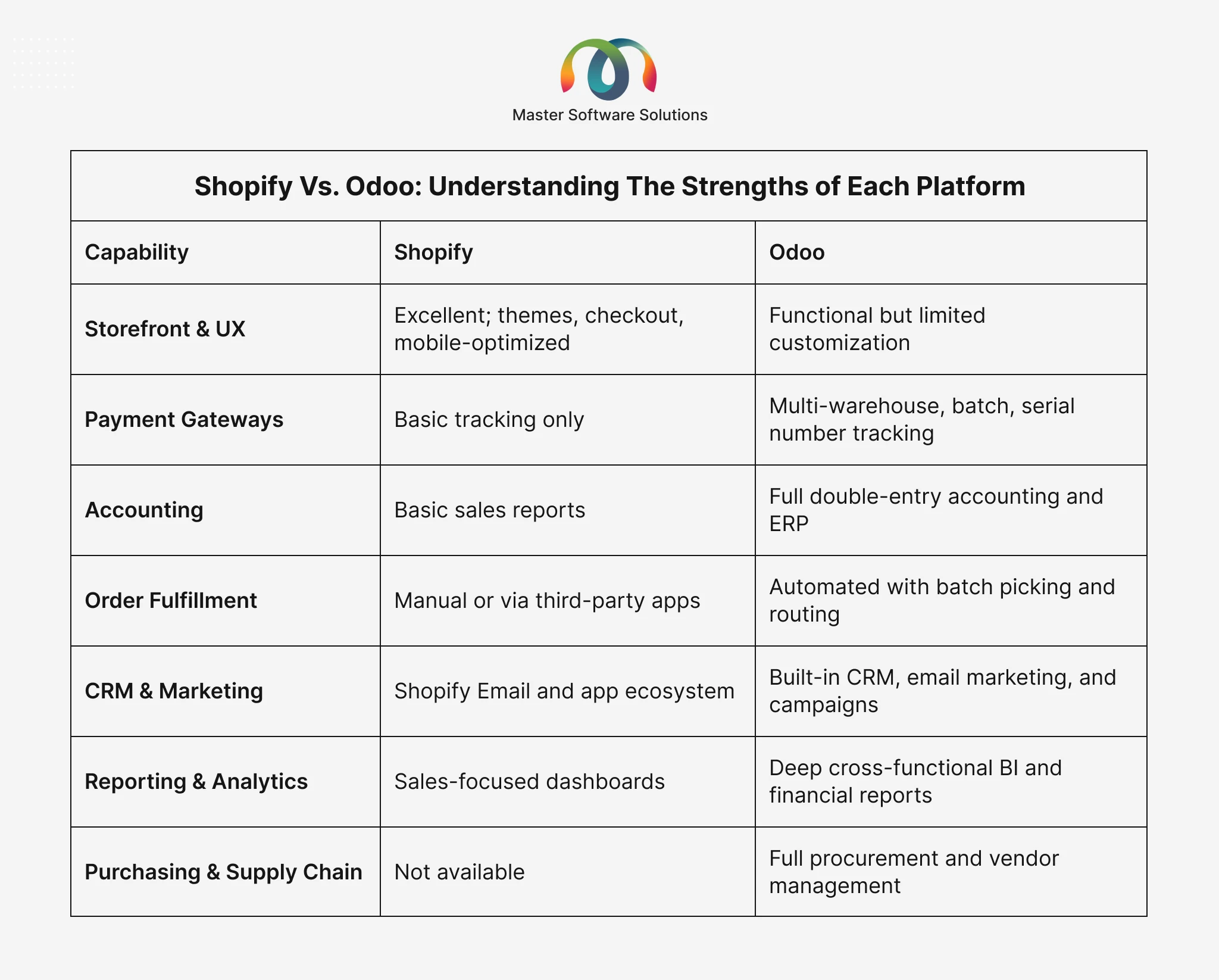
The integration bridges these gaps: Shopify’s storefront power combined with Odoo’s operational depth creates a complete, scalable commerce stack. Odoo also ships with its own storefront, so it’s worth knowing what it does and doesn’t do well before you commit to keeping Shopify as your front end — our review of Odoo eCommerce features and limitations covers that in detail.
Why Integrate Shopify with Odoo? Key Business Drivers
Growing eCommerce businesses consistently run into the same breaking points when Shopify and their back-office systems are disconnected.
Operational Bottlenecks
Manual data entry between Shopify and spreadsheets or standalone accounting tools is error-prone and time-consuming. Stock discrepancies lead to overselling and customer complaints. Delayed order processing results in longer shipping times and negative reviews.
Scalability Limits
As order volumes grow, manual processes simply do not scale. Multi-channel selling, including Shopify Plus wholesale, B2B, and marketplace channels, becomes impossible to manage without a central ERP. Expanding to new markets or warehouses requires automated inventory routing that no manual process can replicate.
Financial Visibility Gaps
Without Odoo’s accounting, you are reconciling Shopify payouts manually in spreadsheets with no real-time view of profitability, cost of goods sold, or cash flow. Multi-currency or multi-entity operations further compound the complexity.
Shopify-Odoo integration resolves all of these issues by creating a single source of truth across your entire business.
Ready to eliminate manual work from your eCommerce operations? Schedule a Free Consultation with Master Software Solutions. Our Odoo integration experts will review your current setup and design an automation roadmap tailored to your business.
Key Benefits of Shopify-Odoo Integration
Real-Time Data Synchronization
Orders, inventory levels, customer data, and payment records sync between Shopify and Odoo in real time, eliminating data lag and the need for manual reconciliation.
Automated Order Management
Every Shopify order automatically becomes an Odoo sales order, triggering the full fulfillment workflow: picking, packing, and shipping with no human intervention required at any step.
Accurate, Live Inventory Control
Inventory adjustments in Odoo, including purchase order receipts, returns, transfers, and stocktakes, immediately update Shopify stock levels. Multi-warehouse businesses gain location-specific visibility, preventing oversells during peak periods like Black Friday and seasonal launches.
Streamlined Accounting and Financial Management
Shopify payouts automatically generate bank statement entries in Odoo. Refunds, taxes, and multi-currency transactions are handled with full double-entry accounting, giving you clean books with minimal manual effort.
Better Customer Experience
Faster fulfillment, accurate stock availability, and automated shipping notifications improve the post-purchase experience, directly reducing support tickets and customer complaints.
Unified Reporting and Business Intelligence
Instead of reporting in silos, you get a unified view: sales performance, inventory turnover, cost of goods sold, profitability, and customer lifetime value, all from Odoo’s reporting dashboards.
Reduced Operational Costs
Automation eliminates the need for manual data-entry staff and reduces the cost of human error. Your team can focus on growth activities rather than administrative reconciliation.
Core Features of Shopify-Odoo Integration
Real-Time Order Synchronization
Orders placed on Shopify create corresponding sales orders in Odoo within seconds. Order updates, such as address changes, cancellations, and line-item modifications, propagate automatically, ensuring your fulfillment team always works from accurate, current information.
Bidirectional Inventory Sync
Stock levels are continuously pushed from Odoo to Shopify. Whether you are receiving a purchase order, processing a return, or adjusting inventory after a stocktake, Shopify reflects the correct available quantity, preventing oversells and backorder surprises.
Product Catalog Management
Products and variants created in Odoo push to Shopify, including product names and descriptions, pricing and pricing tiers, product images and variants (size, color, SKU), and product status propagation (active or archived).
Customer Data Synchronization
Customer records sync bidirectionally. A new customer who registers on Shopify gets created in Odoo CRM. An existing Odoo customer placing a Shopify order gets recognized and matched, building a complete 360-degree customer profile across both systems.
Payment and Refund Handling
Payments received via Shopify, including credit card, Shopify Payments, PayPal, and others, are recorded in Odoo’s accounting module. Refunds initiated in Shopify trigger the corresponding credit note in Odoo, keeping your books accurate without manual entries.
Fulfillment and Shipping Updates
When Odoo marks an order as shipped and includes the carrier name and tracking number, Shopify automatically updates. Customers receive timely fulfillment notifications, and the order status in Shopify reflects the current delivery status.
Payout Reconciliation
Shopify payout reports are automatically converted into bank statement entries in Odoo, streamlining bank reconciliation and eliminating one of the most tedious parts of eCommerce accounting.
Multi-Warehouse and Multi-Currency Support
For businesses operating multiple warehouses or selling in multiple currencies, the integration routes orders to the correct fulfillment location and handles foreign exchange automatically within Odoo’s multi-currency accounting framework.
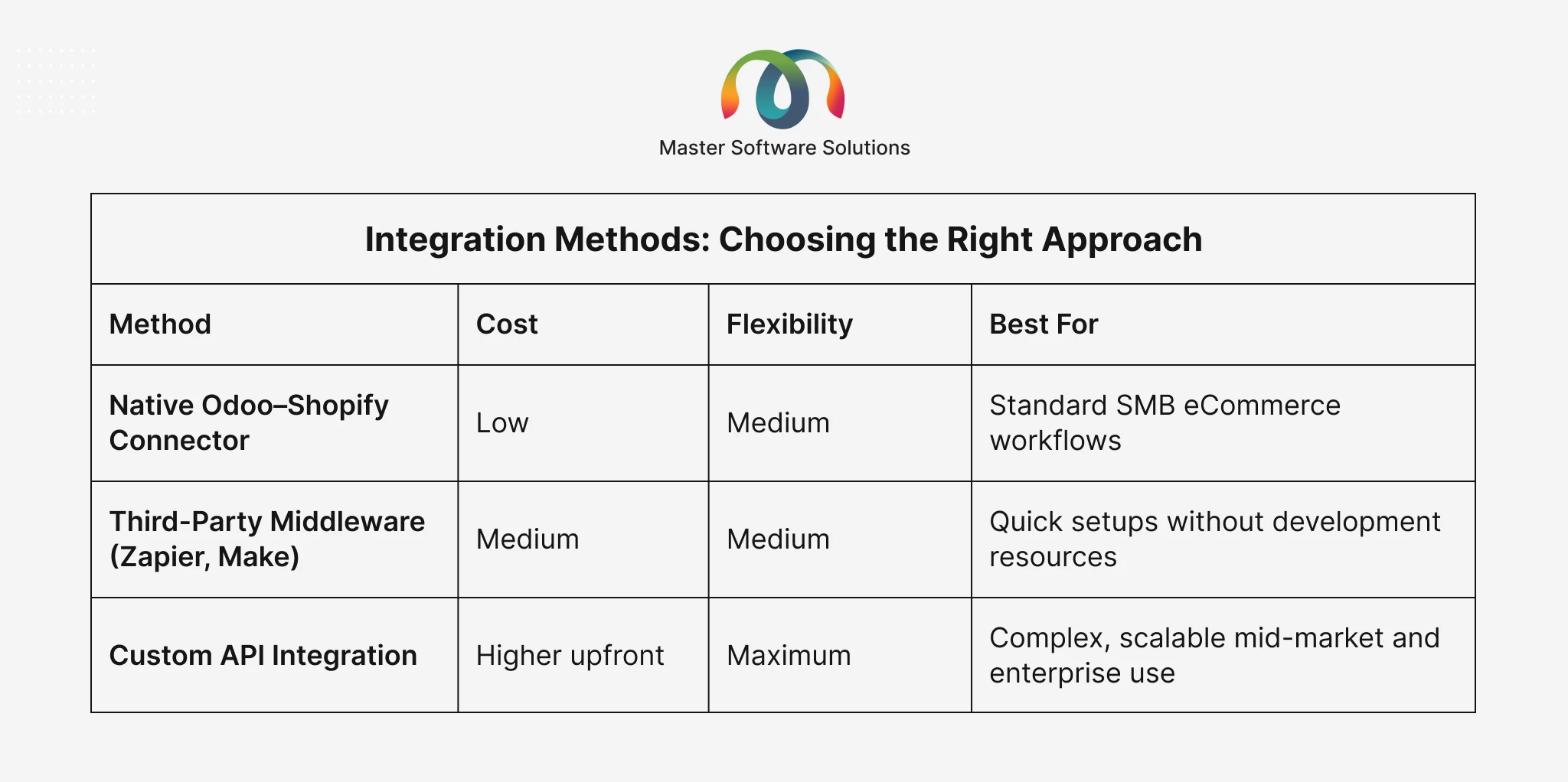
Integration Methods: Choosing the Right Approach
There are three primary ways to connect Shopify and Odoo, each with different trade-offs.
Native Odoo-Shopify Connector
Odoo provides a built-in Shopify connector available through the Odoo App Store. It handles standard use cases, such as order sync, product sync, inventory, & payments, and is the fastest route for businesses with straightforward requirements.
Third-Party Middleware Platforms
Tools like Zapier or Make (formerly Integromat) can connect Shopify and Odoo via pre-built workflows. These offer flexibility without custom code, but can become expensive at scale and may struggle with complex business logic.
Custom API Integration
A fully custom integration built on Shopify’s REST or GraphQL API and Odoo’s API. This approach offers maximum flexibility, custom data mappings, complex business rules, multi-warehouse logic, and loyalty programs, and is the most reliable for long-term production use.
Not sure which integration approach is right for your business? Talk to Our Odoo Integration Experts. Master Software Solutions recommends the right method based on your workflows, scale, and budget, with a clear roadmap before any work begins.
Step-by-Step: How to Integrate Shopify with Odoo
Step 1: Discovery and Requirements Mapping
Define your integration scope: which data flows are needed, the direction of sync for each, and any custom business rules; for example, multi-warehouse routing, B2B pricing tiers, or loyalty program sync.
Step 2: Select Your Integration Architecture
Choose between the native connector, a middleware platform, or a custom API solution based on your complexity, budget, and long-term scalability requirements.
Step 3: Configure Shopify API Access
Create a Shopify private or custom app with the necessary API scopes, including orders, products, inventory, customers, and fulfillments, and generate API credentials for Odoo to connect with.
Step 4: Configure the Odoo-Shopify Connection
In Odoo, install the Shopify connector module and configure the connection using your store URL and API credentials. Map Shopify data fields to Odoo fields: products, price lists, warehouses, tax configurations, and payment journals.
Step 5: Set Sync Rules and Automation
Define sync frequency, such as real-time via webhooks for orders and inventory or scheduled batches for analytics and customer backfill, along with error handling logic and retry behavior for failed transactions.
Step 6: Data Migration and Historical Sync
If migrating from an existing setup, perform a one-time historical data import for products, customer records, and open orders. Validate completeness and accuracy before going live.
Step 7: End-to-End Testing
Run tests covering the full order lifecycle: place a test order in Shopify, verify it appears in Odoo, fulfill it in Odoo, and confirm the tracking update reflects in Shopify. Test edge cases: refunds, partial fulfillments, cancelled orders, and stock adjustments.
Step 8: Go-Live and Ongoing Monitoring
Cut over to production with monitoring dashboards active. Track sync throughput, error rates, and latency. Set up alerts for queue failures. Schedule post-launch reviews at two weeks and thirty days to catch edge cases early.
Common Challenges and How to Avoid Them
Challenge 1: Shopify API Version Deprecation
The problem: Shopify deprecates API versions every six months. Integrations locked to deprecated versions eventually break, often silently.
The solution: Review and upgrade API versions quarterly. Monitor Shopify’s developer changelog and treat version upgrades as scheduled maintenance and not emergency fixes.
Challenge 2: Inventory Oversells During Peak Traffic
The problem: Sync lag during high-traffic events like Black Friday, flash sales, and seasonal launches can result in inventory discrepancies and oversells, eroding customer trust.
The solution: Reserve inventory in Odoo before publishing availability to Shopify. Increase sync frequency during peak periods. Implement safety stock buffers in your ERP configuration.
Challenge 3: Tax and Currency Mismatches
The problem: Shopify and Odoo can compute taxes differently, especially for multi-jurisdiction sellers. Discrepancies create accounting headaches and compliance risk.
The solution: Designate a single source of truth for tax calculation, typically Odoo, optionally augmented by a dedicated tax engine like Avalara, and configure Shopify to defer to it.
Challenge 4: No Error Handling or Observability
The problem: Integrations without retry logic, dead-letter queues, or monitoring dashboards fail silently for days before anyone notices. By then, orders are missing, inventory is out of sync, and customer complaints are incoming.
The solution: Build structured logging, queue-failure alerting, and daily reconciliation reports from day one. Treat the integration like a software product that needs monitoring, not a project that is “done” at go-live.
Challenge 5: Treating Integration as a One-Time Project
The problem: The biggest failure mode is treating the integration as finished after launch. APIs change, business rules evolve, and edge cases emerge over time.
The solution: Budget for ongoing maintenance, typically $3,000–$15,000 per year, depending on complexity, and designate an integration owner within your team or your implementation partner.
Who Should Consider Shopify-Odoo Integration?
This integration delivers the most value for eCommerce businesses that:
- Process more than 100 orders per day and struggle with manual fulfillment workflows
- Operate multiple warehouses or fulfillment centers
- Sell across multiple channels, Shopify Plus, wholesale, B2B, and marketplace
- Need proper double-entry accounting and financial reporting beyond basic Shopify reports
- Are scaling into new markets, currencies, or geographies
- Have outgrown spreadsheets, QuickBooks, or other lightweight back-office tools
Industries that benefit most include retail and fashion, consumer packaged goods, food and beverage, electronics, and health and wellness — all high-SKU, high-volume sectors where operational accuracy is a direct competitive differentiator.
According to Shopify’s eCommerce automation research, businesses that automate core commerce workflows reduce operational overhead by an average of 30% while improving order accuracy and fulfillment speed.
Cost of Shopify-Odoo Integration
Integration investment varies based on scope and complexity.
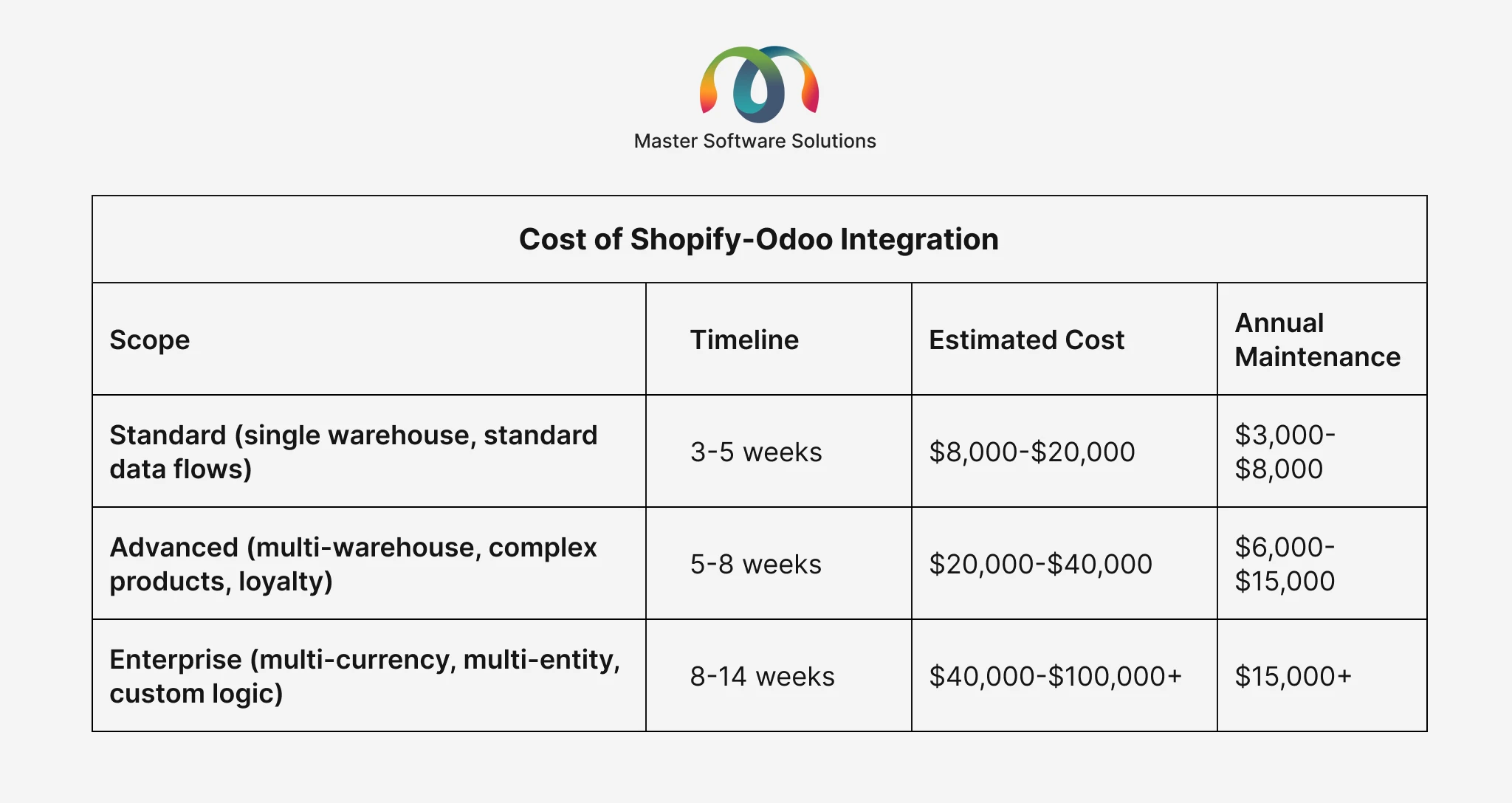
These figures include setup, configuration, testing, and go-live support. Annual maintenance covers API version upgrades, feature additions, and ongoing monitoring. Businesses that do not budget for maintenance are most likely to experience the integration degradation cycle, working well for six months, then silently failing.
How Master Software Solutions Can Help
Master Software Solutions is an Odoo ERP partner specializing in integration services for eCommerce, retail, logistics, and distribution businesses. Our Odoo integration practice covers:
- Full Shopify–Odoo integration design, development, and deployment
- Custom connector development for unique business workflows
- Multi-warehouse and multi-currency configuration
- Ongoing monitoring, maintenance, and API version management
- Migration from legacy or failing integrations to production-grade solutions
- Odoo implementation, customization, and dedicated support services
Whether you are starting fresh or rescuing a failing integration, our team brings the expertise to make it reliable, scalable, and maintainable for the long term.
Learn More About Our Odoo Integration Services.
Conclusion
Shopify and Odoo are powerful platforms, but together, they form a commerce stack capable of handling the demands of a genuinely scalable eCommerce business. The integration eliminates manual data entry, prevents inventory errors, automates financial reconciliation, and gives your team real-time operational visibility that a disconnected stack simply cannot provide.
The key is building it right: with proper error handling, observability, retry logic, and a clear maintenance plan. Treated as a software product rather than a one-time project, a well-implemented Shopify-Odoo integration becomes a compounding competitive advantage, one that gets more valuable as your business grows.
Master Software Solutions works with eCommerce businesses to design, build, and maintain these integrations, so you can focus on growing your business, not managing your tools.
Take the first step toward a fully automated eCommerce operation. Contact us today. Get a no-obligation consultation with our Odoo integration experts and discover what is possible for your business.