Odoo is one of the most versatile open-source ERP platforms available today. With over 50 integrated business applications, including accounting, inventory, manufacturing, CRM, e-commerce, and HR, it offers small and mid-sized businesses a cost-effective path to digital transformation. Yet, this flexibility is a double-edged sword.
When businesses attempt to bend Odoo to fit unique workflows, the journey from vanilla ERP to a truly customized solution can surface a surprising number of technical and organizational hurdles. Upgrade headaches, performance bottlenecks, fragile integrations and scope creep are not hypothetical concerns; they are the lived experience of countless implementation projects.
At Master Software Solutions, a certified Odoo Partner serving 800+ clients across 40+ countries since 2012, we have seen, diagnosed, and resolved every customization challenge there is. Our end-to-end Odoo Customization Services are built around avoiding the pitfalls described in this blog. Read on to navigate them confidently.
Whether you are mid-project or still in the planning stage, the insights here will save you time, money, and frustration.
What Is Odoo Customization?
Odoo customization refers to modifying the standard Odoo ERP platform to align it with a business’s unique processes, data structures, or user-experience requirements. Customization includes:
- Module-level tweaks: adding fields, changing views, and altering workflows within existing modules.
- Custom module development: building entirely new modules for business logic not covered out of the box.
- UI/UX changes: redesigning forms, kanban boards, reports, and dashboards.
- Third-party integrations: connecting Odoo to payment gateways, logistics APIs, e-commerce platforms, and more.
- Data migration customization: transforming legacy data structures to fit the Odoo schema.
What are the Common Odoo Implementation Challenges
Understanding where your project falls on this spectrum is the first step toward managing complexity effectively.
Challenge 1: Over-Customization and Scope Creep
What it is
One of the most common pitfalls in Odoo projects is doing too much. Teams start with a reasonable list of requirements and gradually expand it by adding fields, screens, and automations until the system barely resembles standard Odoo. This is scope creep and expensive.
Why it happens
- Stakeholders request changes after seeing early demos.
- Business analysts fail to distinguish “nice-to-have” from “must-have” requirements.
- No formal change-control process exists to evaluate the impact of additions.
How to solve it
- Define a Minimum Viable ERP (MVERP) scope before development begins.
- Maintain a change-request log with impact assessments for every new requirement.
- Use Odoo’s standard features wherever possible before writing a single line of code. Odoo’s configuration options are extensive and often underutilized.
Not sure what to customize and what to configure? Book a Free Consultation
Challenge 2: Upgrade Incompatibility After New Odoo Releases
What it is
Odoo releases a major version roughly every year. Each new version introduces changes to the ORM, view architecture, and core module APIs. Heavily customized instances often break during or after upgrades, leaving businesses stuck on outdated versions.
Why it happens
- Custom code overrides core Odoo methods directly rather than inheriting or extending them.
- Hard-coded references to internal field names or model IDs that change between versions.
- Third-party modules not maintained for newer versions.
How to solve it
- Always extend, never override. Use Python class inheritance and XML “inherit” references to add or change behavior without touching core source files.
- Avoid direct SQL queries that bypass the ORM; they break when table structures change.
- Structure your custom modules according to Odoo’s official developer guidelines; the documentation covers inheritance patterns, ORM best practices, and module architecture in detail.
- Conduct upgrade feasibility assessments before each major version jump.
Challenge 3: Performance Degradation
What it is
Custom modules that are poorly written can slow Odoo to a crawl, with long page load times, sluggish reporting, and database outdate. In production environments with thousands of records, even a single missing database index can cause serious latency.
Why it happens
- N+1 query problems: looping through records and making a separate database call for each one.
- Missing indexes on frequently filtered or searched custom fields.
- Synchronous computations on large datasets inside computed fields.
- Unoptimized domain filters in list views.
How to solve it
- Use Odoo’s built-in ORM methods (search_read, read_group) for bulk data retrieval.
- Add _sql_constraints and database indexes for frequently queried fields.
- Profile slow operations using the Odoo profiler or PostgreSQL EXPLAIN ANALYZE.
- Offload heavy computations to background jobs using ir.cron or queue_job.
Challenge 4: Poor Module Architecture and Technical Debt
What it is
When customizations are written quickly without a coherent architectural plan, the resulting codebase becomes fragile. Each new feature requires understanding and carefully navigating a tangle of workarounds. Developers refer to this accumulated mess as technical debt.
Why it happens
- Projects prioritize speed over quality, skipping code review and documentation.
- Different developers write code in inconsistent styles and patterns.
- Patches applied to production without testing in a staging environment.
How to solve it
- Follow Odoo module structure conventions: models, views, security, wizards, and reports, each in separate directories.
- Enforce code review for all pull requests, even minor ones.
- Maintain a staging environment that mirrors production for pre-deployment testing.
- Schedule periodic technical debt reviews to refactor high-risk modules before they become unmanageable.
Struggling with a slow or broken Odoo instance? Book a Free Technical Consultation
Challenge 5: Integration Complexity With Third-Party System
What it is
Most businesses don’t run Odoo in isolation. It must talk to payment gateways, shipping APIs, e-commerce platforms (Shopify, WooCommerce), accounting software (QuickBooks, Xero), or custom legacy systems. Each integration is a potential failure point.
Why it happens
- Inconsistent API designs between Odoo versions and third-party providers.
- Lack of error handling: a failed API call silently drops data instead of raising an alert.
- Authentication token expiry is not managed, causing intermittent failures.
How to solve it
- Build integrations using Odoo’s native JSON-RPC or REST API endpoints where possible.
- Implement robust error logging, retry logic, and admin notifications for failed sync operations.
- The Odoo Community Association (OCA) publishes battle-tested connector modules for common integration patterns; reviewing these before building your own saves significant time and avoids known pitfalls.
- Always test integrations against sandbox/test environments of third-party platforms before going live.
Challenge 6: Inadequate Testing and Quality Assurance
What it is
Many Odoo customization projects skip or minimize testing. The result? Bugs surface in production, in front of end users, causing data corruption, lost orders, and eroded trust in the system.
Why it happens
- Time pressure pushes teams to skip testing in favor of faster delivery.
- No automated test suite exists for custom code.
- UAT (User Acceptance Testing) is treated as an afterthought, not a project milestone.
How to solve it
- Write Python unit tests for every custom model and business logic method.
- Use Odoo’s built-in test framework (odoo.tests.common) to simulate transactions in isolation.
- Treat UAT as a formal phase with sign-off criteria before go-live.
- Run regression tests after every deployment to catch unintended breakages in existing functionality.
Challenge 7: Data Migration Challenges
What it is
Moving data from legacy systems into Odoo is not easy. Mismatched field types, missing mandatory values, duplicated records, and complex relational data can turn migration into a months-long ordeal.
Why it happens
- Legacy systems store data in formats incompatible with Odoo’s relational model.
- Data quality issues: duplicates, nulls in required fields, inconsistent date formats.
- No data-cleansing phase before migration attempts.
How to solve it
- Conduct a thorough data audit before writing a single migration script.
- Use Odoo’s import CSV tool for simple entities; write Python migration scripts via odoo.tools.convert for complex ones.
- Run multiple test migrations against a copy of the production database before the final cutover.
- Establish a rollback plan: keep the legacy system live in read-only mode for at least 30 days post-go-live.
Need expert Odoo developers who write clean, upgrade-safe code? Hire Odoo Developers
Challenge 8: Security Vulnerabilities in Custom Code
What it is
Custom Odoo modules can introduce security risks that the standard platform would never allow. SQL injection, broken access control, and exposed API endpoints are real threats in poorly written custom code.
Why it happens
- Developers bypass the ORM with raw SQL, opening SQL injection vectors.
- Access control lists (ACLs) and record rules are not defined for new models.
- Sensitive data logged to debug files is left enabled in production.
How to solve it
- Always use the ORM for database operations, never concatenate user input into raw SQL.
- Define ir.model.access.csv entries and record rules for every new model.
- Disable debug mode in production; ensure server-side logging does not capture PII.
- Conduct a security audit of all custom modules before go-live, and repeat annually.
Challenge 9: Lack of Documentation
What it is
Custom modules that are not documented become black boxes. When the original developer leaves, or when the business upgrades Odoo two years later, no one knows why a particular customization was built or how it works.
Why it happens
- Documentation is not treated as a deliverable with acceptance criteria.
- Time pressure means developers write code first and “document later”, and is never done.
How to solve it
- Require a README, inline docstrings, and a functional specification document for every module.
- Maintain a business-facing change log explaining what was customized and why, in plain language.
- Include documentation review in your Definition of Done before any module is considered complete.
Challenge 10: Finding and Retaining Skilled Odoo Developers
What it is
Odoo expertise is a specialized skill set. Finding developers who understand both the technical platform and the business domain (accounting, manufacturing, logistics) is difficult and expensive. And the costs increase due to the mistakes made by inexperienced developers.
Why it happens
- The Odoo developer pool is smaller than mainstream technology stacks.
- Generic ERP consultants often lack the Python and QWeb depth that Odoo customization demands.
- High turnover in technology roles means institutional knowledge walks out the door.
How to solve it
- Partner with a certified Odoo firm that maintains a dedicated team of Odoo developers. You can hire dedicated Odoo developers from Master Software Solutions on a full-time, part-time, or project basis, without the overhead of recruitment or onboarding.
- Opt for a dedicated Odoo developer model for long-term projects; staff augmentation for short-term tasks.
- Insist on a portfolio of completed Odoo projects and client references before engaging any developer or agency.
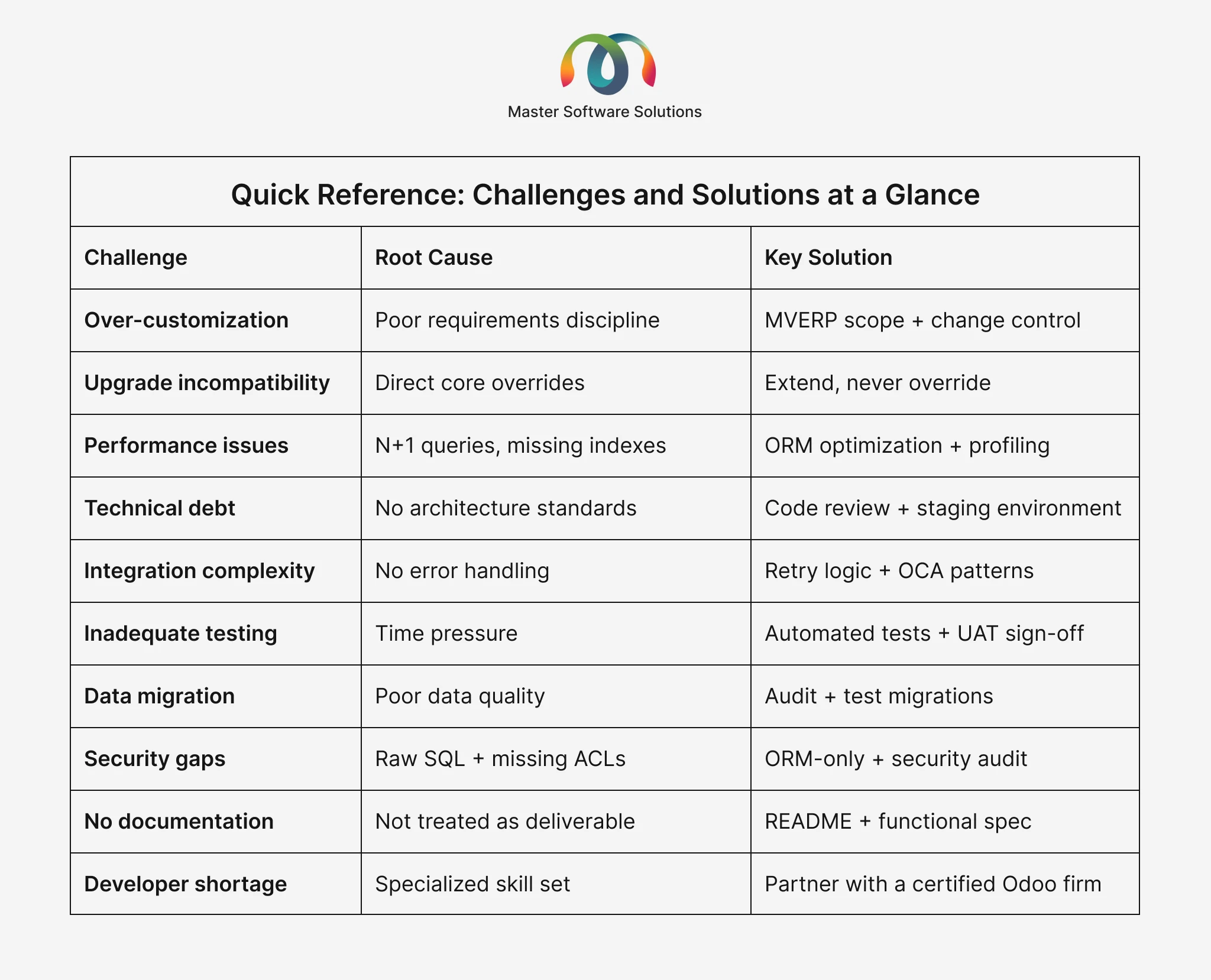
Quick Reference: Challenges and Solutions at a Glance
When to Customize vs. When To Use Standard Odoo Features
Not every business requirement calls for custom code. Before commissioning development, ask these three questions:
- Is this functionality available in a newer Odoo version or in an OCA module?
- Can the requirement be met with Odoo Studio’s no-code/low-code tools?
- Would changing the business process (rather than the software) be more efficient?
Customize only when the answer to all three is “no”. This discipline keeps your Odoo instance lean, maintainable, and upgrade-friendly.
Not sure whether to customize or configure? Let our experts help you decide. Book a Free Odoo Consultation