When businesses want to adopt ERP in their existing system, the one question that comes to mind is, “ Does it replace everything that we have built, or shouldn’t” It has been found that the right ERP integration does not overlap the existing tools, but fills the gaps and makes the entire process greater to streamline the entire process.
Before knowing ERP integration plays a significant role, it’s important to understand how it actually works. This guide breaks down into the workflow, its desired integration & what questions should be asked before ERP integration.
Why Integration Matters More Than Replacement
Integration plays a more important role than replacement because the systems already established contain important data. If it’s replaced, all the data will be deleted. The additional integrations store the data securely & help streamline the processes.
An ERP implementation that ignores this reality will fail, not because the software is bad, but because adoption will stall the moment people feel their existing tools are being ripped away.
The better approach? Meet your business where it is. A well-integrated ERP becomes the operational backbone that connects your existing platforms, handles the complexity they can’t, and gives everyone a clearer picture without forcing a wholesale change in how they work.
The Right Questions to Ask Your Implementation Partner
Before signing anything, ask your implementation partner to walk you through the exact integration flow, not in theory but in specifics.
- How do orders created in our existing system trigger actions in the ERP?
- How does inventory data move between systems, and how often?
- What happens when the stock runs out? Is the manufacturing or purchase order automatically created?
- Are the delivery statuses updated in real time? Or does someone manually sync them?
- What happens if one system goes down? Does the other keep running?
If your partner can’t answer these questions clearly and concretely, that’s a red flag. A good integration partner doesn’t just connect systems; they design a flow that matches how your business actually operates.
Ready to see how integration could work for your business? Book a free 30-minute discovery call.
How a Real ERP Integration Actually Works
Here’s a concrete example of how an integration between an existing sales and accounting platform and an ERP like Odoo might operate:
Step 1: Sales Orders Stay in Your Existing System
Sales orders are created in your existing platform, such as your CRM, e-commerce backend, or accounting tool. We don’t ask your sales team to change the tools they’re already comfortable with. The ERP listens; it doesn’t interrupt.
Step 2: Inventory Is Checked First
When an order comes in, your existing system checks inventory first. If stock is available, fulfillment proceeds exactly as it does today. No change in workflow, no new screens to navigate.
Step 3: If Stock Is Unavailable, Automation Takes Over
This is where the integration earns its keep. If inventory is insufficient, the integration automatically triggers the following:
- A Manufacturing Order inside Odoo
- A corresponding Purchase Order in your accounting system
No manual handoff. No email to the ops team. No spreadsheet update. It just happens.
Step 4: Manufacturing in Odoo
Once a manufacturing order is triggered, Odoo is responsible for the production process, including shop floor management, quality checks, production tracking, and material consumption.
Step 5: Inventory Updating and Confirmation
Once manufacturing is done, Odoo automatically updates inventory and sends a confirmation message to the accounting person.
Step 6: Delivery in Odoo
Delivery orders are created and managed within Odoo, which includes route planning and driver assignment to avoid manual processes.
Step 7: Real-Time Status Pushed Back to Your Accounting System
Delivery status is pushed back to your accounting system in real time. Your finance and sales teams always have the latest updates without switching platforms, asking operations, or waiting for an end-of-day sync.
The Division of Ownership
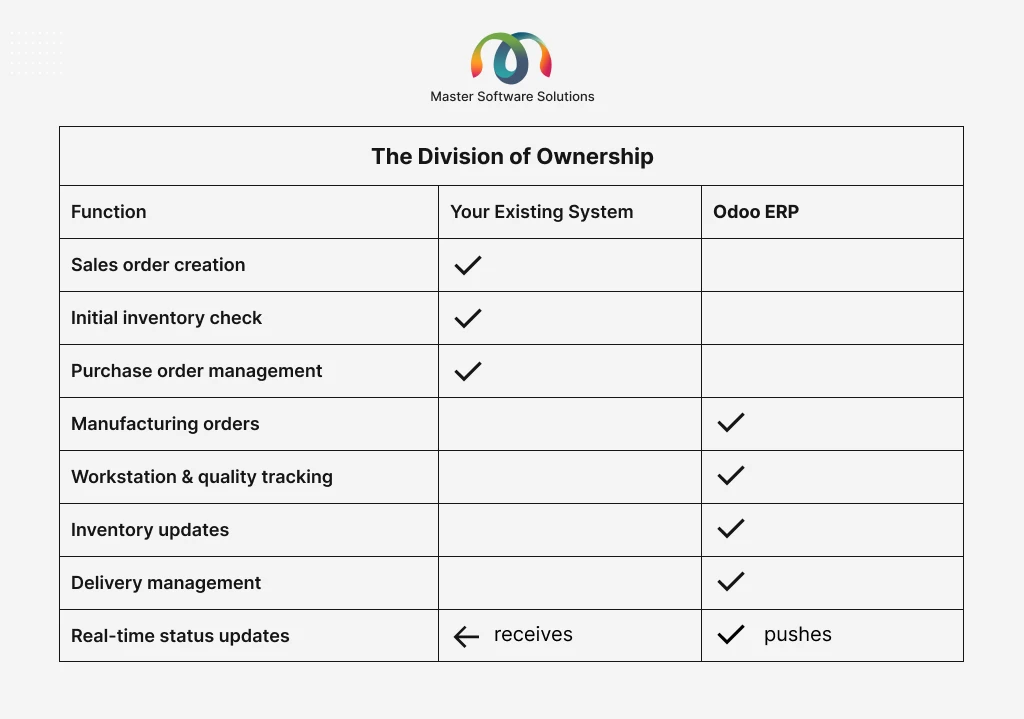
Your existing system handles sales, purchasing, and initial inventory. The ERP handles manufacturing, delivery management, and detailed inventory tracking. These two systems work as one unified solution.
Want to see this flow mapped to your specific tech stack? Request a custom integration walkthrough.
Common Integration Mistakes to Avoid
Getting the integration right from day one saves months of pain later. Here are the most common mistakes businesses make:
- Treating integration as an afterthought. Integration should be scoped and designed before implementation begins, not bolted on at the end.
- Assuming all data will map cleanly. Your existing system may structure customer records, product codes, or pricing differently than your ERP expects. Data mapping needs dedicated time and review.
- Not defining ownership clearly. When two systems update the same record, conflicts happen. Define which system is the “source of truth” for each data type before go-live.
- Skipping user training on the connected workflow. Even if your team keeps using the same tools, the workflow has changed. Train for the new flow, not just the new software.
- Ignoring error handling. What happens when the integration fails? Who gets notified, and how is the data reconciled? This needs to be designed in, not discovered in production.
What Good Integration Looks Like in Practice
A well-integrated ERP implementation should feel almost invisible to most of your team. Sales keep selling the way they always have. Finance keeps reconciling in the tools they know. What changes is that the manual work in between the phone calls, the emails, and the spreadsheet updates quietly disappears.
Operations gets a clearer picture. Leadership gets real-time data without having to chase it. And your team spends less time being a human API between systems.
Thinking about ERP integration for your business? Talk to our implementation team today.
Have any queries related to ERP integration? Get in touch with our ERP consultants and feel free to ask about your project setup.