Choosing an ERP system is one of the most important technology decisions a business can make. At first glance, free ERP software seems the obvious choice, with no licensing fees and full control over customization. On the other hand, paid ERP solutions promise dedicated support, advanced features, and long-term scalability.
But the real difference goes beyond price.
To make the right decision, businesses need to evaluate total cost, implementation effort, risk, and future growth plans. In this blog, we’ll break down free ERP vs. paid ERP in practical terms so you can determine which option aligns best with your operational needs and long-term strategy.
Table of Contents
What is free ERP?
Free ERP refers to enterprise resource planning software that can be used without paying traditional licensing fees. However, “free” typically applies only to the software license, not necessarily to implementation, customization, hosting, or ongoing maintenance. Free ERP can be categorized into:
Open-source ERP
Open-source ERP systems provide access to the source code. Businesses can modify, customize, and deploy the system according to their specific operational needs. These solutions are usually self-hosted and maintained internally or through third-party developers.
Community edition
Some ERP vendors offer a free “community” version of their software. This edition includes core modules but excludes advanced features, enterprise support, or premium integrations. It serves as an entry-level option for smaller businesses or technical teams.
Freemium ERP
Freemium ERP platforms offer limited functionality at no cost for a cloud-based model. Businesses can use basic modules for free but must upgrade to paid plans for advanced features, higher user limits, or expanded storage.
Typical characteristics of free ERP
While the absence of licensing fees is the main attraction, free ERP solutions typically share several operational traits:
- No upfront license cost: The software itself can be downloaded or accessed without purchasing a license.
- Community-based ERP: Assistance usually comes from user forums, documentation, or community contributors rather than guaranteed vendor support.
- Technical dependency: Implementation, configuration, security, hosting, and updates require internal IT expertise or external developers.
Odoo: free ERP
One of the most recognized examples of free ERP software is Odoo Community Edition. It is an open-source ERP platform that provides a broad range of core business applications with no licensing fees. The Community Edition typically includes essential modules such as:
- Accounting
- Inventory management
- Sales and CRM
- Purchase management
- Manufacturing (basic features)
- Human resources
Because it is open-source, businesses can access and modify the source code. This allows extensive customization to align workflows, reporting structures, and integrations with specific operational requirements. However, several important considerations apply:
- No official vendor support is included in the free version.
- Advanced features (such as advanced accounting, studio customization tools, or certain integrations) are reserved for the paid Enterprise Edition.
- Implementation, hosting, maintenance, security hardening, and updates must be handled internally or through third-party service providers.
Odoo Community can be highly cost-effective for technically capable teams or small businesses with straightforward processes. However, as operational complexity increases, many organizations eventually migrate to the paid Enterprise version for enhanced functionality and structured support.
What is paid ERP?
Enterprise resource planning software that charges a license fee or a recurring subscription fee for access to the platform, vendor-backed services, and continuous support and updates is referred to as paid ERP. Unlike free ERP, the vendor assumes greater responsibility for system reliability, security, and long-term product development. Paid ERP solutions are typically offered in three main models:
Licensed on-premise ERP
In this model, the business purchases a software license and installs the ERP system on its own servers and infrastructure. The organization manages hosting and internal IT operations, while the vendor provides updates and support under a maintenance agreement.
Subscription-based cloud ERP
Cloud ERP (SaaS) is delivered via the internet on a subscription basis—monthly or annually. The vendor hosts, maintains, secures, and updates the system. Businesses access the platform through a web browser.
Enterprise ERP platform
These are comprehensive systems designed for mid-sized to large organizations with complex operations. They often include advanced modules for financial management, supply chain, manufacturing, HR, analytics, and regulatory compliance.
Typical characteristics of paid ERP
- Vendor-backed support: Access to professional technical assistance, implementation guidance, and troubleshooting.
- Service level agreements (SLAs): Formal guarantees for uptime, response time, and system performance.
- Regular updates and patches: Security updates, feature enhancements, and regulatory adjustments delivered systematically.
- Built-in compliance features: Support for tax regulations, financial reporting standards, data security frameworks, and industry-specific compliance requirements.
Example of Paid ERP: Microsoft Dynamics 365
A widely adopted example of paid ERP software is Microsoft Dynamics 365. It is a cloud-based, subscription-driven ERP and business management platform designed for small, mid-sized, and enterprise organizations. Dynamics 365 combines core ERP capabilities with CRM and productivity tools, integrating closely with the Microsoft ecosystem (e.g., Microsoft 365, Power BI, Azure).
Depending on the edition (Business Central, Finance, Supply Chain Management, etc.), Dynamics 365 typically includes:
- Financial management and accounting
- Supply chain and inventory management
- Manufacturing operations
- Project management
- Sales and customer relationship management
- Advanced analytics and reporting
Key characteristics of Microsoft Dynamics 365
- Subscription-based pricing: Businesses pay per user, per month.
- Vendor-managed infrastructure: Microsoft hosts, secures, and updates the platform.
- Scalability: Modular structure allows organizations to add functionality as they grow.
- Enterprise-grade security & compliance: Built-in regulatory and data protection standards.
- Dedicated support options: Access to certified partners and Microsoft support services.
What is the difference between free ERP and paid ERP?
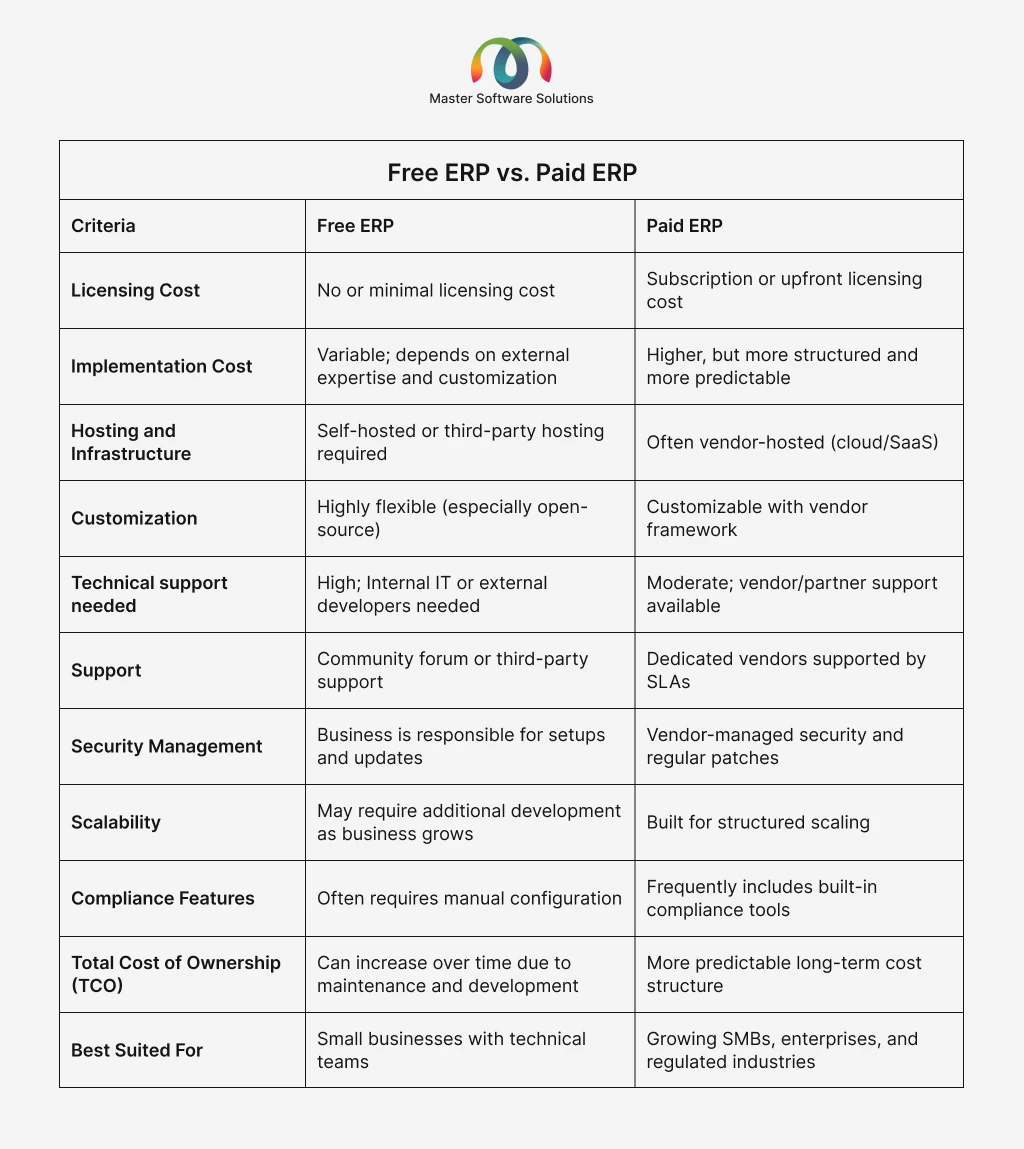
The real distinction extends beyond price. It involves differences in support structure, scalability, security, control customization, and long-term total cost of ownership. Understanding these factors is essential before deciding which model aligns with your business goals.
The hidden cost of free ERP
While free ERP eliminates licensing fees, it does not eliminate operational expenses. In many cases, costs shift from the vendor to the business. Below are the most common hidden cost drivers impacting the total cost of ownership (TCO).
Hosting and infrastructure
As data volume and users grow, infrastructure costs increase. Without proper optimization, performance bottlenecks can also affect productivity. Most free ERP systems require self-hosting. This means:
- Cloud server costs (AWS, Azure, DigitalOcean, etc.)
- Backup systems and disaster recovery setup
- Database management
- Performance monitoring tools
Developer cost
If your organization lacks in-house expertise, you’ll need to hire developers or ERP consultants. These costs can quickly exceed the annual licensing fees of paid systems. Free ERP systems often require technical expertise for:
- Initial installation and configuration
- Custom workflow setup
- Troubleshooting
- System optimization
Custom module development
Custom development requires time, testing, and ongoing maintenance—especially after system upgrades. Many free ERP platforms provide only core functionality. Businesses frequently need:
- Industry-specific modules
- Custom reports
- Automation workflows
- Third-party integrations
Security hardening
Improper security management increases the risk of data breaches, compliance violations, and reputational damage. With free ERP, security responsibility lies with the organization. This includes:
- Server configuration
- Firewall setup
- Access control policies
- Encryption implementation
- Regular vulnerability patching
Maintenance and updates
Updates can break custom modules, requiring additional developer time. Without a structured update strategy, systems can become outdated and vulnerable. Free ERP systems still require:
- Software updates
- Bug fixes
- Database optimization
- Compatibility checks after upgrades
Opportunity cost of downtime
Unlike paid ERPs with SLAs, free ERP systems do not guarantee uptime or response time. Downtime directly impacts revenue and operational efficiency. If the system crashes or performs poorly:
- Operations slow down
- Orders may be delayed
- Financial reporting may be disrupted
- Customer service may suffer
Integration complexity
Modern businesses rely on multiple systems (CRM, eCommerce, payroll, & BI tools). Complex integrations increase implementation time and long-term maintenance costs. Integrating free ERP with these platforms may require:
- Custom API development
- Middleware tools
- Manual data synchronization
When does free ERP make sense?
Free ERP is not inherently inferior; it can be strategically appropriate under specific operational and organizational conditions. The key is alignment between system complexity and business capability. Scenarios when free ERP is appropriate:
Startups with technical founders
Early-stage startups led by technical teams often have the in-house capability to deploy, customize, and maintain open-source systems. A free ERP allows experimentation without long-term financial commitment.
Small businesses with simple workflows
If business processes are straightforward—basic accounting, inventory tracking, sales management, a free ERP can adequately support daily operations. In such cases, the operational complexity does not justify enterprise-level licensing costs.
Organizations with strong IT teams
When internal expertise is available, free ERP becomes more cost-efficient because reliance on external consultants is reduced.
Budget-constrained pilot projects
Free ERP can be useful for testing new operational workflows, validating ERP investment, and running temporary or experimental businesses.
Strategic perspective
Once transaction volume, regulatory exposure, or multi-location complexity increases, the cost-benefit equation often shifts toward paid ERP solutions.
When is a paid ERP a better investment?
Paid ERP becomes strategically advantageous as business complexity increases. At a certain scale, operational risk, compliance exposure, and coordination demands outweigh the cost savings of a free system. Scenarios when paid ERP is a better investment:
Growing small and mid-sized businesses
Paid ERP systems are designed to handle higher data loads, multiple departments, and expanding teams without reducing performance. They also provide predictable support as operational reliance on the system deepens.
Multi-location businesses
Companies that operate across multiple branches, warehouses, retail outlets, and regional offices require centralized data management, controlled user permissions, and consolidated reporting. Paid ERP platforms offer multi-entity accounting, intercompany transactions, centralized transactions, centralized dashboards, and role-based access control. This reduces reconciliation errors and improves cross-location coordination.
Regulated industries
Industries such as manufacturing, pharmaceuticals, healthcare, finance, and food distribution must comply with strict regulatory frameworks. Paid ERP systems include audit trails, compliance reporting tools, tax automation, industry-specific modules, and data security automation. Built-in compliance capabilities reduce legal risk and administrative burden.
Companies requiring advanced analysis
Paid ERP solutions commonly integrate advanced analytics or connect seamlessly with BI platforms, enabling leadership to make strategic decisions based on real-time insights. Data-driven decision-making requires business intelligence dashboards, forecasting tools, demand planning, financial modeling, and KPI tracking.
Businesses scaling internationally
Paid ERP platforms are structured to manage international complexity while maintaining consolidated financial visibility. Global expansion introduces multi-currency transactions, multi-language support, country-specific tax regulations, and a cross-border supply chain.
Conclusion
Choosing between free ERP and paid ERP is not simply a budget decision—it is a strategic one. Free ERP can offer flexibility and lower upfront costs, but it often requires greater internal technical capability and carries higher long-term management responsibility. Paid ERP, while involving structured investment, delivers scalability, vendor-backed support, enhanced security, and predictable total cost of ownership.
At Master Software Solutions, we help businesses evaluate, implement, and optimize ERP systems tailored to their operational needs. Whether you are considering Odoo for its flexibility and modular design or Microsoft Dynamics 365 for its enterprise-grade scalability and integration capabilities, our team provides end-to-end support—from system selection and customization to deployment and ongoing maintenance.
Contact us for a personalized ERP consultation and take the first step toward operational efficiency and sustainable growth.