Mid-size companies often reach a point where disconnected systems, manual processes, and limited visibility start to slow growth. An Enterprise Resource Planning (ERP) system brings core business functions, such as finance, operations, manufacturing, HR, and supply chain management, within a single platform designed to scale with the organization.
This blog explores what ERP means specifically for midsize companies, why it is critical for overcoming operational complexity, and which features and functionalities to prioritize when evaluating the right solution.
What makes the ERP needs of mid-size companies unique?
Midsize companies have ERP needs that vary from those of both small businesses and large enterprises. They are usually too complex to rely on basic accounting or standalone tools. As these companies grow, they must balance scaling operations, controlling costs, and maintaining efficiency. They need better visibility, stronger control, and more automation, but without long implementation timelines or heavy customization.
This is why a right-sized ERP is critical for midsize companies. The ideal system provides the functionality needed to support growth and improve processes while remaining easy to use, cost-effective, and flexible enough to adapt as the business evolves.
Core features of an ERP system for midsize businesses
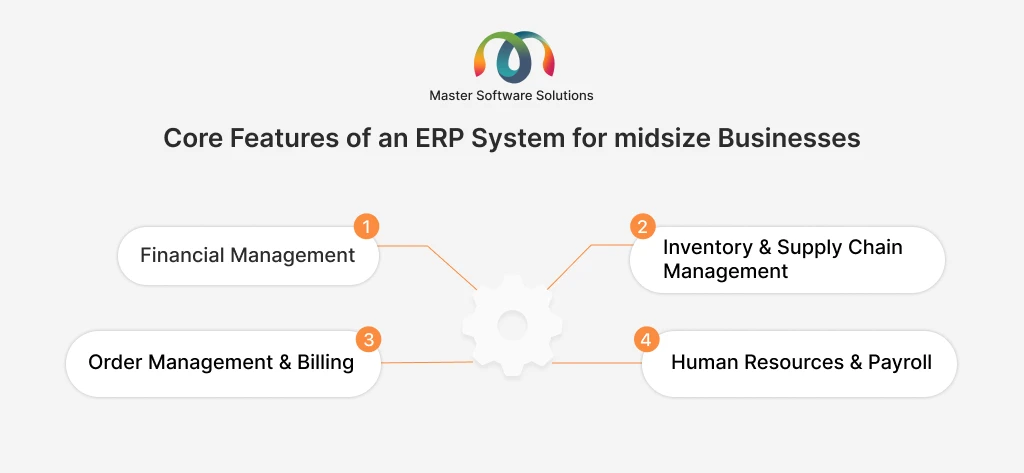
An ERP system brings a company’s most important day-to-day operations into one place. For midsize companies, these core features manage money, products, orders, and people more efficiently. Together, they help reduce manual work, improve accuracy, and give leaders a clear view of how the business is performing. Here are the core features included in ERP for midsize companies.
Financial management
This covers how the company tracks and manages its money. It includes accounting, payments, budgeting, and cash flow. A good ERP also supports multiple business units and helps meet reporting and compliance requirements.
Inventory and supply chain management
These features help companies track inventory, manage purchasing, and work with suppliers. They make it easier to plan demand, avoid stock shortages or overstocking, and keep goods moving smoothly through the supply chain.
Order management and billing
This area manages the full process from receiving a customer order to sending an invoice and collecting payment. It helps ensure accurate pricing, timely billing, and smoother order fulfillment, including recurring or contract-based billing if needed.
Human resources and payroll
HR and payroll features support employee records, time tracking, and salary payments. They help manage the employee lifecycle, from hiring to ongoing management, while reducing errors and administrative efforts.
Key benefits of an ERP for midsize companies
ERP features directly affect how well a midsize company runs its business. When these features work together in one system, they help teams make better decisions, work more efficiently, and support growth with less risk. Here are the key benefits of implementing ERP for midsize companies.
Improved visibility and decision-making
ERP gives leaders a clear, real-time view of finances, operations, and performance. Instead of relying on spreadsheets or reports from different systems, decision-makers can see accurate data in one place and respond faster.
Process standardization and efficiency
With ERP, key processes follow the same rules across departments. This reduces manual work, saves time, and helps employees complete tasks more consistently and efficiently.
Reduced operational risk and errors
Manual data entry and disconnected systems often lead to mistakes. ERP reduces these risks by automating processes, applying controls, and ensuring data is accurate and up-to-date.
Better customer experience and responsiveness
When teams have access to the same information, they can respond to customers quickly and accurately. Orders are processed correctly, issues are resolved sooner, and overall service improves.
Advanced ERP functionalities to look for as your business scales
As midsize companies grow, basic ERP features are often not enough. Advanced functionalities help the business handle higher volume, more complexity, and faster decision-making without adding extra manual work. These capabilities support smoother operations and better customer relationships as the company scales.
Automation & workflow management
Automation helps reduce repetitive tasks across departments. ERP workflows ensure that approvals, handoffs, and control follow clear rules. This saves time, reduces errors, and keeps processes consistent as teams grow.
Reporting, analytics, and business intelligence
Advanced reporting gives leaders access to real-time dashboards and key performance indicators (KPIs). This makes it easier to track performance, spot issues early, and plan using data instead of guesswork.
CRM & customer experience integration
When ERP is connected with customer data, teams across sales, service, and support work from the same information. This improves coordination, speeds up response times, and creates a more consistent and positive customer experience.
How to ensure the ERP can grow with your business?
Choosing an ERP system is a long-term decision. For midsize companies, it is important to select a solution that not only meets today’s needs but can also support future growth without major disruption or high costs.
Scalability & flexibility
A scalable ERP can grow as the business grows. This means it can handle more users, more data, and more transactions over time. A modular design allows companies to add new features only when needed. It is also important to understand the difference between configuration and customization. The systems that are easy to configure can adapt to change without complex or expensive development work.
Future-readiness and innovation
A future-ready ERP helps companies stay competitive; features such as AI, predictive analytics, and intelligent automation support better planning and smarter decision-making. Just as important, the vendor’s product roadmap shows that the ERP provider is constantly improving the system and investing in new technologies to support the business in the coming years.
Cloud vs. on-premise ERP: choosing the right deployment model
When selecting an ERP system, midsize companies also need to decide on a system deployment method. The two main options are cloud-based ERP and on-premise ERP. Each model has different cost, security, and access considerations, and the right choice depends on the company’s needs and resources.
Cost and infrastructure considerations
Cloud ERP is usually paid for through a subscription and does not require buying or maintaining servers. This lowers upfront costs and reduces the need for internal IT resources. On-premise ERP often requires a higher initial investment in hardware, software, and infrastructure, but may offer more control over long-term costs for some companies.
Security and maintenance responsibility
With cloud ERP, the vendor is responsible for system security, updates, and maintenance. This reduces the workload for internal IT teams. In an on-premise setup, the company manages security, backups, and system updates itself, which requires more time, expertise, and ongoing efforts.
Remote access and business continuity
Cloud ERP allows employees to access the system from anywhere with an internet connection, making it easier to support remote or distributed teams. It also supports business continuity through built-in backups and disaster recovery. On-premise ERP may limit remote access and often requires additional planning and systems to ensure uptime during disruptions.
How much does ERP really cost?
When evaluating an ERP system, many midsize companies focus only on the license or subscription price. However, the real cost of ERP includes several other factors. Understanding the total cost of ownership (TCO) helps avoid surprises and supports better budgeting decisions.
Subscription vs. perpetual pricing
Some ERP systems are paid for through a monthly or annual subscription, while others require a one-time license fee. Subscription models usually have lower upfront costs but ongoing payments. Perpetual licenses may cost more initially but involve separate fees for maintenance and upgrades.
Implementation and customization costs
Beyond software pricing, companies must consider the cost of implementation. This includes system setup, data migration, integrations, testing, and training. Customizations can add flexibility but also increase cost and complexity.
Ongoing support and upgrades
ERP systems require continuous support to stay secure and effective. Costs may include vendor support, system updates, and internal IT resources. Cloud ERP often includes subscription upgrades, while on-premise systems may charge separately.
Measuring ROI and time to value
ERP value should be measured by the results it delivers. This includes time saved, fewer errors, better visibility, and improved decision-making. Time to value refers to how quickly the company starts seeing benefits after go-live. A strong ERP investment delivers clear business improvements within a reasonable timeframe.
ERP system implementation for midsize companies
ERP implementation is the process of setting up the system and preparing the business to use it. For midsize companies, a well-planned implementation helps reduce risk, control costs, and ensure the system delivers value as quickly as possible.
Typical implementation phases
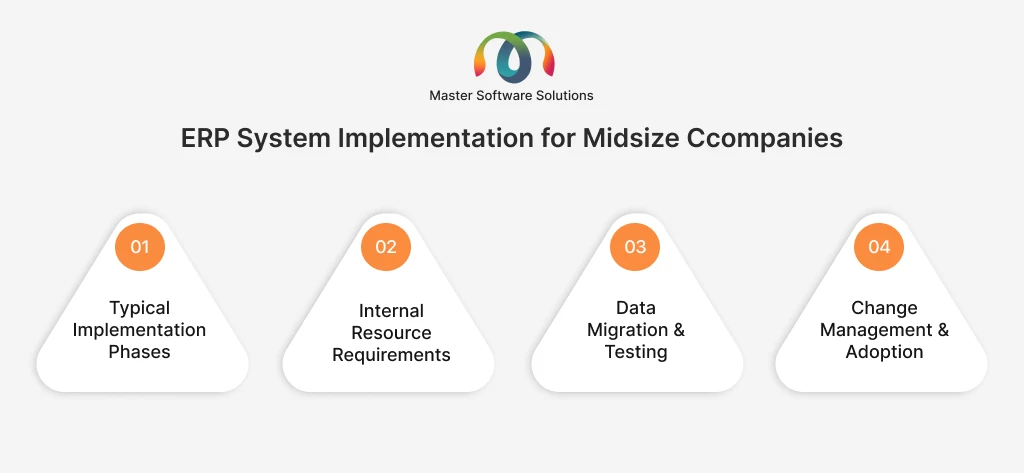
ERP projects usually follow clear steps. These include planning and design, system configuration, data migration, testing, and go-live. Each phase builds on the previous one to ensure the system works as expected before it is fully launched.
Internal resource requirements
Successful implementation requires involvement from internal teams. Business users, managers, and IT staff need to contribute time for process review, decision-making, and testing. Having clear roles and ownership helps keep the project on track.
Data migration and testing
Existing data must be cleaned, validated, and moved into the new ERP system. Testing ensures that data is accurate and that business processes work correctly before the system goes live. This step is critical to avoid errors after launch.
Change management and adoption
ERP changes how people work. Training, communication, and ongoing support help employees understand the new system and use it confidently. Strong management improves user adoption and ensures the ERP delivers long-term benefits.
How to evaluate and select the right ERP vendor?
Choosing the right vendor is just as important as selecting the right features. The vendor will be a long-term partner, so midsize companies need a clear and structured way to evaluate their options and reduce risk.
Key questions to ask vendors
Companies should ask vendors about functionality, implementation approach, pricing, and timelines. It is also important to understand how the system will support future growth and changing business needs.
Industry experience and references
Vendors with experience in the same industry understand common challenges and best practices. Customer references and case studies help confirm whether the vendor has successfully supported similar midsize companies.
Support model and upgrade cadence
Ongoing support plays a major role in long-term success. Companies should review how support is delivered, response time, and whether upgrades are included or require extra efforts and cost.
Evaluation checklist or decision matrix
Using a checklist or decision matrix helps compare vendors side-by-side. This structured approach ensures that decisions are based on business needs rather than demos or pricing, and it enables teams to choose the ERP solution that best meets their objectives.
Common ERP selection mistakes to avoid
Many ERP projects struggle because of mistakes made during ERP selection. Understanding these common issues helps midsize companies avoid costly problems and choose a system that truly fits their needs.
Overbuying enterprise features
Some companies choose ERP systems designed for large organizations. These systems often include complex features that are expensive and difficult to use. Midsize companies may end up paying for capabilities they don’t need, which slows adoption and increases costs.
Underestimating implementation effort
ERP implementation takes time and internal efforts. Many companies underestimate the amount of planning, data preparation, and user involvement required. This can lead to delays, budget overruns, and frustration.
Ignoring long-term scalability
Focusing only on current needs can limit future growth. If the ERP system cannot scale as the business expands, the company may need to replace it sooner than expected, increasing long-term costs and distribution.
Focusing solely on upfront cost
Choosing an ERP based on the lower initial price often leads to highercosts later. Implementation, customization, support, and upgrades all affect the total cost over time. A better approach is to focus on long-term value and return on investment.
Conclusion
Selecting the right ERP system is a strategic decision for midsize companies. The right solution brings together core operations, improves visibility, reduces manual work, and supports growth without adding unnecessary complexity. Focusing on the right features can help understand the true cost, and by planning implementation carefully, businesses can set a strong foundation for long-term success.
Master Software Solutions helps midsize companies plan, implement, and optimize ERP systems that match their business needs. With deep experience in ERP implementation services, MSS supports organizations through every stage, from requirement analysis and system setup to data migration, customization, and post-go-live support.
We work with proven ERP platforms, such as Odoo and Microsoft Dynamics 365 to deliver custom ERP solutions for midsize companies. Odoo offers flexibility and modular design, while Microsoft Dynamics 365 provides strong integration, scalability, and enterprise-grade capabilities. Choosing the right platform and tailoring it to each business, MSS ensures ERP systems are practical, scalable, and easy to use.
If you are evaluating ERP for your midsize company or planning to upgrade an existing system, we can help. Get in touch with our ERP experts to assess your needs, explore the right platform, and build an ERP solution that supports your growth.