Choosing the right Odoo version is one of the most consequential decisions your business will make during an ERP implementation. Go with an outdated version, and you’ll be patching security holes and missing out on features your competitors are already using.
Rush into the latest release without understanding what changed, and you risk costly surprises mid-project.
This guide breaks down every major Odoo release from Version 14 through Version 19: what changed, what improved, and what each version means for your business. Whether you’re evaluating Odoo for the first time or planning an upgrade, this is the reference you need.
Why Odoo Version Selection Matters More Than Most Think
Odoo follows an annual release cycle, dropping a new major version every October/November. Each version is supported for roughly three years before reaching end-of-life (EOL). That means the version you choose today determines your upgrade timeline, your support window, and whether your implementation partner can find experienced resources for your stack.
Here’s what’s at stake with every version decision:
- Security patches: only active versions receive critical security updates
- Module compatibility: third-party apps are built and tested against specific versions
- Performance improvements: newer versions often deliver significant speed gains
- Feature access: major capabilities like AI tools, new modules, or redesigned UX are locked to newer versions
- Support availability: community and enterprise support diminishes for older versions
The bottom line: your Odoo version isn’t just a technical detail. It’s a business strategy.
Odoo Version Timeline at a Glance
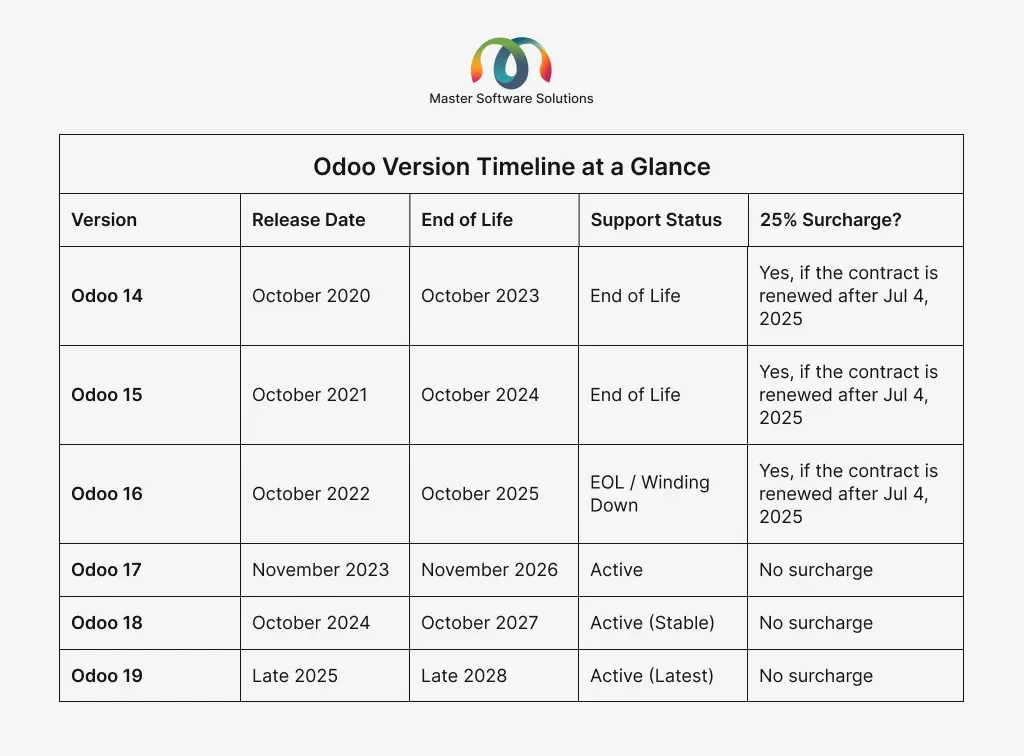
Note: If you’re still operating on an unsupported version, as of April 2026, Odoo will charge a 25% surcharge on top of your annual Enterprise subscription for running legacy versions. Here is a detailed analysis of how this surcharge can impact businesses still operating on V14, V15, and V16.
April 2026 Pricing Alert: Odoo’s 25% Legacy Version Surcharge Is Now Active
Odoo’s 25% Legacy Version Surcharge Is Now Active!
If you’re on Odoo 14, 15, or 16, and your Enterprise contract was renewed after July 4, 2025, you are now being charged an extra 25% on your annual subscription fee, effective April 2026. Odoo’s official policy defines “covered versions” as the three most recent major releases (currently v17, v18, and v19). Anything older triggers the surcharge.
What does this mean in practice?
If your annual Odoo Enterprise subscription is $10,000, you’re now paying $12,500 per year until you upgrade. That surcharge compounds annually for every year you stay behind.
Example
Divide your upgrade cost by 25% of your annual subscription. If upgrading costs $15,000 and your surcharge is $2,500/year, you break even in 6 years, but most upgrades pay back far faster in operational gains.
Additionally, Odoo has increased subscription prices in the US and Canada by up to 30% in 2026, and all new or renewed contracts now include a 7% annual price indexation clause.
Contracts renewed before July 4, 2025, are grandfathered, but only through their next renewal. When your contract comes up, the surcharge applies.
Cut Legacy Costs Before They Cut Into Your Margins.
Upgrade today
Odoo 19: The Latest Version
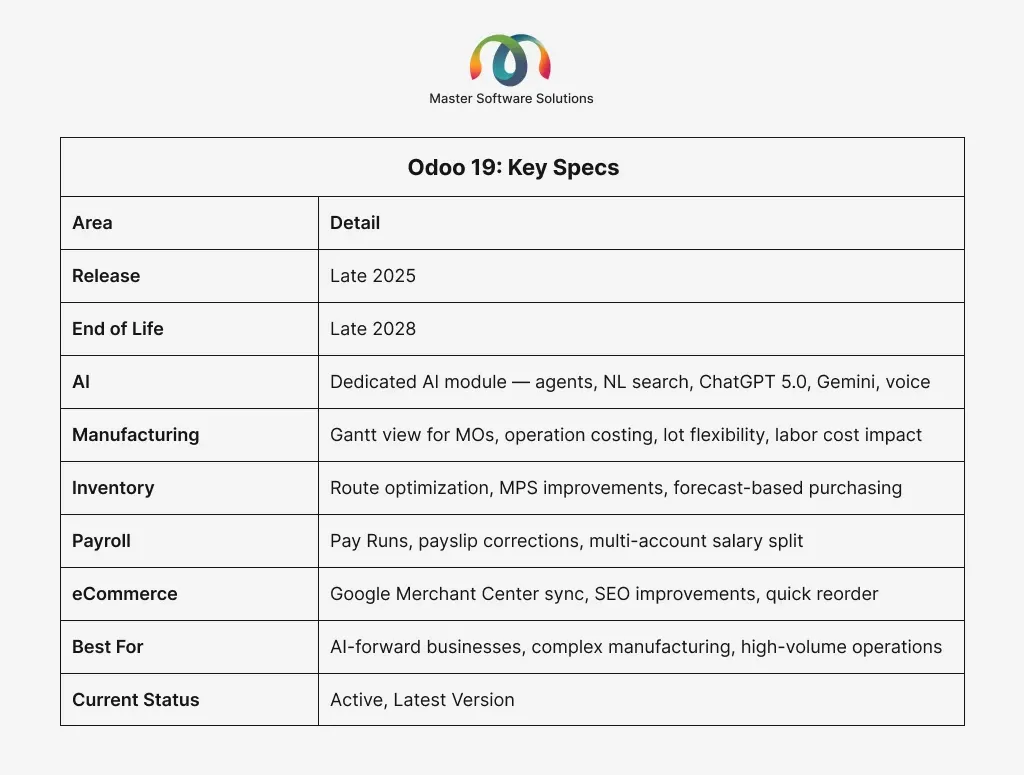
Odoo 19 is the most recent major release, and it continues the trajectory set by 17 and 18: more intelligence, more automation, and deeper integration between modules. What’s New in Odoo 19?
A Dedicated AI Module
For the first time, Odoo introduced a dedicated AI section covering the entire platform. This includes AI agents that learn from your documents and can perform actions, an AI agent that lets internal users query their own database records in natural language (“Ask AI search”), an AI button in the top bar for instant access, AI-assisted field filling, ChatGPT 5.0 support, Gemini account integration (bring your own Gemini key), voice transcription and real-time text dictation, web page generation from a prompt, and AI prompts built directly into email templates. This isn’t speculative; it’s all confirmed in the official release notes.
Manufacturing: Gantt View, Operation Costing, and Lot Flexibility
The Manufacturing module in 19 added a Gantt view for manufacturing orders, making it significantly easier to visualize and manage production schedules. Multiple serial or lot numbers can now be generated from a single manufacturing order. Operation costing was introduced, allowing businesses to decide whether manufacturing operations are valued based on real usage or at a fixed cost. Work center employee cost now directly impacts AVCO and FIFO product valuations, bringing labor cost accuracy to a new level.
Inventory: Route Optimization, MPS, and Smarter Replenishment
Deliveries can now be reordered from a map view to optimize routes. The Master Production Scheduler was improved to calculate forecasted demand using historical data, separate direct from indirect demand, and identify situations where actual demand exceeds forecasts. Products can be updated directly on hand from the product form. Packages within packages are now supported. The replenishment view now shows default values in previously empty columns. A new Late Availability filter helps identify sales orders at risk.
Purchase: Forecast-Based Buying
Purchase required quantities from the product catalog based on forecasted demand — a direct feed from the MPS into the procurement workflow. The RFQ dashboard and UX were improved, and purchase orders can now be created directly from sales orders coming from another Odoo database.
Payroll: Pay Runs Replace Batches
What were previously called “Batches” in Payroll are now “Pay Runs,” with a guided new UI/UX for creating and processing payroll. Payslip corrections now use a dedicated correction workflow. Employees can have multiple bank accounts with their salaries divided among them, and full analytic distribution is available on employee records.
General UX: Activities, Gantt, and Personal Email
Activities received a comprehensive overhaul, a simplified creation modal, new due date filters, and reschedule shortcuts, and activities are no longer deleted when marked done. Gantt views across the platform gained undo functionality, smart zoom, visible start/end dates, and off-hours folding. Users can now connect their personal Gmail or Outlook account to send emails directly via their own account. Out-of-office automatic replies are also new in 19.
eCommerce: Google Merchant Center and SEO
Products can now be synchronized with Google Merchant Center. SEO of product pages was improved for Google’s rich results. Quick reordering lets customers reorder from previous orders directly from the cart. The measurement unit selector now appears on eCommerce product pages, and variant previews are shown on product cards in the shop.
Want to know exactly how Odoo 19 stacks up against 18? We wrote a detailed breakdown: Odoo 19 vs Odoo 18: Differences and Upgrades. Check it out for a full feature-by-feature comparison.
Odoo 18: AI-First, Enterprise-Ready
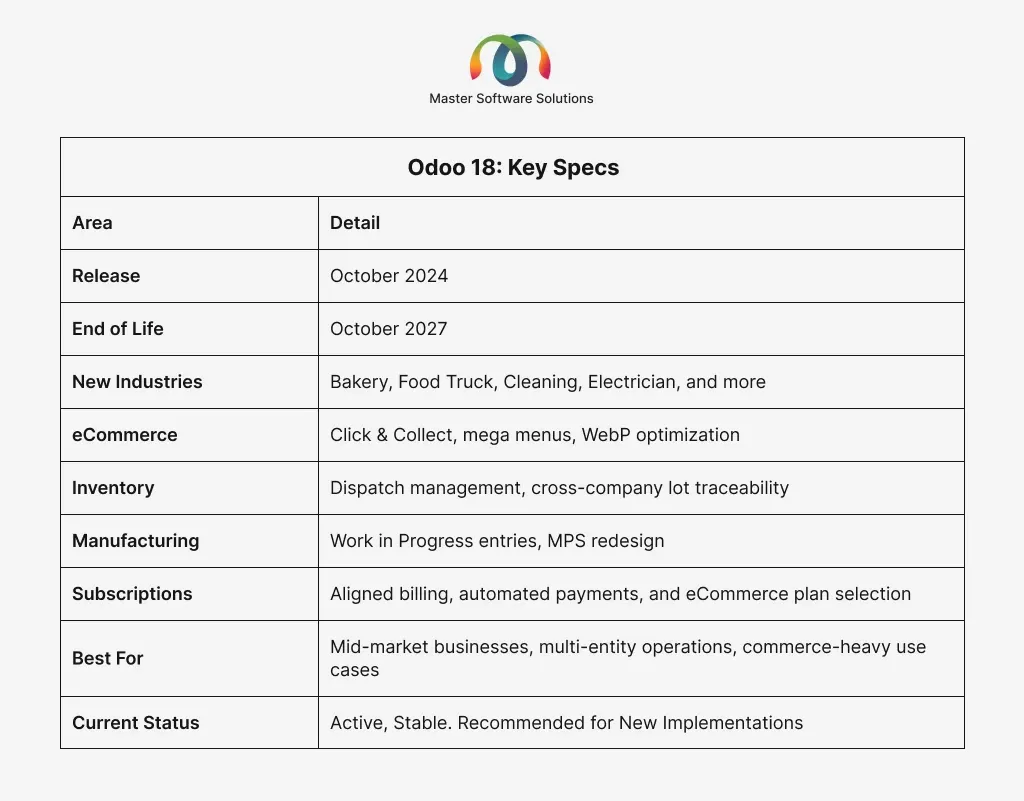
Odoo 18, released in October 2024, doubled down on artificial intelligence and enterprise scalability. This is the version that signaled Odoo’s transition from a growing ERP to a serious enterprise platform. What Was New in Odoo 18?
New Industry Packages
Odoo 18 introduced a wave of new industry starter packs, including Bakery, Food Truck, Cleaning Service, Electrician, Marketing Agency, Outdoor Activities, and more. These pre-configured bundles made it significantly faster to get a new industry-specific implementation off the ground.
Inventory: Dispatch Management and Cross-Company Tracking
A major addition to inventory was the Dispatch Management System, enabling businesses to organize delivery rounds and manage shipments with their own fleet or third-party logistics. Cross-company lot and serial number traceability was also implemented, meaning lots are now fully traceable across multiple legal entities. Valuation by lot and serial number was introduced, and putaway rules were improved to direct stock to where the same product already exists.
Manufacturing: Work in Progress and Mass Production
The Master Production Schedule was redesigned with yearly planning and new automation. Work in Progress journal entries were introduced, allowing businesses to post material and labor consumption for ongoing productions before they’re complete. The mass production wizard for serial numbers was revamped for better component consumption specification.
eCommerce: Click & Collect, Mega Menus, and Image Optimization
The eCommerce module added Click & Collect (customers can check in-store stock and pick up orders), mega menus built on eCommerce categories, the delivery method selection moved to the checkout flow, product images automatically converted to WebP format for web performance, product ribbons for specific variants, and a Save for Later wishlist feature from the cart.
Discuss: Sub-Threads, Message Scheduling, and @everyone.
The Discuss module gained sub-threads for secondary discussions within channels, the ability to schedule messages to be sent later, an @everyone mention to ping all channel members at once, and improved responses.
HR and Employees
HR saw bulk signature requests from the employee list view, a dedicated bank account management menu within the Employees app, improved department manager visibility into team reports, and org chart filters.
Payroll Improvements
Payroll received a reworked payslip generation wizard, a headcount view based on contracts at any point in time, new payslip template styles, and the combination of Salary Attachment Types with Other Input Types for cleaner configuration.
Knowledge Module
Knowledge gained an expandable/collapsible article tree for navigation, full-text search across all articles, and a hierarchy navigation bar to locate your current article.
Subscriptions
The Subscriptions module added aligned invoicing periods (all subscriptions invoiced on the first day of the billing period), automated future payments when customers pay with a saveable method, recurring plan selection directly on the eCommerce product page, and flexible cancellation timing (immediate or end-of-period).
Sign Module
Sign now includes a default sign template setting for each activity type, the ability to request a signature from any document in Odoo, optional signature reminders, and radio button field support in documents.
Website Builder
The library now includes over 60 new building-block snippets, each with an actual preview. Website import lets businesses convert any existing website into an Odoo one. Google Consent Mode v2 and cookie management were implemented. Custom fonts could now be uploaded. All 27+ themes were redesigned.
Odoo 17: The UX Transformation
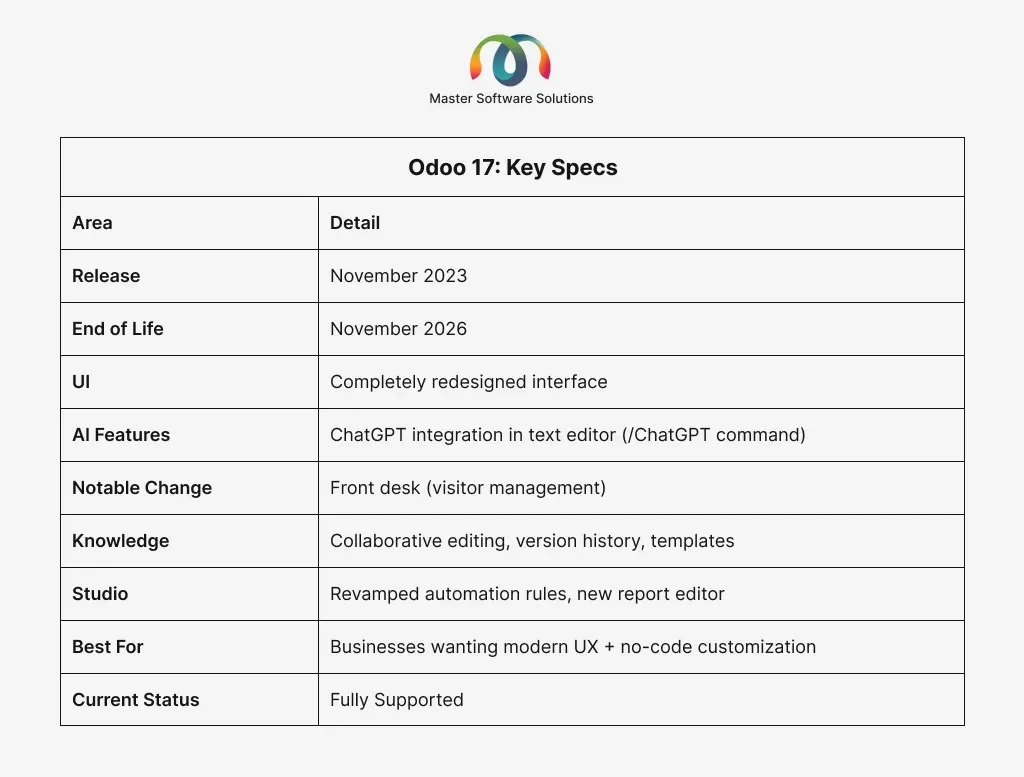
Released in November 2023, Odoo 17 was the most visually striking release in the platform’s history. Odoo didn’t just tweak the interface; they rethought it from the ground up. What Was New in Odoo 17?
Completely New UI Design Language
Odoo 17 introduced a dramatically redesigned interface. The sidebar navigation moved to a top-bar app switcher, colors became more vibrant, and the overall visual design felt significantly more modern. For users accustomed to older versions, the learning curve was real, but the long-term UX gains were undeniable.
Front Desk: Brand New Module
Odoo 17 introduced the Frontdesk app, a dedicated visitor management system that lets businesses track and manage visitors painlessly. For office-based businesses and facilities teams, this was a meaningful addition.
Knowledge Module: Massive Leap Forward
The knowledge module received one of the most significant upgrades of any module in version 17. New capabilities included collaborative editing (multiple users writing simultaneously), article comments, version history, portal user access, Gantt view embedding in articles, video insertion, templates, and article-to-item conversion. If your team uses Odoo for internal documentation, v17 changed the game.
Studio: Revamped Automation and Report Editor
Odoo Studio, the no-code customization tool, received major upgrades in 17. A new report editor made editing PDF reports far more intuitive; automation rules were revamped with direct access from any app, and approval rules gained granular multi-level control enforced server-side (including API calls).
Spreadsheet: Dramatically More Powerful
The spreadsheet module grew significantly in V17. Dynamic pivot tables, 30+ new array functions (UNIQUE, FILTER, TRANSPOSE, etc.), version history, data validation, shared spreadsheets with external users, and dashboard sharing all arrived in this release.
ChatGPT Integration in Text Editor
Odoo 17 took its first step toward AI by integrating ChatGPT directly into the rich-text editor. Using the /ChatGPT shortcut in any text field, users could generate and improve text based on a prompt. This was the beginning of Odoo’s AI journey, limited in scope but a clear signal of direction.
Inventory Improvements
The Inventory module now includes a stock-aging report (to identify dead stock), flexible reservation (edit reserved quantities and reserve specific quantities), shipping-based routing, improved replenishment filtering, a redesigned transfers experience, and real-time inventory valuation with new pre-configurable default accounts.
Manufacturing Planning and BOM Updates
The Manufacturing module added the ability to propagate BOM updates to existing manufacturing orders, a unified manufacturing order overview report, and planning based on component expected arrival dates.
Should You Upgrade to Odoo 17? Yes, if you’re on 14, 15, or 16, Odoo 17 is a strong upgrade target. It’s stable, well-supported, and has a healthy ecosystem of third-party modules. If you’re evaluating between 17 and 18, see our comparison below.
Odoo 16: Performance, Payroll, and the New OWL Framework
Odoo 16, released in October 2022, was a significant technical milestone. The full adoption of OWL (Odoo Web Library) as the frontend framework delivered meaningful performance improvements and made the UI more responsive and modern. What Was New in Odoo 16?
Full OWL Framework
Adoption in Odoo 14 and 15, OWL was partially adopted. Odoo 16 completed the migration. The result was a noticeably faster, more responsive UI — especially on complex pages with large datasets.
Redesigned Discuss Module
The messaging and collaboration module (Discuss) was completely rebuilt in V16. It added a dedicated messaging sidebar, channel organization, threaded conversations, and better notification management. For teams using Odoo as a collaboration hub, this was transformative.
New Payroll Module (for some regions)
Odoo 16 introduced a significantly improved Payroll module with better localization support, new salary structure configuration, and improved payslip generation.
Improved Website Builder
The website builder in 16 introduced building blocks that were more granular, responsive, and customizable without touching code.
IoT Box Improvements
For manufacturing and retail businesses using Odoo IoT, version 16 brought better device support and more stable connections.
POS (Point of Sale) Overhaul
The POS module was rebuilt in V16 with a cleaner interface, better offline mode, and improved hardware compatibility.
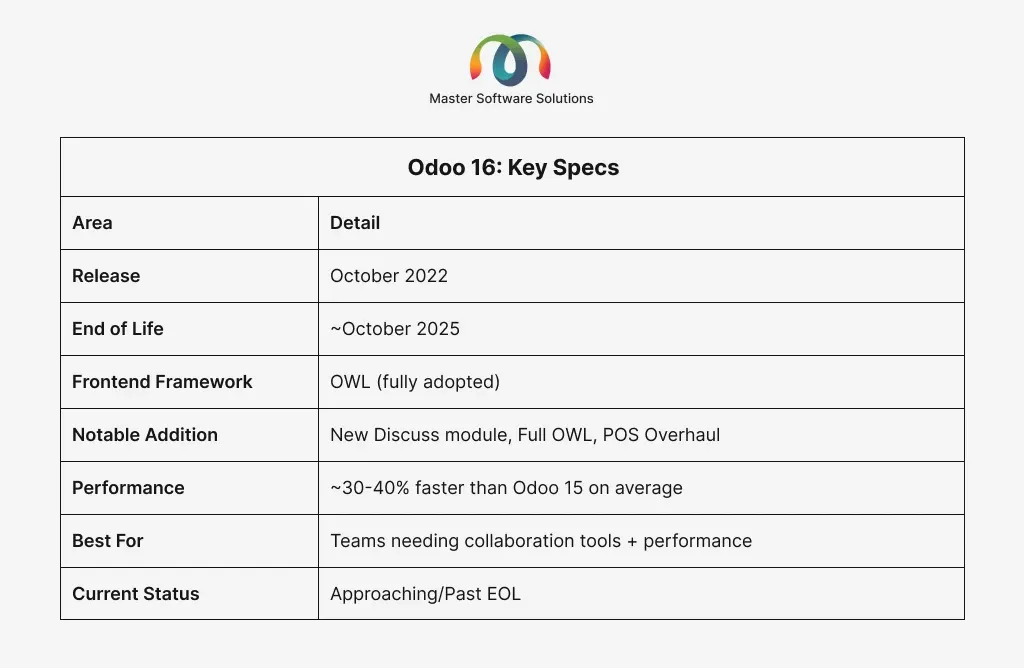
Should You Still Be on Odoo 16? If you’re on V16, you’re at or near the end of life, and the April 2026 surcharge is now hitting your invoices if your contract was renewed after July 4, 2025. Odoo 16 is not one of the three “covered” versions (v17, v18, v19), so it’s subject to the 25% annual legacy fee. Upgrade today to avoid these costs before your next billing cycle. Contact us
Odoo 15: Consolidation and Maturity
Odoo 15, released in October 2021, was more of a refinement than a revolution. Odoo used this cycle to mature the features introduced in version 14, fix pain points, and improve performance across the board. What Was New in Odoo 15?
Spreadsheet Goes Further
The Spreadsheet module was implemented in V14 and was dramatically improved in 15. Users could now embed spreadsheets in dashboards, share them across the organization, and use a wider range of formula-driven data pulls from Odoo models.
New Approvals Module
Odoo 15 introduced a dedicated Approvals module, a long-requested feature. Businesses could now configure multi-level approval workflows for purchases, expenses, time off, and custom requests without requiring developer involvement.
Field Service Improvements
The Field Service module got GPS tracking, better scheduling views, and tighter integration with the Help Desk and Inventory modules.
Email Marketing Enhancements
Email templates became more customizable, A/B testing was added, and the mailing list management interface was overhauled.
Improved Mobile Experience
The mobile app received consistent updates throughout the 15 lifecycle, with better offline capabilities and a more responsive interface on smaller screens.
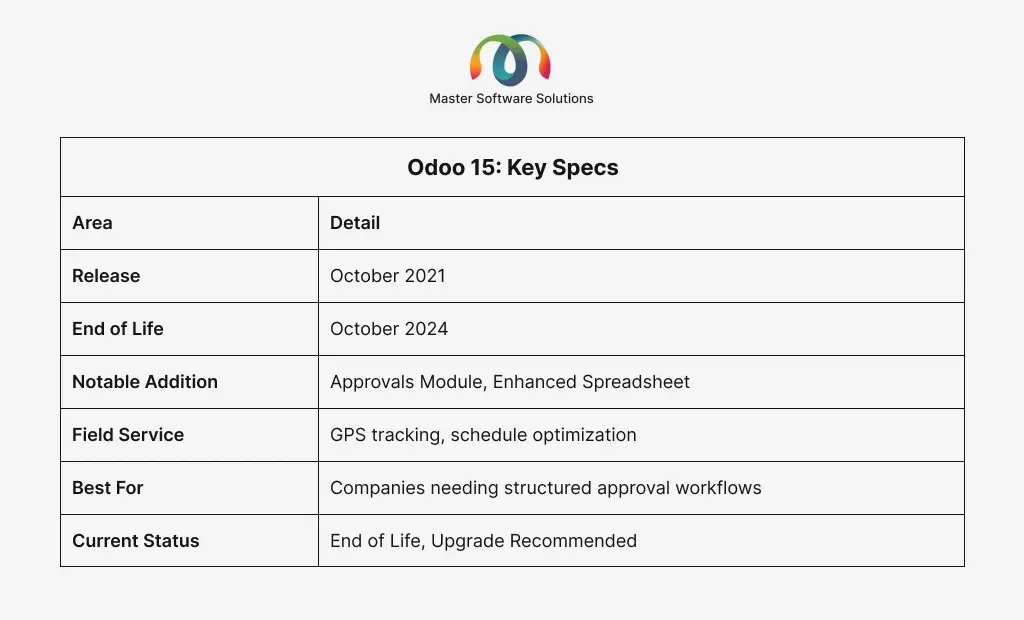
Should You Still Be on Odoo 15? No. Odoo 15 reached end-of-life in October 2024. It’s no longer being updated. If you’re on 15, upgrading to 17 or 18 should be your immediate priority.
As of April 2026, customers on v15 whose contracts were renewed after July 4, 2025, are now paying a 25% annual surcharge on their Enterprise subscription over the base price. If you’re on 15, upgrading to 18 is your immediate priority to restore security coverage and to stop paying the legacy penalty.
Also Read: On-Premises Odoo Enterprise Database Migration: A Complete Guide
Odoo 14: The UI Revolution
Released in October 2020, Odoo 14 was a landmark release. It wasn’t just an update; it was a philosophical shift in how Odoo presented itself to users and the market. What Was New in Odoo 14?
Completely Redesigned Interface
Odoo 14 introduced a cleaner, more modern UI across all modules. The navigation was simplified, kanban views were made more interactive, and the overall visual language became less cluttered. For businesses moving from Odoo 12 or 13, this was a significant adjustment.
Spreadsheet Module
One of the most talked-about additions was the embedded Spreadsheet tool — a lightweight Excel-like interface built directly into Odoo. It lets users create dynamic reports and dashboards using live data directly from the database without the need to export to external tools.
Accounting Overhaul
Odoo 14 introduced a new accounting engine with improved bank reconciliation, lock dates, and a redesigned chart of accounts. For businesses with complex financial workflows, this was a major step forward.
eCommerce Improvements
The website builder and eCommerce module received significant attention. Product pages became more customizable, and the checkout flow was streamlined.
Improved Manufacturing
The Manufacturing module added better work center management, improved routing, and a more intuitive shop floor interface.
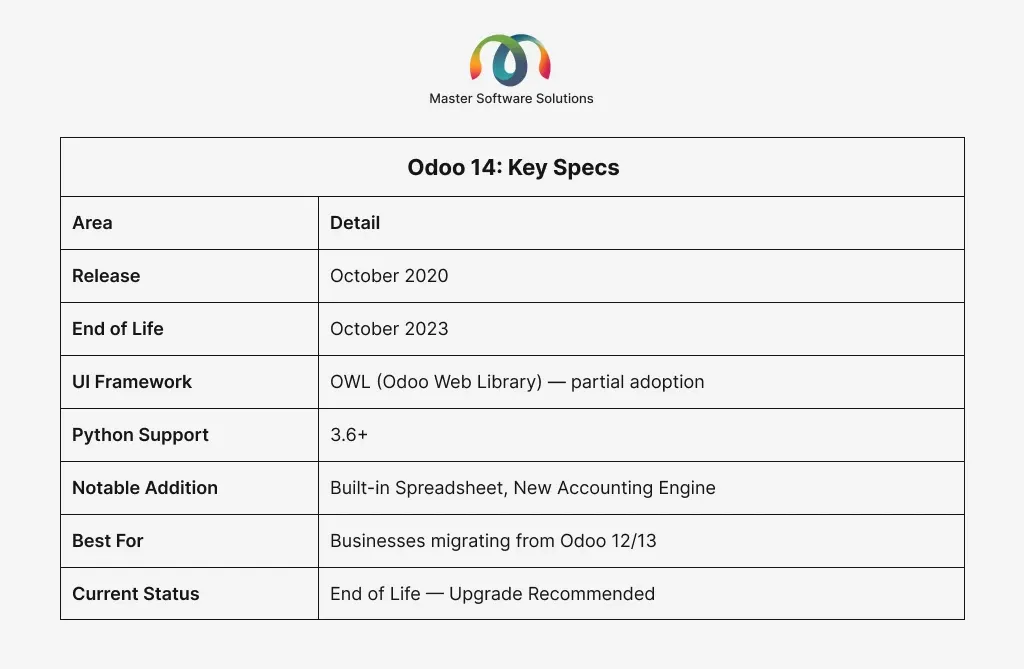
Should You Still Be on Odoo 14? No, and the case just got more expensive. Odoo 14 reached end-of-life in October 2023, which means no security patches or bug fixes. But as of April 2026, if your Enterprise contract was renewed after July 4, 2025, you are now being charged a 25% surcharge on your annual subscription just for staying on v14.
On top of that, Odoo 14 will be removed from Odoo.sh hosting on October 31, 2026, so self-hosted customers on Odoo.sh have a hard deadline. If you’re still running 14, every day you wait costs you both security exposure and real money.
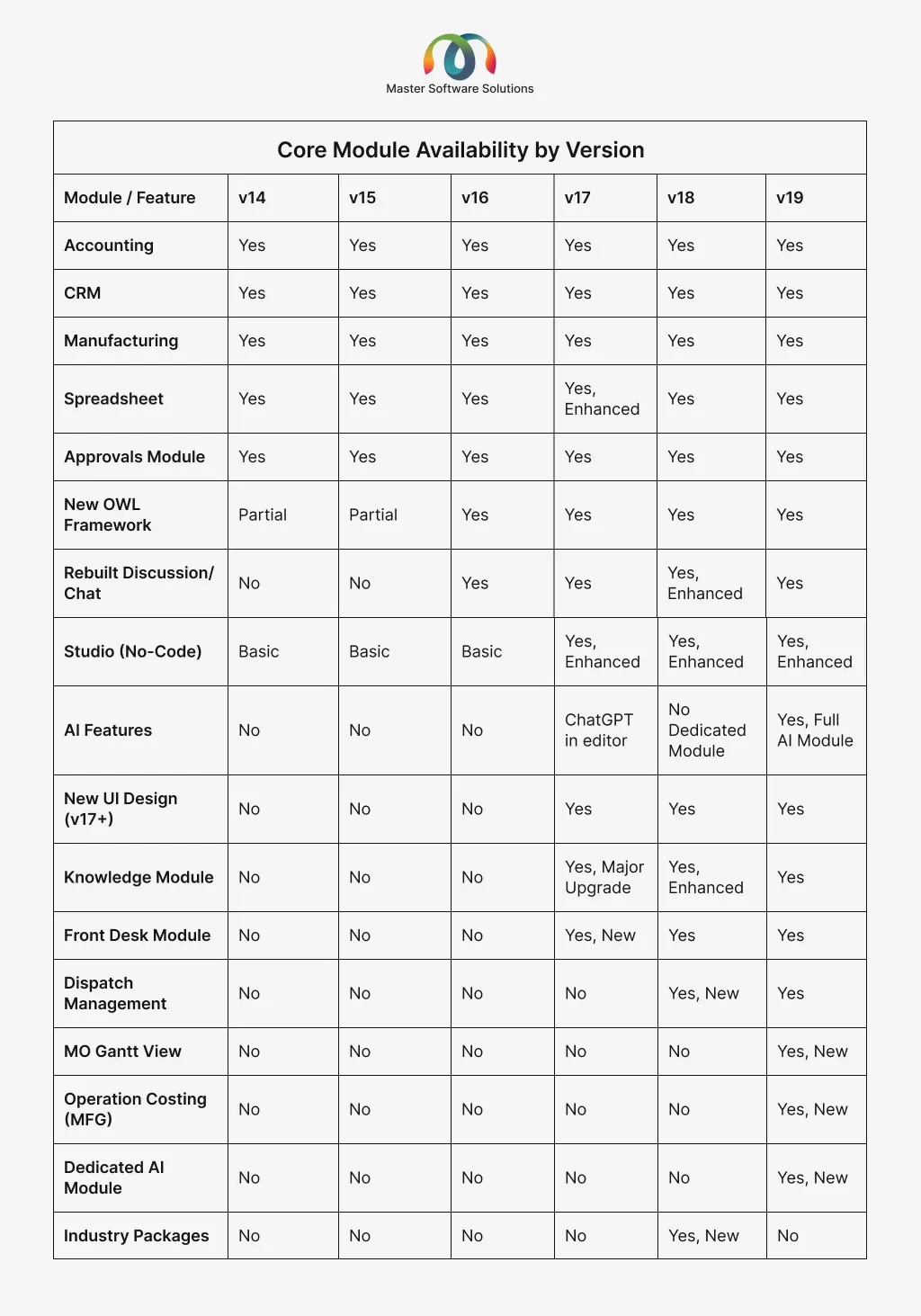
Odoo Version Comparison: The Full Picture
Core Module Availability by Version
Performance and Technical Comparison
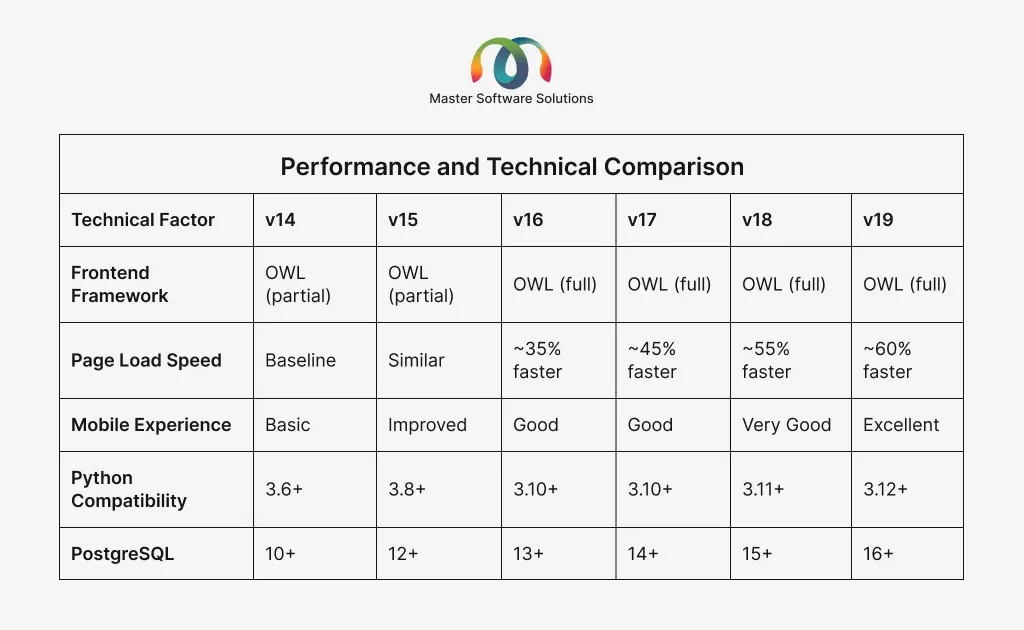
Speed comparisons are approximate relative improvements vs. the v14 baseline.
Business Use Case Match by Version
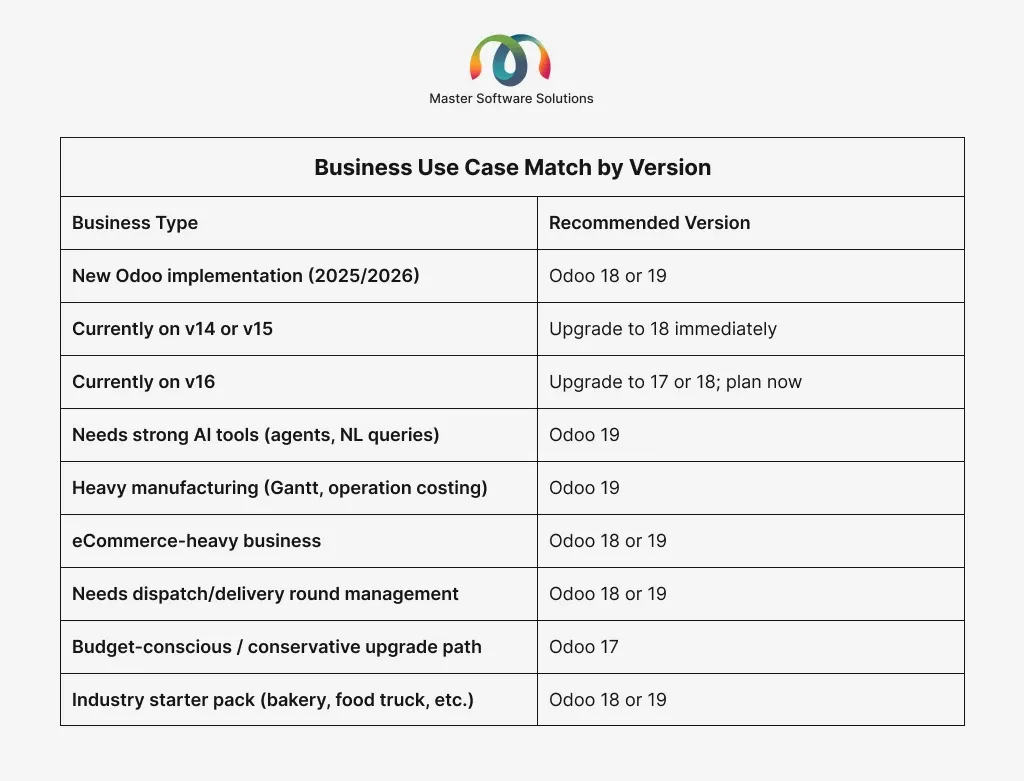
Community Edition vs. Enterprise Edition
One detail that often gets overlooked in version discussions: the gap between Odoo Community (free, open-source) and Odoo Enterprise (paid, subscription-based) has grown with every major release. The most powerful features, including AI tools, advanced manufacturing, multi-company management, eCommerce, Studio, and more, live exclusively in Enterprise.
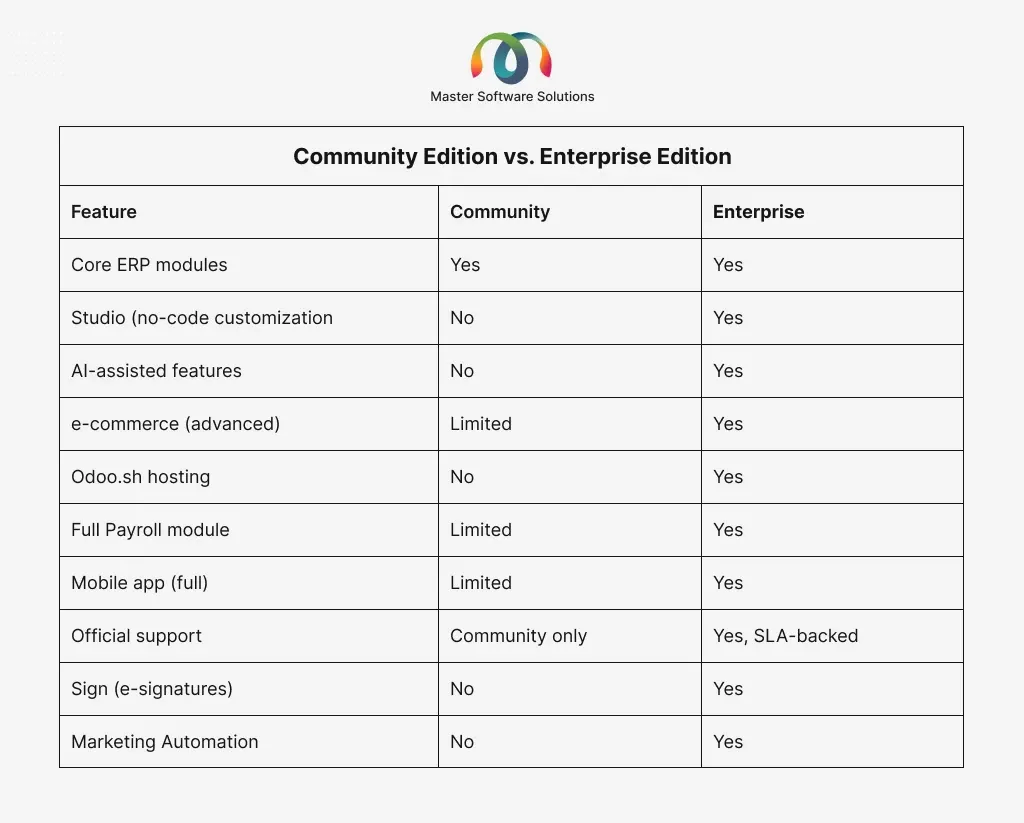
For businesses serious about using Odoo as a core business platform, Enterprise is almost always the right call. The productivity gains from Studio alone typically can pay for the subscription within the first year.
The Real Cost of Staying on a Legacy Odoo Version
For years, the argument for delaying an Odoo upgrade came down to one thing: risk. Upgrades are complex, customizations break, and production systems are not places for experimentation. That argument still holds, but as of 2026, there’s a new number on the other side of the equation.
Odoo’s 25% legacy surcharge means that staying behind is no longer free. Here’s how the math actually works:
Your annual surcharge = 25% × your current annual Enterprise subscription
So if your business pays $20,000/year for Odoo Enterprise, staying on v16 (or older) now costs you an extra $5,000 per year, every year you don’t upgrade.
The break-even formula:
Break-even years = Upgrade cost ÷ Annual surcharge
For example, if your upgrade costs $18,000 and your annual surcharge is $5,000, you break even in 3.6 years. But most businesses don’t wait that long; they upgrade and immediately stop paying the penalty, meaning the upgrade effectively pays for itself from day one of the new contract year.
A few important nuances to know
Contracts renewed before July 4, 2025, are grandfathered until their next renewal, even if you’re on an older version. Once you renew, the surcharge policy applies. For multi-year contracts, Odoo calculates the annual amount by dividing the total contract value by the number of years.
Separately from the surcharge, Odoo has raised base subscription prices in the US and Canada by up to 30% in 2026, and all new or renewed contracts now include a clause allowing up to 7% annual price increases. This means the longer you wait to lock in a new contract, the higher your baseline rate when you finally do.
The surcharge creates a real, calculable financial argument for upgrading. If you’ve been delaying because the ROI wasn’t clear, it is now. Contact us to Upgrade Now!
How to Choose the Right Odoo Version for Your Business
With six versions on the table, here’s a simple decision framework:
If You’re Starting Fresh
Go with Odoo 18. It’s the current stable release, it’s fully supported through October 2027, the ecosystem of third-party apps is robust, and the AI features give you capabilities that will only become more valuable over time. If you need the very latest manufacturing or multi-company features, evaluate Odoo 19.
If you’re on the Odoo 14 or 15 version
Upgrade now. You’re on an unsupported version. The longer you wait, the more complex the migration becomes. We recommend going straight to Odoo 18 rather than doing intermediate upgrades; jumping versions is entirely supported and saves you from going through the upgrade process multiple times.
If You’re on Odoo 16
Plan your upgrade in the next 6 months. You’re at or past EOL for version 16. Odoo 17 is a solid landing point if you want a shorter migration path, or go straight to 18 for maximum runway before your next upgrade.
If You’re on Odoo 17
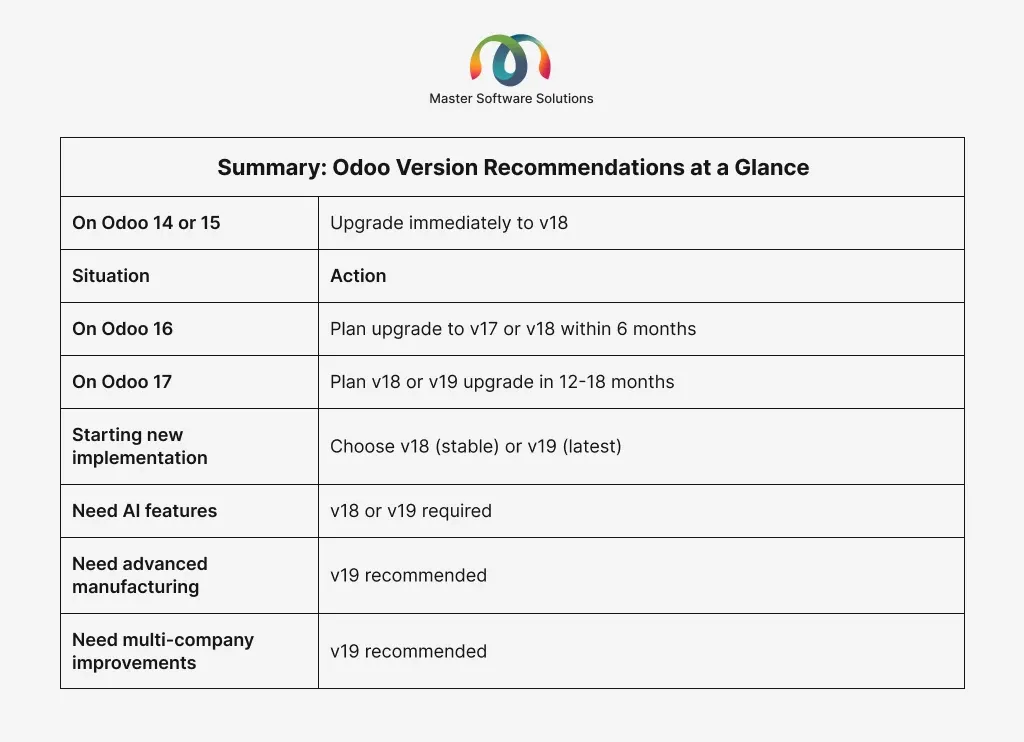
You’re in good shape for now. Version 17 is supported through November 2026. Start planning your migration to 18 or 19 in the next 12-18 months, so you’re not rushing it.
Summary: Odoo Version Recommendations at a Glance
Migrating Between Odoo Versions
Odoo migrations are not like updating a plugin. They require careful planning, testing, and in most cases, an experienced implementation partner. Here’s what the process typically involves:
Audit Your Current Environment
Before migrating, document every customization, third-party module, and integration you’re using. Customizations built for v14 won’t automatically work in v17 or v18.
Assess Third-Party Module Compatibility
Not every community or vendor module is available for every Odoo version. Check compatibility for each module you rely on before committing to a target version.
Data Migration
Your database schema changes between versions. Odoo SA provides migration scripts for core modules, but custom models and tables require manual migration work.
Test in a Staging Environment
Never migrate directly to production. Set up a full staging environment with your migrated data and test every workflow before going live.
Train Your Team
Especially when jumping from v14/15 to v17/18/19, the UI changes are significant. Plan for user training; even power users will need time to adjust.
Plan Your Go-Live
Schedule your production cutover for a low-traffic period. Have a rollback plan ready in case of unexpected issues.
Need help planning your Odoo migration? Master Software Solutions has guided dozens of businesses through version upgrades, v12, v18, and v19. Get a free migration assessment, and we’ll map out exactly what your upgrade will involve.
Upgrade the Right Version: Partner with Master Software Solutions
Navigating Odoo versions is one thing. Getting the implementation right is another. At Master Software Solutions, we specialize in Odoo implementations and upgrades for businesses across manufacturing, distribution, services, and e-commerce. We are a certified Odoo partner helping businesses in manufacturing, distribution, services, and e-commerce implement, customize, and upgrade Odoo ERP. Based in the US, our team of Odoo consultants has delivered 100+ successful implementations.
Whether you’re evaluating Odoo for the first time or trying to escape an aging v14 installation, our certified Odoo consultants will build you a clear plan and execute it without the surprises.
Get a Free Odoo Version Assessment
Frequently Asked Questions
Q 1. Can I skip versions when upgrading? For example, go from Odoo 14 directly to Odoo 18?
A 1. Yes, Odoo supports multi-version jumps. Going from 14 to 18 is a large jump and requires more.
Q 2: Is Odoo 16 still supported?
Odoo 16 is at or past its end-of-life window (approximately October 2025). If you’re on 16, you should treat it as unsupported and plan your upgrade.
Q 3: What’s the difference between Odoo Community and Odoo Enterprise?
A 3. Community is free and open-source. Enterprise is a paid subscription that unlocks advanced modules, AI features, Studio, Odoo.sh hosting, and official support. For most businesses beyond the startup stage, Enterprise delivers significantly more value.
Q 4: How long does an Odoo version migration take?
A 4. It depends on the complexity of your environment. A small business with minimal customizations might complete a migration in 4-8 weeks. A mid-market company with heavy customizations, multiple integrations, and large datasets should plan for 3-6 months.
Q 5: Is Odoo 19 stable enough for a new implementation?
A 5. Yes. Odoo typically stabilizes within the first few months post-release. If you’re starting a new implementation in 2026, Odoo 19 is a fully viable choice.
Q 6: Do I need an Odoo partner to upgrade?
A 6. Technically, no, but practically, yes, for most businesses. Version migrations involve data transformations, module compatibility checks, and UAT, benefiting enormously from experience. A bad migration can cost far more to fix than the partner fee would have been.