As businesses continue to rely on Odoo to manage operations, staying updated with the latest version is key to maintaining efficiency and competitiveness. With every new release, Odoo introduces powerful enhancements, faster performance, improved modules, and smarter automation. They can significantly elevate your business processes.
Odoo migration involves transferring your existing data, updating custom modules, and ensuring that your workflows align with the new system architecture. Without a structured approach, businesses risk downtime, data inconsistencies, or disruptions in daily operations. That is why understanding the full migration journey is essential before getting started.
What is Odoo migration? – Odoo migration is the process of upgrading your existing Odoo system to a newer version, whether it is a jump from Odoo 12 to Odoo 19 or a smaller upgrade between consecutive releases. Since each Odoo version introduces new features, improved performance, and changes in system architecture, migration ensures your business stays aligned with the latest capabilities.
This blog breaks down the step-by-step Odoo migration process, making it easier for you to navigate each phase with confidence. Regardless of whether you are planning your first upgrade or preparing for a complex multi-version jump, this guide will help you migrate smoothly and successfully.
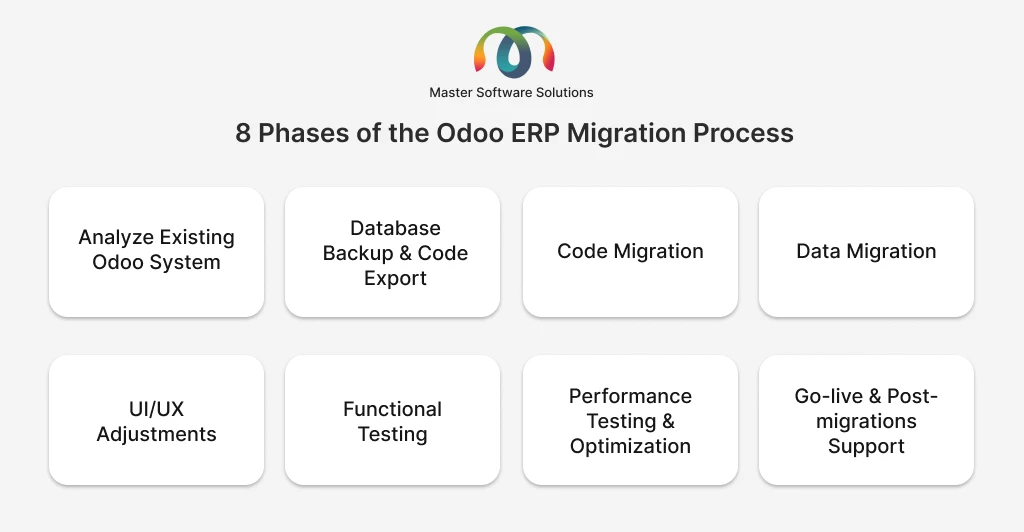
8 phases of the Odoo ERP migration process
Migrating to a new version of Odoo requires a systematic, well-planned approach to ensure data integrity, module compatibility, and uninterrupted business operations. The migration process involves analyzing your existing system, updating custom code, securely transferring data, and testing every workflow to guarantee smooth performance in the upgraded business operations. Breaking the migration journey into clear, manageable steps enables businesses to reduce risks, avoid downtime, and fully leverage the enhanced features and performance improvements of the latest Odoo version. The following step-by-step process outlines the essential phases needed to achieve a successful Odoo migration from start to end.
Analyze your existing Odoo system
Before starting the migration, it is crucial to carefully review your current Odoo setup. This step helps you understand what you’re working with and what needs to be updated or changed. Begin by identifying all the modules you use, both standard and custom, and not any third-party apps or integrations connected to your system.
Next, review any customizations, workflows, and data structures to see how they will behave in the new version. This analysis helps highlight potential issues, outdated features, or unnecessary modules that can be removed. Clearly understanding your existing environment, you can plan the migration more accurately and ensure a smoother transition to the upgraded Odoo version.
Database backup & code export
Once your system analysis is complete, the next step is securing your data and code before migration begins. Start by creating a full backup of your Odoo database, including all records, configurations, and attachments. This ensures that your information is safe and can be stored if anything goes wrong during the migration.
At the same time, export all custom modules and any modifications made to the system’s code. Having clean, organized copies of your custom code makes it easier for developers to update and adjust it for the new Odoo version. The step protects your data, preserves your customizations, and provides a reliable starting point for the technical migration work.
Code migration
Code migration involves updating all your custom modules and technical components so they work smoothly with the new Odoo version. Since each version comes with changes to frameworks, APIs, and data models, older code may not function correctly without adjustments.
During this step, developers review your custom features, rewrite outdated functions, update views and templates, and adapt any integrations to match the new version’s structure. The goal is to ensure that every customization behaves correctly, remains compatible with the upgraded system, and takes advantage of the improvements offered by the latest Odoo release.
Data migration
Data migration focuses on transferring all your business data, such as customers, products, transactions, accounting records, and workflow history, into the new Odoo version. Because each version may introduce new fields, updated structures, or deprecated models, the data must be carefully mapped and validated before import.
This step involves cleaning unnecessary or outdated information, ensuring data accuracy, and aligning with the new version’s schema. The goal is to move your data safely and consistently so that everything functions correctly in the upgraded system without loss or errors.
UI/UX adjustments
After migrating the code and data, it is important to review and adjust the user interface to match the new Odoo version’s design and layout. Each release may introduce updated views, new components, or changes in how menus and screens are organized.
During this step, form views, dashboards, menus, and custom pages are refined to ensure they display correctly and provide a smooth user experience. Any custom UI elements are updated to align with the new design standards. The goal is to create a clean, intuitive interface that helps users navigate easily and make full use of the upgraded system.
Functional testing
Functional testing ensures that every part of your Odoo system works correctly after migration. This step involves checking all key workflows, such as sales, inventory, accounting, HR, and manufacturing, to confirm they behave as expected in the new version.
You verify user permissions, test integrations, and make sure custom features still function smoothly. Any issues or mismatches are identified and resolved before going live. The goal is to guarantee that your business operations continue without interruptions and that users can depend on the upgraded system from day one.
Performance testing & optimization
Performance testing checks how well your upgraded Odoo system handles real-world usage after migration. This step involves evaluating loading speeds, system response times, and the performance of heavy operations like reports, large database queries, and multi-user activities.
If any slowdowns or bottlenecks appear, the system is optimized through database tuning, code improvements, or server configuration adjustments. The goal is to ensure the new Odoo version runs faster, smoother, and more efficiently than before, delivering an improved experience for all users.
Go-live & post-migrations support
Once testing is complete and the system is stable, it is time to go live with your upgraded Odoo version. During the go-live phase, the migrated system is moved from the staging environment to production, and users begin working in the new version. This step requires careful monitoring to ensure everything functions smoothly and that no unexpected issues arise.
After going live, post-migration support becomes essential. This includes resolving any minor bugs, answering user questions, fine-tuning performance, and helping teams adapt to new features. Ongoing support ensures a smooth transition, minimizes disruptions, and helps your business fully benefit from the capabilities of the upgraded Odoo system.
Conclusion
Migrating to a newer version of Odoo is an investment in your company’s long-term efficiency, performance, and scalability. With each release offering improved features, faster workflows, and enhanced user experience, staying updated ensures your business continues to operate at its best. A successful Odoo migration not only preserves your existing operations but also unlocks the full potential of the latest version. With the right approach, your business can benefit from greater productivity, improved usability, and a future-ready ERP platform.
Master Software Solutions is a leading Odoo migration company that follows an agile migration process that enables a smooth and seamless transition from one platform to another. If you need help with your migration journey, our Odoo-certified developers can ensure an upgrade tailored to your business needs. Book a free consultation to discuss your business.