Cloud ERP is becoming more common in today’s businesses, but many people are still unsure what it actually means or how it works. Companies are now using cloud-based ERP systems to manage critical business tasks such as finance, supply chain, human resources, and customer data, rather than old, on-site software. These systems are easier to access, more flexible, and often more affordable.
This blog explains what cloud ERP is, how it works, and why so many businesses are choosing it.
Table of Contents
What is cloud ERP software?
Cloud ERP software is a type of business management system that runs on the internet instead of being installed on company computers or servers. It helps organizations manage key processes, such as accounting, inventory, purchasing, human resources, and computer data, in one central system.
Cloud-based ERP systems enable users to access the software anytime, from anywhere, using a web browser. The service provider handles system updates, security, and maintenance, which reduces IT effort and costs. Cloud ERP is popular because it is flexible, scalable, and easier to use than traditional on-premise ERP systems.
How does cloud ERP work?
Cloud ERP works by hosting business management software on remote servers and is accessed over the internet. Instead of installing and maintaining the system on local hardware, companies use a web browser or app to log in and work with the system online.
All business data, such as financial records, inventory levels, employee information, and sales data, is stored in a central cloud database. Different departments use the same system, so information updates in real-time and stays consistent across the organization. The ERP provider is responsible for system maintenance, security, backups, and software updates, allowing businesses to focus on daily operations rather than IT management.
Difference between cloud ERP, on-premise ERP, and hybrid ERP
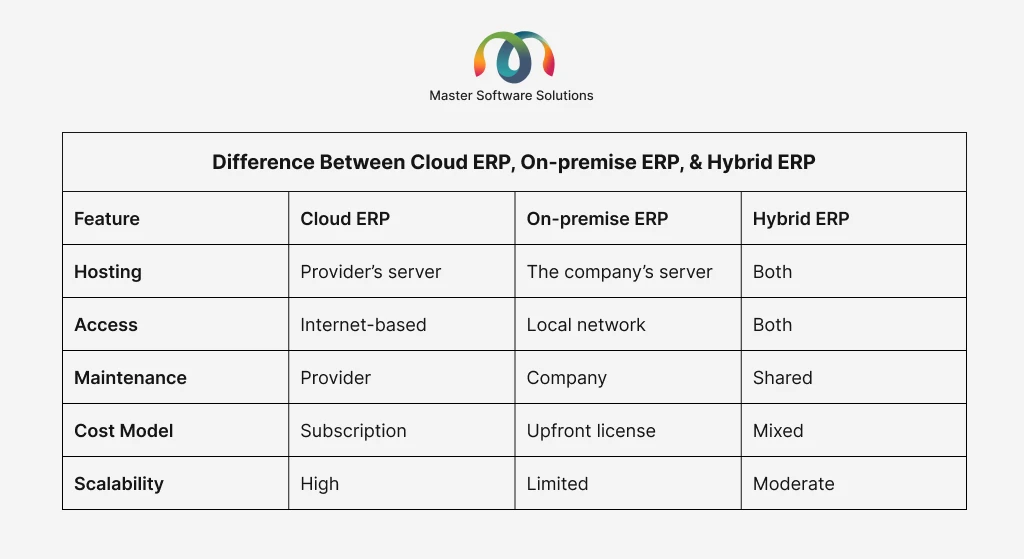
This section covers the key differences between cloud ERP, On-premise ERP, and hybrid ERP systems; how each type works; where it is hosted; and the level of control and flexibility it offers. Understanding these differences can help businesses choose the ERP solution that fits their needs, budget, and long-term goals.
Cloud ERP
It is hosted on the software provider’s servers and accessed through the internet. There is no need to install or maintain hardware on-site. The provider handles updates, security, and backups. It is usually paid for through a subscription and can be accessed from anywhere. This type of deployment is best for businesses looking for flexibility, lower upfront costs, and easy scalability.
On-premise ERP
On-premise ERP is installed on a company’s own servers and managed by its internal IT team. This business is responsible for maintenance, security, and system upgrades. This often requires a higher upfront investment in hardware and software. This is best for organizations that need full control over their data and systems.
Hybrid ERP
Hybrid ERP combines both cloud and on-premise systems. Some functions run in the cloud, while others remain on local servers. This allows businesses to move to the cloud gradually while keeping certain data or processes on-site. This is best for companies that want flexibility but are not ready to move completely to the cloud.
Features of cloud ERP
Cloud ERP systems are designed to be flexible, easy to access, and simple to manage. They use modern cloud technology to help businesses run their operations efficiently while reducing IT efforts and costs. Below are the key features of cloud ERP.
SaaS model (Software-as-software)
Cloud ERP is delivered through a subscription-based SaaS model. The software is hosted by the provider and accessed online. The businesses do not need to install or manage their own servers.
Accessibility and remote work
Users can access cloud ERP from anywhere with an internet connection. This makes it easier for teams to work remotely, collaborate in real-time, and stay connected across different locations.
Centralized data and real-time visibility
All business data is stored in one central system. When information is updated, it becomes instantly available across departments, helping teams make faster and better decisions.
Scalability
Cloud ERP can easily scale as a business grows. Companies can add users, features, or storage without major system changes or new hardware.
Automatic updates and maintenance
The ERP provider handles software updates, system maintenance, and backups automatically. This ensures the system stays up-to-date without disrupting daily operations.
Security and compliance
Cloud ERP providers use advanced security measures to protect data, such as encryption and access control. They also help businesses meet industry regulations and compliance standards.
Advantages of implementing cloud ERP
Cloud ERP offers several benefits that help businesses operate more efficiently and adapt quickly to change. By using cloud-based technology, organizations can reduce costs, improve accessibility, and simplify system management. Here are the benefits of implementing a cloud ERP.
Lower upfront costs
Cloud ERP doesn’t require expensive hardware or large one-time software purchases. Businesses typically pay a subscription fee, helping manage costs more easily.
Easy accessibility
Employees can access the system from anywhere using an internet connection. This supports remote work and improves team collaboration.
Scalability and flexibility
Cloud ERP systems can grow with the business. Companies can add or remove users and features as needed without major technical changes.
Automatic updates
The software provider automatically manages updates and upgrades. This ensures the system stays current with the latest features and security improvements.
Reduced IT maintenance
Since the provider handles system maintenance, backups, and security, internal IT teams have less workload and can focus on strategic tasks.
Real-time data and better decision-making
Cloud ERP provides real-time access to accurate data across departments, helping managers make faster and more informed decisions.
Type of cloud ERP software
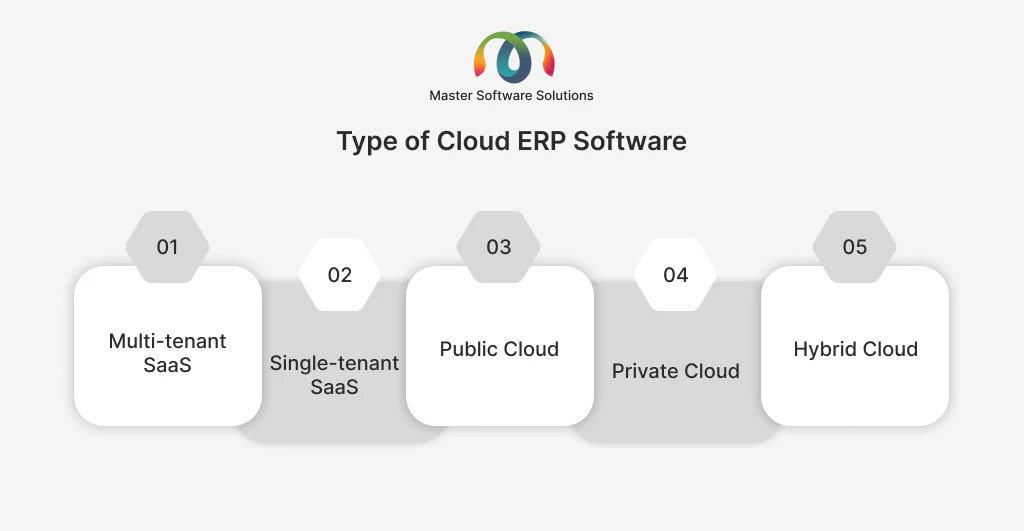
Cloud ERP software can be deployed in different ways depending on how data, infrastructure, and users are managed. Each type offers various levels of flexibility, control, and cost.
Multi-tenant SaaS
In a multi-tenant SaaS model, multiple businesses use the same ERP software and infrastructure, while each company’s data is kept separate and secure.
Single-tenant SaaS
Single-tenant SaaS provides a dedicated ERP environment for one organization. While the software is still hosted in the cloud, it offers more control and customization than multi-tenant systems.
Public cloud
Public cloud ERP is hosted on shared cloud infrastructure provided by third-party vendors. It is affordable, scalable, and suitable for businesses that want quick deployment.
Private cloud
Private cloud ERP runs on cloud infrastructure dedicated to a single organization. It offers higher security and control, making it ideal for businesses with strict compliance requirements.
Hybrid Cloud
Hybrid cloud ERP combines public and private cloud environments. Businesses can keep sensitive data in a private cloud while using the public cloud for other operations.
Challenges of cloud ERP software
While cloud ERP offers many benefits, businesses may face certain challenges during adoption and use. Understanding these challenges helps organizations prepare and plan better. Here are the challenges faced by companies with cloud-based ERP software.
Data security concern
Storing business data in the cloud can raise security concerns. Although providers use strong security measures, companies may worry about data privacy and unauthorized access.
Internet dependency
Cloud ERP requires a stable internet connection. Any network issues or downtime can temporarily limit access to the system.
Limited customization
Some cloud ERP solutions offer less customization than on-premise systems. This can be a challenge for businesses with specific processes.
Integration challenges
Integrating cloud ERP with existing software or legacy systems can be complex and may require additional time and effort.
Ongoing subscription costs
While upfront costs are lower, subscription fees can add up over time. Businesses need to plan long-term budgets.
Data migration complexity
Moving data from legacy systems to a new cloud ERP can be time-consuming and risky if not handled properly.
How to choose the right cloud ERP software?
Choosing the right cloud ERP software is an important decision that can impact how efficiently a business operates. To make the best decision, organizations should consider their needs, budget, and long-term objectives. Prerequisites for selecting the appropriate cloud ERP software.
Understanding your business requirements
Start by identifying the key processes you want the ERP system to manage, such as finance, inventory, HR, or sales. Choose a solution that fits your industry and business size.
Check scalability and flexibility
Make sure the ERP system can grow with your business. It should allow you to add users, features, or locations as needed without major disruptions.
Evaluate ease of use
The software should be user-friendly and easy for employees to learn. A simple interface reduces training time and improves adoption.
Review integration capabilities
Ensure the cloud ERP can integrate smoothly with your existing tools, such as CRM, payroll, or e-commerce platforms.
Assess security and compliance
Look for strong security features like data encryption, access controls, and compliance with industry regulations to protect sensitive business information.
Compare costs and pricing models
Understand the subscription fees, implementation costs, and any extra charges. Choose a solution that fits your budget both now and in the long term.
Check vendor support and reliability
Select a vendor with a good reputation, reliable uptime, and responsive customer support to ensure smooth operations.
When to switch to cloud ERP?
Businesses should consider switching to cloud ERP when their current systems can no longer support growth, efficiency, and modern work needs. Below are common signs that it might be time to move to a cloud-based ERP solution.
Outdated or manual systems
If your business relies on spreadsheets or legacy software that is slow and hard to maintain, cloud ERP can improve efficiency and accuracy.
Business growth or expansion
When your company is growing, adding new locations, users, or products, cloud ERP offers the scalability needed to support expansion.
High IT maintenance costs
If maintaining on-premise servers and software updates is costly and time-consuming, switching to cloud ERP can provide easy anytime access.
Lack of real-time data
When decision-making is slowed by delayed or inconsistent data, cloud ERP’s real-time visibility can help improve business insights.
Difficult with system updates and compliance
If software upgrades and regulatory compliance are challenging, cloud ERP’s automatic updates and built-in compliance support can be a better option.
Conclusion
Cloud ERP has become a smart choice for businesses looking to improve efficiency, gain real-time visibility, and support future growth. By moving core operations to the cloud, organizations can reduce IT complexity, scale easily, and make better decisions with accurate, up-to-date data. Choosing the right cloud ERP solutions and the right implementation partner is the key to achieving long-term success.
Master Software Solutions helps businesses successfully adopt cloud ERP by offering end-to-end ERP implementation services, including consulting, customization, integration, migration, and ongoing support. MSS works closely with organizations to understand their unique requirements and deliver ERP solutions that align with their business goals. We provide custom ERP solutions using leading platforms such as Odoo and Microsoft Dynamics 365. Odoo offers flexibility and modularity for growing businesses, while Microsoft Dynamics 365 delivers powerful, enterprise-grade capabilities with seamless integration across the Microsoft ecosystem. We ensure scalable, secure, and tailored ERP systems for businesses of all sizes.
Get in touch with us to explore how our ERP experts can help you implement a solution that drives efficiency, growth, and long-term value.