Migrating to a new version of Odoo can bring major improvements to your business operations, performance, and user experience. However, an Odoo ERP migration is a critical business process that requires careful planning and execution. Many companies face delays, data issues, and user adoption problems because of common and avoidable mistakes.
This blog highlights the top 10 mistakes to avoid during an Odoo migration and shares practical tips to help ensure a smooth and successful transition. Whether you are upgrading to a newer Odoo version or migrating from a legacy system, understanding these pitfalls helps save time, reduce risk, and get the most value from your Odoo ERP environment.
Mistakes to avoid when migrating to Odoo ERP software
Migrating to the Odoo ERP system can be challenging if not planned properly. Understanding and avoiding them helps you reduce disruptions, protect your data, and ensure a smooth transition to the new Odoo version. Here are the common mistakes businesses make.
Not setting clear goals
This is one of the most common and costly mistakes during an Odoo migration, which can turn a meaningful upgrade into a simple system copy. This can lead to unnecessary features, longer timelines, higher costs, and a system that does not fully support business needs.
Without clear goals, teams may struggle to decide which modules to migrate, which processes to improve, and which data is actually needed. This lack of direction also makes it difficult to measure success, resulting in frequent scope changes and misaligned expectations between business users and technical teams.
How to avoid this mistake?
To prevent this issue, begin with a clear business-focused plan:
- Define business objectives: Identify what you want to achieve, such as improved reporting, faster operations, better user experience, or access to new Odoo features.
- Document key requirements: List essential workflows, modules, and integrations that must work in the new system.
- Eliminate outdated processes: Use the migration as an opportunity to remove unused features and simplify workflows.
- Set success criteria: Establish measurable outcomes, such as reduced processing time or improved data accuracy.
- Align stakeholders early: Ensure management, key users, and technical teams agree on the goals before development begins.
Migrating unnecessary data
Migrating unnecessary data increases the complexity, cost, and risk of an Odoo migration. Over time, ERP systems accumulate outdated records, duplicate entries, inactive customers, old transactions, and unused products. Migrating all of this data without review can slow down the migration process and negatively impact system performance after going live.
Such reluctant data makes testing more difficult and increases the chances of data inconsistencies or errors. In many cases, businesses carry forward historical data that is rarely used, adding little value while creating confusion for users in the new system.
How to avoid this mistake?
To avoid migrating unnecessary data, take a selective and structured approach:
- Identify critical data: Determine which data is essential for daily operations, compliance, and reporting.
- Archive old records: Store historical or inactive data outside the new Odoo system for reference rather than migrating it.
- Remove duplicates: Clean duplicate customers, vendors, products, and records before migration.
- Define data cut-off dates: Migrate only recent and relevant transactional data based on business needs.
- Validate with stakeholders: Confirm data selection with business users to ensure nothing important is missed.
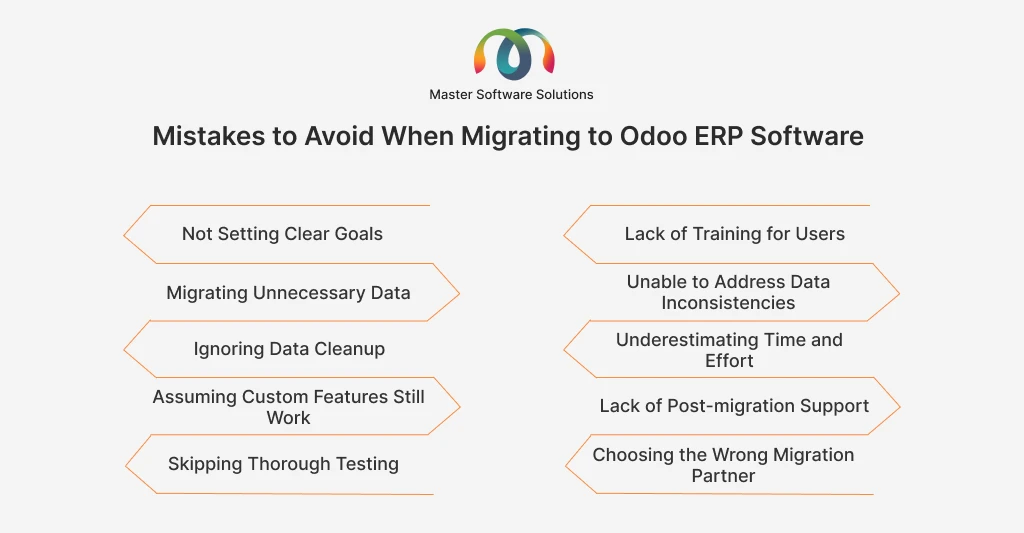
Ignoring data cleanup
If incorrect, incomplete, or duplicate data is migrated, these issues will persist and frequently manifest after going live. Poor data quality can affect reporting accuracy, business operations, and user trust in the system.
Over time, ERP databases tend to accumulate errors, such as duplicate customers, missing fields, outdated product details, and inconsistent formats. Mitigating this data without cleanup increases the risk of failed imports, broken workflows, and incorrect financial or operational results.
How to avoid this mistake?
To avoid this issue, data cleanup should be treated as a mandatory step in the migration process.
- Audit existing data: Review master and transactional data to identify errors, duplicates, and missing information.
- Standardize data formats: Ensure consistency in names, units of measure, currencies, and date formats.
- Remove or merge duplicates: Clean up duplicate records for customers, vendors, and products to remove redundancy.
- Validate required fields: Ensure all mandatory fields in Odoo are properly filled before migration.
- Test data accuracy: Perform trial migrations to confirm data integrity before the final move.
- Assuming custom features still work
Assuming that existing custom features will work without changes after an Odoo migration is a risky mistake. Custom modules, workflows, and third-party add-ons are often built for a specific Odoo version. When upgrading, changes in Odoo’s framework, data models, or APIs can cause these custom features to break or behave incorrectly.
This assumption may lead to system errors, broken business processes, and delays during the go-live period. In some cases, outdated customizations may interfere with new standard Odoo features, causing performance issues or unnecessary complexity.
How to avoid this mistake?
To avoid problems with custom features, take a proactive and structured approach:
- Audit all customizations: List all custom modules, reports, workflows, and third-party integrations.
- Check version compatibility: Verify whether custom features are supported or need updates for the target Odoo version.
- Refactor or rebuild where needed: Update custom code to align with the new Odoo framework and best practices.
- Replace with standard features: Implement native Odoo functionality to reduce maintenance and upgrade effort.
- Test thoroughly: Validate all custom features during testing to ensure they work as expected in real business scenarios.
Also Read: Factors to Consider the Right Partner for Your Odoo 19 Migration and Upgrade
Skipping thorough testing
Without proper testing, issues such as broken workflows, incorrect data, system errors, and inaccurate reports may only be discovered when users start working in the system. This can disrupt daily operations and reduce confidence in the new Odoo environment.
Testing is important during a migration because data structures, customizations, and integrations may behave differently in the new Odoo version. Relying on limited or superficial testing increases the risk of unexpected failures and costly fixes after deployment.
How to avoid this mistake?
- Generate test scenarios: Use actual business cases such as daily operations, rather than just basic functionality.
- Validate all critical workflows: Test key processes, including sales, purchasing, inventory, accounting, and reporting.
- Verify data accuracy: Confirm that migrated data is complete, accurate, and correctly linked.
- Test integrations: Ensure third-party systems and external tools function properly after migration.
- Conduct user acceptance testing (UAT): Involve end users to confirm that the system meets business requirements.
- Plan multiple test cycles: Fix issues, retest, and validate before going live again.
Lack of training for users
Even when the technical migration is successful, users may struggle to perform their daily tasks if they are unfamiliar with the new system, updated workflows, or interface changes. This often leads to errors, reduces productivity, and increases resistance to adopting the new Odoo version.
Each Odoo upgrade may introduce new features, redesigned screens, and modified processes. Without adequate training, users may continue using old methods or avoid certain features altogether, limiting the value of the migration.
How to avoid this mistake?
To ensure smooth user adoption, training should be planned as a core part of the migration:
- Provide role-based training: Train users based on their specific responsibilities, such as sales, accounting, or inventory.
- Introduce changes early: Show users what will change in the new system before going live to reduce resistance.
- Use real scenarios: Train using actual business processes instead of generic examples.
- Prepare documentation: Create simple user guides, videos, or FAQs for ongoing reference.
- Offer post-go-live support: Assist during the initial period after launch to address questions and issues.
Unable to address data inconsistencies
Failing to address data inconsistencies during an Odoo migration can cause major operational and reporting issues. Data inconsistencies occur when records do not match across modules, contain conflicting values, or are incorrectly linked. For example, mismatched customer details, incorrect inventory balances, or accounting entries that do not align with transactions.
If these inconsistencies are migrated into the new Odoo system, they can lead to inaccurate reports, broken workflows, and confusion for users. Over time, this reduces trust in the system and makes issue resolution more complex and costly.
How to avoid this mistake?
To prevent data inconsistencies, data validation must be a structured part of the migration process:
- Reconcile data across modules: Ensure consistency between sales, inventory, accounting, and purchasing records.
- Validate master data relationships: Check links between customers, vendors, products, and accounts.
- Use data mapping rules: Clearly define how data fields from the old system map to the new Odoo structure.
- Perform trial migrations: Identify and fix inconsistencies early through test imports.
- Run post-migration checks: Compare key reports and balances before and after migration to confirm accuracy.
Underestimating time and effort
Underestimating the time and effort required for an Odoo migration is a frequent mistake that can lead to rushed implementations, missed requirements, and quality issues. Many organizations assume the migration is a straightforward technical task, when in reality it involves data preparation, customization updates, testing, training, and change management.
When timelines are too aggressive, critical activities such as data cleanup, testing, and user training are often shortened or skipped. This increases the risk of errors, delays at go-live, and higher costs due to last-minute fixes.
How to avoid this mistake?
To manage time and effort realistically, proper planning and resource allocation are essential:
- Create a detailed project plan: Include all phases such as analysis, data cleanup, development, testing, training, and post-go-live support.
- Allow buffer time: Plan for unexpected issues, especially with data migration and customizations.
- Break the project into phases: Use milestones to track progress and manage complexity.
- Allocate dedicated resources: Ensure business users and technical teams have enough time to participate.
- Set realistic deadlines: Base timelines on project scope, system complexity, and past migration experience.
Lack of post-migration support
Lack of post-migration support is critical because even after thorough testing, issues often arise once users begin working in the live system. These may include data discrepancies, workflow adjustments, performance concerns, or user questions that were not identified earlier.
Without proper support after going live, small issues can quickly escalate, disrupting business operations and frustrating users. This can lead to reduced adoption of the new system and increased dependency on workarounds outside Odoo.
How to avoid this mistake?
To ensure stability and user confidence after migration, post-migration support must be planned:
- Plan a support period: Define a dedicated support window immediately after go-live to address issues quickly.
- Assign clear responsibilities: Ensure there is a support team available to handle technical and functional queries.
- Monitor system performance: Track errors, logs, and user feedback to identify and resolve issues early.
- Provide ongoing user assistance: Offer refresher training and quick help for common questions.
- Document fixes and changes: Maintain clear records to support future maintenance and upgrades.
Choosing the wrong migration partner
Selecting the wrong migration partner is a critical mistake that can derail an Odoo migration. An inexperienced or unqualified partner may lack the technical expertise, industry knowledge, or understanding of Odoo best practices needed to handle complex migrations. This can lead to delays, data errors, broken customizations, and higher overall costs.
A poor partner may also fail to provide planning, testing, training, or post-migration support, leaving your team to handle issues on their own. Choosing the wrong partner increases the risk and reduces the chance of a smooth, successful migration.
How to avoid this mistake?
To ensure a reliable migration, take a careful approach when selecting a partner:
- Look for certified experience: Choose an Odoo-certified partner, like Master Software Solutions, with proven migration experience.
- Check industry expertise: Ensure the partner understands your business processes and industry requirements.
- Review past projects: Ask for case studies or references to verify successful migrations.
- Evaluate support capabilities: Confirm they offer testing, training, and post-migration support.
- Assess communication and project management: Ensure the partner can clearly plan, track, and report on migration progress.
Conclusion
Migrating to a new Odoo version is a significant step that can bring major benefits to your business. However, it comes with risks if not planned and executed carefully. Avoiding common mistakes, such as unclear goals, poor data management, skipped testing, lack of user training, or choosing the wrong migration partner, is key to a smooth and successful transition.
Master Software Solutions specializes in Odoo migrations, helping businesses navigate every stage of the process. From data cleanup and customization audits to testing, user training, and post-migration support, we ensure your migration is efficient, error-free, and aligned with your business goals. Contact us today to plan a seamless migration and get the most value from your Odoo environment.