Your business is changing and evolving, but the real question is this: Is your Odoo ERP version keeping pace?
Many companies continue to run older versions of Odoo ERP software after implementation. Over time, this leads to slower processes, limited visibility, growing customizations, and higher maintenance effort. The version of Odoo brings major improvements in performance, usability, security, and built-in features. For many organizations, upgrading is no longer just an IT decision; it is a business necessity.
This blog will outline the key reasons why migrating to the latest version of Odoo in 2026 is crucial, the risks associated with delaying the upgrade, and how businesses can approach the migration process.
What is Odoo ERP migration?
Odoo ERP migration is the process of upgrading an existing Odoo system from an older version to a newer version while preserving business data, configurations, and critical functionality. In practical terms, it includes:
- Moving databases, including customers, products, transactions, accounting data, etc., to the latest version’s framework.
- Adapting or replacing custom modules to match the new version’s framework.
- Updating third-party integrations and APIs.
- Testing to ensure all business processes continue to work correctly.
The Odoo migration aims to ensure that the system runs more securely, efficiently, and reliably while taking advantage of new features and performance improvements offered by the latest Odoo release. This helps businesses modernize their ERP without losing critical data or disrupting operations.
Types of Odoo migrations
Odoo migration can be categorized based on what is being changed and the extent of the upgrade. Below are the common types of Odoo migrations explained simply and clearly.
Version migration (Upgrade Migration)
This is the most common type of Odoo migration. This blog focuses on this type of Odoo migration. This includes moving from an older Odoo version to a newer one (e.g., Odoo 18 to Odoo 19). This is crucial to access new features, security updates, and performance improvements. The focus areas of this type of migration are
- Migrating user data (customers, products, vendors)
- Migrating transactional data (sales, purchases, accounting)
- Data validation and integrity checks
Cross-ERP migration
Cross-ERP platform migration involves moving data and business processes from another ERP system (such as SAP, Oracle, Tally, or a legacy system) to Odoo. It is often a part of a broader digital transformative initiative. The major focus areas of this type of migration are
- Mapping data structures between the source ERP and Odoo
- Cleaning and transforming legacy data
- Reconfiguring business workflows in Odoo
- User training and change management
Platform migration
Platform migration refers to moving an Odoo system from on-premise infrastructure to a cloud environment (Odoo Online, Odoo.sh, or third-party cloud hosting). It improves scalability, availability, and long-term efficiency. The key focus areas are
- Infrastructure and hosting setup
- Data application transfer
- Security, backups, and performance optimization
- Reduced infrastructure management overhead
Key business reasons to migrate to the latest version of Odoo
Migrating to the latest version of Odoo ERP software delivers measurable benefits to business, technology, and finance. Below are the key reasons organizations choose to upgrade.
Improved business efficiency
The latest version of Odoo enables businesses to work faster and more smoothly by automating routine tasks and simplifying day-to-day processes. Activities that required manual follow-ups, data entry, and multiple approvals can now be handled automatically within the system.
Reducing manual tasks
- Allows teams to make fewer errors and dedicate more time to high-value tasks rather than administrative tasks
- Information flows seamlessly between departments such as sales, finance, inventory, and operations, ensuring everyone works with accuracy and up-to-date data
- Accelerates order processing, faster invoicing, smoother inventory management, and improved coordination across teams
- Improves productivity and better overall business performance
For example, A distribution company upgraded from an older Odoo version and automated its order-to-invoice process. As a result, order processing time dropped significantly, and the finance team reduced manual data entry.
Enhanced user experience
The latest version of Odoo will offer a cleaner, more modern interface that is easier to navigate and understand. Users can quickly find information, complete tasks with fewer steps, and spend less time learning about the system.
Results of enhancing user experience
- Require less training and are more comfortable using the Odoo ERP system in their daily work
- Improves productivity, smoothens workflows, and fastens task completion
Example: A sales team struggled with user adoption of an older version of Odoo. After migration, sales representatives could update leads, quotations, and activities directly from a simplified dashboard, increasing CRM usage and data accuracy.
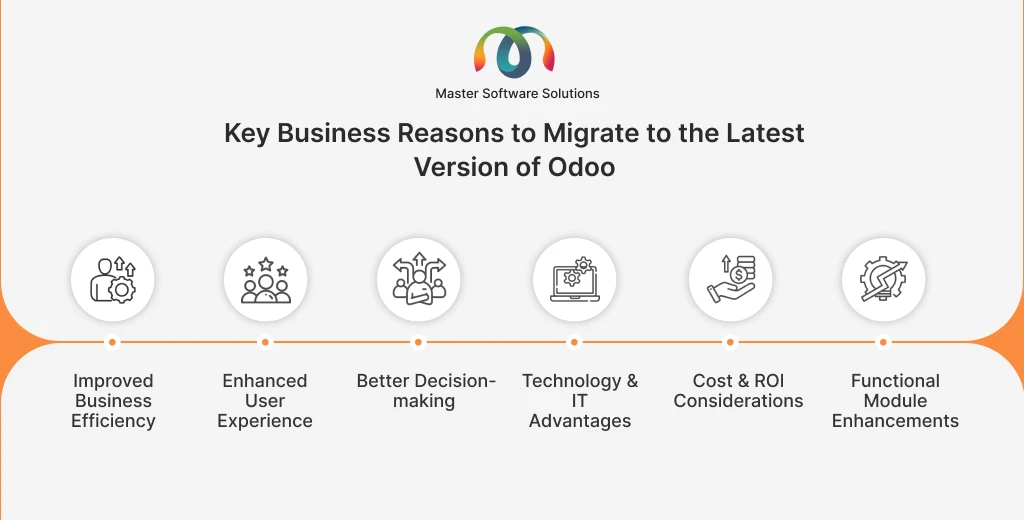
Better decision-making
The latest Odoo version will provide upgrade reporting tools and real-time dashboards, offering managers and executives clear visibility into key business metrics. Instead of waiting for reports or manually gathering data, decision-makers can access accurate, up-to-date information instantly.
This enables businesses to
- Respond quickly to changes, identify trends, and make strategic choices based on reliable data
- Make faster, smarter, and more confident business decisions.
Example: After upgrading to the latest Odoo version, the manufacturing company gained real-time visibility into production costs and inventory levels. Management used these insights to reduce excess inventory and improve margin control.
Technology & IT advantages
Updating to the latest version of Odoo ensures the system remains reliable, secure, and ready to support business growth. This reduces system slowdowns, lowers the risk of disruptions, and protects critical business data. Technology and IT advantages include:
Performance, scalability, & stability
The latest Odoo versions are optimized for speed and scalability, making them suitable for growing businesses with increasing user and transaction volumes.
Example: An e-commerce company experienced frequent slowdowns during peak sales periods on an older version of Odoo. After the migration, the system handled high-order volumes smoothly, even during seasonal spikes.
Security & compliance updates
New releases include the latest security patches, improved access controls, and compliance-ready features to protect sensitive business data.
Example: A finance-focused organization upgraded to ensure compliance with data protection regulations. The new version helped them implement stronger user controls and audit trails.
Improved integrations & API capabilities
Modern Odoo business versions provide stronger APIs and integration tools, allowing seamless connectivity with third-party systems such as payment gateways, logistics providers, and BI tools.
Example: A retail business integrated Odoo with its external shipping and payment platforms after migrating, reducing manual updates, and improving order fulfillment accuracy.
Cost & ROI considerations
Upgrading to the latest version of Odoo is a long-term optimization decision. Older Odoo versions often rely heavily on custom-built features, workarounds, and frequent manual fixes. Over time, this increases support costs, slows down operations, and creates dependency on technical resources.
Newer versions include many built-in features that replace the need for custom development, which results in
- Reduced ongoing maintenance
- Lowers support and upgrade costs
- Improves system reliability
- Fewer disruptions, less downtime, and higher productivity across teams
Example: In a services company, migrating allowed them to eliminate multiple custom features that were expensive to maintain. They switched to standard Odoo functionality, reducing annual support costs and making a stable system. This led to a better return on investment, as the ERP system delivered more value at a lower ongoing cost.
Functional module enhancements
Each new version of the Odoo ERP system includes improvements to its core business modules, including Accounting, Sales, Inventory, Manufacturing, HR, and CRM. These enhancements are designed to reflect how businesses actually operate today. They are faster, more connected, and more data-driven.
With functional module enhancements, businesses gain
- Access to upgraded features that simplify daily operations, improve accuracy, and increase visibility across departments
- Enable more efficient teamwork while ensuring processes remain aligned as the organization grows or changes.
Example: In a manufacturing company, upgrading to the latest Odoo ERP version that introduced better inventory planning and more accurate production scheduling. This enabled the company to maintain optimal stock levels, avoid material shortages, and consistently meet delivery commitments. As a result, customer satisfaction is improved while operational disruptions decrease.
Risks of not migrating to the latest Odoo version
Staying on an older version may not have any impact. But if your business is evolving and the database is increasing, your current Odoo ERP system may be insufficient. This may expose you to several operational, technical, and financial risks, which are
Security vulnerabilities
Older Odoo versions no longer receive regular security updates, leaving sensitive business and customer data exposed to potential breaches and cyberattacks.
Reduced system performance
An outdated Odoo version may struggle to handle growing data volumes or increased user activity, leading to slower processes, system crashes, and operational bottlenecks.
Limited access to new features
Staying on your old version prevents your business from leveraging the latest automation, analytics, and workflow improvements, which can result in lower efficiency compared to competitors.
Increased maintenance costs
Older versions often require custom fixes and workarounds to remain functional. Over time, this increases IT costs and consumes resources that could be spent better on innovation.
Growing technical debt and upgrade complexity
Delaying migration makes future upgrades more complex, time-consuming, and expensive. The longer you wait, the harder it becomes to move data, adapt custom modules, and maintain integrations with newer systems.
Best practices for a successful Odoo migration in 2026
Migrating to the latest Odoo version requires careful planning and execution. Following these best practices can help ensure a smooth, low-risk transition.
Conduct a version and gap analysis.
Analyzing your current version helps you prioritize what to migrate, reduce unnecessary complexity, and align migration with business needs.
What to do?
- Review your current Odoo version, customization, and third-party modules.
- Identify the outdated features that are redundant or replaced in the new version.
Clean and prepare your data
Cleansing and structuring your business data ensures accurate data is migrated, avoiding errors post-migration.
What to do?
Remove duplicate, obsolete, or inaccurate data.
Ensure master data (customers, products, and vendors) is complete and standardized.
Choose the right migration strategy
The right approach ensures minimized disruptions to daily operations.
Your options for choosing the right migration strategy are
- Phased migration: Upgrade modules or departments step-by-step to reduce risk.
- Big-bang migration: Upgrade the entire system at once for faster implementation.
Test extensively
Thoroughly testing the migration can help you detect issues early, ensuring the system works as intended and that users are confident to use it.
What to do?
- Conduct functional, integration, and User Acceptance Testing (UAT).
- Test critical business processes end-to-end before going live.
Plan for custom modules and third-party apps
This will prevent system errors and ensure seamless functionality post-migration.
What to do?
- Evaluate custom modules and third-party apps for compatibility with the new version.
- Upgrade, replace, or remove modules as needed.
Prepare users and manage change
User training and change management encourage adoption, reduce resistance, and maintain productivity.
What to do?
- Provide training sessions and user guides so that users easily adapt to the new features.
- Communicate migration timelines, benefits, and process changes to all stakeholders.
Ensure backup and rollback plans
Maintain data backups to protect your company against data loss and reduce downtime risk.
What to do?
Take full backups of your current system before migration.
Have a rollback plan in case issues arise during the process.
Partner with an experienced migration expert
Connect with certified Odoo partners, like Master Software Solutions, to benefit from best practices, minimize errors, and ensure a faster and smoother upgrade.
What to do?
Engage with certified Odoo partners or consultants who have experience in migrating Odoo.
When is the right time to migrate to the latest Odoo version?
Upgrading to the latest Odoo version ensures better performance, security, and access to new features. While version upgrades are sometimes required based on Odoo’s release cycle, businesses should also evaluate whether their current system is supporting growth and efficiency.
General upgrades guidelines:
- Databases on major versions such as Odoo 16, 17, or 18 typically require an upgrade every two years.
- Databases running on minor versions (16.1, 16.2, 16.3) should be upgraded shortly after the next version release.
Signs it may be time to migrate
- Slower system performance or frequent technical issues
- heavy reliance on custom workarounds
- difficulty generating accurate reports
- limited automation and workflow inefficiencies
- increasing maintenance and support costs
Best time to upgrade:
- During a stable business period, rather than peak operational or financial cycles
- When teams have enough time to test and adapt to the updated system
- Migrating before outdated technology begins affecting productivity, security, and decision-making helps ensure smoother operations and long-term scalability.
Bottom-Line
Migrating to the latest version of Odoo improves business efficiency, user adoption, decision-making, and long-term system stability. The latest version of Odoo enhances performance, boosts security, introduces new features, and reduces maintenance costs, helping businesses remain competitive and future-ready. Master Software Solutions is an Odoo implementation company that offers end-to-end odoo migration services. We ensure successful migration with the right planning, expertise, and execution. We offer end-to-end Odoo migration services to assist businesses at every stage of the Odoo migration process, ensuring minimal disruption and the highest return on your Odoo investment.
If you are considering upgrading to the latest version of Odoo, now is the right time to take the first step. Contact us today for a consultation or Odoo migration assessment and discover how we can help.